Lifetime VPS Europe
 Lifetime VPS Asia
 Lifetime WooCommerce Hosting
 Lifetime Hosting
 Lifetime Game Dedicated Servers
 Chicago, US
 Tokyo, Japan
 Singapore
 Hong Kong
 Seoul, South Korea
 Amsterdem, Netherlands
 London, UK
 Stockholm, Sweden
 Oslo, Norway
 Vienna, Austria
 Zurich, Switzerland
 Sydney, Australia
 Wordpress Hosting
 VPS Hosting
 DDOS Protection
 Submit Ticket
 Full Management
 Guides
 Videos and Podcasts
 Discover Creative Ideas
 Cybersecurity Services
 Voxfor Mega Menu
 Voxfor Advanced Price Management For WooCommerce
 Voxfor Secure Live Chat and AI Support
 Voxfor Multilanguage
 Voxfor AI Content Summary
 Voxfor Autopilot

Lifetime VPS hosting plans offer a unique opportunity for users to pay a single upfront fee and enjoy VPS hosting services indefinitely, without recurring monthly or yearly charges, making it an attractive lifetime hosting solution.
Lifetime VPS hosting
Start with Voxfor Lifetime VPS for long-term hosting control
A lifetime VPS plan gives developers and businesses dedicated resources for websites, apps, staging environments, and server-side tools. Choose Voxfor VPS when you want predictable value and control.
This model is particularly appealing for individuals and businesses looking to secure long-term hosting solutions without the financial commitment of ongoing fees. You can manage your WordPress website effortlessly with a suitable WordPress hosting plan, guaranteeing seamless performance and reliability.
With traditional VPS hosting, users typically pay a monthly or annual fee to lease server resources. This recurring cost can accumulate significantly over time, especially for those running multiple websites or resource-intensive applications.
In contrast, lifetime VPS plans provide a cost-effective alternative by allowing users to make a one-time payment upfront. This upfront investment not only eliminates ongoing expenses but also offers predictable budgeting and financial savings in the long run.
Features of Lifetime VPS Hosting Plans
1. Plan Selection and Pricing
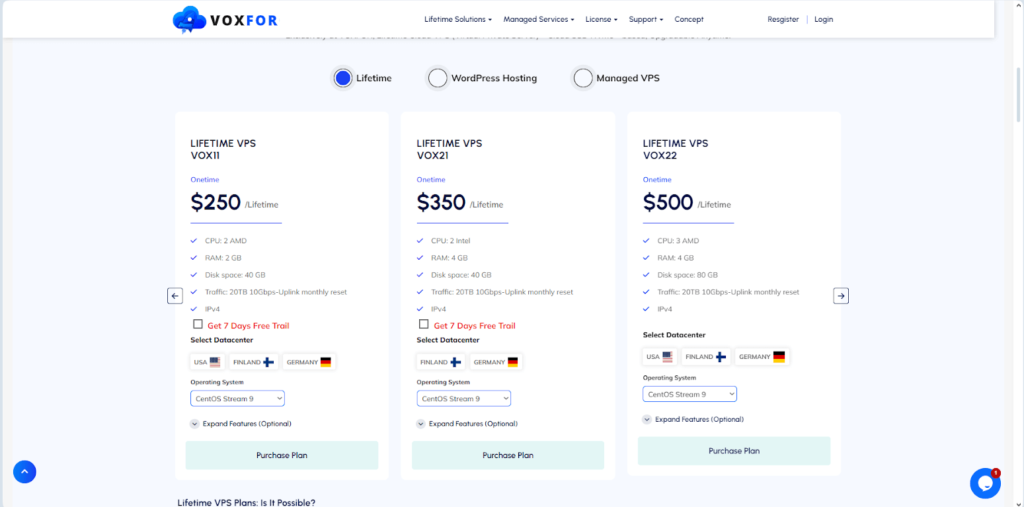
Lifetime VPS plans come in various configurations tailored to different needs, ranging from basic servers suitable for hosting websites to robust setups capable of supporting complex applications and multiple websites simultaneously.
- Pricing starts at $250 and can go up to $17,340, depending on the server specifications and additional features chosen, including SSD storage and increased bandwidth.
- The variety in plan configurations ensures that users can select a VPS solution that aligns perfectly with their specific requirements and growth projections.
- Small businesses or individuals with modest hosting needs may opt for entry-level plans, which provide essential resources like CPU cores, RAM, and storage sufficient for running a single website or application.
On the other hand, enterprises or high-traffic websites may choose higher-tier plans offering scalability, enhanced performance, and additional server resources to accommodate increasing demands.
2. Data Centers

Users have the flexibility to choose their server location from three different data centers across distinct countries. This choice allows them to optimize their website performance by selecting a data center closest to their target audience, minimizing latency and ensuring faster loading times.
- The geographical location of a data center plays a crucial role in determining website speed and performance.
- By selecting a data center in close proximity to their target audience or primary market, users can significantly reduce latency and improve overall user experience.
This optimization is particularly beneficial for e-commerce websites, online applications, or any platform where responsiveness and speed are critical factors influencing user engagement and satisfaction.
3. Operating Systems
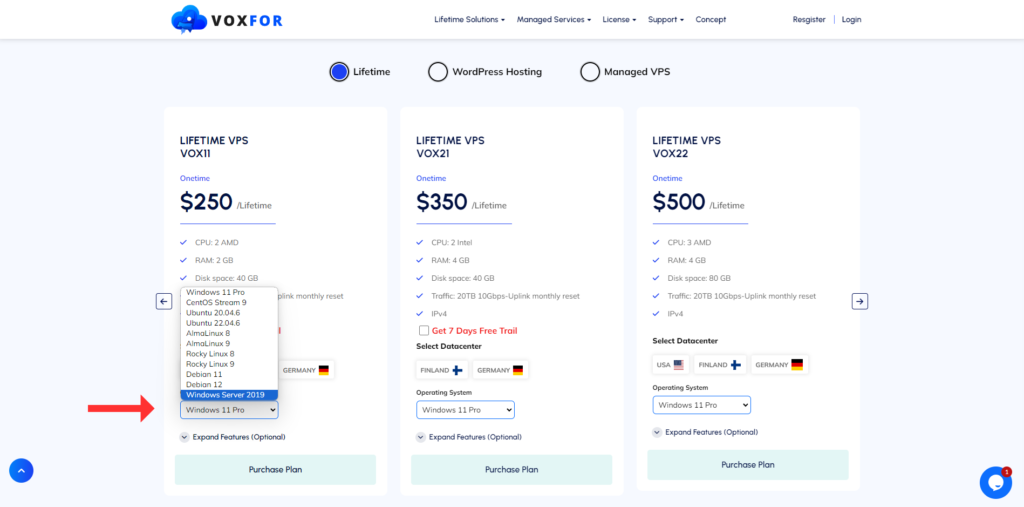
Each lifetime VPS plan offers a selection of operating systems, including CentOS, Ubuntu, AlmaLinux, and Debian, catering to various Linux distributions. This diversity enables users to choose an OS that best suits their technical requirements and familiarity, ensuring compatibility with their applications and development environments.
The choice of operating system (OS) is a pivotal decision for VPS hosting users, as it dictates the software environment in which their websites or applications will operate. You can also choose latest windows 11 vps just by operating system drop down menu in pricing table depending upon your budget.
- Different OS options offer varying levels of customization, security features, and compatibility with specific software applications or development frameworks.
- CentOS and Ubuntu, for instance, are popular choices among developers and system administrators due to their robust security features and extensive community support.
- Meanwhile, Debian’s stability and reliability make it a preferred OS for production environments where uptime and performance are paramount.
If you encounter issues such as “this site can’t provide a secure connection,” it might be worth exploring solutions like those discussed in our detailed guide about this.
4. Control Panel Options
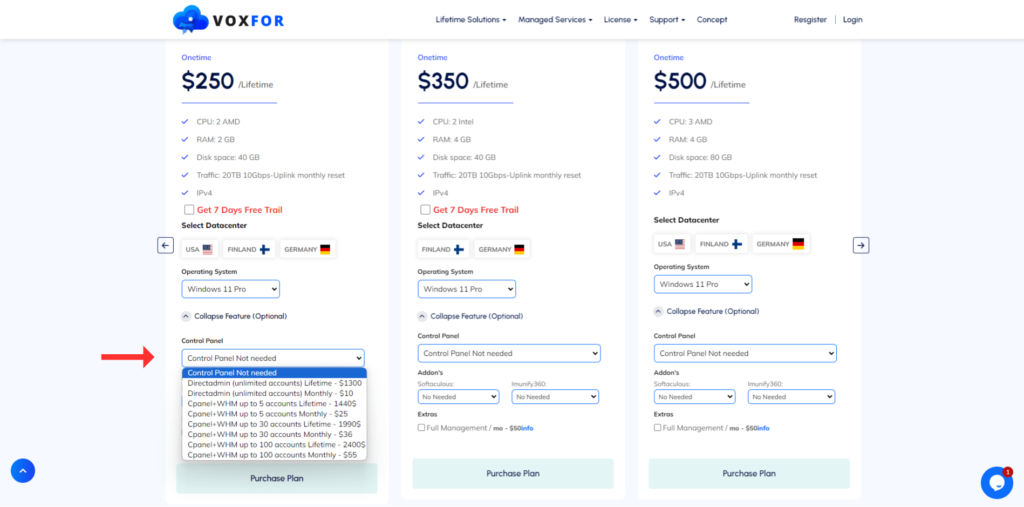
Depending on their preferences and technical expertise, users can opt for a control panel with their lifetime VPS plan to simplify their virtual server management. Control panels streamline server management tasks, offering intuitive interfaces for tasks like website deployment, domain management, and server configuration, essential for those using a VPS server.
- Options are available with both monthly and lifetime payment structures to accommodate different financial preferences, whether you’re interested in dedicated servers hosting or VPS hosting.
- Control panels play a pivotal role in simplifying server management and administration for VPS hosting users, particularly those managing a Linux-based virtual server.
- These graphical user interfaces (GUIs) provide centralized control over various aspects of server operations, empowering users to perform essential tasks without relying on complex command-line interfaces (CLIs) or technical expertise.
Popular control panels like cPanel and Plesk offer features such as one-click application installs, automated backups, and resource usage monitoring, enhancing usability and efficiency for users managing multiple websites or applications on their VPS.
5. Add-ons

Lifetime VPS hosting plans often include valuable add-ons to enhance functionality and security:
- Softaculous: This auto-install script library simplifies the installation of various web applications and scripts on hosting accounts or servers, making web hosting more efficient. Users can choose between monthly and yearly payment options for this service, ensuring flexibility in managing their web applications.
- Imunify 360: Imunify 360 provides advanced security features and proactive defense mechanisms specifically designed for Linux-based servers, making it an ideal choice for VPS server security. It helps protect websites and web applications from emerging threats, ensuring a robust security posture and peace of mind for users. Additionally, it enhances the security of your virtual private server (VPS).
These add-ons complement core VPS hosting services by offering enhanced capabilities and additional layers of protection against cybersecurity threats, ensuring a secure virtual server environment.
Softaculous streamlines the deployment of popular content management systems (CMS) and web applications, enabling users to quickly set up and manage their online platforms with minimal technical expertise.
Imunify 360, on the other hand, leverages machine learning and AI-driven insights to detect and mitigate potential security risks in real time, safeguarding websites from malicious attacks and unauthorized access attempts.
6. Full Management Services

One of the key advantages of opting for a lifetime VPS hosting plan is comprehensive management and support services:
- 24/7 Professional Support: Users benefit from round-the-clock support for server-related issues, ensuring prompt resolution of technical challenges and minimizing downtime.
- Performance Optimization: Services include regular troubleshooting and testing to enhance website loading speeds and overall server performance. This proactive approach helps maintain optimal hosting conditions, ensuring reliable service delivery over the long term.
Full management services encompass a wide range of proactive and reactive measures aimed at optimizing server performance, enhancing security posture, and ensuring seamless operation of hosted websites or applications.
These services are particularly beneficial for users who prioritize operational efficiency, reliability, and scalability in their online ventures.
By entrusting server management tasks to experienced professionals, users can focus on core business activities and strategic growth initiatives without being burdened by technical complexities or infrastructure management.
Conclusion
Choosing a lifetime VPS hosting plan offers substantial benefits for individuals and businesses seeking stability and cost-effectiveness in their hosting solutions. By paying a one-time fee upfront, users can secure uninterrupted VPS hosting services without worrying about escalating monthly expenses, making lifetime hosting a cost-effective solution.
Whether you’re launching a new website or migrating an existing one, lifetime VPS plans provide the flexibility, security, and support needed to sustain your online presence effectively. For those considering a lifetime VPS plan, evaluating your specific hosting requirements and comparing available features and pricing options will help you make an informed decision regarding your web hosting needs. With the right plan in place, you can focus on growing your online ventures while enjoying reliable, high-performance hosting services.