Lifetime VPS Europe
 Lifetime VPS Asia
 Lifetime WooCommerce Hosting
 Lifetime Hosting
 Lifetime Game Dedicated Servers
 Chicago, US
 Tokyo, Japan
 Singapore
 Hong Kong
 Seoul, South Korea
 Amsterdem, Netherlands
 London, UK
 Stockholm, Sweden
 Oslo, Norway
 Vienna, Austria
 Zurich, Switzerland
 Sydney, Australia
 Wordpress Hosting
 VPS Hosting
 DDOS Protection
 Submit Ticket
 Full Management
 Guides
 Videos and Podcasts
 Discover Creative Ideas
 Cybersecurity Services
 Voxfor Mega Menu
 Voxfor Advanced Price Management For WooCommerce
 Voxfor Secure Live Chat and AI Support
 Voxfor Multilanguage
 Voxfor AI Content Summary
 Voxfor Autopilot

Plugin Overview
Voxfor AI Content Summary is a WordPress plugin that generates accurate, faithful AI-powered summaries of your post content. Built with strict adherence to source material - no external knowledge, interpretation, or fabrication.
🎯 Why Choose Voxfor AI Content Summary?
Unlike other AI summary plugins, Voxfor AI Content Summary prioritizes accuracy above all else. Every summary is 100% based on the actual content with intelligent caching, rate limiting, and comprehensive content extraction that captures the true essence of your posts.
Key Features
Dual AI Provider Support
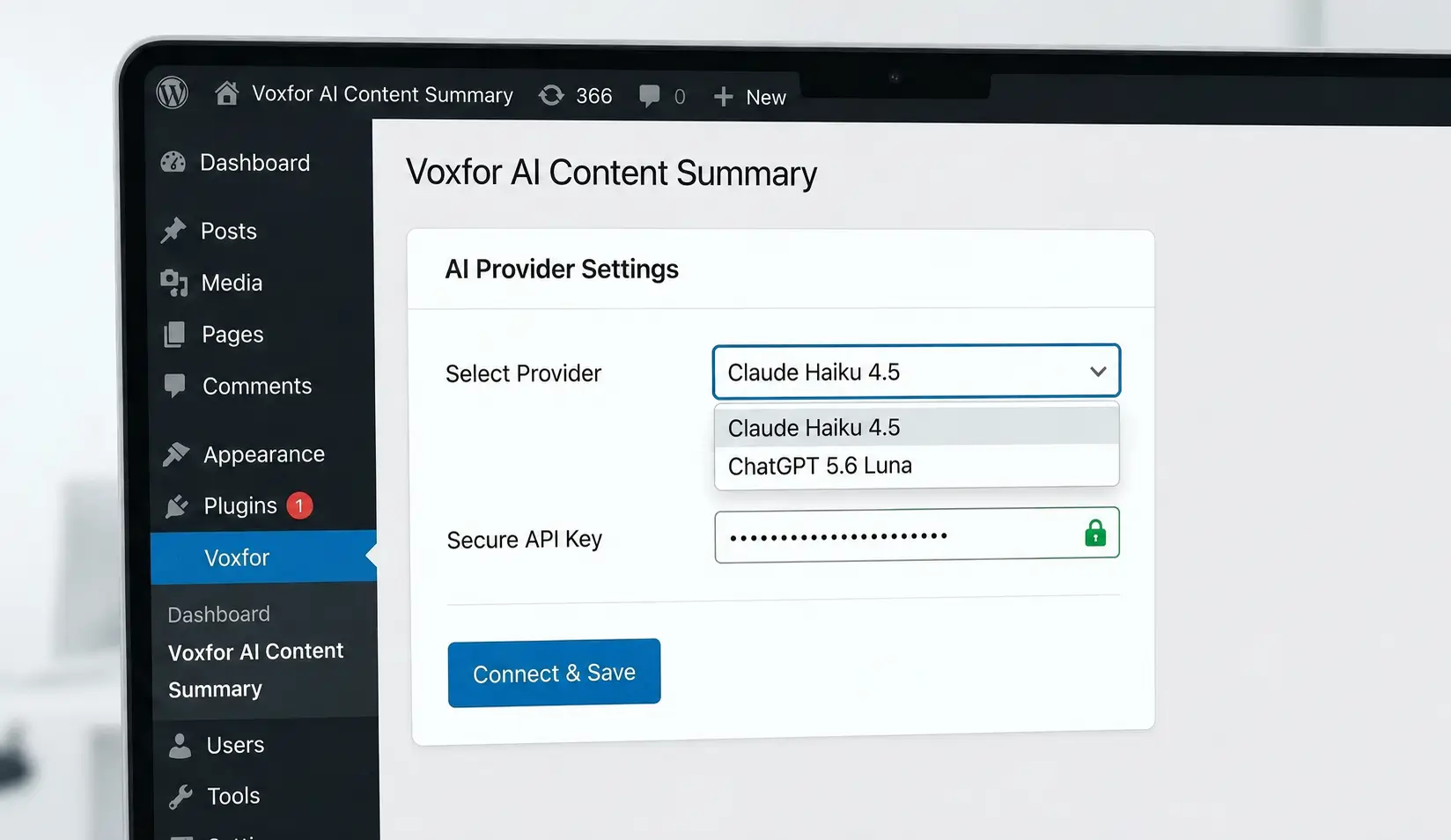
Choose between Claude Haiku 4.5 or ChatGPT 5.6-luna. Both providers operate under the same strict accuracy standards.
Database Storage
All summaries are saved in your WordPress database for comparison and verification with the original content.
Smart Content Detection
Automatically detects when post content changes and marks summaries for regeneration to keep them current.
Intelligent Caching
Content hash-based caching system prevents unnecessary API calls. Only requests new summaries when content actually changes.
Clean Content Extraction
Advanced HTML parsing extracts only meaningful content - text, headings, lists, quotes. Excludes code, buttons, forms, and dynamic content.
Rate Limiting & Security
Built-in rate limiting (15 requests per 5 minutes), nonce verification, and capability checks ensure safe, controlled API usage.
What Gets Summarized
- ✅ Post title
- ✅ Text paragraphs
- ✅ Headings (H2, H3, etc.)
- ✅ Lists (bullets and numbered)
- ✅ Blockquotes
- ✅ Facts, dates, and names (if present in content)
What Is Excluded
- ❌ HTML/CSS/JavaScript code
- ❌ Buttons and form elements
- ❌ Dynamic content and shortcodes
- ❌ External knowledge or interpretation
- ❌ Marketing wording or generalizations
Installation Guide
System Requirements
| Component | Minimum | Recommended |
|---|---|---|
| WordPress | 5.8+ | Latest |
| PHP | 8.0+ | 8.1+ |
| MySQL | 5.6+ | 8.0+ |
| Memory | 128MB | 256MB+ |
Installation Steps
- Download: Get the plugin from your source location
- Upload: Go to WordPress Admin → Plugins → Add New → Upload Plugin
- Install: Select the zip file and click "Install Now"
- Activate: Click "Activate Plugin" after installation
- Configure: Navigate to "Voxfor AI" in your WordPress admin sidebar
- API Key: Add your Claude or ChatGPT API key in Settings
- Display Settings: Configure where and how to show the summary button
✅ Quick Setup!
After activation, the plugin automatically creates the necessary database table (wp_voxfor_ai_summaries) and is ready to use. You'll see "Voxfor AI" in your WordPress admin sidebar.
Getting API Keys
Claude API Key (Recommended)
- Visit https://console.anthropic.com/
- Sign up for an Anthropic account
- Navigate to API Keys section
- Create a new API key
- Copy the key (starts with
sk-ant-) - Paste it in
Voxfor AI → Settings → Claude API Key
ChatGPT API Key (Alternative)
- Visit https://platform.openai.com/
- Sign up for an OpenAI account
- Navigate to API Keys section
- Create a new API key
- Copy the key (starts with
sk-) - Paste it in
Voxfor AI → Settings → ChatGPT API Key
Quick Start Guide
Get Started in 5 Minutes
-
Configure Settings:
Go to
Voxfor AI → Settings- Choose your AI provider (Claude or ChatGPT)
- Enter your API key
- Select which post types should display the summary button
- Choose display mode (Auto or Manual)
- Select button position (Before/After content or Shortcode only)
-
Create or Edit a Post:
Go to any post editor page
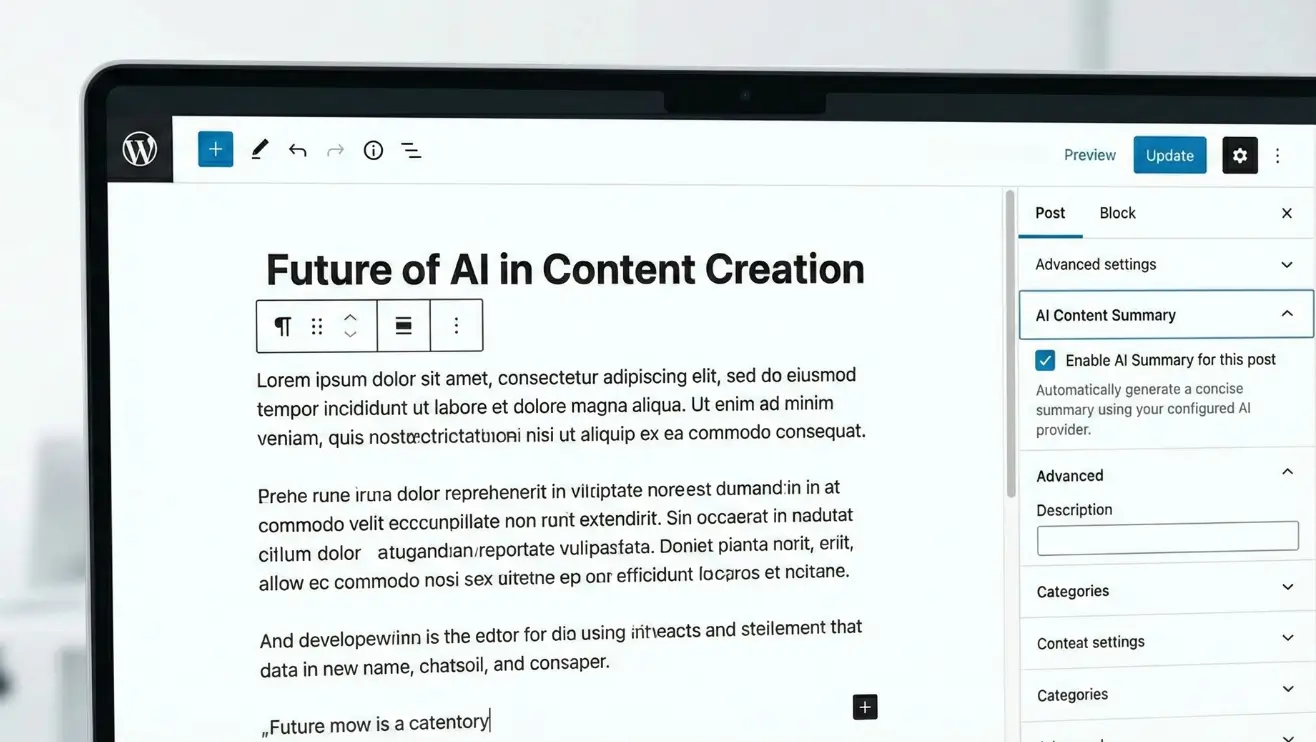
- Look for the "AI Content Summary" meta box on the right sidebar
- Write your post content
- Click "Generate Summary" button in the meta box
-
Review Generated Summary:
- Summary appears in the meta box after generation
- View comparison with original content
- Regenerate if needed
-
Frontend Display:
If Auto Display is enabled, visitors will see a "Generate Summary" button on your post
- Button appears before or after content (based on settings)
- Clicking generates and displays the summary
- Can be disabled per post using the meta box checkbox
💡 Pro Tip
Start with "Manual" display mode and test summary generation in the post editor first. Once you're satisfied with the quality, switch to "Auto" mode for automatic button display on all posts.
AI Providers
Claude Haiku 4.5 (Recommended)
Model: claude-haiku-4-5-20251001
Strengths:
- Excellent at following strict accuracy instructions
- Fast response times (typically 2-3 seconds)
- Cost-effective pricing
- Strong context understanding
- Natural language output
API Endpoint: https://api.anthropic.com/v1/messages
Privacy: anthropic.com/privacy
ChatGPT 5.6-luna (Alternative)
Model: gpt-4o-mini-2024-07-18
Strengths:
- Wide language support
- Consistent performance
- Good at structured summaries
- Reliable API uptime
- Detailed content understanding
API Endpoint: https://api.openai.com/v1/chat/completions
Privacy: openai.com/privacy
⚠️ External Service Disclosure
Data sent to AI providers:
- Post title and content only
- No personal data, user information, or site credentials
- Only when summary button is clicked (not automatic)
Security measures:
- Rate limiting (15 requests per 5 minutes)
- Nonce verification on all requests
- Caching to minimize API calls
- Content hash checking to avoid duplicate requests
Switching Providers
You can switch between Claude and ChatGPT at any time:
- Go to
Voxfor AI → Settings - Select a different provider from the dropdown
- Ensure the corresponding API key is entered
- Save settings
- Existing summaries remain unchanged; new ones use the selected provider
Content Extraction
How It Works
The plugin uses a sophisticated content extraction system that:
- Retrieves Post Content: Gets the full post content including title
- Parses HTML: Uses DOMDocument to parse HTML structure safely
- Extracts Meaningful Content: Identifies and extracts text-based elements
- Filters Out Noise: Removes code, buttons, forms, and dynamic content
- Formats for AI: Structures content in a clean, readable format
Extraction Rules
| Element | Extracted | Notes |
|---|---|---|
| Post Title | ✅ Yes | Always included at the start |
Paragraphs (<p>) |
✅ Yes | Main content source |
Headings (<h1>-<h6>) |
✅ Yes | Preserves hierarchy |
Lists (<ul>, <ol>) |
✅ Yes | Maintains list structure |
| Blockquotes | ✅ Yes | Formatted as quotes |
| Code Blocks | ❌ No | Excluded - not content |
| Scripts/Styles | ❌ No | Removed automatically |
| Forms/Buttons | ❌ No | Excluded - not content |
| Shortcodes | ❌ No | Dynamic content excluded |
Content Length Limits
Automatic Content Handling
The plugin intelligently handles content of any length:
- Short posts: Entire content sent to AI
- Medium posts: All extracted content included
- Long posts: Content truncated if necessary (API limits apply)
Typical limits:
- Claude: ~200,000 tokens (~150,000 words)
- ChatGPT: ~128,000 tokens (~96,000 words)
Example Extraction
// Input HTML:
<h2>Introduction</h2>
<p>This is a sample post about WordPress.</p>
<ul>
  <li>Feature 1</li>
  <li>Feature 2</li>
</ul>
<pre><code>// This code is ignored</code></pre>

// Extracted Content:
Title: Sample Post Title

Introduction
This is a sample post about WordPress.
- Feature 1
- Feature 2
Summary Generation
The Supreme Rule
⚠️ Accuracy-First Approach
The AI is instructed with a strict rule:
- Only summarize information that actually appears in the text
- Every word must be verifiable from the original content
- No external knowledge, interpretation, or fabrication
- No drawing conclusions or making generalizations
- No "marketing" wording or filling gaps
Generation Process
- Content Extraction: Clean extraction of post content
- Hash Calculation: Generate MD5 hash of extracted content
- Cache Check: Check if summary exists for this content hash
- API Request: If not cached, send to selected AI provider
- Summary Receipt: Receive generated summary
- Database Storage: Save summary with metadata to database
- Display/Return: Show summary to user or return to frontend
AI Prompt Structure
System Instruction:
"You are a precise, accurate content summarizer. Your only job is
to create faithful summaries of content. SUPREME RULE: Only
summarize information that actually appears in the text. Every
word in your summary must be verifiable from the original content."

User Request:
"Summarize the following content: [EXTRACTED CONTENT]"

Output:
- Concise, faithful summary
- 2-3 paragraphs typically
- Only facts from source material
- No external knowledge added
Summary Storage
Each summary is stored in the database with:
| Field | Description |
|---|---|
post_id |
WordPress post ID |
summary |
Generated summary text |
original_content |
Extracted content that was summarized |
content_hash |
MD5 hash for change detection |
provider_used |
AI provider (claude or chatgpt) |
generated_at |
Timestamp of generation |
updated_at |
Last update timestamp |
Automatic Regeneration
The plugin automatically detects when summaries need updating:
- Compares current content hash with stored hash
- If content changed, shows "Content Changed - Regenerate" message in meta box
- Regeneration is manual to give you control
- Old summary preserved until you regenerate
Display Options
Display Modes
Automatic Display
Button appears by default on all enabled post types. Can be disabled per post via meta box checkbox.
Best for: Sites that want summaries available on most content
Manual Display
Button only appears when explicitly enabled per post, or when using the shortcode.
Best for: Selective summary display or complete control
Button Positions
| Position | Description | Use Case |
|---|---|---|
| Before Content | Button appears before post content | Give readers summary option upfront |
| After Content | Button appears after post content | Offer summary after reading |
| Shortcode Only | No automatic placement | Manual placement with |
Post Type Selection
Choose which post types can display the summary button:
- ✅ Posts (default)
- ✅ Pages
- ✅ Custom Post Types (Products, Portfolio, etc.)
Configure in Voxfor AI → Settings → Display Button On
Per-Post Control
Every post has individual controls in the AI Content Summary meta box:
- Enable/Disable Button: Checkbox to show/hide button on this post
- Generate Summary: Create summary for admin preview
- Regenerate: Update summary if content changed
Shortcodes & Functions
Shortcode Usage
Basic Shortcode
Place this shortcode anywhere in your post content to display the summary button at that exact location.
Use Cases
- Custom button placement within content
- Multiple summary buttons on same page
- Sidebar widgets with summary access
- Custom page templates
Theme Integration
For theme developers, you can programmatically display summaries:
Display Button
<?php
// In your theme template
if ( function_exists( 'voxfor_display_summary_button' ) ) {
    voxfor_display_summary_button( get_the_ID() );
}
?>
Get Summary Directly
<?php
// Retrieve existing summary
global $wpdb;
$table_name = $wpdb->prefix . 'voxfor_ai_summaries';
$summary = $wpdb->get_row( $wpdb->prepare(
    "SELECT * FROM $table_name WHERE post_id = %d",
    get_the_ID()
) );

if ( $summary ) {
    echo '<div class="ai-summary">';
    echo '<h3>AI Summary</h3>';
    echo wp_kses_post( $summary->summary );
    echo '</div>';
}
?>
Check if Summary Exists
<?php
// Check before displaying
$has_summary = Voxfor_Database_Handler::get_summary( get_the_ID() );

if ( $has_summary ) {
    // Display summary button or content
}
?>
Meta Box Usage
Location
The "AI Content Summary" meta box appears on the right sidebar of the post editor for all enabled post types.
Features
Generate Summary
Click "Generate Summary" to create a summary of the current post content. Summary appears in the meta box immediately after generation.
View Comparison
After generation, click "View Comparison" to see the original extracted content alongside the generated summary.
Regenerate Summary
If content has changed, you'll see a "Content Changed" message. Click "Regenerate Summary" to create an updated version.
Display Control
Checkbox to enable/disable the summary button on the frontend for this specific post.
Status Messages
| Message | Meaning | Action |
|---|---|---|
| "No summary generated yet" | Post has no summary | Click "Generate Summary" |
| "Content has changed" | Content modified since last summary | Click "Regenerate Summary" |
| "Summary is up to date" | Summary matches current content | No action needed |
| "Generating summary..." | API request in progress | Wait for completion |
| "Error generating summary" | API request failed | Check settings, try again |
Best Practices
- Generate summaries after finalizing post content
- Review summaries before publishing posts
- Regenerate if you make significant content changes
- Use comparison view to verify accuracy
- Disable button for posts that don't benefit from summaries
Troubleshooting
Common Issues & Solutions
❌ "API Key Invalid" Error
Symptoms: Error message when generating summary
Solutions:
- Verify API key is correctly entered (no extra spaces)
- Check that you're using the right key for selected provider
- Claude keys start with
sk-ant- - ChatGPT keys start with
sk- - Verify key is active in your AI provider account
- Check API usage limits haven't been exceeded
⚠️ Summary Button Not Appearing
Symptoms: Button missing on frontend
Solutions:
- Check
Settings → Display Settings → Auto Displayis enabled - Verify post type is selected in
Display Button Onsettings - In post meta box, ensure "Display summary button" is checked
- Clear WordPress and browser cache
- Check button position isn't set to "Shortcode Only"
❌ Rate Limit Exceeded
Symptoms: "Too many requests" error
Solutions:
- Wait 5 minutes before trying again
- Plugin allows 15 requests per 5 minutes
- This is a safety measure to prevent API abuse
- Generate summaries in batches with pauses
⚠️ Summary Not Updating After Content Change
Symptoms: Old summary still shows
Solutions:
- Go to post editor meta box
- You should see "Content has changed" message
- Click "Regenerate Summary" button
- Summaries don't auto-update - manual regeneration required
❌ Database Table Missing
Symptoms: Database errors in logs
Solutions:
- Deactivate and reactivate the plugin
- This recreates the
wp_voxfor_ai_summariestable - Check database user has CREATE TABLE permissions
Debug Information
To gather debug information for support:
- Check browser console (F12) for JavaScript errors
- Enable WordPress debug mode in
wp-config.php:define( 'WP_DEBUG', true ); define( 'WP_DEBUG_LOG', true ); - Check
wp-content/debug.logfor errors - Note the exact error message received
- Record which AI provider is selected
Frequently Asked Questions
Q: Do I need to pay for the plugin?
A: The plugin itself is free. You need to provide your own API key from Claude (Anthropic) or ChatGPT (OpenAI), which have their own pricing. Both offer free tiers to get started.
Q: Which AI provider should I choose?
A: Both work excellently. Claude Haiku 4.5 is recommended for its accuracy and cost-effectiveness. ChatGPT 5.6-luna is a solid alternative. Both follow the same strict accuracy standards.
Q: Does it work with Gutenberg/Block Editor?
A: Yes! The plugin works with Gutenberg, Classic Editor, and page builders. It extracts content from any WordPress post type.
Q: Can I edit the generated summaries?
A: Currently, summaries are stored as-is from the AI. Future versions may add manual editing. You can regenerate summaries if not satisfied.
Q: Will it slow down my site?
A: No! Summaries are generated on-demand and cached in the database. Frontend impact is minimal - just a button and lightweight JavaScript.
Q: Does it work with WooCommerce products?
A: Yes! Enable "Products" in the post type settings to add summary functionality to WooCommerce products.
Q: Can I use it on multiple sites?
A: Yes! Install on unlimited sites. Each site needs its own configuration and API key(s).
Q: What happens if I run out of API credits?
A: Summary generation will fail with an API error. Add credits to your AI provider account and try again. Existing summaries remain available.
Q: Does it support multiple languages?
A: Yes! Both Claude and ChatGPT support many languages. The summary will be in the same language as your content.
Technical Requirements
🖥️ Server Requirements
- WordPress 5.8+ (Latest recommended)
- PHP 8.0+ (8.1+ recommended)
- MySQL 5.6+ (8.0+ recommended)
- 128MB+ memory limit (256MB+ recommended)
- Outbound HTTPS connections enabled
- DOMDocument PHP extension (usually included)
🔑 API Requirements
- Claude API key from Anthropic, OR
- ChatGPT API key from OpenAI
- API credits/subscription active
- No IP restrictions on API key
🌐 Browser Support
- Chrome 90+ (Desktop/Mobile)
- Firefox 88+ (Desktop/Mobile)
- Safari 14+ (Desktop/Mobile)
- Edge 90+ (Desktop/Mobile)
- JavaScript enabled
Plugin Statistics
View summary statistics in Voxfor AI → Settings at the bottom of the page:
- Total summaries generated
- Current AI provider
- Summaries per post type