Lifetime VPS Europe
 Lifetime VPS Asia
 Lifetime WooCommerce Hosting
 Lifetime Hosting
 Lifetime Game Dedicated Servers
 Chicago, US
 Tokyo, Japan
 Singapore
 Hong Kong
 Seoul, South Korea
 Amsterdem, Netherlands
 London, UK
 Stockholm, Sweden
 Oslo, Norway
 Vienna, Austria
 Zurich, Switzerland
 Sydney, Australia
 Wordpress Hosting
 VPS Hosting
 DDOS Protection
 Submit Ticket
 Full Management
 Guides
 Videos and Podcasts
 Discover Creative Ideas
 Voxfor Autonomous AI Workers
 Voxfor Mega Menu
 Voxfor Advanced Price Management For WooCommerce
 Voxfor Secure Live Chat and AI Support
 Voxfor Multilanguage
 Voxfor AI Content Summary
 Voxfor Autopilot

Headless WordPress has changed the face of a modern web development and has separated the content management system and the frontend presentation layer. This architecture allows developers with the flexibility never before seen in architecture because they can use the latest technologies, such as React, Vue, and Angular, and benefit from the powerful content management of WordPress.
Headless WordPress hosting
Run React frontends and WordPress backends on VPS infrastructure
Headless WordPress projects need reliable APIs, fast frontends, and flexible deployment options. Voxfor VPS gives developers dedicated resources for React apps, WordPress backends, and custom web architectures.
As traditional monolithic CMS setups become increasingly limiting in a multi-channel digital landscape, headless WordPress emerges as the solution for businesses and developers seeking greater customization, superior performance, and seamless scalability across various platforms and devices.
What is Headless WordPress?
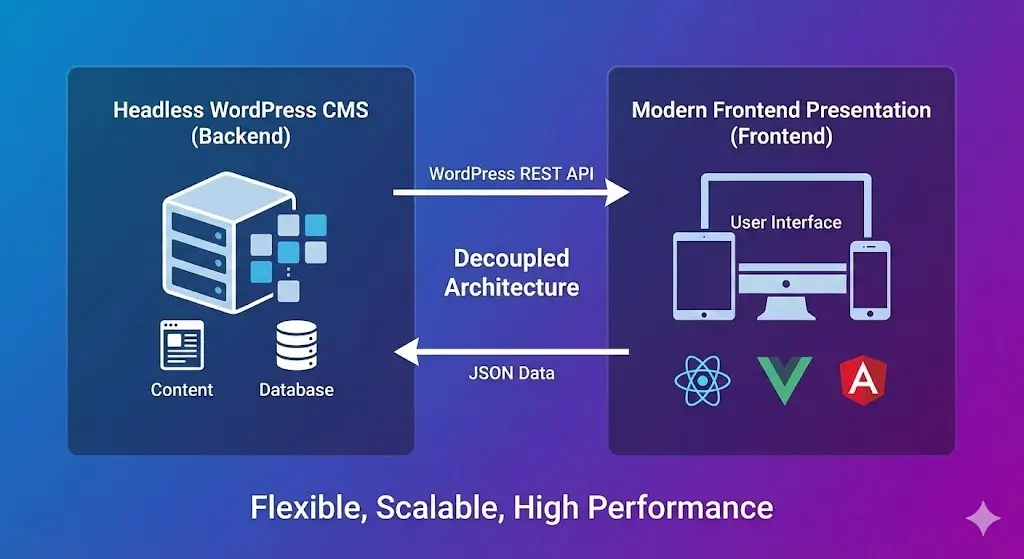
Headless WordPress is a new web development system that isolates the content management system of the backend presenter layer of the frontend. Essentially, WordPress is merely a content management system, and has no control over how the content is presented to visitors, and a specific front end technology is in charge of how the user interface is done.
This decoupling is made possible through the WordPress REST API, which allows the frontend to communicate with the WordPress backend using JSON (JavaScript Object Notation). The REST API exposes WordPress data as structured JSON objects, enabling any frontend technology capable of processing JSON to consume and display WordPress content.
For example, a JSON response from WordPress might look like:
{
  "friends": [
    {
      "id": 0,
      "name": "Harriet Stanley"
    },
    {
      "id": 1,
      "name": "Benton Odom"
    }
  ]
}
}
This standardized data format ensures compatibility between WordPress and virtually any modern frontend framework, making headless WordPress an exceptionally flexible solution for diverse development needs.
Headless CMS vs. Decoupled CMS: Key Differences
While headless and decoupled CMS architectures are often used interchangeably, they represent distinct approaches to content management with important implications for flexibility, performance, and scalability.
| Aspect | Headless CMS | Decoupled CMS |
| Frontend Flexibility | Maximum flexibility for any frontend technology | Limited to specific frontend technologies |
| Backend Independence | Complete separation of backend from frontend | Frontend decoupled, but backend tied to CMS |
| Technology Agnostic | Use React, Angular, Vue.js, or any technology | Predefined frontend frameworks |
| Performance | Superior performance with direct content delivery | Potential bottlenecks from the coupled architecture |
| Scalability | Scale frontend and backend independently | Limited scalability due to coupling |
| Development Speed | Concurrent frontend and backend development | Slower due to frontend-backend dependencies |
| Content Syndication | Easy multi-platform content distribution | More challenging due to the coupled structure |
The basic difference is in the level of their separation. Headless WordPress supports full decoupling and is maximally flexible and performant, whereas decoupled systems have architectural dependencies.
How Headless WordPress Works: Technical Overview
Headless WordPress operates through a series of interconnected components that work in concert to deliver content from the backend to the frontend:
- WordPress Backend: Serves as the exclusive content management system, storing all posts, pages, custom post types, and metadata in the database.
- WordPress REST API: Acts as the bridge between frontend and backend, exposing content through standardized endpoints that return JSON data.
- Custom Frontend Framework: Communicates with the REST API endpoints to retrieve content and render it for end users.
- API Endpoints: Specific URLs that expose different content types. For instance:
- https://example.com/wp-json/wp/v2/posts — retrieves all posts
- https://example.com/wp-json/wp/v2/books — retrieves custom post type data
When a user visits the frontend application, it makes API requests to WordPress, retrieves the necessary content in JSON format, and renders it dynamically using frontend technologies. This process eliminates the need for WordPress to handle any presentation layer concerns, resulting in improved performance and developer autonomy.
Setting Up Headless WordPress with React
Choose Your Hosting Provider
The basics of successful headless WordPress implementation start with the choice of the hosting. Although the frontend is decoupled, the WordPress backend, which is the guts of your system, does need a good server infrastructure.
Your hosting provider directly impacts:
- Backend Performance: Affects API response times and content delivery speed
- Security: Protects your content and API endpoints from threats
- Reliability: Ensures consistent uptime and content availability
- Scalability: Enables handling traffic spikes without performance degradation
Managed hosting platforms like Voxfor provide several advantages:
- Fully managed WordPress on top-tier cloud providers
- One-click WordPress installations for rapid setup
- Advanced caching mechanisms and content delivery networks (CDNs) for global content distribution
- Robust security through regular patching, firewalls, and SSL certificates
- Automated backups and easy restoration options
- 24/7 expert support for technical issues
Enable WordPress REST API
Headless arrangements require the WordPress REST API which is provided by default in both recent versions of WordPress (5.0+). But with older installation, you will have to enable it:
- Download the WP-REST-API plugin zip file from the official repository
- Navigate to your WordPress plugins folder and upload the zip file
- Extract the plugin files
- Go to your WordPress background and enable the plug-in under Plugins – Installed Plugins.
Once activated, the REST API becomes available at: https://yourdomain.com/wp-json/
Configure Permalinks and Fetch Post Data
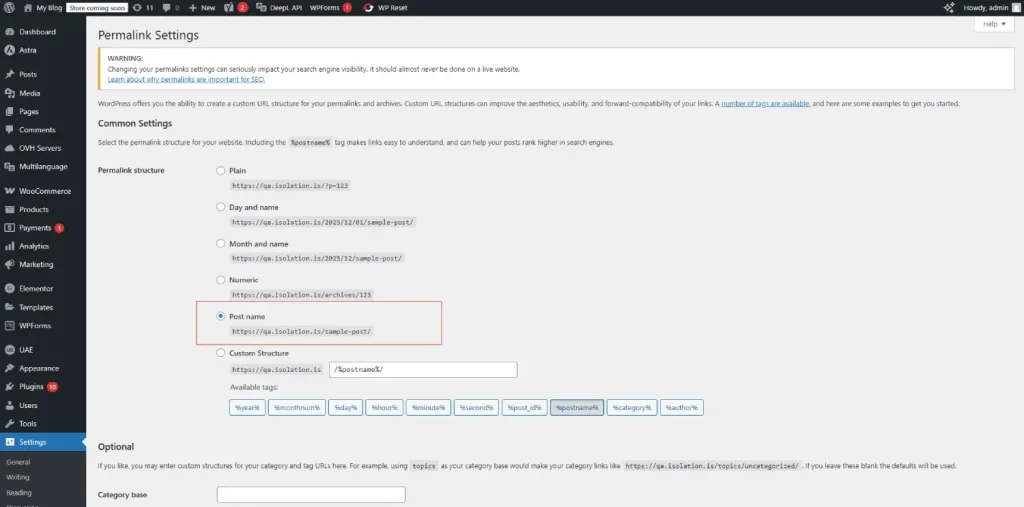
To ensure the REST API functions correctly with your custom post types:
- Go to Settings → Permalinks in your WordPress dashboard
- Select either “Post name” or “Custom Structure” to enable pretty permalinks
- Save your changes
To verify that your API is returning data correctly:
- Download the Postman application or use an online API testing tool
- Enter your API endpoint URL: https://example.com/wp-json/wp/v2/posts
- Send a GET request to retrieve all posts in JSON format
This test is a confirmation that your WordPress backend is properly exposing content via the REST API.
Create Custom Post Types for Specialized Content
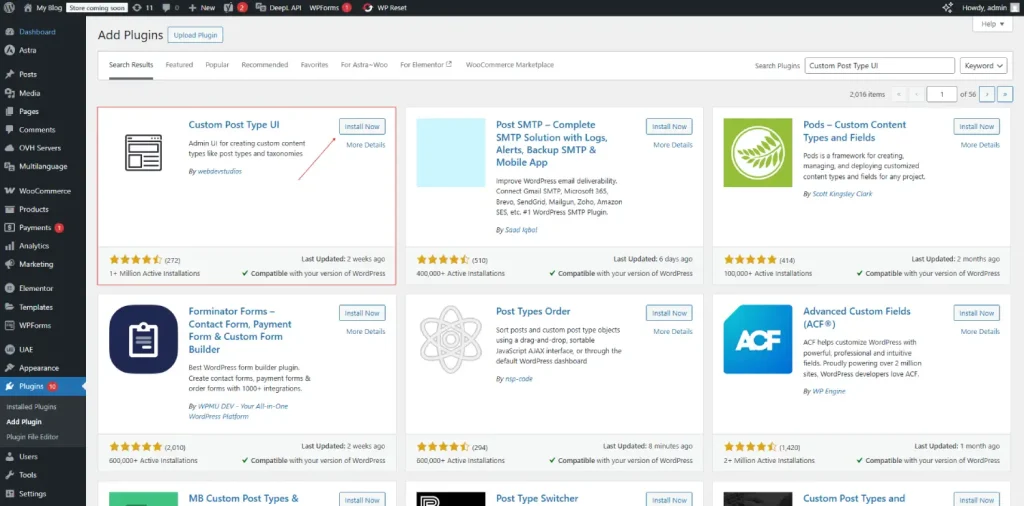
WordPress default post types (posts and pages) might not be suitable to every content structure. You can create your own types of posts:
- Install and activate the Custom Post Type UI plugin from your WordPress dashboard
- Navigate to CPT UI → Add New to create a new post type
- Enter a descriptive name (e.g., “Books”) and slug
- Critical: Enable the “Show in REST API” checkbox, this is mandatory for headless WordPress.
- Set the REST API base slug to your custom post type name
- Check all information boxes you want accessible via the API
- Save your custom post type
After saving, a new menu item will be displayed on your WordPress sidebar. It is now possible to add content to your own custom post type and handle it like ordinary posts.
Extend Custom Fields with ACF and REST API
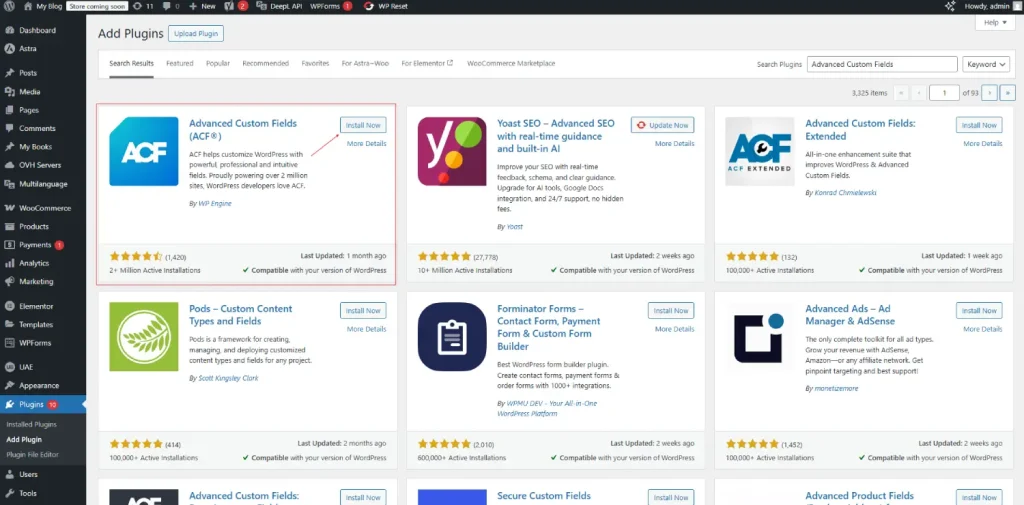
Advanced Custom Fields (ACF) allows you to add custom metadata to your posts. To make this metadata accessible through the REST API:
- Install and activate the Advanced Custom Fields (ACF) plugin
- Install the ACF to REST API plugin to enable API access
- Create a new field group from ACF → Field Groups → Add New
- Add your custom fields (e.g., “Publisher” for your books)
- Select the post types where this field should appear (e.g., “Book”)
- Publish the field group
Your custom fields are now accessible through the REST API. For example, your custom post type endpoint will include all ACF field data:
https://example.com/wp-json/wp/v2/booksVerify API Responses
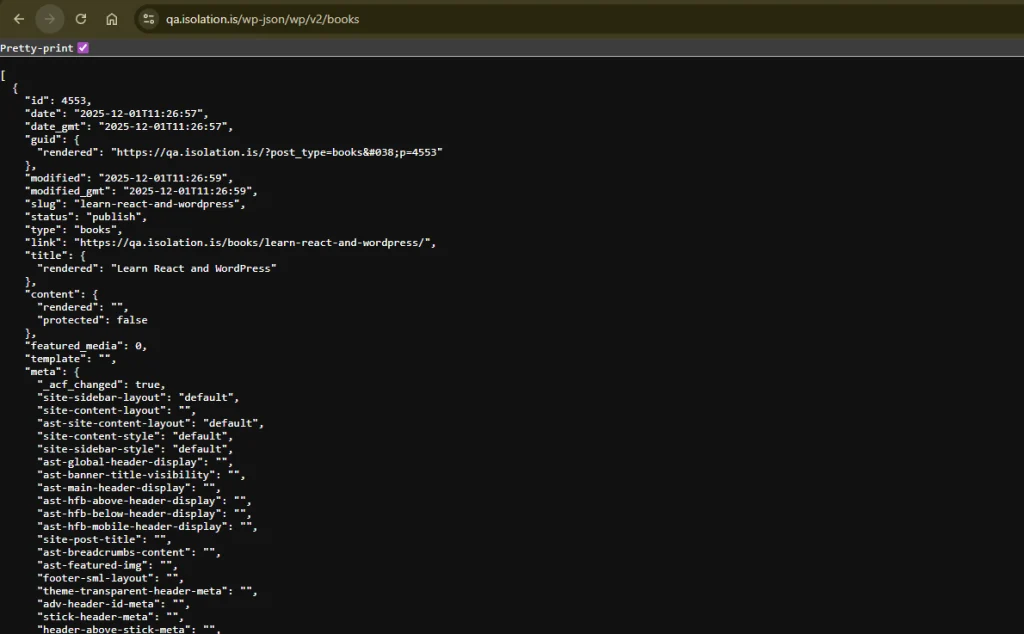
Test your API endpoints to ensure all data is correctly exposed:
- Use Postman or your browser to visit: https://example.com/wp-json/wp/v2/books/
- Examine the JSON response to confirm it includes:
- Post titles
- Content and excerpts
- Custom fields and metadata
- Featured images (with media IDs)
- Author information
A properly configured API response contains all necessary data for your frontend application to render content dynamically.
Setting Up React with Headless WordPress
Prerequisites for React Development
Before beginning React development, ensure your system has:
- Node.js and NPM: Download from nodejs.org. NPM is included with Node.js
- Code Editor: Visual Studio Code, Sublime Text, or your preferred editor
- Git: Optional but recommended for version control
Verify installation by running:
node --version
npm --version
Creating a React Project
Initialize a new React application:
npx create-react-app frontend
cd frontend
Install Axios for making HTTP requests to your WordPress API:
npm i axiosStart the development server:
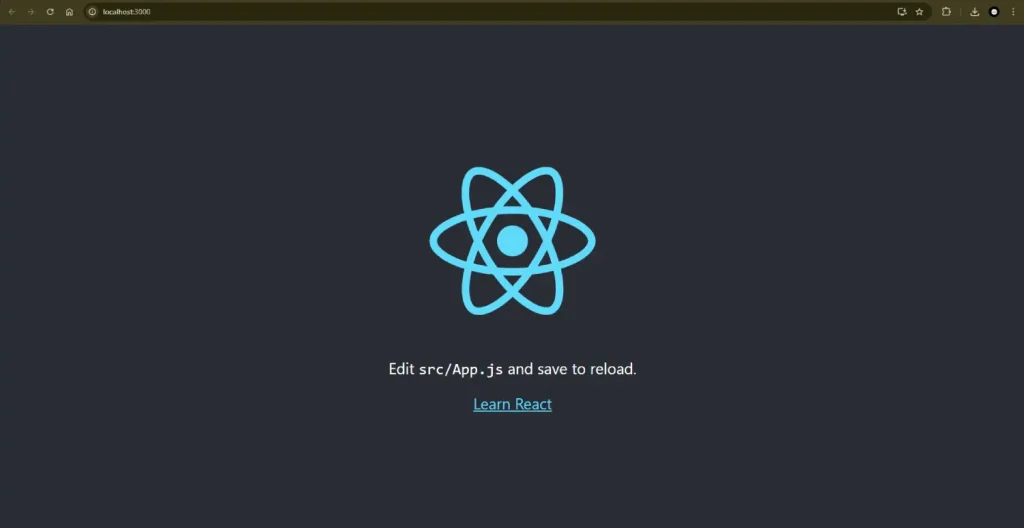
npm startYour React application now runs at http://localhost:3000 and is ready for integration with WordPress.
Fetching and Displaying WordPress Content in React
Creating a Books Component
Create a new folder structure for your components:
src/
  components/
    Books.js
    BookItems.js
In Books.js, implement the main component that fetches data from your WordPress REST API:
// src/components/Books.js
import React, { Component } from 'react';
import axios from 'axios';
import BookItems from './BookItems';

export class Books extends Component {
  state = {
    books: [],
    isLoaded: false,
    error: null
  };

  componentDidMount() {
    axios
      .get('https://qa.isolation.is/wp-json/wp/v2/books/')
      .then(res => {
        this.setState({
          books: res.data || [],
          isLoaded: true
        });
      })
      .catch(err => {
        console.error(err);
        this.setState({ error: 'Failed to load books', isLoaded: true });
      });
  }

  render() {
    const { books, isLoaded, error } = this.state;

    if (!isLoaded) {
      return <p>Loading books…</p>;
    }

    if (error) {
      return <p>{error}</p>;
    }

    return (
      <div>
        {books.map(book => (
          <BookItems key={book.id} book={book} />
        ))}
      </div>
    );
  }
}

export default Books;
export default Books
This component:
- Initializes state with an empty books array and loading status
- Calls the WordPress API when the component mounts
- Updates the state with the fetched data
- Maps through books and renders each book using the BookItems component
Creating Individual Book Item Components
Create BookItems.js to display individual book details:
// src/components/BookItems.js
import React from 'react';
import PropTypes from 'prop-types';

const BookItems = ({ book }) => {
  // Safely get the rendered title
  const title = book?.title?.rendered || '';

  if (!title) {
    // If there is no title, render nothing (or a fallback)
    return null;
  }

  return (
    <div className="book-item">
      {/* title from WP REST API can contain HTML */}
      <h2 dangerouslySetInnerHTML={{ __html: title }} />
    </div>
  );
};

BookItems.propTypes = {
  book: PropTypes.object.isRequired
};

export default BookItems;
export default BookItems
Integrating Components into Your App
In App.js, import and use your Books component:
import React from 'react';
import './App.css';
import Books from './components/Books';

function App() {
  return (
    <div className="App">
      <Books />
    </div>
  );
}

export default App;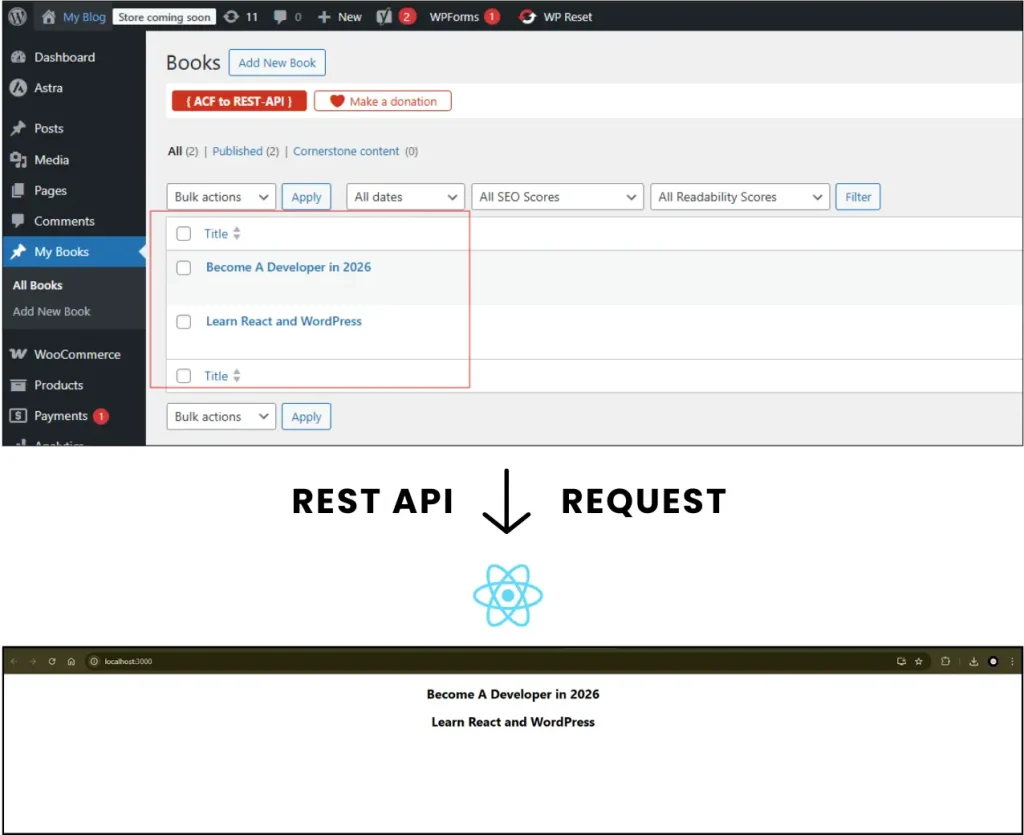
This framework will allow your React application to load the WordPress content and render it. The entry point is the App.js component, which provides the Books component, which handles all the interactions with the API and the display of all the data.
Benefits of Headless WordPress
1. Superior Flexibility
Headless WordPress removes frontend limitations which are enforced by the traditional WordPress themes. Workers will be able to build interfaces with current JavaScript libraries, develop progressive web apps, or develop multi-channel experiences without the WordPress backend drawbacks.
2. Enhanced Security
Decoupling frontend and backend is a major way to decrease the attack surface area. The WordPress administrative is not exposed to the world, thus reducing any vulnerability of WordPress. Authentication mechanisms on API offer an extra level of protection so that only your authorized requests are used to access your content.
3. Improved Performance
Headless architecture enables:
- Faster API response times: Optimized REST API calls deliver content in milliseconds
- Reduced rendering overhead: Frontend frameworks handle presentation independently
- Superior caching strategies: JAMstack principles enable aggressive caching and CDN optimization
- Better scalability: Independent scaling of frontend and backend resources
4. Multi-Platform Content Delivery
A single WordPress backend serves multiple frontends simultaneously:
- Web applications built with React or Vue
- Native mobile applications (iOS, Android)
- Static site generators (Next.js, Gatsby)
- Headless commerce implementations
- Progressive web applications
5. Concurrent Development Workflows
Frontend and backend teams work independently on their respective systems. Frontend developers focus on user experience while backend developers handle content infrastructure, improving overall development velocity.
Drawbacks and Limitations of Headless WordPress
1. Increased Complexity
Headless WordPress incites a complexity of architecture that is beyond the traditional setups of WordPress. The developers need to be knowledgeable about WordPress backend architecture as well as frontend framework mechanics, which demands a higher level of technical knowledge and increase their learning curves.
2. Limited Plugin Compatibility
A lot of WordPress extensions that are used in customary setups cannot work in headless setups. As the frontend is independent, any kind of plugin that alters the displays of the theme or depends on the WordPress output cannot be used. Necessary functionality needs to be reinstated, and more effort and project schedules are required.
3. Operational Overhead
Managing two separate systems demands:
- Maintenance complexity: Updates and compatibility checks for both systems
- Deployment coordination: Ensuring frontend and backend changes align
- Troubleshooting challenges: Issues can originate from the frontend, backend, or their integration
- Team skill requirements: Larger teams with diverse skillsets
4. Development Time
Initial set up and customization is very time consuming compared to the conventional WordPress. Third party integration, front end architecture and creation of custom components add a lot of time into the project schedules.
5. Learning Curve for Teams
Teams transitioning from traditional WordPress may struggle with:
- Understanding API-based architecture principles
- Mastering modern JavaScript frameworks
- Managing separate deployment pipelines
- Debugging complex frontend-backend interactions
When to Use Headless WordPress
Headless WordPress proves advantageous for:
- Large-scale enterprises requiring multi-platform content delivery
- Organizations building custom web applications with specific functionality requirements
- Development teams skilled in modern JavaScript frameworks
- Businesses prioritizing performance and security over simplicity
- Companies managing diverse content across websites, mobile apps, and external platforms
- Projects requiring independent frontend-backend scaling
- Applications needing advanced customization beyond standard WordPress capabilities
Frequently Asked Queston:
Conclusion
Headless WordPress denotes a radical change in the way content management and the presentation process can be separated providing unseen flexibility, security, and performance benefits. Using the strength of WordPress content management system and the latest front end frameworks, the developers produce flexible and scalable applications that meet the needs of individual users.
About the writer

Hassan Tahir wrote this article, drawing on his experience to clarify WordPress concepts and enhance developer understanding. Through his work, he aims to help both beginners and professionals refine their skills and tackle WordPress projects with greater confidence.