
In 2026, the way we build websites has completely changed. We no longer have to keep design and coding in separate boxes; instead, everything is working together in one smart system. Leading this change is the Elementor AI Site Planner, a tool built to fix the slow and messy parts of starting a new project. By combining project planning, smart content writing, and easy WordPress setup, it does more than just help with small tasks; it acts as the foundation for your entire site. In this article, we’ll look at how this tool works, how it saves you money, and why it’s a game-changer for anyone using WordPress.
Starting a new website from scratch is often the hardest part of the job. Many designers suffer from “blank page syndrome”, that frustrating moment where you’re staring at a white screen and just can’t get moving. In the past, this meant weeks of messy work: juggling client meetings, scribbling down notes, and drawing site maps in different apps, only to end up with a “rough draft” full of meaningless “Lorem Ipsum” filler text. The Elementor AI Site Planner fixes this headache by turning your rough ideas into a professional, organized plan in less than twenty minutes.
This speed is possible because the tool uses smart AI to understand exactly what you’re saying and turn those ideas into a professional website layout. Instead of leaving you to figure it out, the AI starts a conversation with you. It asks specific questions about what your business does, who your customers are, what you want to achieve, and how you want your brand to “sound” to visitors. Because it actually “listens” to your answers, you don’t just get a boring, one-size-fits-all template. You get a custom-made plan designed to hit your goals, whether that’s getting more people to sign up or boosting your online sales.
| Discovery Component | Mechanism of Action | Strategic Benefit |
| AI-Led Conversation | Interactive Q&A regarding business niche and goals | Establishes a professional foundation without manual guesswork. |
| Project Brief Generation | Synthesis of user inputs into a structured roadmap | Ensures alignment between the creator and the client early in the project. |
| Tone & Voice Selection | Application of specific adjectives (e.g., authoritative, energetic) | Guarantees brand consistency across all AI-generated copy. |
| Multilingual Input | Support for major world languages in the chat interface | Allows global creators to articulate nuanced ideas in their native tongue. |
For agencies, this early planning phase is a total game-changer. By getting the client to agree on a clear, interactive plan before you even touch the design settings in WordPress, you save yourself a massive amount of time. It means far fewer “can we change this?” emails later on and ensures the final website actually matches what you promised, keeping even the biggest projects from spiraling out of control.
One of the best new features in this toolbox is the AI Notetaker. It’s a helpful assistant that works right inside your video calls on Zoom and Google Meet. It fixes a major headache: that moment when you realize an important client request was forgotten between the meeting and the actual build. Instead of things getting “lost in translation,” this tool makes sure every detail from your conversation is saved and ready to use.
Think of the AI Notetaker as a silent partner you can invite to your meeting with a simple link. Once you let it in, it listens and takes notes automatically while you talk.
Instead of just giving you a wall of text, the AI is smart enough to highlight the big ideas, the decisions you made, and the “to-do” list for the project. This is a huge win for freelancers and managers. You can finally focus on actually talking to your client instead of panicking that you’re going to miss a key detail because you were too busy typing.
The data extracted by the Notetaker is not merely a transcript; it is an intelligent summary that serves as the direct input for the Site Planner. For instance, if a client mentions the need for a “membership portal for premium coffee subscribers” during a Zoom call, the AI Notetaker identifies this as a core project requirement. It automatically suggests the inclusion of appropriate pages and widgets in the subsequent site plan.
| Platform Support | Integration Status | Feature Set |
| Google Meet | Fully Integrated | Real-time transcription, automated brief generation, multi-language support. |
| Zoom | Fully Integrated | Real-time recording, transcription, and direct ingestion into the Site Planner. |
| Microsoft Teams | Coming Soon | Anticipated parity with existing video conferencing integrations. |
The notetaker multilingual feature is specifically robust considering the fact that it supports languages like English, Spanish, French, German, Italian, Portuguese, Dutch, Hindi, Japanese, Chinese, Finnish, Korean, Polish, and Russian in Google Meet settings. This facilitates the cross-cultural process of development, where a meeting, which was held in Japanese, can be automatically translated into a structured site brief and wireframe (written in English).
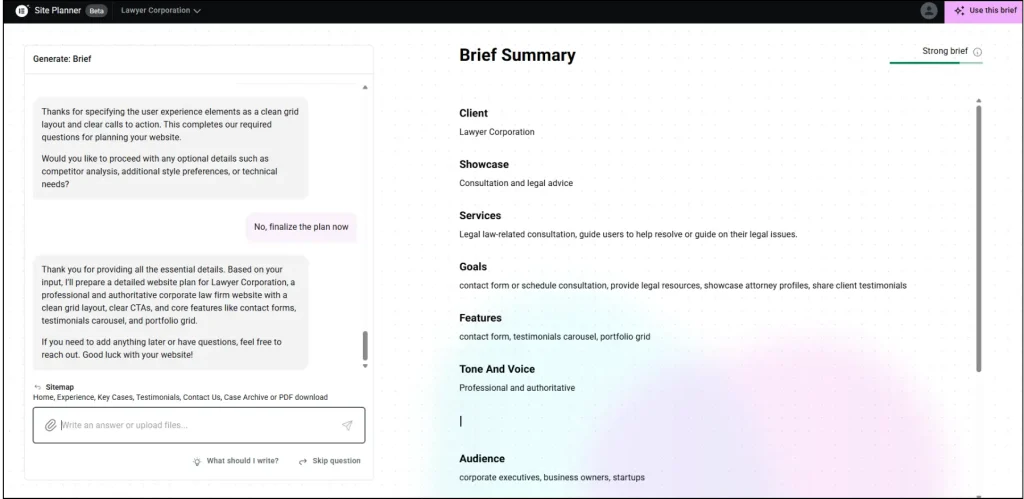
Once the discovery data is ingested, the AI Site Planner moves into the hierarchical representation phase, creating a visual sitemap that outlines the relationship and flow between all intended pages. This phase is essential for both user experience (UX) design and search engine optimization (SEO), as it defines the site’s architecture and internal linking logic before the visual design is applied.
The sitemap generation is not a static process; the tool leverages industry best practices to recommend core pages based on the business type. For a professional services firm, the AI might suggest a hierarchy consisting of a Home page, About Us, individual Service pages, a Portfolio, and a Contact page with integrated lead capture. The user retains absolute control over this hierarchy, with the ability to add, delete, or rearrange sections and pages via an intuitive drag-and-drop interface.
The best thing about the site planner is that it will be able to export these sitemaps in various formats. To present the client, a visual diagram will be used to give a high-level view of the user journey. As a developer and SEO expert, the XML export enables instant consummation of the site structure into technical aids to proceed with the analysis. This interoperability will ensure that the Site Planner is not a compartmentalized design tool but a centralized location of project data.
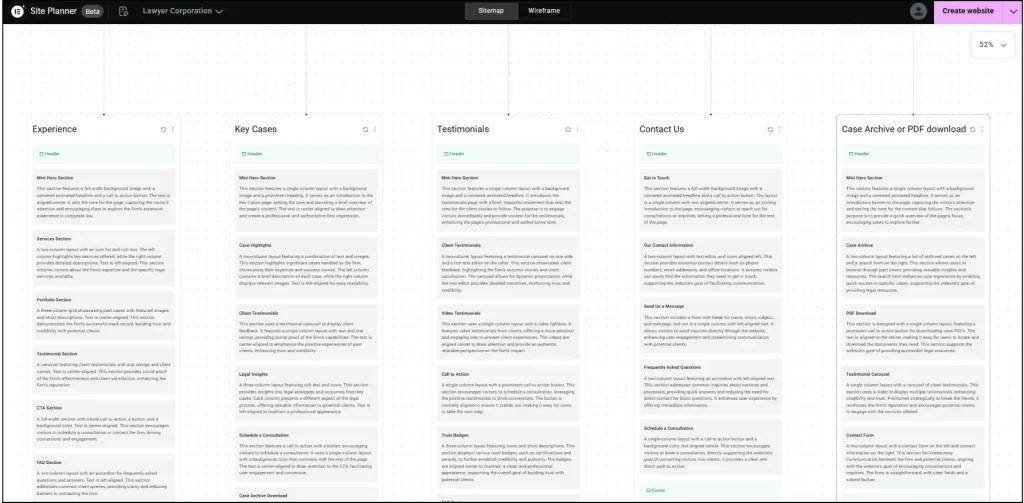
The transition from a sitemap to a wireframe represents the “structural realization” of the project brief. Elementor AI Site Planner produces wireframes that are fundamentally different from traditional “gray box” prototypes. Instead of using placeholder text, the AI generates context-aware, industry-relevant copy for headers, sub-headers, and body sections.
This is a major strategic benefit to agencies in the form of this no-lorem-ipsum approach. It enables the client to view their real value proposition in the design at the earliest stage of the draft, which makes it easy to buy in quicker and eliminates the revision fatigue of the vague prototypes. The wireframes are constructed on the basis of the advanced system of containers in Elementor that guarantees the appearance of the layouts, yet at the same time makes sure that the layouts can be functionalized in accordance with the current web standards.
All the wireframes created by the AI are automatically responsive, which ensures the same experience on desktop, tablet, and mobile devices. The AI can perceive the specifics of the mobile-first design, changing the padding, font sizes, and the layout structures (stacking columns or concealing non-needed items) according to the latest performance standards, such as Google Core Web Vitals. This active optimization is essential in a time when mobile traffic has frequently surpassed half of overall web volume, and mobile page experience is directly ranked as a component of search engines.
| Wireframe Element | AI Logic Application | Technical Benefit |
| Container System | Uses Flexbox-based structures instead of legacy sections | Reduces DOM depth and improves rendering speeds. |
| Content Blocks | Generated based on industry best practices for conversion | Provides a clear narrative flow without manual copywriting. |
| Responsive Controls | Automatic adjustment for specific device breakpoints | Minimizes the need for manual CSS media queries. |
| Placeholder Images | Sourced based on the specific industry mentioned in the brief | Enhances the visual fidelity of the prototype for client review. |
In late 2025, the Site Planner introduced a robust styling engine that bridges the gap between a structural wireframe and a polished design. This feature allows creators to apply a cohesive visual identity to the site plan before it is imported into WordPress.
The tool can suggest color palettes and typography pairings based on the “tone” and “industry” defined during the discovery phase. For example, a financial institution might receive suggestions for a palette of deep navy and charcoal with traditional serif fonts to convey trust and stability. Conversely, a modern tech startup might be presented with vibrant gradients and clean, geometric sans-serif typefaces.
Users can also enter hex codes to replicate the color scheme of an existing brand guide or utilize a color picker to adjust specific details, even though the AI suggestions are not disregarded. The decisions are then implemented on a sitewide basis, ensuring that all global style variables are brought into the Elementor WordPress world. It is an automatic transfer of aesthetic information, and creators do not need to redefine global colors and fonts manually when the site passes to the production phase.
The impact of the AI Site Planner is perhaps most pronounced in the e-commerce sector, where the technical complexity of building a functional store often leads to prolonged development cycles. The tool has been specifically optimized to handle the intricate page hierarchies required by WooCommerce.
Creation of core transaction pages, such as My Account, Shopping Cart, and Checkout, has long been a monotonous and time-consuming process. These pages are automatically generated by the AI Site Planner, which takes care not only to make them functional and secure but also to ensure that they are aesthetically similar to the rest of the store. The tool enables agencies to have more clients without a proportional growth of manual labor by automating the plumbing of an e-commerce site.
The AI also suggests product listing grids, category archives, and individual product page layouts that are optimized for conversions. These layouts incorporate conversion-boosting elements such as sticky “Add to Cart” buttons, progress bars for free shipping, and stock meters, features that traditionally required advanced coding or specialized third-party plugins.
| E-Commerce Page | AI Generation Logic | Conversion Feature Integration |
| Product Archive | Dynamic grids based on product count and hierarchy | Intelligent filtering and sorting placeholders. |
| Product Detail | Hierarchical placement of title, price, and gallery | Optimized CTA placement and stock meters. |
| Shopping Cart | Cohesive branding across transactional steps | Trust badges and shipping calculators. |
| Checkout Flow | Secure, multi-step or single-page layouts | Form optimization and payment gateway placeholders. |
The transition from the web-based Site Planner to a live WordPress environment is a meticulously engineered process that relies on the Elementor Import/Export Kit system. This pipeline ensures that the structural and aesthetic intent of the site plan is preserved during the migration.
Upon the activation of the “Create Website” action, the Site Planner packages all the sitemaps, wireframes, and global styles into a proprietary .zip package. In this packaging stage, this tool will carry out a dependency check to determine what type of plugins will be needed to maintain the design. In case the plan contains complex widgets or WooCommerce elements, the tool notifies the user that such plugins are necessary in the target WordPress site to ensure that the design works properly.
The user has two primary paths for deployment:
A manual export process where the user downloads the .zip kit and uploads it to an existing WordPress site using the Elementor Import/Export feature.
A significant advantage of the Elementor AI Site Planner over other AI “site generators” is its adherence to high-performance coding standards. Because the tool is built by the same engineering team that maintains the Elementor Core plugin, the generated layouts leverage the latest performance optimizations.
All of the layouts in the Site Planner are built with Flexbox and CSS Grid containers only, which is a technical choice that severely minimizes the depth of the Document Object Model (DOM). A shallow DOM implies that the browsers can process and display the page faster, and the score in the Largest Contentful Paint (LCP) and Cumulative Layout Shift (CLS) metrics increases. Moreover, the tool only smartly loads the CSS it needs for those specific widgets, significantly reducing unused CSS warnings common in generic page builders.
When the AI-built site is deployed on Elementor Hosting, it benefits from an infrastructure layer specifically tuned for the builder. This includes:
The Elementor AI ecosystem operates on a tiered credit system that provides flexible access to its suite of generative tools. While the Site Planner is currently free to use during its beta phase, the subsequent refinement of the site, generating unique images, custom CSS, or AI-written body copy, requires an active AI subscription.
| Subscription Plan | Monthly/Annual Cost | Credit Allotment | Best For |
| AI Starter | $4 / mo ($48 billed annually) | 24,000 annual credits | Single-site owners and small bloggers. |
| AI Power | $8.25 / mo ($99 billed annually) | 50,000 annual credits | Freelancers and small businesses. |
| AI Visionary | $15.99 / mo ($192 billed annually) | 100,000 annual credits | High-volume agencies and enterprises. |
| Elementor One | $14 – $19 / mo ($168 – $228 billed annually) | 25,000 monthly credits | Users requiring a unified builder, hosting, and AI ecosystem. |
The cost of individual AI actions varies based on the computational intensity required. Simple text and code generations are highly affordable, while structural container generation and image manipulation require a larger portion of the credit pool.
This tiered model allows creators to scale their AI usage according to project requirements, ensuring that agencies can bill clients appropriately for the increased efficiency provided by the tool.
To understand the strategic position of the Elementor AI Site Planner, it must be compared against both WordPress-native competitors and closed-system SaaS builders.
Divi and Elementor are the primary rivals in the premium WordPress ecosystem. While Divi has integrated AI into almost every field of its builder, its approach is more “assistive” at the module level. Elementor’s Site Planner offers a superior “macro” approach, allowing for the strategic planning of the entire site architecture before the visual build begins. Furthermore, Elementor container-based AI Copilot is often cited as more flexible for professional developers than the Divi module-based system.
Black box AI experience is provided by closed SaaS applications such as Wix and Framer. Although Wix ADI has the capability of creating a site within a short timeframe, depending on a questionnaire, the code that is created is proprietary and cannot be copied to another hosting company. This is a risk of vendor lock-in, which is a major threat to businesses. Framer AI offers premium design features to landing pages and portfolios, but does not have the in-depth CMS and e-commerce of the WordPress-Elementor ecosystem.
Elementor “open source” advantage means that while the AI assists in the build, the final output is a portable WordPress site that the user owns entirely.
| Platform | Ownership Model | Ease of Use | Customization Ceiling | Export Support |
| Elementor AI | Open Source (WordPress) | High | Very High (Pro widgets, CSS) | Native ZIP Kit Export. |
| Wix ADI | Closed SaaS | Very High | Moderate | None (Proprietary). |
| Framer AI | Closed SaaS | High | High (Visual/React) | None (Locked to Framer). |
| Divi AI | Open Source (WordPress) | High | High (Module-based) | Native Export. |
The reception of the AI Site Planner among professional web creators and agencies has been largely positive, though not without critical nuance.
Experts at Magnifyi have found that Elementor AI can reduce the time it takes to build a standard website by nearly half (about 30-40%).
Agencies are finding it incredibly helpful because it creates “first drafts” that actually look professional and solid right out of the gate. This means you can show a client a high-quality design within an hour of your first meeting!
Even better, the AI is a fast learner. As you choose what you like and reject what you don’t, it starts to understand your style and makes better suggestions next time. It’s moving away from being just a computer program and toward being a real “AI partner” that works alongside you.
A common worry among top-tier designers is that AI designs can feel a little “plain” or “safe”, missing that unique “wow” factor you only get from a hand-crafted site. Some developers on Reddit have even complained that the AI sometimes creates layouts that still need a lot of manual fixing to meet professional standards.
However, most agencies see it differently: even a “safe” starting point is way better than starting with a totally blank screen. It gives you a solid, working foundation so you can spend your time on the fun part, adding your own “human magic” to make the site truly stand out.
Looking toward late 2026, Elementor strategy involves the transition from generative AI to agentic AI through a new platform layer called Angie.
Unlike the Site Planner, which requires user prompts for every structural change, Angie is designed to perform complex, multi-step workflows autonomously. This represents a shift from “Build with AI” to “Build through Conversation”. Angie can be instructed to “optimize my store for mobile speed and fix any accessibility issues.” It will automatically audit the site, convert images to WebP/AVIF, adjust color contrast to meet WCAG standards, and reorganize container structures for better performance.
Making a website accessible to everyone has always been a tough technical task for agencies because the rules (like the ADA and EAA) are so strict. To help with this, Elementor introduced a tool called Ally.
Ally scans your site for over 180 different accessibility problems and uses AI to explain how to fix them in simple, easy-to-understand language. It handles the boring stuff, like making sure your images have “alt text” and your headings are in the right order for screen readers, automatically. This means making a site that everyone can use is now just a normal part of the process, not a complicated chore you have to worry about at the end.
At the end of the day, the Elementor AI Site Planner is more than just a shortcut to build sites faster. It’s a whole new way to think about how we create for the web.
By letting the AI handle the time-consuming stuff, like research, site maps, and the basic setup, you’re finally free to focus on what you’re actually best at. You can spend your energy on the big ideas, the brand’s story, and the tricky custom work that still needs a human brain.
Because these powerful tools are now available to everyone, even small businesses and solo freelancers can build websites that look just as good as those made by big, expensive agencies.
All you have to do is master the “art of the prompt” and learn how to use the AI Site Planner’s best features. In the future, building a great website won’t be about who can code the fastest; it will be about who knows how to lead the AI to bring a professional vision to life.

Hassan Tahir wrote this article, drawing on his experience to clarify WordPress concepts and enhance developer understanding. Through his work, he aims to help both beginners and professionals refine their skills and tackle WordPress projects with greater confidence.





 Lifetime VPS Europe
 Lifetime VPS Asia
 Lifetime WooCommerce Hosting
 Lifetime Hosting
 France Lifetime Dedicated Servers
 Germany Lifetime dedicated servers
 Lifetime Game Dedicated Servers
 Chicago, US
 Tokyo, Japan
 Singapore
 Hong Kong
 Seoul, South Korea
 Amsterdem, Netherlands
 London, UK
 Stockholm, Sweden
 Oslo, Norway
 Vienna, Austria
 Zurich, Switzerland
 Sydney, Australia
 Wordpress Hosting
 VPS Hosting
 DDOS Protection
 Submit Ticket
 Full Management
 Guides
 Videos and Podcasts
 Discover Creative Ideas
 MetaAgentOS High-Ticket Support System
 Voxfor Mega Menu
 Voxfor Advanced Price Management For WooCommerce
 Voxfor Secure Live Chat and AI Support
 Voxfor Multilanguage
 Voxfor AI Content Summary


