Lifetime VPS Europe
 Lifetime VPS Asia
 Lifetime WooCommerce Hosting
 Lifetime Hosting
 Lifetime Game Dedicated Servers
 Chicago, US
 Tokyo, Japan
 Singapore
 Hong Kong
 Seoul, South Korea
 Amsterdem, Netherlands
 London, UK
 Stockholm, Sweden
 Oslo, Norway
 Vienna, Austria
 Zurich, Switzerland
 Sydney, Australia
 Wordpress Hosting
 VPS Hosting
 DDOS Protection
 Submit Ticket
 Full Management
 Guides
 Videos and Podcasts
 Discover Creative Ideas
 Voxfor Autonomous AI Workers
 Voxfor Mega Menu
 Voxfor Advanced Price Management For WooCommerce
 Voxfor Secure Live Chat and AI Support
 Voxfor Multilanguage
 Voxfor AI Content Summary
 Voxfor Autopilot
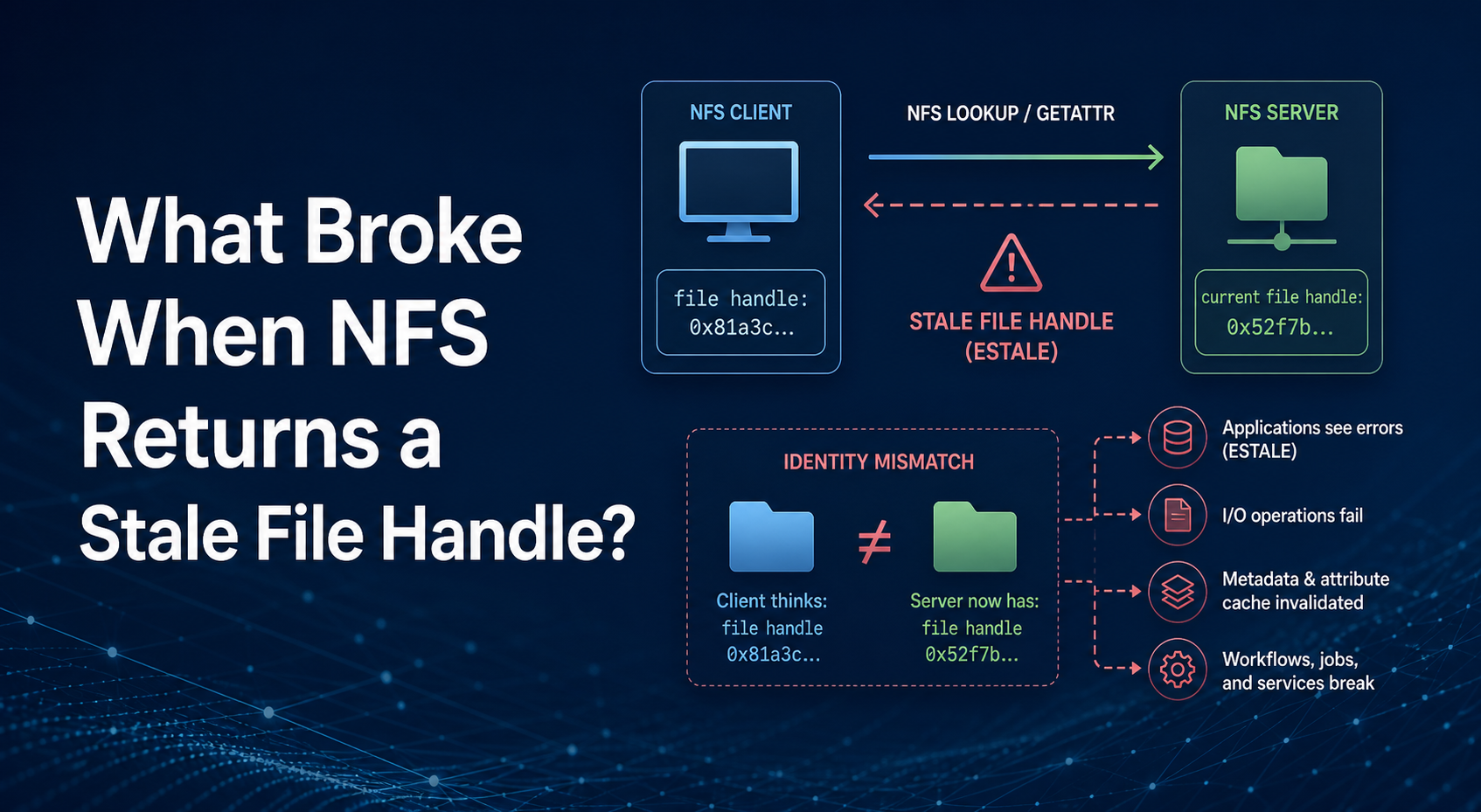
Stale file handle is an identity error, not a generic network outage. The NFS client is presenting a server-issued handle for a file, directory or export root, but the server can no longer resolve that handle to the object it currently exposes. A remount often gives the client fresh handles; it does not repair an export whose backing filesystem, fsid, root path or failover identity is still changing.
Recover in that order: confirm ESTALE, decide whether one pathname or the whole export is affected, preserve the mount contract, drain only the processes using it, stabilize the server-side identity, perform a normal unmount/remount, then prove the real application. Avoid making umount -l, umount -f, cache disabling or a fleet-wide reboot the first response.
Name the protocol error before treating the network
Linux reports an invalid file handle as ESTALE. The file-handle system-call documentation names deletion as one way a handle becomes stale, while NFS adds server export and filesystem identity to that relationship. By contrast, an unreachable server usually produces retries, server not responding messages or timeouts according to the mount’s hard/soft policy.
Start from the failing client’s mount namespace. Replace /srv/shared with the exact application mountpoint and keep the commands read-only:
date -u
findmnt -T /srv/shared -o TARGET,SOURCE,FSTYPE,OPTIONS
stat /srv/shared
journalctl -k --since '-15 min' | grep -Ei 'nfs|stale|not responding|timed out'
findmnt reads the kernel mount table and reveals the effective source, target, type and options. If stat returns Stale file handle while the server still answers RPC traffic, continue with identity scoping. If logs show only timeouts, solve reachability, routing, firewall, DNS or server availability first; changing export identity during a network incident creates two problems.
The current nfs(5) manual warns that soft and softerr mounts can return errors after retry exhaustion and can cause silent data corruption in some cases. Do not switch a production data mount from hard to soft as an incident shortcut. Mount policy is a workload design decision, not an ESTALE cure.
Scope one stale object against a stale export
One failed pathname does not prove that the mount root is invalid. Test a known-good sibling, the mount root and the exact failing object without running a recursive walk that can hang or flood logs.
stat /srv/shared
stat /srv/shared/known-good-directory
stat /srv/shared/path/reported-by-the-application| Observation | Likely identity boundary | Next useful check |
|---|---|---|
One file or directory returns ESTALE; siblings work |
Object was removed, replaced or renamed in a handle-sensitive path | Ask what changed that pathname on the server |
Mount root and every child return ESTALE |
Export root, backing filesystem or server fsid changed |
Compare client source with current server export |
| Host shell works but one service still fails | Service or container uses another mount namespace or an old open descriptor | Inspect the service process namespace and restart only after state is safe |
| Requests hang and kernel reports server timeouts | Connectivity or server availability, not proven ESTALE |
Restore RPC path before changing mounts |
Object-scoped failure may be legitimate: a deploy replaced a directory tree, a backup restore recreated an inode, or an administrator moved an exported subdirectory. Save unsynced editor or application data to local storage when possible. Recreating a same-named file does not guarantee the old handle becomes valid because the identity is not the pathname alone.
Freeze the client mount contract before detaching it
Capture enough evidence to reconstruct the exact mount. A casual mount server:/export /srv/shared can silently negotiate a different NFS version, security flavor or option set than the application used before the incident.
findmnt -T /srv/shared -o TARGET,SOURCE,FSTYPE,OPTIONS -n
grep -nF '/srv/shared' /etc/fstab
systemctl list-units --type=mount --all | grep -F 'srv-shared'
Record the source hostname or address, export path, NFS version, security flavor, hard or soft behavior, automounter or systemd ownership, and whether containers bind-mount the path. This contract remains client-side regardless of hosting provider; a reboot cannot identify which server-side object identity changed.
Also preserve application evidence: failing operation, UTC timestamp, affected path, recent deployment/restore/failover, and whether pending writes exist. A clean remount can erase the easiest symptom while leaving the cause ready to recur.
Drain consumers, then prefer a normal unmount
A filesystem is busy when a process holds an open file, working directory or another reference. Identify those owners instead of killing every process that appears near the mount.
sudo fuser -vmM /srv/shared
sudo lsof +f -- /srv/shared
fuser -M requires the supplied path to be a mountpoint, which is a useful guard against targeting an ordinary directory by mistake. lsof can itself block on an unhealthy network filesystem, so use a timeout policy from a second administration session and rely on service ownership when the walk is unsafe.
Stop or quiesce the named application through its normal service, container or orchestration path. Preserve queues and unfinished transactions first. Move every operator shell outside the mount and then attempt the least surprising action:
cd /
sudo umount /srv/shared
findmnt -T /srv/shared
The util-linux umount(8) manual limits forced unmount to cases such as unreachable NFS and notes that it still may hang. Its lazy option immediately detaches the mount from the hierarchy, cleans references later, and warns that network shares may not be remountable afterward; a reboot is normally expected. Therefore umount -l is containment for a stuck, unreachable share—not routine repair for a reachable server returning ESTALE.
If normal unmount stays busy, return to process and namespace ownership. Do not stack a fresh mount over the same directory merely to make ls look healthy; hidden old mounts and processes can continue using different views.
Mount namespaces can preserve an old view
Containers, system services with namespace isolation and manual unshare sessions may not see the same mount table as the host shell. A successful host remount is insufficient when the application process still points at its original namespace or inherited descriptor.
Capture the application’s PID and inspect from its namespace without changing it:
app_pid=APP_PID
sudo nsenter -t "$app_pid" -m findmnt -T /srv/shared -o TARGET,SOURCE,FSTYPE,OPTIONS
sudo readlink "/proc/$app_pid/ns/mnt"
sudo readlink /proc/1/ns/mnt
Replace APP_PID with a numeric process ID before running the block. Different namespace identifiers prove different mount views; they do not authorize an arbitrary restart. Decide whether the service must be recreated, whether a container bind mount should be refreshed, or whether the orchestrator owns the mount lifecycle. Restart only the smallest workload boundary that can safely release the stale view.
Stabilize server export identity before remounting clients
Client recovery lasts only when the server resolves handles consistently. On the NFS server, compare the exported path with the filesystem actually mounted beneath it and with the export table presented to clients.
findmnt -T /srv/nfs/shared -o TARGET,SOURCE,FSTYPE,OPTIONS
stat -c 'device=%d inode=%i path=%n' /srv/nfs/shared
sudo exportfs -v
sudo grep -Rns -- '/srv/nfs/shared' /etc/exports /etc/exports.d
Replace the server path with the real export root. Run exportfs -ra only after reviewing and validating the intended export configuration; it applies the table described by exports(5), so a typo can affect every client.
| Server-side change | Why old handles fail | Safe repair boundary |
|---|---|---|
| File or directory was deleted and recreated | New object has a different identity even at the same pathname | Recover unsaved data if possible, then reopen that object from a fresh lookup |
| Export root now sits on another filesystem or restored volume | Existing handles encode the previous filesystem/object identity | Stabilize the intended backing mount before re-export and client remount |
Cluster failover exposes inconsistent fsid or export topology |
Another node cannot resolve handles issued by its peer | Make export identity consistent across nodes, then schedule client refresh |
subtree_check export sees rename-heavy paths |
File-handle location data can make renames unreliable | Review whether exporting the filesystem root or no_subtree_check fits the security model |
| File-handle signing key changed while mounts stayed active | Previously signed handles no longer validate | Preserve key continuity or coordinate a complete client remount window |
exports(5) explains that subtree checking places path-location information in file handles and can cause trouble when open files are renamed; current nfs-utils defaults to no_subtree_check. That default is not permission to weaken an existing security design blindly. Review export boundaries, client authorization and rename behavior together.
A central export serving many clients may benefit from clearer resource and failure ownership, but changing hardware does not create stable fsid values or a safe failover contract automatically. If the backing mount is an unhealthy LVM thin volume, complete the thin-pool recovery workflow before asking NFS clients to trust it again.
Rebuild the client view and prove the workload
Once server identity is stable and the old client mount is normally detached, mount through the recorded owner. Prefer systemctl start for a systemd mount unit, the automounter for autofs, or the exact /etc/fstab entry rather than inventing an ad hoc command.
sudo mount /srv/shared
findmnt -T /srv/shared -o TARGET,SOURCE,FSTYPE,OPTIONS
stat /srv/shared
Do not declare recovery from a successful ls. Use an application-approved test directory and prove each operation the workload depends on. The following example creates and removes only its uniquely named probe; set MOUNT first and confirm that the directory permits a disposable test file.
MOUNT=/srv/shared/approved-probe-directory
probe="$MOUNT/.nfs-probe-$(hostname)-$(date +%s)"
printf 'nfs recovery probe\n' > "$probe"
stat "$probe"
cat "$probe"
rm -- "$probe"
Add a lock test when the application coordinates writers through NFS locking. Verify rename, ownership, permissions, ACLs, extended attributes and close-to-open visibility when the workload uses them. For Filestash, prove upload and download through the application after the mount test; the secure deployment workflow provides that higher-layer context. Other workloads need their own representative transaction from outside the host, such as a media fetch, backup write, artifact publish or database-dump handoff.
Recovery is complete when mount identity stays stable, the intended application succeeds, no new ESTALE appears, and a controlled service restart returns to the same export. A green mount command alone proves only that one lookup worked.
Design migrations and failover around handle continuity
Future prevention belongs in the storage change plan. Preserve the exported filesystem and fsid across failover when the architecture supports it. When a restore or migration must replace identity, drain writers, record client mounts, switch the server once, refresh every affected client namespace, and keep a rollback path that does not expose two writable copies.
Ownership must also be explicit. Document where provider responsibility ends and guest filesystem or export ownership begins; the managed-versus-unmanaged responsibility guide can help define that boundary. An NFS incident can cross both sides, so the change record needs one accountable owner on each.
Availability is not retention. NFS can centralize files yet still propagate deletion, corruption or compromised credentials. Where the export stores recovery copies, pair it with versioning outside the same failure domain and evaluate immutable object-lock backup design rather than treating a mounted writable share as the final backup boundary.
Monitor for ESTALE in application and kernel logs, but alert on rate and workload impact instead of every isolated line forever. More importantly, record export root, backing filesystem identity, fsid policy, failover node consistency, client namespace owners and the exact acceptance transaction. The prevention artifact is a tested identity contract, not a cache-tuning value.
FAQ: NFS stale file handle decisions
Why can one NFS file be stale while the rest of the mount works?
One file can return ESTALE when that server object was deleted, replaced or renamed while the client retained its old handle. Sibling objects and the export root can remain valid because their handles still resolve.
Does clearing the NFS client cache fix a stale file handle?
No. Cache timing can change when attributes are revalidated, but it cannot make an invalid server-issued handle identify a replacement object. Reopen the object or remount after the server export identity is stable.
Should umount -l be the first NFS stale-handle repair?
Lazy unmount should not be the first repair. It detaches the mount immediately and cleans references later; current util-linux guidance warns that a network share may not be remountable afterward and normally expects a later reboot. Drain consumers and try normal unmount first.
When is umount -f appropriate for NFS?
Forced unmount is mainly a recovery option for an unreachable NFS server after application state and data-integrity risks are accepted. A reachable server returning ESTALE needs export-identity diagnosis, not automatic force.
Can changing an NFS fsid break mounted clients?
Yes. File handles identify the exported filesystem and object, so inconsistent fsid or backing-filesystem identity across re-export or failover can invalidate handles already held by clients.
What proves that NFS stale-handle recovery is complete?
Completion requires a stable remounted source and option set, successful application reads and writes, required metadata or lock behavior, no recurring ESTALE, and a controlled service restart that returns to the same export.