Artificial intelligence is moving fast. Every week, new tools promise to change the way we work, communicate, and manage our lives. But most AI tools still work the same way, you open a chat window, type a question, and wait for an answer. That is where OpenClaw is different.
OpenClaw is a free, open-source personal AI assistant that does not just talk to you, it actually does things for you. It runs on your own computer or server, connects to the apps and messaging platforms you already use, and can handle real tasks like managing files, browsing the web, sending messages, and running automations, all while you are doing something else. Think of it as having a smart digital helper working quietly in the background, 24 hours a day.
Whether you are a developer, a student, a business owner, or just someone curious about AI, this guide will walk you through everything you need to know about OpenClaw, what it is, how it works, what it can do, and how to get started safely.
OpenClaw (also known by its earlier names Moltbot and Clawdbot) is an open-source personal AI agent. Peter Steinberger, the founder of PSPDFKit, created it. The project gained massive attention when it went from 9,000 to over 60,000 GitHub stars in just a few days after launch, making it one of the fastest-growing open-source projects in history.
But what does “open-source” mean? It simply means that the code behind OpenClaw is available for anyone to view, use, and improve, completely for free. You do not pay a monthly subscription. You do not sign up for a company’s cloud service. You download it, run it on your own machine, and take full control.
The simplest way to describe OpenClaw is this: it is a bridge between an AI brain (like ChatGPT or Claude) and your real digital life, your files, your apps, your messages. You give it instructions through apps like WhatsApp or Telegram, and it gets to work.
OpenClaw’s story began as a small weekend project focused on relaying AI responses to messaging apps. Over time, it evolved through several phases:
Today, OpenClaw has grown into a full-featured platform with thousands of community contributors adding new features and skills every week.
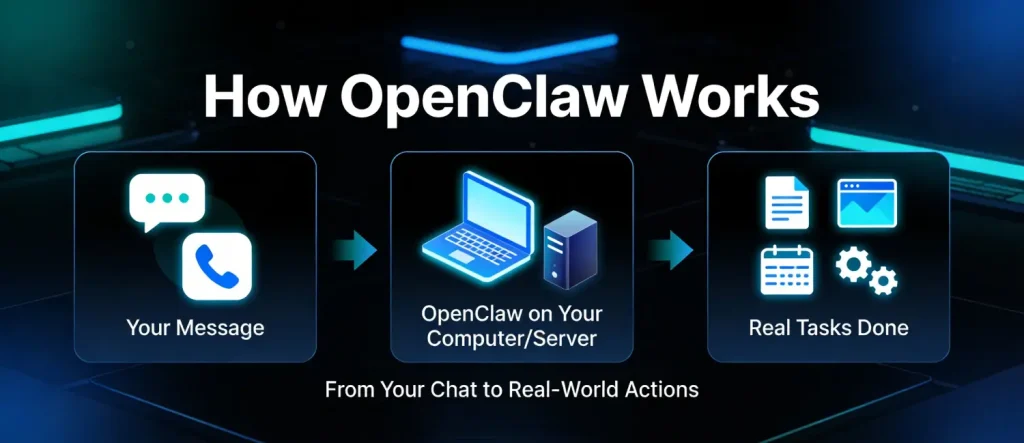
Imagine you have a very smart assistant sitting at a desk in your home. You send them a message on WhatsApp saying, “Please organize my project folder and remind me about my meeting tomorrow.” Your assistant reads the message, accesses your computer, sorts the files, and sets the reminder, all without you having to do anything else. That is essentially what OpenClaw does, digitally.
Here is the process in simple steps:
The clever part is that this process can run continuously, even while you sleep. OpenClaw checks in regularly and handles tasks automatically if you set it up to do so.
The “Gateway” is the central engine of OpenClaw. When you start OpenClaw, you launch a single program called the Gateway. This program:
Everything runs through this one Gateway, which makes OpenClaw simple to manage. Want to switch from one AI model to another? Just update your settings — the rest stays the same.
One of the biggest selling points of OpenClaw is the cost, or rather, the lack of cost.[1]
Compare that to commercial AI assistants, which can cost anywhere from $20 to $200 per user per month. For teams or businesses, the savings add up very quickly. A basic virtual private server (VPS) to run OpenClaw can cost as little as $40/month, which is far cheaper than most AI subscriptions.
Unlike cloud-based AI tools, OpenClaw runs on your own machine or server. Your personal data, files, and conversations are never sent to a third-party company’s servers. This is a major advantage for people who care about privacy, especially businesses handling sensitive information.
You do not need to learn a new interface. OpenClaw connects with the messaging apps you use every day, including:
This means you can simply text your AI assistant from your phone, just like texting a friend.
One of the most impressive features of OpenClaw is its long-term memory. Most AI chatbots forget everything when you close the tab. OpenClaw is different, it saves your preferences, conversation history, and important context in simple text files on your computer. Over time, it gets to know you better and stops asking the same questions over and over.
OpenClaw is not locked to a single AI provider. You can connect it to:
This is called the “Bring Your Own Model” (BYOM) approach. It also supports automatic failover, if one AI provider goes down, OpenClaw automatically switches to another.[8]
OpenClaw has a skills marketplace called ClawHub, which offers thousands of ready-made skills that extend what OpenClaw can do. Think of skills like apps on a smartphone, you install the ones you need, and your assistant becomes more powerful.
The ClawHub marketplace currently offers over 3,000+ skills covering:
You can also ask OpenClaw to create a new skill for you if you cannot find one that fits your needs.
OpenClaw runs in the background as a service on your machine. It checks in on a regular schedule (every 30 minutes by default) to see if there is anything it should do. This “heartbeat” allows it to proactively reach out to you, for example, sending you a morning summary, alerting you about server issues, or reminding you of upcoming events.
OpenClaw is incredibly versatile. Here are the main areas where it can make your life easier:
Developers love OpenClaw because it can automate repetitive technical tasks. You can connect it to GitHub to manage issues and pull requests, set up scheduled jobs that run while you sleep, and automate deployment tasks, all through a simple text message.
OpenClaw can become your personal life manager. Connect it to apps like:
Then manage all of them from one chat window on your phone.
Need to fill out a form online? Want someone to scrape data from a website? OpenClaw can browse the web on your behalf, interact with websites, and bring you the information you need. It uses a built-in browser automation tool that can navigate web pages, click buttons, and extract content.
If you have smart home devices, OpenClaw can control them for you. It supports integrations with Philips Hue lights, Elgato devices, and Home Assistant so that you can manage your smart home through a simple text command.
Draft and schedule posts for Twitter/X and Bluesky, or let OpenClaw handle your Gmail inbox, without leaving your chat app. It can write replies, organize emails, and help you stay on top of your communications.
OpenClaw can generate images, search for GIFs, and even help with audio content using Spotify and Sonos integrations. Creative professionals can set up automated workflows for content generation.
Here are some examples of how people are already using OpenClaw in everyday life:
Many people wonder how OpenClaw compares to tools they already know. Here is a simple breakdown:
| Feature | OpenClaw | ChatGPT / Claude (regular) |
| Runs on your machine | ✅ Yes | ❌ No — cloud only |
| Free to use | ✅ Yes (open-source) | ❌ Subscription required |
| Works through WhatsApp/Telegram | ✅ Yes (10+ platforms) | ❌ No |
| Remembers you long-term | ✅ Yes (local files) | ⚠️ Limited |
| Works with any AI model | ✅ Yes | ❌ Locked to one provider |
| Can take real actions | ✅ Yes (files, browser, etc.) | ❌ Text responses only |
| Proactive (reaches out to you) | ✅ Yes | ❌ No |
| Requires technical setup | ⚠️ Some setup needed | ❌ No setup |
The biggest difference is that regular AI chatbots respond to your messages but cannot take actions. OpenClaw actually does things on your behalf, it is an agent, not just a chatbot.
Getting started with OpenClaw is easier than many people expect. Here is a simple overview:
OpenClaw works on macOS, Windows, and Linux. To install it locally, open your terminal and run this single command:
curl -fsSL https://openclaw.ai/install.sh | bashThis command downloads and installs everything you need, including Node.js. After installation, an onboarding wizard guides you through:
Many users prefer to run OpenClaw on a small cloud server (called a VPS) rather than their personal computer. This keeps it running 24/7 without using your computer’s resources. A basic VPS typically costs $10–$40 per month.
This is recommended for beginners who want their AI assistant to always be available, even when their computer is off.
Some cloud platforms offer a one-click OpenClaw deployment option that sets everything up automatically with security features already configured. This is the easiest starting point for non-technical users.
One of the most exciting parts of OpenClaw is the skills system. Skills are like plug-ins, small packages of code that teach OpenClaw how to interact with a specific app or service.
Once you find a skill you want to use, installing it is just one terminal command. The community-built skill registry (ClawHub) organizes thousands of skills by category, so you can quickly find what you need.
Most Popular Skills
According to community data, some of the most downloaded skills include:
Do not see a skill you need? You can simply ask OpenClaw to create it for you. Describe what you want the skill to do, and OpenClaw will write the code. You can then share your new skill with the community on ClawHub.
This “self-improving” quality is one reason people compare OpenClaw to science-fiction AI, it can genuinely expand its own capabilities.
OpenClaw is a powerful tool, and with great power comes the need for careful use. Because it has access to your files, browser, and messaging apps, security is something every user should take seriously.
Good News: Strong Default Security
By default, OpenClaw is designed to be safe for personal use:
Important Safety Tips for Beginners
Security experts and the OpenClaw community recommend the following for anyone getting started:
The OpenClaw maintainer has even acknowledged that beginners may find it too risky to use without proper setup. This does not mean you should avoid it — it means you should follow the safety steps above.
OpenClaw is a flexible tool that appeals to different types of users:
Developers and Tech Enthusiasts
If you are comfortable with the command line and APIs, OpenClaw offers deep customization, GitHub integration, scheduled automations, and multi-agent setups.
Small Business Owners
Automate repetitive tasks like email sorting, document management, meeting reminders, and social media drafting — without paying for expensive AI subscriptions.
Students and Learners
Use OpenClaw to build a personal knowledge base, organize study notes, summarize articles, and set study reminders.
Home Users
Control your smart home, manage your calendar, set grocery reminders, and automate your daily routine through a familiar messaging app.
Not Ideal For:
OpenClaw and the Future of Personal AI
OpenClaw represents a big shift in how people think about AI assistants. Instead of AI being a tool you visit on a website, OpenClaw makes AI a background service that works for you, continuously, on your own terms.
The project is growing fast. The GitHub repository has surpassed 219,000 stars, the ClawHub marketplace has thousands of community-built skills, and developers around the world are contributing new features every day.
The combination of being fully open-source, model-agnostic, privacy-first, and automation-capable puts OpenClaw in a unique position. It is not trying to compete with ChatGPT or Claude as a chatbot, it is trying to be the engine that connects AI to your real life.
As AI models continue to get smarter, tools like OpenClaw will become more powerful too. Because it works with any AI model, every improvement in AI technology automatically makes OpenClaw more capable.
OpenClaw is one of the most exciting open-source AI projects of 2026. It takes the idea of an AI assistant and makes it real — not just a chatbot that answers questions, but an agent that actively helps you manage your digital life. It runs on your own hardware, keeps your data private, works through messaging apps you already love, and can be extended with thousands of community-built skills.
Is it perfect? Not yet. It requires some technical setup, and security must be handled carefully. But for those willing to invest a little time in getting it running properly, OpenClaw offers a level of AI automation that was previously only available to large organizations with big budgets.
If you have ever dreamed of having a personal assistant that works around the clock, never forgets what you told it, and can handle your digital tasks while you focus on what matters — OpenClaw is the closest thing available today, for free.

Hassan Tahir wrote this article, drawing on his experience to clarify WordPress concepts and enhance developer understanding. Through his work, he aims to help both beginners and professionals refine their skills and tackle WordPress projects with greater confidence.





 Lifetime VPS Europe
 Lifetime VPS Asia
 Lifetime WooCommerce Hosting
 Lifetime Hosting
 France Lifetime Dedicated Servers
 Germany Lifetime dedicated servers
 Lifetime Game Dedicated Servers
 Chicago, US
 Tokyo, Japan
 Singapore
 Hong Kong
 Seoul, South Korea
 Amsterdem, Netherlands
 London, UK
 Stockholm, Sweden
 Oslo, Norway
 Vienna, Austria
 Zurich, Switzerland
 Sydney, Australia
 Wordpress Hosting
 VPS Hosting
 DDOS Protection
 Submit Ticket
 Full Management
 Guides
 Videos and Podcasts
 Discover Creative Ideas
 MetaAgentOS High-Ticket Support System
 Voxfor Mega Menu
 Voxfor Advanced Price Management For WooCommerce
 Voxfor Secure Live Chat and AI Support
 Voxfor Multilanguage
 Voxfor AI Content Summary


