Lifetime VPS Europe
 Lifetime VPS Asia
 Lifetime WooCommerce Hosting
 Lifetime Hosting
 Lifetime Game Dedicated Servers
 Chicago, US
 Tokyo, Japan
 Singapore
 Hong Kong
 Seoul, South Korea
 Amsterdem, Netherlands
 London, UK
 Stockholm, Sweden
 Oslo, Norway
 Vienna, Austria
 Zurich, Switzerland
 Sydney, Australia
 Wordpress Hosting
 VPS Hosting
 DDOS Protection
 Submit Ticket
 Full Management
 Guides
 Videos and Podcasts
 Discover Creative Ideas
 Voxfor Autonomous AI Workers
 Voxfor Mega Menu
 Voxfor Advanced Price Management For WooCommerce
 Voxfor Secure Live Chat and AI Support
 Voxfor Multilanguage
 Voxfor AI Content Summary
 Voxfor Autopilot

The interface between the server-side scripting language and the underlying host infrastructure is the key element of the architecture of modern web development, on which all dynamic applications are based. To the developers who are using PHP (Hypertext Preprocessor), this interface is not a fixed structure but a dynamic, tunable, run-time environment that determines not only how much memory is available, how much time can be used, but also how secure the system is and what extensions are available. The most important way of introspecting this complex internal state is the phpinfo() function. Although often dismissed as a simple version checker by novice practitioners, the phpinfo diagnostic page is a detailed dump of the internal registry of the PHP runtime and reveals thousands of directives, environment variables, compilation flags, and module statuses that define the ability of the server to run code.
Inbound Marketing Strategy
Turn technical readers into inbound marketing growth
Helpful tutorials attract qualified visitors, but reliable hosting keeps those readers engaged. Voxfor VPS gives growing websites the speed, uptime, and control needed to support stronger inbound marketing campaigns.
The report is a comprehensive, professional-level assessment of the phpinfo tool in the framework of a localhost development environment. It is aimed to steer the reader through the entry-level notion of how to build the page, to the second level of knowledge to properly diagnose unknown configuration conflicts, to optimize performance of content management systems (CMS) such as WordPress or Drupal, and to protect the environment against information disclosure vulnerabilities. We will go through the conceptual structure of the Server API (SAPI), the practicality of configuration on the various local stacks (XAMPP, WAMP, MAMP, Docker) and the hygiene of the security that is necessary to work with this sensitive information.
The Role of Introspection in Dynamic Languages
In computer science, the term introspection denotes the capability of a program to look at itself and its on-the-fly state. The nature of PHP, as an interpreted language, is that it depends on a runtime environment, which is initialized at each request (in the case of CGI) and is kept specific to the server and highly visible through introspection tools. PHP is a transparent layer, unlike compiled languages such as C++ or Rust, where the configuration of the runtime environment has been baked into the binary and is often obscured after compilation.
The phpinfo() function is the standard-bearer for this capability. When a developer executes this function, they are not merely printing text; they are querying the core engine for a status report on:
- The Operating System Interface: How PHP interacts with Windows, macOS, or Linux, including file path resolution, permissions, and threading models.
- The Web Server Integration: Whether PHP is running as a subordinate module of Apache, a standalone FastCGI process under Nginx, or a CLI command.
- The Configuration Directive Set: The active values of over 500 directives defined in php.ini, .user.ini, and .htaccess files.
- The Extension Ecosystem: The status of loaded modules (e.g., curl, mbstring, gd) and their specific library versions (e.g., OpenSSL version, libxml version).
The Localhost Paradigm
The term “localhost” technically refers to the loopback network interface, universally mapped to the IP address 127.0.0.1 (IPv4) or::1 (IPv6). Developing locally allows for rapid iteration cycles, the “code-save-refresh” loop, without the latency of network transmission or the risk of exposing unfinished, insecure code to the public internet. However, local environments are notoriously fragmented. A script that functions flawlessly on a Windows machine running WAMP may fail catastrophically on a Linux Docker container due to subtle differences in case sensitivity, directory separators, or enabled extensions.
The phpinfo page is serving as the ground truth in this fragmented landscape. It resolves ambiguity. When a developer makes a mistake, like in the example of the error of file upload exceeded, the particular limit is not in the code, but in the server setup. In instances where a date function gives the wrong time, this error is in the date. timezone configuration of the runtime, and may not always be the script logic. Thus, the phpinfo page generation and correct interpretation are the conditions for further development of PHP and server management.
How PHP Integrates with Web Servers
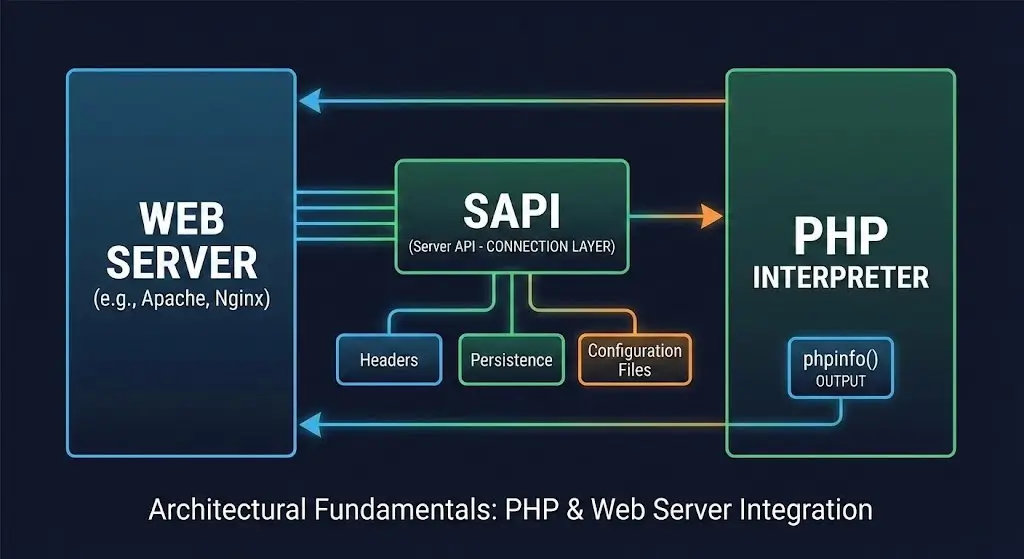
To interpret the output of phpinfo() correctly, one must understand the mechanism by which it is generated. The output is not static; it changes fundamentally depending on how PHP is connected to the web server. This connection is defined by the Server API (SAPI).
Server APIs (SAPI): The Connection Layer
The SAPI is the interface PHP uses to communicate with the host environment. The topmost section of a phpinfo page explicitly states the “Server API,” and this single data point dictates the behavior of many subsequent directives, including how headers are sent, how persistence works, and which configuration files are loaded.
Comparison of Common PHP Server APIs (SAPI)
| SAPI Type | Technical Description | Ecosystem Prevalence | Implications for phpinfo() Analysis |
| Apache 2.0 Handler (mod_php) | PHP is loaded as a shared library (.so or .dll) directly inside the Apache process memory space. | XAMPP (Default), WAMP, Legacy Linux setups. | Shows Apache 2.0 Handler. PHP runs with the same user permissions as Apache. Configuration changes usually require a full Apache restart. .htaccess overrides are natively supported. |
| CGI / FastCGI | PHP runs as a separate process from the web server. The server forwards requests to PHP via a socket or TCP port. | IIS (Windows), Shared Hosting, Nginx (occasionally). | Shows CGI/FastCGI. Environment variables are passed differently. php.ini is re-read more frequently in standard CGI, whereas FastCGI processes are persistent to reduce overhead. |
| FPM (FastCGI Process Manager) | A highly specialized version of FastCGI with advanced process management, adaptive spawning, and logging. | Nginx (LEMP stacks), High-performance Apache, Docker containers. | Shows FPM/FastCGI. Highly configurable pool settings. The phpinfo output will contain a dedicated FPM section detailing the pool name and process manager status. |
| CLI (Command Line Interface) | PHP runs from the terminal, independent of a web server. | Scripts, Cron Jobs, REPL, Package Managers (Composer). | Shows Command Line Interface. Crucial Distinction: CLI often uses a different php.ini file than the web server. Directives like max_execution_time default to 0 (infinite) in CLI but 30 in Web SAPI. |
| Built-in Web Server | PHP’s internal development server. | Quick prototyping (php -S localhost:8000). | Shows Built-in Web Server. Limited concurrency, single-threaded. Not suitable for production simulation, but useful for quick phpinfo checks. |
Insight: A pervasive source of confusion for beginners is editing the php.ini file and observing no change in the phpinfo() output. This phenomenon frequently occurs because the developer has edited the CLI configuration file (e.g., /etc/php/8.1/cli/php.ini) while the web server is actually reading the FPM configuration file (e.g., /etc/php/8.1/fpm/php.ini). The phpinfo() page is the definitive authority for identifying which configuration file is currently active, overruling any assumptions the developer might have.
The HTTP Request Lifecycle for phpinfo
Understanding the lifecycle helps in troubleshooting why a page might fail to load. When a user requests http://localhost/phpinfo.php:
- Request Initiation: The browser sends an HTTP GET request to localhost on port 80 (or 8080/8888 depending on the stack).
- Server Interception: The Web Server (e.g., Apache) receives the request. It parses the URL and maps it to a directory on the filesystem (the Document Root).
- Handler Invocation: The server checks the file extension (.php). Based on its internal MIME type configuration (AddType or SetHandler), it determines that this file is not static content (like an image) but executable code. It invokes the PHP SAPI.
- Execution & Introspection: The PHP interpreter parses the file phpinfo.php. When it encounters the phpinfo() function, it halts normal script execution logic to gather internal registry data. It generates a standardized HTML stream containing the tables and styles.
- Response Construction: PHP passes this HTML back to the web server, which adds standard HTTP headers (200 OK, Content-Type, Date) and transmits the payload to the browser.
- Rendering: The browser renders the HTML.
If this chain is broken, for example, if the MIME type application/x-httpd-php is missing, the server will default to treating the file as plain text or a binary download, causing the browser to download the PHP source code rather than displaying the result.
The Local Ecosystem
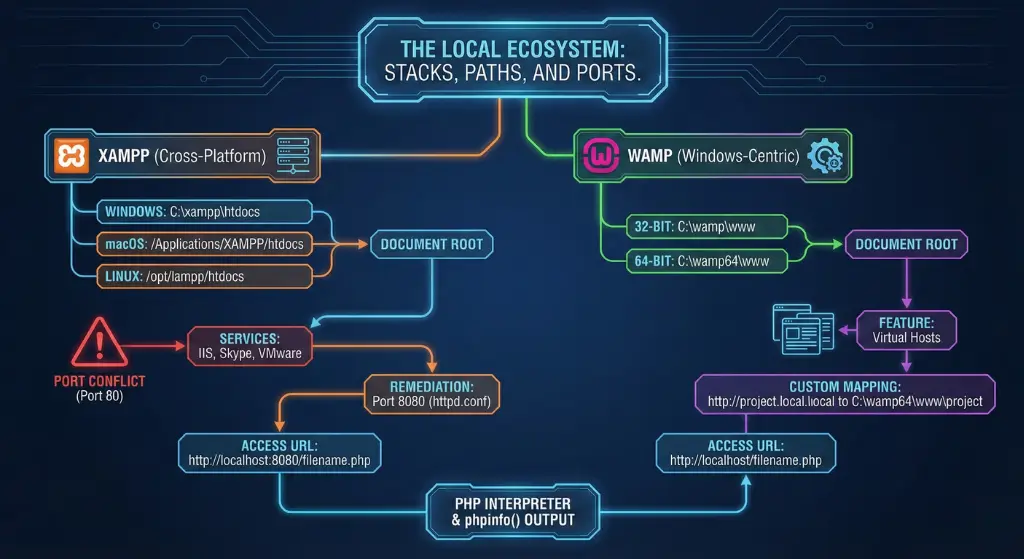
Before one can create a phpinfo page, one must know where to create it. The “Document Root” varies significantly across the diverse ecosystem of localhost tools.
XAMPP (Cross-Platform, Apache, MySQL, PHP, Perl)
XAMPP is arguably the most ubiquitous local development stack due to its ease of installation on Windows, macOS, and Linux.
- Default Document Root (Windows): C:\xampp\htdocs.
- Default Document Root (macOS): /Applications/XAMPP/htdocs or /Applications/XAMPP/xamppfiles/htdocs.
- Default Document Root (Linux): /opt/lampp/htdocs.
- Access Protocol: Standard access is via http://localhost/filename.php.
Insight – Port Conflicts: A distinct characteristic of XAMPP users on Windows is the frequent conflict with port 80. Services like World Wide Web Publishing Service (IIS), Skype, or VMware often claim port 80. If XAMPP Apache fails to start, the standard remediation is to modify httpd.conf to listen on port 8080. Consequently, the access URL shifts to http://localhost:8080/filename.php. The phpinfo page will reflect this in the $_SERVER variable.
WAMP (Windows, Apache, MySQL, PHP)
WAMP is a Windows-centric stack that offers a tray-icon interface for switching PHP versions on the fly.
- Default Document Root: C:\wamp\www or C:\wamp64\www, depending on the architecture (32-bit vs 64-bit).
- Access Protocol: http://localhost/filename.php.
Insight – Virtual Hosts: WAMP encourages the use of Virtual Hosts. While the www folder is the default, advanced WAMP setups might map http://project.local to C:\wamp64\www\project. In this case, creating a phpinfo page in the project root allows for project-specific introspection, which is vital if different projects are configured to use different PHP versions.
MAMP (Mac, Apache, MySQL, PHP)
Originally designed for macOS, MAMP is now available on Windows. It isolates itself from the system’s pre-installed Apache/PHP to prevent conflicts.
- Default Document Root (macOS): /Applications/MAMP/htdocs.
- Default Document Root (Windows): C:\MAMP\htdocs.
- Access Protocol: MAMP defaults to non-privileged ports to avoid password prompts on startup. The default port is usually 8888. Thus, the URL is http://localhost:8888/filename.php.
Docker and Containerized Environments
Docker represents a paradigm shift where the “localhost” is actually a virtualized container running a stripped-down Linux OS (usually Alpine or Debian).
- Document Root: Defined in the Dockerfile or docker-compose.yml. The standard image php:apache uses /var/www/html inside the container.8
- Mapping: Developers typically “bind mount” a local folder to this internal path. For example, a local folder ./src might be mapped to /var/www/html.
- Access: Depends on the port mapping in docker-compose.yml (e.g., ports: – “8080:80” maps local port 8080 to container port 80).
- One-Liner Execution: Docker allows for ephemeral phpinfo execution without creating a file. A developer can run docker run –rm php:8.1-cli php -i to see the configuration of a specific image version immediately.
Constructing the Diagnostic Tool: Code and Creation
The creation of the phpinfo page is a trivial coding task, but it requires adherence to strict file formats and permissions to function correctly.
The Code Syntax
The code required is universally consistent across all platforms. A standard file, typically named phpinfo.php or info.php, contains the following lines:
<?php
phpinfo();
?>
Critical Warning on PHP Tags: A frequent point of failure for beginners is the use of “Short Open Tags” (<? phpinfo();?>). By default, many modern production-grade php.ini configurations have short_open_tag = Off to avoid conflicts with XML declarations (which also start with <?). If short tags are disabled, the server will treat the code as plain text and display the code itself rather than executing it. It is an industry best practice to always use the full <?php opening tag to ensure portability.17
File Encoding and Naming
The file must be saved as plain text.
- Windows: Using Notepad is acceptable, but one must ensure the file is saved with the .php extension. A common mistake is saving as info.php.txt because Windows hides file extensions by default. In the “Save As” dialog, selecting “All Files” and wrapping the name in quotes, “info.php” forces the correct extension.
- macOS: TextEdit defaults to Rich Text Format (.rtf). Users must strictly convert the document to “Make Plain Text” (Format > Make Plain Text) before saving. Saving an RTF file as .php will result in a parser error because the file contains hidden formatting characters (RTF headers) that PHP cannot interpret.
- Best Practice: Use a dedicated Integrated Development Environment (IDE) or code editor like VS Code, Sublime Text, or Notepad++. These editors handle character encoding (UTF-8 without BOM) and line endings (LF vs CRLF) correctly, preventing syntax errors caused by invisible whitespace.
Permissions and Ownership (Linux/macOS)
Unlike Windows, Linux enforces strict file ownership. A user might create a file in their home directory and move it to /var/www/html using sudo, resulting in a file owned by the root user. If the web server (typically running as user www-data on Ubuntu/Debian or apache on CentOS) does not have read permissions for this file, it will return a 403 Forbidden error.
Remediation:
- Check Ownership: ls -l /var/www/html/info.php
- Grant Access: Set the web server user as the owner or ensure the file is world-readable.
sudo chown www-data:www-data /var/www/html/info.php
sudo chmod 644 /var/www/html/info.php
The chmod 644 command grants the owner read/write access and everyone else (including the web server if not the owner) read-only access.
The phpinfo() Function: Parameters and Customization
Although the normal usage is not argumentative, the phpinfo() function has fine configurable controls with the ability to acquire customized output. This comes in handy, especially during the debugging of certain subsystems without creating a huge HTML payload.
The Bitwise Mask Parameters
The function accepts a single optional parameter: int $flags. This parameter is a bitmask, meaning multiple constants can be combined using the bitwise OR operator (|) to aggregate specific sections of data.
phpinfo() Constants and Output Sections
| Constant | Value | Description | Utility Case |
| INFO_GENERAL | 1 | The “header” information: System line, Build Date, Web Server API, and Config File Path. | Quick verification of Architecture (x86 vs x64) and Thread Safety (TS/NTS).1 |
| INFO_CREDITS | 2 | Lists PHP developers and contributors. | Rarely used for technical diagnostics. |
| INFO_CONFIGURATION | 4 | Vital: Displays current Local and Master values for all PHP directives. | The primary section for tuning memory_limit or upload_max_filesize.2 |
| INFO_MODULES | 8 | Vital: Lists all loaded extensions and their individual settings. | verifying if mysqli or gd libraries are loaded and checking their versions.2 |
| INFO_ENVIRONMENT | 16 | Shows environment variable information ($_ENV). | Critical for debugging Docker containers or 12-factor apps where config is injected via ENV.1 |
| INFO_VARIABLES | 32 | Shows predefined variables from EGPCS (Environment, GET, POST, Cookie, Server). | Security auditing: checking cookie values or session tokens.1 |
| INFO_LICENSE | 64 | The PHP License text. | Legal compliance checks. |
| INFO_ALL | -1 | Displays all of the above. | The default behavior when no parameter is passed. |
Example of Selective Output:
If a developer needs to verify loaded modules and configuration but wants to suppress the long credit list and license text (to keep the page short):
<?php
// Show only Modules and Configuration
phpinfo(INFO_MODULES | INFO_CONFIGURATION);
?>
Programmatic Capture (Output Buffering)
phpinfo() is designed to output directly to the browser’s output stream. It returns a Boolean TRUE on success, not the data itself. To capture the data into a variable for parsing (e.g., to create a custom dashboard that shows the PHP version in the admin panel), one must use Output Buffering.
ob_start(); // Start recording output
phpinfo();  // Execute function (output goes to buffer, not screen)
$server_data = ob_get_contents(); // Save buffer to variable
ob_end_clean(); // Stop recording and discard buffer

// Now $server_data contains the HTML string, which can be parsed
if (strpos($server_data, 'xdebug')!== false) {
    echo "Xdebug is installed!";
}
This technique is widely used by CMS plugins (like WordPress Site Health) to report on server status without displaying the raw, unstyled phpinfo table.
Anatomy of the Output: Decoding the Data
To the untrained eye, the phpinfo page is a wall of noise. To the expert, it is a map of the server’s capabilities. We will deconstruct the page section by section to understand the implications of the data presented.
The Header Section: System Integrity
The first block contains the fundamental identity of the PHP process.
- System: Displays the host name and kernel version (e.g., Linux localhost 5.4.0…). This confirms which machine is handling the request, which is vital in load-balanced environments.
- Compiler / Architecture: Indicates if the build is x86 or x64. Mismatching architectures (e.g., trying to load a 64-bit extension DLL into a 32-bit PHP installation) is a common source of startup errors on Windows.
- Thread Safety: Displays enabled or disabled.
- Implication: If running PHP as an Apache module (mod_php), Thread Safety is usually required. If running via Nginx/FPM (which is multi-process, not multi-threaded), Non-Thread Safe (NTS) is preferred for a slight performance gain. Mismatching extensions (installing an NTS extension on a TS PHP) will cause the extension to fail silently.
Configuration Loading: The File Hierarchy
This is often the most critical section for troubleshooting configuration persistence issues.
- Configuration File (php.ini) Path: The directory where PHP expects to find the file.
- Loaded Configuration File: The specific file that was actually read.
- Troubleshooting: If this row reads (none), PHP is running with default factory settings. This often happens in manual compilations or Docker containers where the template php. ini-production has not yet been renamed to php.ini.
- Scan this dir for additional.ini files: Modern Linux distributions (Ubuntu/Debian) do not rely on a single monolithic php.ini. Instead, they define a core config and then scan a directory (e.g., /etc/php/8.1/apache2/conf.d/) for modular config files.
- Additional.ini files parsed: Lists every single auxiliary file loaded (e.g., 10-opcache.ini, 20-mysql.ini).
- Insight: Files are parsed in alphabetical order. A setting in 99-custom.ini will override a setting in 10-opcache.ini. This list allows the developer to trace the “inheritance chain” of a setting.
Core Directives: Master vs. Local Values
The “Core” section details the runtime behavior. The table presents two columns for each directive:
- Local Value: The effective value for the current request. This reflects overrides applied via .htaccess, .user.ini, or ini_set() calls within the script itself.
- Master Value: The global value set in the main php.ini file or the server configuration.
The Debugging Utility: If a developer sets memory_limit to 512M in php.ini but the application crashes with an Out of Memory error, looking at phpinfo might reveal a Local Value of 128M and a Master Value of 512M. This discrepancy proves that the global config is correct, but something “downstream”, likely an .htaccess file or an ini_set(‘memory_limit’, ‘128M’) line in the CMS core, is overriding it. This isolates the problem away from the server config and toward the application code.
Critical Extensions for Modern Development
Modern web applications require specific extensions to function. phpinfo verifies their presence and version.
- cURL: Essential for making external API requests (e.g., Stripe payments, OAuth logins).
- Check: cURL support => enabled and SSL Version. If the SSL version is outdated, the application may fail to connect to external APIs that enforce modern TLS 1.2/1.3 security standards.
- GD / Imagick: Required for server-side image manipulation (e.g., creating thumbnails). WordPress Site Health will flag a critical warning if these are missing.
- mbstring (Multibyte String): Crucial for internationalization (i18n). Without this, standard string functions may corrupt data containing non-ASCII characters (emojis, Asian scripts).
- OpenSSL: Provides cryptographic functions.
- PDO / MySQLi: The database abstraction layers. The Client API version listed here should ideally match or be compatible with the version of the MySQL server running on localhost to avoid protocol mismatches.
- Zend OPcache: A very performance-enhancing bytecode cache. Within a local development setting, developers may check whether this is disabled or set to re-check timestamps very often, to ensure that the changes in code are taken into account instantly and no caching delays are encountered.
EGPCS: The Variable Dump
The EGPCS (Environment, GET, POST, Cookie, Server) sections display the data PHP received from the server and the browser.
- $_SERVER: Confirms the physical path on the disk where the web server looks for files. This is useful for debugging include() or require() path errors.
- Environment Variables: In modern “12-Factor App” deployments (common in Docker/Kubernetes), secrets like DB_PASSWORD or API_KEY are passed as environment variables. phpinfo() displays these values in plain text. This section is the primary reason why phpinfo pages are considered a high-severity security risk if exposed publicly.
Configuration Management: Tuning the Environment
The primary utility of the phpinfo page is to guide configuration changes. A “vanilla” PHP installation usually comes with conservative defaults (e.g., 2MB upload limit) that are insufficient for modern application development.
Locating the Correct Configuration File
The first step in any tuning exercise is finding the correct file to edit. As established in Section 6.2, one must consult the “Loaded Configuration File” row.
- Command Line Verification: While one can run php –ini in the terminal, it is vital to remember that the CLI SAPI and the Web SAPI often use different files. Relying on php –ini to find the config file for the web server is a common mistake that leads to “edit-restart-no change” frustration cycles. Always trust the web-rendered phpinfo page for web server configuration.
Common Tuning Parameters
The following directives are the most frequently adjusted in local environments.
memory_limit
Controls the maximum amount of RAM a single PHP script execution is allowed to consume.
- Default: Often 128M.
- Requirement: Heavy CMSs (Magento, Drupal, extensive WordPress builds) or scripts processing high-resolution images often require 256M or 512 MB.
- Implication: This is a safety mechanism. Setting it to -1 (unlimited) is dangerous, as a script with a memory leak could consume all available system RAM, triggering the Operating System’s OOM (Out of Memory) Killer, which might crash the web server or database service.
upload_max_filesize and post_max_size
These two directives act as a gatekeeper for file uploads and must be configured in tandem.
- upload_max_filesize: The maximum size of an individual file.
- post_max_size: The maximum size of the entire POST request body (which includes all files plus all text form fields).
- The Golden Rule: memory_limit > post_max_size > upload_max_filesize.
- Reasoning: If post_max_size is smaller than upload_max_filesize, the upload will fail before the file size check is even reached because the POST body is truncated. If memory_limit is too low, the script may run out of RAM while processing the uploaded data.
- Verification: After editing php.ini, restart the web server, refresh phpinfo, and use the browser’s “Find” (Ctrl+F) feature to verify the new values.
max_execution_time
The time limit, in seconds, a script is allowed to run before the parser terminates it.
- Default: 30 seconds.
- Impact: Long-running local tasks, such as importing a large SQL database dump, regenerating thumbnails for a media library, or running composer updates, will often exceed this limit.
- Tuning: For localhost, it is common to increase this to 300 (5 minutes) or 600. Note that this only measures CPU execution time; it typically excludes time spent waiting for database queries or system calls.
Applying Changes: The Restart Requirement
PHP reads the php.ini file only once upon startup (in Module/FPM modes). Changes made to the file are not applied dynamically.
- Apache (XAMPP/WAMP): Requires restarting the Apache service via the XAMPP/WAMP Control Panel.
- Nginx/FPM: Requires restarting the php-fpm service (sudo service php8.1-fpm restart). Restarting Nginx alone is usually insufficient because Nginx is merely a proxy; the configuration is held in the FPM process memory.
- Docker: Usually requires restarting the container (docker restart <container_id>). If the php.ini was copied into the image during the build process, the container must be rebuilt (docker-compose build) for changes to take effect.
Security Implications and Risk Management
While phpinfo() is an invaluable diagnostic instrument, it represents a significant Information Disclosure vulnerability (CWE-200) if exposed to unauthorized actors.
The Attack Surface
Why is a simple status page dangerous?
- Version Enumeration: Knowing the exact PHP version (e.g., “PHP 7.4.1”) allows an attacker to search the CVE database for specific exploits (e.g., buffer overflows or remote code execution bugs) known to affect that exact patch level.
- Path Disclosure: The $_SERVER and configuration paths reveal the server’s directory structure. This information is critical for executing Directory Traversal or Local File Inclusion (LFI) attacks, as the attacker knows exactly where valid files are located.
- Module Enumeration: Knowing which extensions are enabled helps attackers tailor their payloads. For instance, if phpinfo reveals that disable_functions includes system() and exec(), the attacker knows not to waste time on those and instead tries passthru() or proc_open().
- Credential Leaks: As noted in Section 6.5, environment variables often contain API keys, database passwords, and AWS secrets. Exposing phpinfo is often equivalent to publishing the .env file.
Securing the Page in Localhost
Even in a localhost environment, security is paramount. If the development machine is connected to a public Wi-Fi network, or if a router has UPnP (Universal Plug and Play) enabled, “local” services can sometimes be reached from the outside.
IP Restriction (The Gold Standard)
The most robust defense is to configure the web server to strictly allow access only from the loopback address (127.0.0.1 and ::1). This blocks any request originating from another machine on the LAN or the internet.
Apache Configuration (.htaccess):
Create a .htaccess file in the same directory as info.php:
<Files "info.php">
    <RequireAny>
        Require ip 127.0.0.1
        Require ip ::1
    </RequireAny>
</Files>
For older Apache 2.2 setups, the syntax is:
Order Deny,Allow
Deny from all
Allow from 127.0.0.1
Allow from ::1
Precedence: Note the order. In Apache 2.2, Order Deny, Allow means “Deny everything by default, then process Allows.” If you reverse it, you might accidentally leave it open.38
Nginx Configuration:
In the server block config:
location = /info.php {
    allow 127.0.0.1;
    allow ::1;
    deny all;
    include snippets/fastcgi-php.conf;
    fastcgi_pass unix:/var/run/php/php8.1-fpm.sock;
}
This restricts access at the network stack level, returning a 403 Forbidden to any other IP.
9.2.2 Password Protection (Basic Auth)
If the local server must be accessed by other devices on the LAN (e.g., testing on a mobile phone), the IP restriction is too strict. In this case, implement Basic Authentication.
PHP Wrapper Solution:
Instead of raw phpinfo(), use a wrapper script that requires a hardcoded password:
<?php
$username = 'admin';
$password = 'secure_password';

if (!isset($_SERVER) ||!isset($_SERVER) ||
    $_SERVER!= $username |

| $_SERVER!= $password) {
    header('HTTP/1.1 401 Unauthorized');
    header('WWW-Authenticate: Basic realm="Secure Area"');
    exit('Unauthorized Access');
}

// Only runs if auth succeeds
phpinfo();
?>
This forces a browser login prompt before executing the info function.
9.3 The “Self-Destruct” Pattern
The safest phpinfo page is the one that no longer exists. A common best practice for one-time diagnostics is to create a “suicide script” that deletes itself immediately after execution.
<?php
phpinfo();
// Delete this file from the filesystem after execution
unlink(__FILE__);
?>
When the developer visits this page, they see the info once. If they refresh the page, they get a 404 Not Found error because the file has deleted. This prevents the accidental “leave-behind” of sensitive diagnostic files.
10. Conclusion
The phpinfo() page is the Rosetta Stone of the PHP environment. It translates the silent, invisible configurations of the web server and operating system into readable, actionable data. For the beginner, it acts as a confirmation of life, proof that the stack is installed and operational. For the intermediate developer, it is the manual for the environment, dictating which libraries are available and what limits are enforced. For the expert systems architect, it provides the forensic data necessary to diagnose SAPI conflicts, optimize bytecode caching, and audit security postures.
However, the very utility of phpinfo() lies in its total transparency, which makes it a liability. Mastering this tool requires a dual discipline: the technical acumen to interpret its thousands of data points to build robust applications, and the operational rigor to restrict its access, ensuring that the server’s internal anatomy remains private. By understanding the architectural context of SAPI, the hierarchy of configuration loading, and the mechanisms of web server access control, a developer transforms phpinfo() from a simple debugging trick into a precise, professional diagnostic instrument.
About the writer

Hassan Tahir wrote this article, drawing on his experience to clarify WordPress concepts and enhance developer understanding. Through his work, he aims to help both beginners and professionals refine their skills and tackle WordPress projects with greater confidence.