Lifetime VPS Europe
 Lifetime VPS Asia
 Lifetime WooCommerce Hosting
 Lifetime Hosting
 Lifetime Game Dedicated Servers
 Chicago, US
 Tokyo, Japan
 Singapore
 Hong Kong
 Seoul, South Korea
 Amsterdem, Netherlands
 London, UK
 Stockholm, Sweden
 Oslo, Norway
 Vienna, Austria
 Zurich, Switzerland
 Sydney, Australia
 Wordpress Hosting
 VPS Hosting
 DDOS Protection
 Submit Ticket
 Full Management
 Guides
 Videos and Podcasts
 Discover Creative Ideas
 Voxfor Autonomous AI Workers
 Voxfor Mega Menu
 Voxfor Advanced Price Management For WooCommerce
 Voxfor Secure Live Chat and AI Support
 Voxfor Multilanguage
 Voxfor AI Content Summary
 Voxfor Autopilot
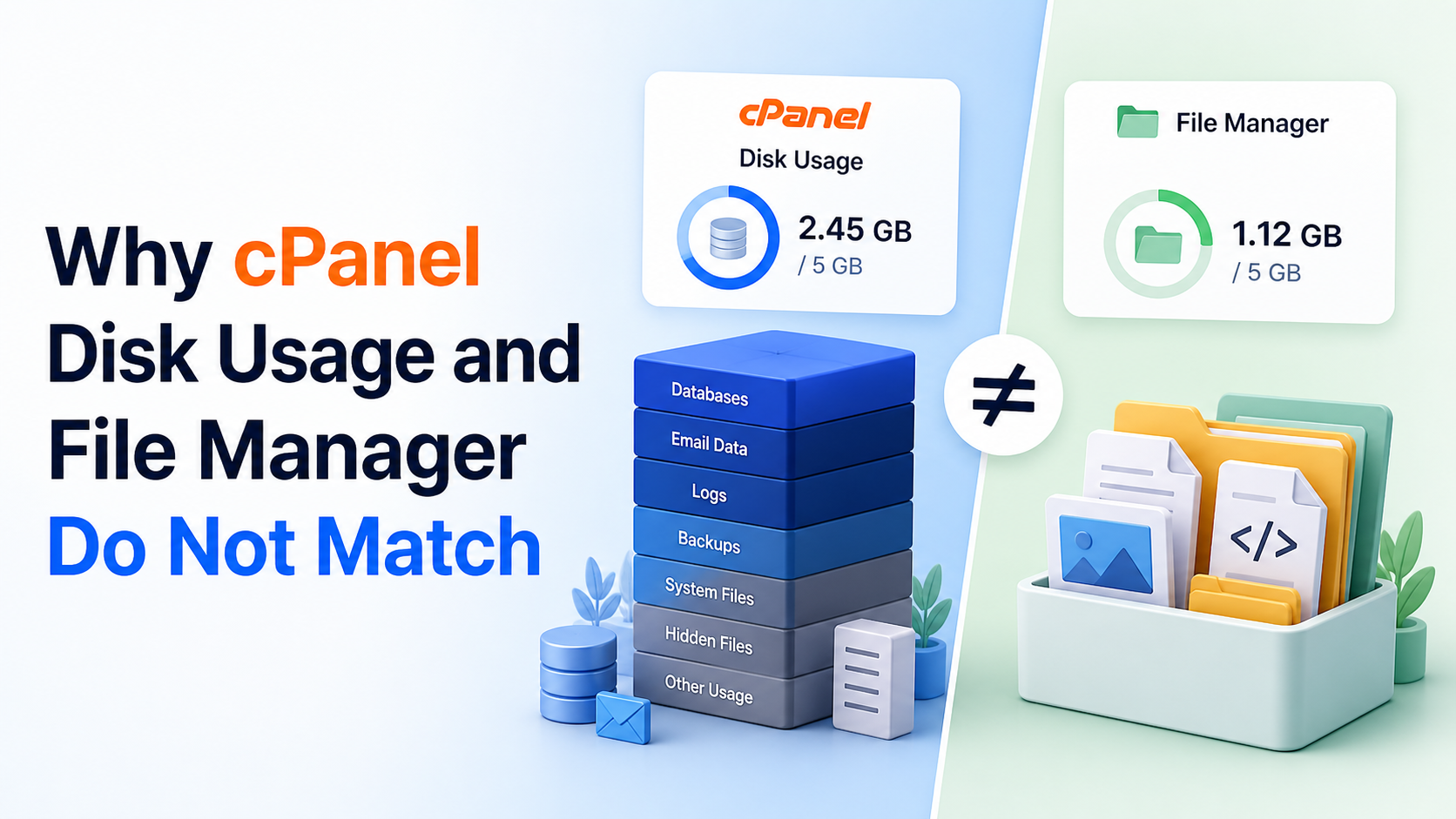
Two cPanel storage numbers can disagree without either one being broken. File Manager shows names inside the account’s visible home tree; Disk Usage summarizes broader account categories; File Usage counts filesystem objects; and quota reports an ownership-based limit. Those counters answer different questions, refresh on different paths and may not cover the same data.
Start with the counter that is actually blocking work. An upload rejected for byte quota is not solved by chasing inode count, while a File Usage limit is not cleared by compressing one large archive. When the panel total looks larger than public_html, hidden paths, mail, databases, files owned outside the home directory, allocation units or delayed statistics may explain the gap.
This guide is for an agency or hosting account owner who can use cPanel Terminal or ask a host to run read-only commands. It assumes basic shell copy and paste, but defines apparent size, allocated blocks, hard links and inodes before using them. The reproduced evidence combines cPanel 11.136.0.33 UAPI fields with a disposable Debian 13 fixture; it does not change a quota, clear a cache or delete client data.
Name the Counter Before Diagnosing the Account
cPanel’s current Disk Usage documentation says the interface includes files in the home directory, hidden subdirectories, mailing-list data and files outside the home directory. It also warns that figures may lag recent changes. File Manager, by contrast, is a path browser; seeing a small public_html folder does not account for every category attributed to the account.
Four labels matter:
| Counter | Unit | Question it answers | First useful check |
|---|---|---|---|
| File Manager tree | File names and logical lengths | What can this login browse under the selected path? | Include hidden entries and Trash |
| Disk Usage | Account categories in bytes | Which cPanel category contributes to the displayed total? | Compare home, mail, databases and Other Usage |
| File Usage | Inodes or file objects | How many files and directories count toward the account limit? | Count objects, not megabytes |
| Local quota | Bytes and inodes owned on one filesystem | What does the quota backend currently attribute to the account UID? | Read byte and inode values separately |
An inode is filesystem metadata for one object. One empty file can consume an inode while contributing almost no content bytes. Conversely, one video can use gigabytes but only one inode. cPanel’s inode quota explanation is the reason File Usage must not be read as another storage-size bar.
Agencies choosing a panel for recurring client work can compare that operational burden through agency control-panel workflow. The present task is narrower: identify why the current cPanel counters diverge and leave a defensible evidence packet.
Read Current cPanel Values Without Changing Them
Run the next block as root and replace accountname, or ask the host to run it. Inside cPanel Terminal, omit --user="$CPANEL_USER" because UAPI already runs as the logged-in account. Both calls are read-only: StatsBar::get_stats returns the panel statistic, while Quota::get_local_quota_info returns local byte and inode fields. Current API references document account statistics and quota information.
set -euo pipefail
CPANEL_BIN=/usr/local/cpanel/bin/uapi
CPANEL_USER=accountname
[[ -x "$CPANEL_BIN" ]]

"$CPANEL_BIN" --user="$CPANEL_USER" --output=json \
  StatsBar get_stats display=diskusage |
python3 -c '
import json, sys
x = json.load(sys.stdin)
row = x["result"]["data"][0]
assert x["result"]["status"] == 1 and row["id"] == "diskusage"
print("statsbar count={} max={} units={}".format(
    row.get("count"), row.get("max"), row.get("units")))
'

"$CPANEL_BIN" --user="$CPANEL_USER" --output=json \
  Quota get_local_quota_info |
python3 -c '
import json, sys
x = json.load(sys.stdin)
d = x["result"]["data"]
assert x["result"]["status"] == 1
assert {"bytes_used", "byte_limit", "inodes_used", "inode_limit"} <= set(d)
print("quota bytes_used={} byte_limit={} inodes_used={} inode_limit={}".format(
    d["bytes_used"], d["byte_limit"], d["inodes_used"], d["inode_limit"]))
'
null or unlimited limits are meaningful results, not parser failures. Preserve the timestamp, account name, cPanel version and both rows in the support ticket. Do not publish client paths, usernames or raw usage outside the authorized team.
Panel values alone cannot explain why totals differ. The miniature account below makes the underlying counter model visible without touching an actual hosting account.
Build a Harmless Counter Fixture
Use a Linux shell with GNU du, find, stat, truncate and dd. The lab needs about 67 MiB of real memory or disk because one 64 MiB file is dense; the second 64 MiB file is sparse and consumes no data blocks in the reproduced fixture. A hard link creates a second name for the same inode.
The scope guard refuses an existing path and marks the exact directory that later cleanup is allowed to remove.
set -Eeuo pipefail
LAB=/tmp/voxfor-cpanel-disk-usage-lab
MARKER="$LAB/.voxfor-cpanel-disk-usage-lab"
ACCOUNT_HOME="$LAB/account-home"
OWNED_ELSEWHERE="$LAB/owned-elsewhere"
EXPECTED_MARKER=voxfor-cpanel-disk-usage-lab-v1

if [[ -e "$LAB" ]]; then
  printf 'Refusing existing path: %s\n' "$LAB" >&2
  exit 2
fi
mkdir -m 700 "$LAB" "$ACCOUNT_HOME" "$OWNED_ELSEWHERE"
printf '%s\n' "$EXPECTED_MARKER" > "$MARKER"
printf 'kernel=%s filesystem=%s block_size=%s\n' \
  "$(uname -r)" "$(findmnt -no FSTYPE -T "$LAB")" "$(stat -fc %s "$LAB")"
Create five names inside the account tree and one same-owner file outside it. regular-hardlink.bin shares data and inode identity with regular.bin; sparse.bin and dense.bin have equal logical length but very different block allocation.
set -Eeuo pipefail
LAB=/tmp/voxfor-cpanel-disk-usage-lab
MARKER="$LAB/.voxfor-cpanel-disk-usage-lab"
ACCOUNT_HOME="$LAB/account-home"
OWNED_ELSEWHERE="$LAB/owned-elsewhere"
EXPECTED_MARKER=voxfor-cpanel-disk-usage-lab-v1

if [[ "$LAB" != /tmp/voxfor-cpanel-disk-usage-lab ||
      ! -d "$LAB" || -L "$LAB" ||
      ! -d "$ACCOUNT_HOME" || -L "$ACCOUNT_HOME" ||
      ! -d "$OWNED_ELSEWHERE" || -L "$OWNED_ELSEWHERE" ||
      ! -f "$MARKER" || -L "$MARKER" ||
      "$(cat "$MARKER")" != "$EXPECTED_MARKER" ]]; then
  printf 'Fixture scope is missing or unsafe; run the scope block first.\n' >&2
  exit 2
fi
for PATH_TO_CREATE in \
  "$ACCOUNT_HOME/regular.bin" "$ACCOUNT_HOME/regular-hardlink.bin" \
  "$ACCOUNT_HOME/sparse.bin" "$ACCOUNT_HOME/dense.bin" \
  "$ACCOUNT_HOME/.hidden.bin" "$OWNED_ELSEWHERE/outside-home.bin"; do
  if [[ -e "$PATH_TO_CREATE" || -L "$PATH_TO_CREATE" ]]; then
    printf 'Refusing existing fixture path: %s\n' "$PATH_TO_CREATE" >&2
    exit 2
  fi
done

dd if=/dev/zero of="$ACCOUNT_HOME/regular.bin" bs=1M count=1 status=none
ln "$ACCOUNT_HOME/regular.bin" "$ACCOUNT_HOME/regular-hardlink.bin"
truncate -s 64M "$ACCOUNT_HOME/sparse.bin"
dd if=/dev/zero of="$ACCOUNT_HOME/dense.bin" \
  bs=1M count=64 conv=fsync status=none
dd if=/dev/zero of="$ACCOUNT_HOME/.hidden.bin" bs=4K count=1 status=none
dd if=/dev/zero of="$OWNED_ELSEWHERE/outside-home.bin" \
  bs=1M count=2 status=none
Nothing in this fixture predicts the exact implementation of every cPanel filesystem or provider policy. Its purpose is more precise: show why a path listing, logical byte sum, allocated-block total, name count and ownership scope cannot be substituted for one another.
Measure Names, Blocks, Inodes and Ownership Separately
First inspect each visible name. stat returns logical length, the count of allocated 512-byte blocks, device plus inode identity, and hard-link count. The command converts blocks to bytes and maps each dynamic device/inode value to a stable identity label. Two names with the same label share one inode. Hidden names appear because find does not depend on a shell * glob.
set -Eeuo pipefail
LAB=/tmp/voxfor-cpanel-disk-usage-lab
MARKER="$LAB/.voxfor-cpanel-disk-usage-lab"
ACCOUNT_HOME="$LAB/account-home"
OWNED_ELSEWHERE="$LAB/owned-elsewhere"
EXPECTED_MARKER=voxfor-cpanel-disk-usage-lab-v1

if [[ "$LAB" != /tmp/voxfor-cpanel-disk-usage-lab ||
      ! -d "$LAB" || -L "$LAB" ||
      ! -d "$ACCOUNT_HOME" || -L "$ACCOUNT_HOME" ||
      ! -d "$OWNED_ELSEWHERE" || -L "$OWNED_ELSEWHERE" ||
      ! -f "$MARKER" || -L "$MARKER" ||
      "$(cat "$MARKER")" != "$EXPECTED_MARKER" ]]; then
  printf 'Fixture scope is missing or unsafe; run the earlier blocks first.\n' >&2
  exit 2
fi
for EXPECTED_FILE in \
  "$ACCOUNT_HOME/regular.bin" "$ACCOUNT_HOME/regular-hardlink.bin" \
  "$ACCOUNT_HOME/sparse.bin" "$ACCOUNT_HOME/dense.bin" \
  "$ACCOUNT_HOME/.hidden.bin" "$OWNED_ELSEWHERE/outside-home.bin"; do
  [[ -f "$EXPECTED_FILE" && ! -L "$EXPECTED_FILE" ]] || {
    printf 'Expected regular fixture file is missing or unsafe: %s\n' "$EXPECTED_FILE" >&2
    exit 2
  }
done

mapfile -d '' FILES < <(
  find "$ACCOUNT_HOME" -maxdepth 1 -type f -print0 | sort -z
)
declare -A IDENTITY_LABELS=()
NEXT_IDENTITY=1
for FILE in "${FILES[@]}"; do
  DEVICE_INODE=$(stat -c '%D:%i' "$FILE")
  if [[ -z "${IDENTITY_LABELS[$DEVICE_INODE]+x}" ]]; then
    IDENTITY_LABELS[$DEVICE_INODE]="inode_$NEXT_IDENTITY"
    NEXT_IDENTITY=$((NEXT_IDENTITY + 1))
  fi
  BLOCKS=$(stat -c '%b' "$FILE")
  printf '%s|identity=%s|links=%s|logical_bytes=%s|allocated_bytes=%s\n' \
    "${FILE##*/}" "${IDENTITY_LABELS[$DEVICE_INODE]}" \
    "$(stat -c '%h' "$FILE")" "$(stat -c '%s' "$FILE")" "$((BLOCKS * 512))"
done
Next collect totals without mixing units. GNU Coreutils documents that ordinary du estimates filesystem usage, --apparent-size reports logical length, --inodes counts objects and hard-linked data is counted once unless --count-links is requested. The detailed GNU du reference also explains why sparse files can have large apparent size and tiny allocation.
set -Eeuo pipefail
LAB=/tmp/voxfor-cpanel-disk-usage-lab
MARKER="$LAB/.voxfor-cpanel-disk-usage-lab"
ACCOUNT_HOME="$LAB/account-home"
OWNED_ELSEWHERE="$LAB/owned-elsewhere"
EXPECTED_MARKER=voxfor-cpanel-disk-usage-lab-v1

if [[ "$LAB" != /tmp/voxfor-cpanel-disk-usage-lab ||
      ! -d "$LAB" || -L "$LAB" ||
      ! -d "$ACCOUNT_HOME" || -L "$ACCOUNT_HOME" ||
      ! -d "$OWNED_ELSEWHERE" || -L "$OWNED_ELSEWHERE" ||
      ! -f "$MARKER" || -L "$MARKER" ||
      "$(cat "$MARKER")" != "$EXPECTED_MARKER" ]]; then
  printf 'Fixture scope is missing or unsafe; run the earlier blocks first.\n' >&2
  exit 2
fi
for EXPECTED_FILE in \
  "$ACCOUNT_HOME/regular.bin" "$ACCOUNT_HOME/regular-hardlink.bin" \
  "$ACCOUNT_HOME/sparse.bin" "$ACCOUNT_HOME/dense.bin" \
  "$ACCOUNT_HOME/.hidden.bin" "$OWNED_ELSEWHERE/outside-home.bin"; do
  [[ -f "$EXPECTED_FILE" && ! -L "$EXPECTED_FILE" ]] || {
    printf 'Expected regular fixture file is missing or unsafe: %s\n' "$EXPECTED_FILE" >&2
    exit 2
  }
done

printf 'apparent_bytes=%s\n' \
  "$(du --apparent-size --bytes --summarize "$ACCOUNT_HOME" | awk '{print $1}')"
printf 'allocated_bytes=%s\n' \
  "$(du --block-size=1 --summarize "$ACCOUNT_HOME" | awk '{print $1}')"
printf 'directory_entries=%s\n' \
  "$(find "$ACCOUNT_HOME" -mindepth 1 -maxdepth 1 | wc -l)"
printf 'unique_file_inodes=%s\n' \
  "$(find "$ACCOUNT_HOME" -maxdepth 1 -type f -printf '%D:%i\n' | sort -u | wc -l)"
printf 'naive_name_logical_bytes=%s\n' \
  "$(find "$ACCOUNT_HOME" -maxdepth 1 -type f -printf '%s\n' | awk '{s+=$1} END{print s+0}')"
printf 'unique_inode_logical_bytes=%s\n' \
  "$(find "$ACCOUNT_HOME" -maxdepth 1 -type f -printf '%D:%i %s\n' |
    sort -u -k1,1 | awk '{s+=$2} END{print s+0}')"

OWNER_UID=$(stat -c '%u' "$ACCOUNT_HOME")
find "$LAB" -xdev -uid "$OWNER_UID" -type f ! -name "$(basename "$MARKER")" \
  -printf '%p|logical_bytes=%s\n' | sed "s|$LAB/||" | sort
printf 'outside_home_logical_bytes=%s\n' \
  "$(du --apparent-size --bytes --summarize "$OWNED_ELSEWHERE" | awk '{print $1}')"

REGULAR_IDENTITY=$(stat -c '%D:%i' "$ACCOUNT_HOME/regular.bin")
HARDLINK_IDENTITY=$(stat -c '%D:%i' "$ACCOUNT_HOME/regular-hardlink.bin")
SPARSE_LOGICAL=$(stat -c '%s' "$ACCOUNT_HOME/sparse.bin")
DENSE_LOGICAL=$(stat -c '%s' "$ACCOUNT_HOME/dense.bin")
SPARSE_BLOCKS=$(stat -c '%b' "$ACCOUNT_HOME/sparse.bin")
DENSE_BLOCKS=$(stat -c '%b' "$ACCOUNT_HOME/dense.bin")
[[ "$REGULAR_IDENTITY" == "$HARDLINK_IDENTITY" ]]
[[ "$SPARSE_LOGICAL" == "$DENSE_LOGICAL" ]]
[[ "$SPARSE_BLOCKS" -lt "$DENSE_BLOCKS" ]]
printf 'verification hardlink_same_inode=yes sparse_dense_same_length=yes allocation_differs=yes\n'
On the reproduced Debian 13 host, /tmp was tmpfs with 4 KiB blocks. The important result is not the filesystem name; it is the controlled disagreement among valid counters.
kernel=6.12.96+deb13-amd64 filesystem=tmpfs block_size=4096
.hidden.bin|identity=inode_1|links=1|logical_bytes=4096|allocated_bytes=4096
dense.bin|identity=inode_2|links=1|logical_bytes=67108864|allocated_bytes=67108864
regular-hardlink.bin|identity=inode_3|links=2|logical_bytes=1048576|allocated_bytes=1048576
regular.bin|identity=inode_3|links=2|logical_bytes=1048576|allocated_bytes=1048576
sparse.bin|identity=inode_4|links=1|logical_bytes=67108864|allocated_bytes=0
apparent_bytes=135270400
allocated_bytes=68161536
directory_entries=5
unique_file_inodes=4
naive_name_logical_bytes=136318976
unique_inode_logical_bytes=135270400
account-home/.hidden.bin|logical_bytes=4096
account-home/dense.bin|logical_bytes=67108864
account-home/regular-hardlink.bin|logical_bytes=1048576
account-home/regular.bin|logical_bytes=1048576
account-home/sparse.bin|logical_bytes=67108864
owned-elsewhere/outside-home.bin|logical_bytes=2097152
outside_home_logical_bytes=2097152
verification hardlink_same_inode=yes sparse_dense_same_length=yes allocation_differs=yes
cleanup=exact-lab-path-absent
Five names resolve to four file inodes because two names share one inode. Adding stat lengths by name overcounts that hard-linked data by 1 MiB. Meanwhile, sparse and dense files both claim 64 MiB of logical length, but only the dense file consumes 64 MiB of allocated blocks in this fixture.
The counter model is verified when both regular-file names have identical device/inode identity, sparse and dense files have equal logical length, sparse allocation is lower than dense allocation, hidden data appears in the account-tree receipt, the unique inode count is lower than the file-name count, and the same owner has a measured file outside the simulated home tree.
Mail-heavy accounts deserve inode-exhaustion recovery evidence because thousands of small messages can exhaust file count while byte headroom remains. That workflow addresses file-count pressure; it should not be used to reinterpret a current byte-quota failure.
Reconcile cPanel Scope Before Deleting Anything
Work from the smallest scope outward:
- Capture the failure. Record the exact upload, mail, backup or application error and its UTC time. A panel warning without the failed operation is weak evidence.
- Separate bytes from inodes. Compare UAPI
bytes_usedwithbyte_limit, theninodes_usedwithinode_limit. A healthy byte ratio does not clear an inode failure. - Include hidden account paths. File Manager Trash, dot directories, mail and locally stored backups may sit outside the first visible web folder.
- Keep database accounting distinct. cPanel documents that MySQL and PostgreSQL sizes are included in its Disk Usage calculation, while database size alone does not cause the filesystem quota limit to be enforced. A home-directory
dutotal therefore need not equal the panel total. - Ask the host about Other Usage. UID-owned data may live outside the home tree or in paths the account cannot read. Account users should not search or remove system paths themselves.
- Allow for a measured refresh. Capture before and after values with timestamps. cPanel states that displayed figures may not reflect recent changes, but it does not promise one universal refresh delay for every provider.
When whole-filesystem df remains high after files were removed, check deleted-open-file disk diagnosis as a separate server-level problem. An open deleted file can explain df versus du; it does not by itself explain every cPanel account-quota mismatch.
Backups are another deletion trap. Before removing a large local archive, keep restore-verification evidence or equivalent proof that the retained copy can recover the required data. Freeing quota by deleting the only usable recovery point is not a successful repair.
Hand the Host Evidence, Not a Global Repair Request
Account owners can safely provide the exact error, UTC timestamp, cPanel version, StatsBar row, local quota fields, relevant directory totals, hidden-path check and whether data recently moved. Redact domains, usernames and filenames when the ticket does not need them.
Root-only actions belong to the host. Searching the entire server for a UID, inspecting quota mount options, rebuilding quota files or running /usr/local/cpanel/scripts/fixquotas can affect more than one account and may be expensive on a busy filesystem. Do not recommend a global repair merely because File Manager and Disk Usage differ. First prove that the cPanel statistic conflicts with the quota backend after accounting for scope and refresh timing.
The reproduced fixture can now be removed. Every path and marker is checked, and only the six known files plus exact directories are deleted.
set -Eeuo pipefail
LAB=/tmp/voxfor-cpanel-disk-usage-lab
MARKER="$LAB/.voxfor-cpanel-disk-usage-lab"
ACCOUNT_HOME="$LAB/account-home"
OWNED_ELSEWHERE="$LAB/owned-elsewhere"
EXPECTED_MARKER=voxfor-cpanel-disk-usage-lab-v1

if [[ "$LAB" != /tmp/voxfor-cpanel-disk-usage-lab ||
      ! -d "$LAB" || -L "$LAB" ||
      ! -d "$ACCOUNT_HOME" || -L "$ACCOUNT_HOME" ||
      ! -d "$OWNED_ELSEWHERE" || -L "$OWNED_ELSEWHERE" ||
      ! -f "$MARKER" || -L "$MARKER" ||
      "$(cat "$MARKER")" != "$EXPECTED_MARKER" ]]; then
  printf 'Cleanup scope is missing or unsafe; nothing was removed.\n' >&2
  exit 2
fi
for EXPECTED_FILE in \
  "$ACCOUNT_HOME/regular.bin" "$ACCOUNT_HOME/regular-hardlink.bin" \
  "$ACCOUNT_HOME/sparse.bin" "$ACCOUNT_HOME/dense.bin" \
  "$ACCOUNT_HOME/.hidden.bin" "$OWNED_ELSEWHERE/outside-home.bin"; do
  [[ -f "$EXPECTED_FILE" && ! -L "$EXPECTED_FILE" ]] || {
    printf 'Cleanup refused an unexpected fixture state: %s\n' "$EXPECTED_FILE" >&2
    exit 2
  }
done

rm -f -- \
  "$ACCOUNT_HOME/regular.bin" \
  "$ACCOUNT_HOME/regular-hardlink.bin" \
  "$ACCOUNT_HOME/sparse.bin" \
  "$ACCOUNT_HOME/dense.bin" \
  "$ACCOUNT_HOME/.hidden.bin" \
  "$OWNED_ELSEWHERE/outside-home.bin" \
  "$MARKER"
rmdir -- "$ACCOUNT_HOME" "$OWNED_ELSEWHERE" "$LAB"
[[ ! -e "$LAB" ]]
printf 'cleanup=exact-lab-path-absent\n'
If the fixture stops early, remove only the exact guarded lab after confirming its marker and absolute path. Never point cleanup at an account home, /home, /tmp, an unresolved variable or client data. On a real cPanel account, rollback means leaving data unchanged, preserving the before-state receipt and asking the host to investigate the proven counter boundary.
The safe stopping point is a specific statement: which counter is near its limit, which scope was measured, which discrepancy remains after reconciliation and which owner has authority to inspect the next layer.
FAQ: cPanel Disk Usage Decisions
Does cPanel Disk Usage include MySQL databases?
Yes. Current cPanel documentation says Disk Usage includes MySQL and PostgreSQL database sizes in the account calculation. It also says database size does not make the account’s filesystem quota enforce the limit by itself, so database-inclusive panel totals and home-directory totals can legitimately differ.
Is cPanel File Usage the same as disk space?
No. File Usage represents inode or object count, while Disk Usage represents bytes. Many tiny cache or mail files can approach an inode limit with free byte capacity; one large archive can consume byte quota with very few inodes.
Why did deleting public_html not reduce the reported total?
public_html is only one path. Trash, hidden directories, mail, databases, backups, files owned outside the home tree and delayed statistics can remain. Reconcile category totals and quota fields first, then use website storage measurement and growth planning for future capacity instead of treating one folder as the whole account.
Should an account owner run fixquotas?
No. fixquotas is a root-level cPanel server repair, not an account cleanup command. A host should first confirm quota configuration or backend inconsistency and schedule the operation proportionately; a display mismatch alone is not evidence that every server quota needs rebuilding.
Do hard links count as two files in cPanel?
Two hard links are two directory names that reference one inode. Name listings can show both, while inode-aware size tools normally count the shared data once. Provider quota implementation and reporting still decide the displayed total, so preserve device/inode evidence instead of assuming every surface counts identically.
How long should cPanel disk usage take to refresh?
cPanel warns that displayed figures may not reflect recent changes but does not define one universal delay for every host and storage layout. Record before and after values with UTC times, wait for the provider’s documented statistics cycle, then escalate if the backend and panel remain inconsistent.