Lifetime VPS Europe
 Lifetime VPS Asia
 Lifetime WooCommerce Hosting
 Lifetime Hosting
 Lifetime Game Dedicated Servers
 Chicago, US
 Tokyo, Japan
 Singapore
 Hong Kong
 Seoul, South Korea
 Amsterdem, Netherlands
 London, UK
 Stockholm, Sweden
 Oslo, Norway
 Vienna, Austria
 Zurich, Switzerland
 Sydney, Australia
 Wordpress Hosting
 VPS Hosting
 DDOS Protection
 Submit Ticket
 Full Management
 Guides
 Videos and Podcasts
 Discover Creative Ideas
 Voxfor Autonomous AI Workers
 Voxfor Mega Menu
 Voxfor Advanced Price Management For WooCommerce
 Voxfor Secure Live Chat and AI Support
 Voxfor Multilanguage
 Voxfor AI Content Summary
 Voxfor Autopilot

Quick Answer
A Voxfor VPS is a practical deployment target for GitHub apps because it gives developers root-level control, persistent availability, custom runtime choices and predictable hosting costs. A production-ready setup uses GitHub Actions or webhooks, SSH keys, a limited deploy user, rollback steps, logging and a clear staging-to-production workflow.
Deployment Fit
| Use case | Recommended deployment path | Why it matters |
|---|---|---|
| Simple app | Webhook or manual pull | Fast to set up, but needs clear rollback steps. |
| Production app | GitHub Actions with deploy user | Better for repeatable releases and auditability. |
| Agency workflow | Staging plus production VPS | Reduces client risk and makes QA easier. |
Related Voxfor Guides
There are two good patterns for auto-deploying from GitHub to a Voxfor VPS, and this is for both of them. The first one is using GitHub as the orchestrator: Your tests are executed on GitHub, a release is packaged, and then your VPS is connected through SSH to publish your release. The second is with the help of webhooks, or the events that GitHub sends to your server when you push. The second is with the help of webhooks (HTTP events sent to your server after a push), and you determine how to fetch, build, and switch the release locally. Both actions and webhooks have their own home on GitHub: GitHub Actions is the CI/CD platform for automating build, test, and deployment, while webhooks are meant to alert your server when a repository event occurs.
For most teams, the cleaner default is GitHub Actions, in which all the CI/CD logs, status checks, artifacts, and approvals will be in GitHub. Similarly, GitHub can protect deployments with secrets and required reviews in environments, albeit with some limitations based on plan in private repositories, as noted by GitHub. Environment secrets and protection rules are not supported if you’re using a private repository on GitHub Freem It says that these are only supported in private repositories when you use GitHub Pro, Team, or Enterprise.
Webhooks work great if your build process is on the server. This is usually the case if an app is built to system packages, has local migrations, or uses a deployment user with all the necessary things already in place. GitHub says to check each webhook with the X-Hub-Signature-256 HMAC signature, use a long secret, and only subscribe to events you are interested in.
Regardless of which option you go with, the fundamentals of hardening remain the same: Don’t use the root deploy user, use SSH keys rather than passwords, keep your deploy keys read-only unless they actually need to be writeable, keep the number of secrets to a minimum, and block all traffic on your VPS except for the ports you need. However, GitHub also cautions that secret redaction isn’t the solution for everything, and clean logs and secret rotation should be part of the operating playbook, not a security checklist.
If a detail in the examples below depends on your application, I mark it as unspecified. In practice, the unspecified pieces are usually your build command, migration command, process start command, domain name, TLS certificate paths, and health-check URL.
Requirements and Server Hardening before the first deploy
Before you wire up automation, make sure the baseline is boring and safe. You want a GitHub repository, a Voxfor VPS with SSH access, a sudo-capable admin account, and permission to create repository secrets or environment secrets in GitHub. GitHub states that repository secrets can be created by people with write access in organization repositories, and environment secrets require stronger permissions.
Start by creating a dedicated deployment user and a predictable release layout. This keeps ownership clean and makes rollbacks much less stressful.
sudo adduser --disabled-password --gecos "" deploy
sudo mkdir -p /srv/myapp/{releases,shared,repo}
sudo chown -R deploy:deploy /srv/myapp
A release-directory layout like this works well for both Actions and webhook deployments:
/srv/myapp/
  current -> /srv/myapp/releases/release-a
  releases/
  shared/
  repo/
Next, secure SSH access. GitHub SSH docs recommend generating a new key with ed25519, and GitHub supports adding a passphrase to further protect the private key. On Ubuntu, OpenSSH server behavior is configured through sshd_config or files in sshd_config.d, and the PasswordAuthentication directive defaults to yes unless you change it.
# On your admin workstation
ssh-keygen -t ed25519 -C "[email protected]"

# Copy your public key to the server
ssh-copy-id adminuser@your-vps-ip
After you confirm that key-based login works, move SSH server settings into a drop-in file:
sudo tee /etc/ssh/sshd_config.d/99-hardening.conf >/dev/null <<'EOF'
PasswordAuthentication no
PubkeyAuthentication yes
PermitRootLogin no
EOF

sudo sshd -t
sudo systemctl restart ssh
That exact PermitRootLogin choice is a deployment recommendation here; the important sourced point is that Ubuntu supports OpenSSH drop-in configuration, and password authentication is enabled by default unless you change it.
Then lock down the network. Ubuntu server docs recommend allowing SSH before enabling UFW, and they document opening ports by number or by service name. They also show how to allow SSH from a specific source IP, which is a nice extra layer if your admin IP is stable.
sudo ufw allow OpenSSH
sudo ufw allow 80/tcp
sudo ufw allow 443/tcp
sudo ufw enable
sudo ufw status verbose
If your admin IP is fixed, you can narrow SSH down further:
sudo ufw delete allow OpenSSH
sudo ufw allow proto tcp from YOUR.PUBLIC.IP.ADDRESS to any port 22
For repository access on the server, use a read-only deploy key unless the server must push back to GitHub. GitHub defines a deploy key as an SSH key attached directly to a single repository, notes that deploy keys are read-only by default, warns that write-enabled deploy keys can act with very broad repository power, and states that a deploy key cannot be reused across multiple repositories. That last point matters more than people expect when one VPS hosts several apps.
sudo -u deploy mkdir -p /home/deploy/.ssh
sudo -u deploy ssh-keygen -t ed25519
  -f /home/deploy/.ssh/id_ed25519_myapp
  -C "myapp-deploy-key"
sudo chmod 700 /home/deploy/.ssh
sudo chmod 600 /home/deploy/.ssh/id_ed25519_myapp
sudo chmod 644 /home/deploy/.ssh/id_ed25519_myapp.pub
Add the contents of id_ed25519_myapp.pub to Repository Settings → Deploy keys on GitHub. If you host multiple private repositories on the same server, use SSH aliases exactly the way GitHub documents:
# /home/deploy/.ssh/config
Host github.com-myapp
    Hostname github.com
    User git
    IdentityFile /home/deploy/.ssh/id_ed25519_myapp
    IdentitiesOnly yes
GitHub also publishes its official SSH host fingerprints and ready-made known_hosts entries. That is better than blind trust. Add GitHub known host entry to the deploy user’s known_hosts file before the first clone.
sudo -u deploy tee -a /home/deploy/.ssh/known_hosts >/dev/null <<'EOF'
github.com ssh-ed25519 AAAAC3NzaC1lZDI1NTE5AAAAIOMqqnkVzrm0SdG6UOoqKLsabgH5C9okWi0dh2l9GKJl
EOF
sudo chmod 644 /home/deploy/.ssh/known_hosts
Finally, be disciplined with GitHub secrets. GitHub security guidance says to use least privilege, keep the default GITHUB_TOKEN permissions as small as possible, avoid storing complex structured blobs as one secret, and remember that redaction can fail in some transformation and logging paths. GitHub also supports environment secrets and required reviewers, which is a very practical protection for production deployments.
Method one with GitHub Actions
This method fits teams that want GitHub to be the control tower. It lets you test on every push, package a release artifact, and deploy only after the build is green. GitHub documents Actions as its CI/CD platform, workflow files as YAML stored in .github/workflows, artifacts as a way to pass build output between jobs, and concurrency controls as a way to prevent overlapping production deploys.
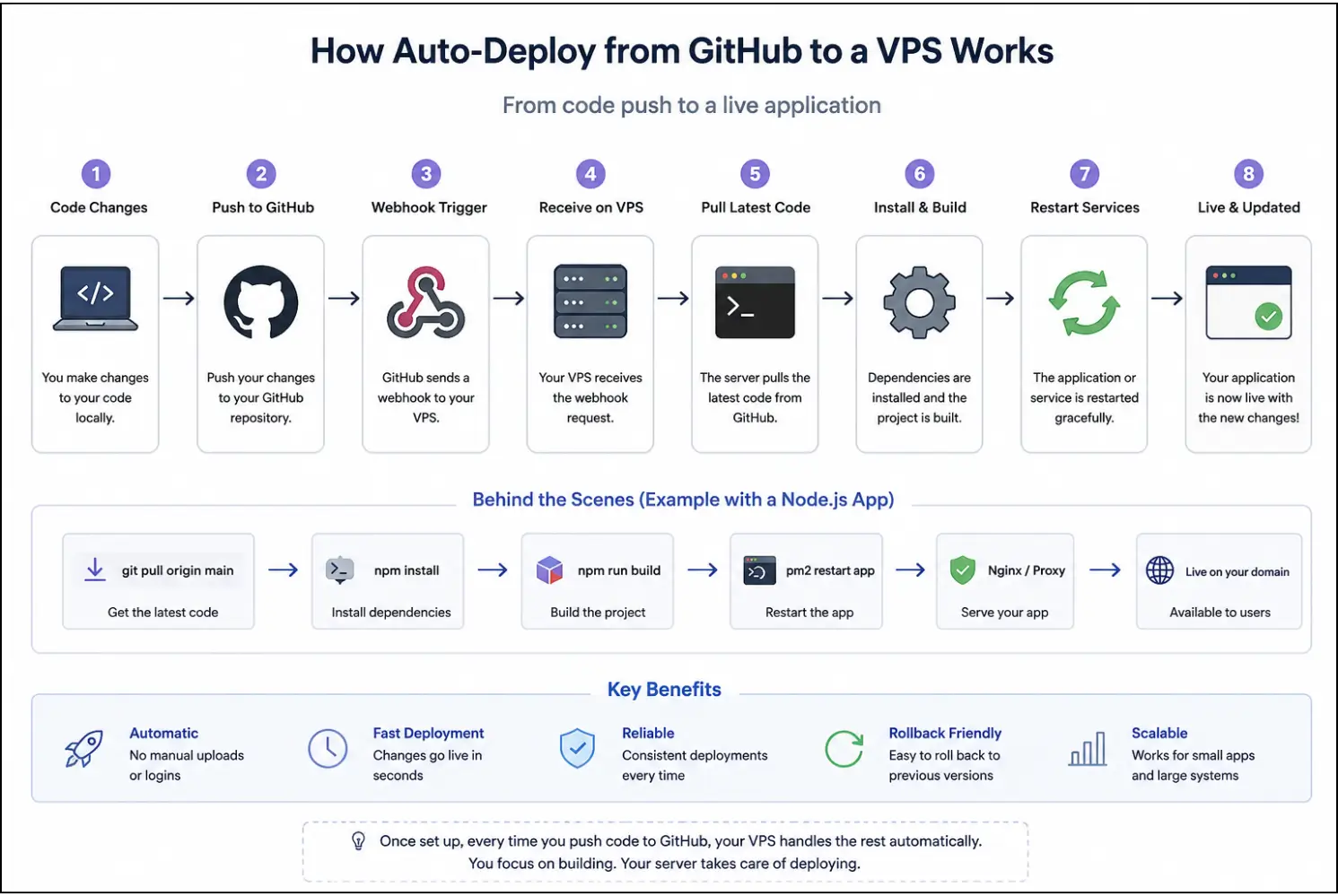
Create these GitHub secrets first:
- VPS_HOST
- VPS_PORT
- VPS_USER
- VPS_SSH_KEY
- VPS_KNOWN_HOSTS
If you want approvals, create a GitHub environment named production and store the secrets there. GitHub documentation explicitly supports environment secrets and required reviewers for that use case.
A good production workflow looks like this:
# .github/workflows/deploy.yml
name: Deploy to Voxfor VPS

on:
  push:
    branches: [main]
  workflow_dispatch:

permissions:
  contents: read

concurrency:
  group: production-deploy
  cancel-in-progress: true

jobs:
  build:
    runs-on: ubuntu-latest
    environment: production

    steps:
      - name: Checkout repository
        uses: actions/checkout@v6
        # For maximum supply-chain safety, pin actions to a full commit SHA in production.

      - name: Run tests
        run: |
          chmod +x ci/test.sh
          ./ci/test.sh

      - name: Build release bundle
        run: |
          chmod +x ci/build.sh
          ./ci/build.sh
          test -d release
          tar -czf release.tgz release

      - name: Upload release artifact
        uses: actions/upload-artifact@v4
        with:
          name: release-bundle
          path: release.tgz
          retention-days: 7

  deploy:
    runs-on: ubuntu-latest
    needs: build
    environment: production

    steps:
      - name: Download release artifact
        uses: actions/download-artifact@v5
        with:
          name: release-bundle

      - name: Prepare SSH
        env:
          VPS_SSH_KEY: ${{ secrets.VPS_SSH_KEY }}
          VPS_KNOWN_HOSTS: ${{ secrets.VPS_KNOWN_HOSTS }}
        run: |
          install -d -m 700 ~/.ssh
          printf '%sn' "$VPS_SSH_KEY" > ~/.ssh/id_ed25519
          chmod 600 ~/.ssh/id_ed25519
          printf '%sn' "$VPS_KNOWN_HOSTS" > ~/.ssh/known_hosts
          chmod 644 ~/.ssh/known_hosts

      - name: Copy artifact to VPS
        env:
          VPS_HOST: ${{ secrets.VPS_HOST }}
          VPS_PORT: ${{ secrets.VPS_PORT }}
          VPS_USER: ${{ secrets.VPS_USER }}
        run: |
          scp -P "$VPS_PORT" release.tgz
            "${VPS_USER}@${VPS_HOST}:/tmp/release.tgz"

      - name: Deploy on VPS
        env:
          VPS_HOST: ${{ secrets.VPS_HOST }}
          VPS_PORT: ${{ secrets.VPS_PORT }}
          VPS_USER: ${{ secrets.VPS_USER }}
        run: |
          ssh -p "$VPS_PORT" "${VPS_USER}@${VPS_HOST}"
            'APP_NAME=myapp ARTIFACT=/tmp/release.tgz /usr/local/bin/deploy_from_artifact.sh'
A few details in that workflow matter. Concurrency prevents two production deploys from colliding. Artifacts let you build once and deploy that exact output. GitHub also documents artifact retention controls, by default, logs and artifacts are retained for 90 days unless customized, which is handy for rollback investigation. GitHub secure-use docs additionally recommend pinning third-party actions to full commit SHAs, even though actions/checkout, upload-artifact, and download-artifact are official, the habit is still a sound one.
On the server, add the deployment script:
sudo tee /usr/local/bin/deploy_from_artifact.sh >/dev/null <<'EOF'
#!/usr/bin/env bash
set -euo pipefail

APP_NAME="${APP_NAME:-myapp}"
APP_ROOT="/srv/${APP_NAME}"
CURRENT_LINK="${APP_ROOT}/current"
RELEASES_DIR="${APP_ROOT}/releases"
ARTIFACT="${ARTIFACT:-/tmp/release.tgz}"
TIMESTAMP="$(date +%Y%m%d-%H%M%S)"
NEW_RELEASE="${RELEASES_DIR}/${TIMESTAMP}"
PREVIOUS_RELEASE="$(readlink -f "${CURRENT_LINK}" || true)"

mkdir -p "${RELEASES_DIR}" "${APP_ROOT}/shared"
mkdir -p "${NEW_RELEASE}"

tar -xzf "${ARTIFACT}" -C "${NEW_RELEASE}" --strip-components=1

cd "${NEW_RELEASE}"

# Application-specific steps: these are examples and may be unspecified for your stack.
if [ -f package-lock.json ]; then
  npm ci --omit=dev
fi

if [ -x ./scripts/migrate.sh ]; then
  ./scripts/migrate.sh
fi

ln -sfn "${NEW_RELEASE}" "${CURRENT_LINK}"

# Restart or reload your app service
sudo systemctl restart myapp.service

# Health check if your app exposes one
if curl -fsS http://127.0.0.1:3000/health >/dev/null; then
  rm -f "${ARTIFACT}"
else
  echo "Health check failed. Rolling back..." >&2
  if [ -n "${PREVIOUS_RELEASE}" ]; then
    ln -sfn "${PREVIOUS_RELEASE}" "${CURRENT_LINK}"
    sudo systemctl restart myapp.service
  fi
  exit 1
fi

# Keep the newest 5 releases
ls -1dt "${RELEASES_DIR}"/* | tail -n +6 | xargs -r rm -rf
EOF

sudo chmod +x /usr/local/bin/deploy_from_artifact.sh
That release-directory pattern is not mandatory, but it is one of the cleanest ways to make rollback fast and predictable. If your app needs Git history during build or deploy, note that actions/checkout fetches only one commit by default, GitHub own action docs say to set fetch-depth: 0 when you need full history or tags.
Method two with GitHub webhooks and a server-side deploy script
If you prefer “push to main, let the VPS handle the rest,” webhooks are the straightforward choice. GitHub webhook docs say that when a subscribed event occurs, GitHub sends an HTTP request to the URL you configured. It also recommends a high-entropy secret, application/json payloads, and only subscribing to the events you need. GitHub sends a ping event after webhook creation so you can confirm the endpoint is alive.
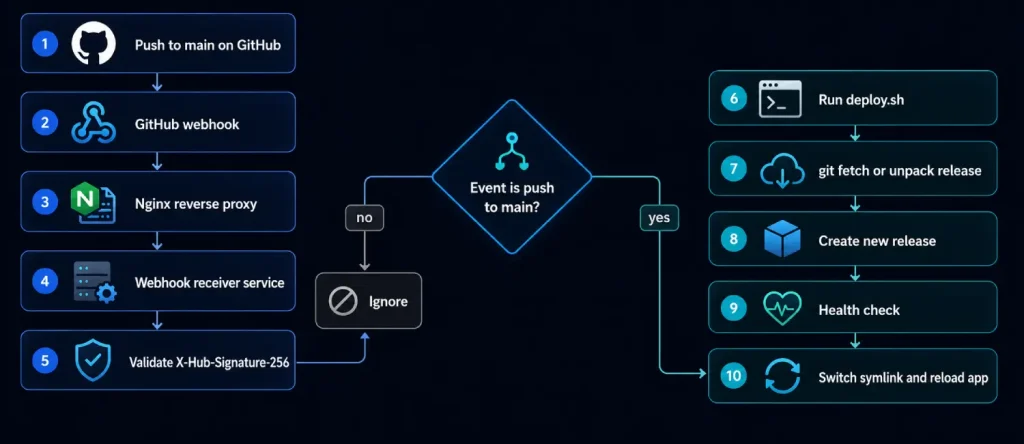
Create the webhook in GitHub
Use these settings:
- Payload URL:
https://deploy.example.com/hooks/github - Content type:
application/json - Secret: long random value
- Events: ideally just push
- Active: enabled
GitHub specifically documents application/json, the secret field, the recommendation to choose a high-entropy secret, and the idea of subscribing only to the needed events.
Node.js receiver example
GitHub says the signature is carried in X-Hub-Signature-256, computed as an HMAC-SHA256 over the payload contents with your secret, and should be compared using a constant-time method. Its examples also make clear that you must verify the original request body, not a mutated JSON object.
Python receiver alternative
# /srv/myapp/webhook/server.py
from http.server import BaseHTTPRequestHandler, HTTPServer
import hashlib, hmac, json, os, subprocess

SECRET = os.environ["WEBHOOK_SECRET"].encode("utf-8")
BRANCH = os.environ.get("DEPLOY_BRANCH", "refs/heads/main")

class Handler(BaseHTTPRequestHandler):
    def do_POST(self):
        if self.path != "/hooks/github":
            self.send_response(404)
            self.end_headers()
            self.wfile.write(b"not found")
            return

        length = int(self.headers.get("Content-Length", "0"))
        raw_body = self.rfile.read(length)
        header = self.headers.get("X-Hub-Signature-256", "")
        event = self.headers.get("X-GitHub-Event", "")

        expected = "sha256=" + hmac.new(
            SECRET, raw_body, hashlib.sha256
        ).hexdigest()

        if not hmac.compare_digest(expected, header):
            self.send_response(401)
            self.end_headers()
            self.wfile.write(b"invalid signature")
            return

        if event == "ping":
            self.send_response(200)
            self.end_headers()
            self.wfile.write(b"pong")
            return

        payload = json.loads(raw_body.decode("utf-8"))

        if event == "push" and payload.get("ref") == BRANCH:
            result = subprocess.run(
                ["/usr/local/bin/deploy.sh"],
                capture_output=True,
                text=True
            )
            self.send_response(200 if result.returncode == 0 else 500)
            self.end_headers()
            self.wfile.write(result.stdout.encode("utf-8"))
        else:
            self.send_response(202)
            self.end_headers()
            self.wfile.write(b"ignored")

HTTPServer(("127.0.0.1", 9000), Handler).serve_forever()
Bash prototype receiver
A pure Bash HTTP receiver is possible, but it is usually more brittle than Node or Python. If you still want one, treat it as a minimal prototype and keep Nginx in front of it. The deploy logic itself, however, is a perfectly good fit for Bash.
# /usr/local/bin/deploy.sh
#!/usr/bin/env bash
set -euo pipefail

APP_ROOT="/srv/myapp"
REPO_DIR="${APP_ROOT}/repo"
RELEASES_DIR="${APP_ROOT}/releases"
CURRENT_LINK="${APP_ROOT}/current"
TIMESTAMP="$(date +%Y%m%d-%H%M%S)"
NEW_RELEASE="${RELEASES_DIR}/${TIMESTAMP}"
PREVIOUS_RELEASE="$(readlink -f "${CURRENT_LINK}" || true)"
LOCK_FILE="/tmp/myapp-deploy.lock"

exec 9>"${LOCK_FILE}"
flock -n 9 || { echo "Another deployment is already running"; exit 1; }

mkdir -p "${RELEASES_DIR}"

# First clone: use your GitHub deploy key alias from ~/.ssh/config
if [ ! -d "${REPO_DIR}/.git" ]; then
  sudo -u deploy git clone [email protected]:OWNER/REPO.git "${REPO_DIR}"
fi

sudo -u deploy git -C "${REPO_DIR}" fetch origin
mkdir -p "${NEW_RELEASE}"
sudo -u deploy git -C "${REPO_DIR}" archive origin/main | tar -x -C "${NEW_RELEASE}"

cd "${NEW_RELEASE}"

# Application-specific steps (unspecified for your stack)
if [ -f package-lock.json ]; then
  npm ci --omit=dev
fi

if [ -x ./scripts/migrate.sh ]; then
  ./scripts/migrate.sh
fi

ln -sfn "${NEW_RELEASE}" "${CURRENT_LINK}"
sudo systemctl restart myapp.service

if curl -fsS http://127.0.0.1:3000/health >/dev/null; then
  echo "Deploy successful"
else
  echo "Health check failed. Rolling back..." >&2
  if [ -n "${PREVIOUS_RELEASE}" ]; then
    ln -sfn "${PREVIOUS_RELEASE}" "${CURRENT_LINK}"
    sudo systemctl restart myapp.service
  fi
  exit 1
fi

ls -1dt "${RELEASES_DIR}"/* | tail -n +6 | xargs -r rm -rf
Limited sudo permissions for deployment
The deploy user should not receive broad passwordless sudo. If your deploy script must restart one service, allow exactly that service command and validate the sudoers file before relying on it.
# Allow the deploy user to restart only this app service.
sudo tee /etc/sudoers.d/myapp-deploy >/dev/null <<'EOF'
deploy ALL=(root) NOPASSWD: /bin/systemctl restart myapp.service, /bin/systemctl status myapp.service
EOF
sudo chmod 440 /etc/sudoers.d/myapp-deploy
sudo visudo -cf /etc/sudoers.d/myapp-deploy
systemd service and environment file
GitHub explicitly says webhook secrets should be stored securely and not hardcoded into the repository. A separate environment file with tight permissions is the cleanest server-side answer.
# /etc/myapp/webhook.env
WEBHOOK_SECRET=replace-with-a-long-random-secret
DEPLOY_BRANCH=refs/heads/main
PORT=9000

# /etc/systemd/system/github-webhook.service
[Unit]
Description=GitHub webhook receiver for myapp
After=network.target

[Service]
Type=simple
User=deploy
Group=deploy
WorkingDirectory=/srv/myapp/webhook
EnvironmentFile=/etc/myapp/webhook.env
ExecStart=/usr/bin/node /srv/myapp/webhook/server.mjs
Restart=on-failure
RestartSec=3

[Install]
WantedBy=multi-user.target

sudo install -d -o root -g deploy -m 750 /etc/myapp
sudo install -m 640 /dev/null /etc/myapp/webhook.env
sudo systemctl daemon-reload
sudo systemctl enable --now github-webhook.service
Nginx reverse proxy
Nginx proxy module is built for this job, and its docs show the standard proxy_pass pattern and common proxy headers. If you terminate TLS here, the certificate file paths are application-specific and therefore unspecified in this template.
# /etc/nginx/sites-available/deploy.example.com.conf
server {
    listen 80;
    server_name deploy.example.com;

    client_max_body_size 5m;

    location /hooks/github {
        proxy_pass http://127.0.0.1:9000;
        proxy_set_header Host $host;
        proxy_set_header X-Real-IP $remote_addr;
        proxy_set_header X-Forwarded-For $proxy_add_x_forwarded_for;
        proxy_set_header X-Forwarded-Proto $scheme;
    }
}
If the same VPS also serves your app, your runtime service can sit behind a second Nginx server block or a different location. Nginx is commonly used as a reverse proxy in exactly this way.
Testing rollback safer switchovers troubleshooting and monitoring
A deployment setup is not real until you test the unhappy path. With GitHub Actions, the easiest dry run is workflow_dispatch plus a non-production environment. With webhooks, GitHub sends an initial ping, and the GitHub webhook UI shows recent deliveries from the last three days, including request headers, payload, and your server response. That page is the first place I look when a push mysteriously does nothing.
Your CI/CD test checklist should be simple and repeatable:
- Run the deploy script manually over SSH.
- Push a harmless change to a test branch or trigger
workflow_dispatch. - Confirm the release directory is created.
- Confirm current points for the new release.
- Verify the health endpoint.
- Trigger a deliberate failure and make sure rollback works.
For rollback, the release-directory model is your safest tool. If the new release fails health checks after the symlink switch, the deploy script can immediately repoint current to the previous directory and restart the service. If you are using GitHub Actions artifacts, GitHub also lets you download old artifacts, and by default, it keeps build logs and artifacts for 90 days unless you change retention.
A manual rollback is intentionally boring:
ls -1dt /srv/myapp/releases/*
sudo ln -sfn /srv/myapp/releases/release-a /srv/myapp/current
sudo systemctl restart myapp.service
curl -fsS http://127.0.0.1:3000/health
If you prefer artifact-based rollback from GitHub:
gh run download RUN_ID -n release-bundle
scp release.tgz deploy@your-vps:/tmp/release.tgz
ssh deploy@your-vps 'APP_NAME=myapp ARTIFACT=/tmp/release.tgz /usr/local/bin/deploy_from_artifact.sh'
For short switchover windows, the symlink-swap approach is often enough for static sites and some app servers because the filesystem switch is atomic and fast. For dynamic apps that need traffic to keep flowing during release changes, use a blue-green pattern: run myapp-blue on one port, myapp-green on another, health-check the new one, then flip Nginx upstreams and reload Nginx. Nginx open-source load-balancing docs note that reverse proxying includes passive health checks and can mark failed upstreams as down temporarily using max_fails and fail_timeout.
upstream myapp_upstream {
    server 127.0.0.1:3001 max_fails=3 fail_timeout=10s;
    # Switch this line during blue-green deploys:
    # server 127.0.0.1:3002 max_fails=3 fail_timeout=10s;
}

server {
    listen 80;
    server_name app.example.com;

    location / {
        proxy_pass http://myapp_upstream;
        proxy_set_header Host $host;
        proxy_set_header X-Real-IP $remote_addr;
    }
}
The most common failures are predictable. If you see Permission denied (publickey), GitHub SSH troubleshooting says the server rejected the connection, which usually means the wrong key, wrong user, or wrong repository permission. If you see Host key verification failed, GitHub says the host key no longer matches what SSH previously recorded. If webhook signature validation fails, GitHub says to confirm the secret exists, use X-Hub-Signature-256, verify the original payload bytes, use HMAC-SHA256, and make sure your proxy did not modify the body or headers before verification.
One practical network edge case is outbound SSH from the VPS. If a firewall somewhere refuses normal SSH to GitHub, GitHub documents SSH over port 443 by using ssh.github.com. That can rescue a deployment setup that otherwise looks correct.
A minimal monitoring stack does not need to be fancy:
sudo systemctl status github-webhook.service
sudo systemctl status myapp.service
sudo journalctl -u github-webhook.service -f
sudo journalctl -u myapp.service -f
sudo tail -f /var/log/nginx/access.log /var/log/nginx/error.log
curl -fsS http://127.0.0.1:3000/health
On the GitHub side, watch Actions run logs, artifacts, and environment approvals. On the webhook side, use Recent deliveries in GitHub webhook settings, where GitHub exposes the last three days of deliveries and supports redelivery for recent events. Together, those two views usually tell you whether the failure happened before the server, at the proxy, inside signature validation, or during the deploy script itself.
The practical takeaway is this: if you want the most maintainable default for a Voxfor VPS, start with GitHub Actions + release artifacts + a server-side deploy script. If your build genuinely belongs on the server, use GitHub webhooks + validated receiver + release directories. In both cases, the winning pattern is the same underneath the hood: unprivileged deploy user, read-only deploy key, verified SSH hosts, narrow secrets, firewall rules you understand, and a rollback path you have tested before you need it.
About the writer

Hassan Tahir wrote this article, drawing on his experience to clarify WordPress concepts and enhance developer understanding. Through his work, he aims to help both beginners and professionals refine their skills and tackle WordPress projects with greater confidence.
Frequently Asked Questions
Is GitHub Actions better than a webhook?
GitHub Actions is usually better for repeatable production releases because the workflow is versioned, logged and easier to review. A webhook can still fit smaller private apps when you verify signatures, restrict events and keep rollback steps simple.
Should deployment use the root user?
No. Use a dedicated deploy user with SSH keys and narrow permissions. If the app service must restart during deployment, allow only the exact systemctl command needed for that service.
How do I verify GitHub webhook signatures?
Read the original raw request body, calculate an HMAC-SHA256 value with the shared secret, compare it to the X-Hub-Signature-256 header using a constant-time comparison, and reject the request before parsing JSON if the signature fails.
How do I roll back a failed VPS deployment?
Keep each release in its own directory, point a current symlink at the active release, and switch that symlink back to the previous release if health checks fail. Restart only the app service and confirm the health endpoint before accepting traffic.
What is the first rollback step to plan?
Decide where the previous release lives and how the deploy user can activate it. Write down the exact command path, required service restart and health check before the first production deploy.