
The development of the WordPress content management system, which now serves to support between 43 percent and 44 percent of the infrastructure of the global internet, has led to the need to create highly advanced defensive architectures to deal with the torrent of automated and manual spam. To the digital administrator, the problem of spam is beyond mere irritation, and it has developed as a multi-faceted menace to the integrity of search engine optimization (SEO), server performance and the psychological contract of trust formed with the end-user. Spam propagation is the activity of a large variety of actors, both simple scripts and advanced so-called botnets and spam farms operated by humans, all aimed at evading the classic heuristics filters. To have a complete picture of these threats, the analysis of the dual vectors of exploitation, namely the contact form that represents a gateway to the inbox of the administrator and the reputation of their domain, and the comment section that can be used as a publicly accessible location of possibly malicious code, is required.
The economics of digital influence are the motivation for the constant bombardment of WordPress installations. The main factor is spamdexing, or the manipulation of search engine results by placing backlinks in an illicit manner. By inserting links in authority websites, malicious agents are trying to artificially boost the PageRank of third-party websites, which are often related to grey-market pharmaceuticals, gambling, or fraudulent financial schemes. Also, the technical overhead costs of dealing with thousands of spam submissions per day can cause serious resource depletion of the server, which has been realized as higher latency or complete service unavailability.
In addition to the direct exploitation of SEO, spam is used to distribute phishing and malware. The malicious code introduced as comments or payloads of contact forms can be designed in such a way that it resembles a valid login screen or causes a drive-by download, where malicious programs are automatically downloaded to the computer of the visitor without their explicit knowledge.
Such exploitation is not limited to the exploited post but the whole domain where that post was exploited, since security agencies such as Google Safe Browsing can block out the site, thus effectively putting an end to organic traffic and the discontinuation of related services such as Google Ads.
| Impact Vector | Technical Consequence | Organizational Risk |
| SEO Integrity | Degradation of SERP rankings; de-indexing by major search engines. | Critical |
| Domain Reputation | Blocklisting by mail servers and security authorities. | High |
| Server Stability | Resource exhaustion (CPU/RAM); database bloat from junk entries. | Moderate |
| User Trust | Loss of brand credibility due to an unprofessional site appearance. | High |
| Data Security | Potential for XSS, SQL injection, and credential harvesting via phishing. | Critical |

A business-to-consumer contact form is an essential means of communication, but its accessibility also means that it is high on the list of targets. Old-fashioned types of contact forms may usually not be very strong in terms of validation, leaving bots to enter any type of data directly to the email system of the site owner. To protect these endpoints, administrators will need to provide a layered approach of defense that does not compromise the end user experience, who requires a frictionless experience.
The honeypot technique is one of the best non-intrusive techniques for detecting automated submissions. Such a methodology is based on the natural behavior of the spambots, which are coded to fill in all available fields of input in a form in the most effective way that leaves the greatest likelihood of a successful submission.
A honeypot field is an input that is not visible to human users through CSS or JavaScript; since not visible to human users, they do not respond to the field. After a form submission has been received with information in the honeypot field, the system determines that the actor was an automated script and rejects the submission.
In the WPForms ecosystem, it is provided as the so-called Modern Anti-Spam Protection, which is a multi-layered token-based authentication of the legitimacy of the submission without the visible interaction of the user.
In order to make this possible, the administrator opens the form editor, clicks on the Settings menu, clicks on Spam Protection and Security and clicks on the Enable modern anti-spam protection option. This offers a no-noise, behind-the-scenes shield that lets one have actual user interactions without any interference, and is quite effective in blocking most bot traffic.
When more advanced scripts bypass invisible filters, explicit verification challenges become necessary. The evolution of these tests has moved from distorted text images to sophisticated behavioral analysis.
Google reCAPTCHA v2 and v3 are still used popularly. The reCAPTCHA v2 will ask the user to either touch a checkbox, or solve a puzzle in the form of an image, which is extremely secure, but somewhat frictionate to the user.
reCAPTCHA v3, on the contrary, functions by tracking user behavior within the site and giving a risk score ranging between 0.0 and 1.0. When the score is less than some predetermined value, which is usually 0.5, the submission is flagged or challenged.
To make it a working case, beginners have to use WPForms and, therefore, enable the reCAPTCHA type in their global settings, obtain Site and Secret keys in the Google Administrator, and add the reCAPTCHA field to the required form.
To organizations that place privacy first, hCaptcha and Cloudflare Turnstile are interesting alternatives as hCaptcha is reported to have data privacy standards and a model of giving part of the proceeds to charity.
Cloudflare Turnstile is an especially novel product, since it can usually not interact at all, relying on advanced browser-level challenges that can identify a human versus a bot in a completely transparent way to the end-user.
In businesses where the target audience has a geographic boundary, it is possible to limit the number of form submissions by country in order to filter a large amount of international spam.
Plug-in tools such as WPForms Pro also enable the activation of a “Country Filter” that can be set to either allow only entries by a certain country or to only accept entries by a specific country. It is also very handy in reducing spam being sent by the known large botnet addresses that will not match the market offered by the site.
Another filtering mechanism can be the keyword filtering, which can be applied in countering the spam created by humans, which might be capable of bypassing the automated Turing tests. Administrators can automatically block the entries that contain these words with the assistance of the so-called Keyword Filter and by inputting a list of disallowed words (not limited to profane language, but also such popular spam words as the term “cryptocurrency” or a “free trial” and so on). Care is, however, taken to ensure that the list of keywords used is not too broad as to censor out valid searches.
| Defense Mechanism | Primary Function | Ideal Use Case |
| Honeypot | Blocks bots via invisible fields. | High-traffic sites prioritizing UX. |
| reCAPTCHA v3 | Behavioral scoring and risk assessment. | Sites needing high security with low friction. |
| hCaptcha | Privacy-focused verification. | GDPR-compliant organizations. |
| Turnstile | Interaction-free bot detection. | Modern sites seek zero friction. |
| Custom CAPTCHA | Math or logic questions (e.g., 10). | Low-traffic, resource-light blogs. |
| Country Filtering | Blocks traffic based on Origin. | Regionally specific service businesses. |
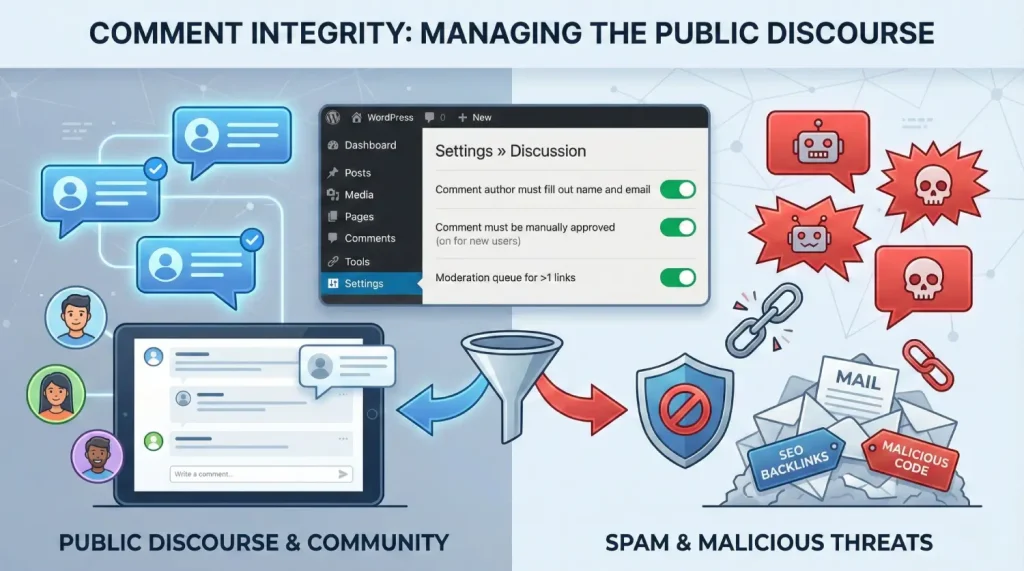
The WordPress comment system is a two-edged sword, where on the one hand, it encourages the audience to interact with the community. Still, on the other hand, it is a commonly used graveyard with SEO backlinks and malicious code. The native configuration, coupled with third-party algorithmic analysis are needed to achieve this vector.
WordPress provides an extensive array of built-in features located under Settings » Discussion that can mitigate up to 70 percent to 80 percent of automated spam when configured correctly.
The foundational step is to require that the “Comment author must fill out name and email,” which introduces a basic level of accountability and stops simple, one-click bot submissions. For sites facing persistent attacks, the more aggressive “Users must be registered and logged in to comment” setting acts as a virtually impenetrable barrier to most bots, though it may discourage casual readers.
Intermediate processes are also important. The administrator can keep absolute control over what is seen on the site by allowing the comment to be posted manually.
To strike a compromise between security and efficiency, a so-called “Comment author must have a previously approved comment” setting can give established users the freedom to post freely while retaining new members under scrutiny. Besides, administrators ought to be very strict regarding the number of links allowed in a particular comment. The spammers tend to put several URLs in order to optimize their profile on the backlinks; the moderation limit has to be set at one or two links to make sure that these entries of link-stuff are automatically reviewed.
The Disallowed Comment Keys field is the nuclear option of recurring spamming. Any comment that included a word, IP address, or email address listed here would be sent directly to the garbage bin, without even going through the moderation queue.
This is especially useful in banishing certain repeat phrases or URLs that are linked to spamming. Also, the administrators must take into consideration the “Automatically close comments on posts older than X days” feature. Because archived material may no longer be monitored, spammers will attack it; closing these threads will ensure that the history of the site is not exploited retroactively.
Trackbacks and pingbacks are legacy features designed to facilitate inter-site notifications when content is linked. However, in the modern web, these features are overwhelmingly abused by spammers to insert illicit links into a site’s comment section.
Disabling these in the Discussion settings is a standard recommendation for any secure WordPress installation, as the communicative benefit they provide is significantly outweighed by the security risk.
While native settings are powerful, they lack the ability to cross-reference global data in real-time. This is where dedicated anti-spam plugins become indispensable.
Akismet, pre-installed on most WordPress sites, operates as a massive, cloud-based filtration system. Every comment submitted is cross-referenced with the Akismet global database, which has processed over 500 billion spam entries over 15 years. Akismet is particularly effective because it uses machine learning to identify patterns; if a spammer is blocked on one site, the entire Akismet network is alerted. For beginners, setting up Akismet requires an API key, which is free for personal use but requires a subscription for commercial domains.
For administrators concerned with GDPR and data sovereignty, Antispam Bee is the premier local solution. Unlike cloud-based tools, it performs its analysis on the local server, checking the commenter’s IP address against a public spam database, verifying the timing of the submission, and filtering by language. It is completely free, ad-free, and requires no external API keys, making it a favorite for privacy-focused personal blogs.
| Plugin | Analysis Method | Best For | Cost Model |
| Akismet | Cloud-based Global DB. | High-traffic blogs. | Freemium. |
| Antispam Bee | Local heuristic analysis. | Privacy-centric sites. | 100% Free. |
| CleanTalk | Real-time behavior analysis. | E-commerce and registration forms. | Subscription. |
| WP Armour | Lightweight honeypot JS. | Simple, fast bot blocking. | Free/Paid. |
| Titan Security | Multi-layered scan + firewall. | Comprehensive site defense. | Freemium. |
A common but often overlooked consequence of contact form spam is the degradation of the site’s email deliverability. When a site sends automated notifications for every spam entry, and those emails are subsequently marked as spam by the recipient, the site’s domain reputation is severely penalized. Furthermore, the default WordPress PHP mail() function is inherently unreliable because it lacks proper authentication, often leading legitimate messages to be blocked by providers like Gmail and Yahoo.
In order to reduce such risks, administrators ought to install a special SMTP (Simple Mail Transfer Protocol) plugin, which in this case is WP Mail SMTP. This enables the site to send emails via an authenticated mail service (e.g., SendLayer, Brevo or Google Workspace) instead of the local web server. Three important authentication protocols are involved in the transition.
By authenticating the domain, administrators lower the “spam score” of their outbound messages, ensuring that critical notifications reach the inbox. Additionally, “domain warming”, the practice of gradually increasing email volume on new sites, is recommended to avoid triggering automated red flags from email providers.
Reviewing comments with outbound links is the most dangerous activity for a moderator of WordPress. Allowing one poisonous URL will jeopardize the security of users and the search engine reputation of the site. Spammers use advanced methods of disguising their motive and messages, which may include harmless-sounding messages encapsulated in harmful coding.
Should a visitor, having followed a link on an approved comment, be subsequently infected by malware, the site owner will receive a tremendous loss of user confidence and possible litigation consequences. On technical grounds, the search engines such as Google use crawlers that condemn websites containing links to bad neighborhoods, domains within malware or black-hat SEO.
Beginners should utilize a systematic checklist to identify malicious or suspicious comments before approval:
Before approving a questionable link, administrators can use external diagnostic tools to verify its safety. Sucuri SiteCheck and URLVoid are premier resources that scan URLs against dozens of security databases to detect malware, phishing, and blocklisting status. Bitdefender Link Checker also provides AI-powered analysis of a site’s behavior to determine if it is fraudulent or counterfeit.
| Identification Feature | Malicious Indicator | Legitimate Indicator |
| Author Name | Keywords or commercial phrases. | Real name or consistent pseudonym. |
| Comment Content | Generic, vague, or repetitive. | Specific reference to post content. |
| Link Context | Irrelevant to the topic (e.g., gambling on a food blog). | Relevant reference or personal site. |
| URL Integrity | Numbers-only (IPs) or excessive hyphens. | Standard domain names. |
| Email Address | Obviously fake (e.g., [email protected]). | Valid, consistent email address. |
Failure to implement these precautions often leads to the site being blacklisted by authorities like Google Safe Browsing. A blacklisted site is effectively “dead” to the internet until the issue is resolved.
When a site is blacklisted, browsers like Chrome display a full-page warning: “Deceptive site ahead”. This causes an immediate and catastrophic drop in traffic, often exceeding 95 percent, as users are scared away from the domain. Furthermore, search engines will de-index the site, erasing months or years of SEO progress, and hosting providers may suspend the account to prevent the infection from spreading to other customers on the same server.
Remediating a blacklisted site is a high-stakes process that requires meticulous attention to detail:
A single anti-spam tool is rarely a complete solution. Professional administrators employ a “defense-in-depth” strategy, where multiple layers of security work in concert to protect the site.
Spam control on a WordPress site is an essential element of the web administration of the present day. To the novice, a shift between passive and active defensive positions is very crucial. With the help of native WordPress configurations, authenticated email services, and advanced algorithmic filters, administrators will be able to reclaim their inboxes and publicly accessible comment forms from the noise of the automated web.
Nevertheless, the human moderator is the most crucial aspect. No algorithm can fully replace the observing eye of an administrator who sees the details of their community life and knows the signs of bad intentions in detail. The three components of a safe WordPress presence include vigilance in the examination of connections, regular refresh of site parts, and the application of efficient authentication protocols.
With every automated attack being directed at the comment systems, the distinction between a successful online community and a blacklisted domain is, in many cases, in the quality of the preventive actions taken nowadays. It is not just eliminating junk mail, but ensuring a secure, trustworthy and high-performing digital platform serving its audience without compromise.

Hassan Tahir wrote this article, drawing on his experience to clarify WordPress concepts and enhance developer understanding. Through his work, he aims to help both beginners and professionals refine their skills and tackle WordPress projects with greater confidence.





 Lifetime VPS Europe
 Lifetime VPS Asia
 Lifetime WooCommerce Hosting
 Lifetime Hosting
 France Lifetime Dedicated Servers
 Germany Lifetime dedicated servers
 Lifetime Game Dedicated Servers
 Chicago, US
 Tokyo, Japan
 Singapore
 Hong Kong
 Seoul, South Korea
 Amsterdem, Netherlands
 London, UK
 Stockholm, Sweden
 Oslo, Norway
 Vienna, Austria
 Zurich, Switzerland
 Sydney, Australia
 Wordpress Hosting
 VPS Hosting
 DDOS Protection
 Submit Ticket
 Full Management
 Guides
 Videos and Podcasts
 Discover Creative Ideas
 MetaAgentOS High-Ticket Support System
 Voxfor Mega Menu
 Voxfor Advanced Price Management For WooCommerce
 Voxfor Secure Live Chat and AI Support
 Voxfor Multilanguage
 Voxfor AI Content Summary


