Voxfor Multilanguage Plugin helps WordPress and WooCommerce teams translate content with DeepL, manage hreflang, localize URLs and review translated pages before they are used for SEO. Treat this guide as a setup checklist: configure the API, choose languages, translate priority pages, verify hreflang, clear cache and test the live storefront.
This guide assumes a WordPress site with DeepL API access, defined target languages, cache control, Rank Math or another SEO layer, and manual review for important translated pages before indexing.
Setup Path
Use case
Setup focus
Why it matters
Plugin overview support
Explain features in practical language
Helps users understand why the plugin matters before installing it.
Setup guide
Walk through translation and hreflang logic
Reduces confusion and support questions.
SEO setup asset
Answer multilingual SEO questions
Improves AEO visibility for plugin-related searches.
Setup Validation Checklist
Step
Expected result
Manual check
DeepL API
API key saved and quota visible
Run one short test translation before bulk work.
Languages
Only target markets are enabled
Confirm locale codes, slugs and language switcher labels.
Hreflang
Translated versions reference each other correctly
View page source and test canonical/hreflang after cache clear.
WooCommerce
Products, categories and checkout-critical strings are reviewed
Place a test cart flow in each important language.
SEO review
Titles, descriptions and internal links fit the target language
Do not index machine translation before human review on money pages.
This guide explains the main setup areas of the Voxfor Multilanguage Plugin WordPress plugin. It is written as a practical manual so any site owner, marketer, or developer can confidently set up and manage a fully multilingual website.
Multilingual WordPress hosting
Run multilingual WordPress sites on VPS resources built for growth
Multilingual sites can add more pages, plugins, redirects, and performance demands. Voxfor VPS gives WordPress owners dedicated resources for global content, translations, and growing audiences.
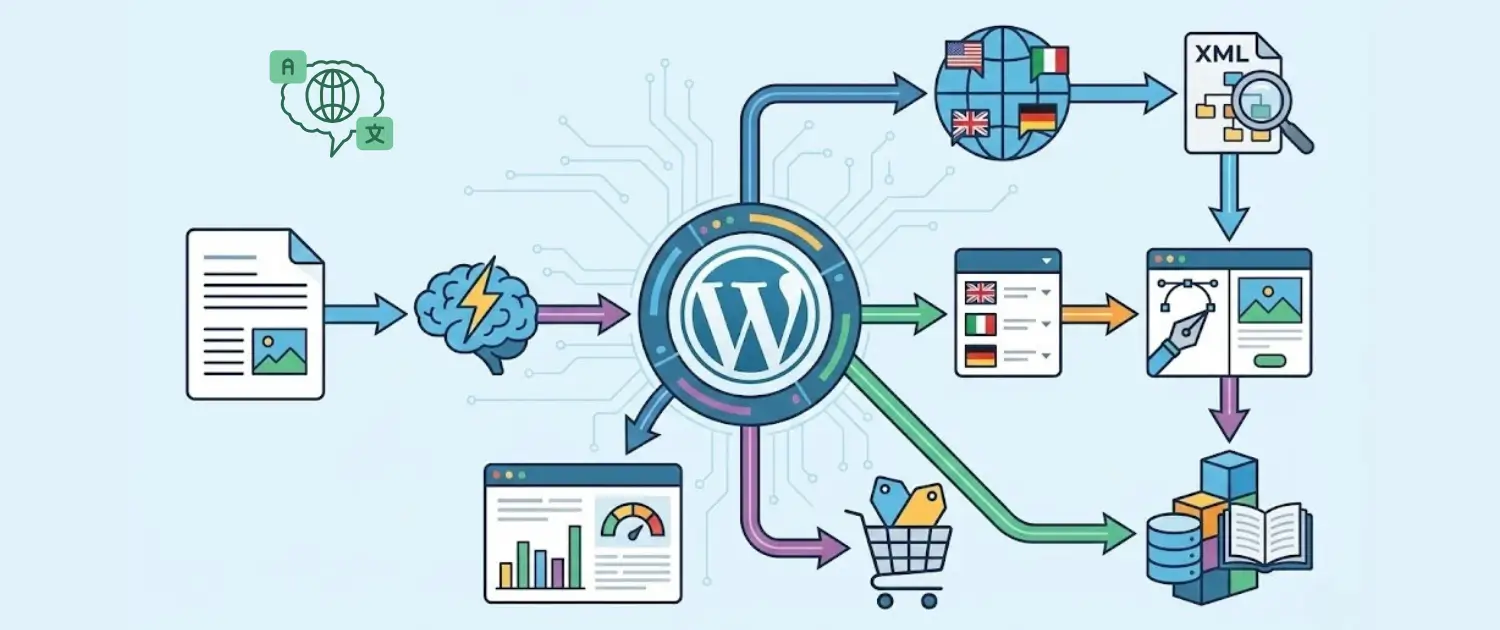
Voxfor Multilanguage Plugin is a free, professional-grade translation plugin for WordPress that turns any site into a multilingual, SEO-optimized platform.
It uses the DeepL API to deliver highly accurate, context-aware AI translations, while still giving full manual control over every piece of content. You can translate:
Posts and pages
Menus and widgets
Images and alt text
WooCommerce products and taxonomies
URL slugs and internal links
It also includes:
SEO features (hreflang tags, multilingual sitemaps, clean URLs)
Translation memory
A visual translation editor
A customizable language switcher
Performance optimizations and detailed usage controls
Key Features at a Glance
Key capabilities of Voxfor Multilanguage Plugin include:
Full-site translation coverage: Posts, pages, products, menus, widgets, theme strings, and more.
DeepL-powered translations: High-quality machine translation with strong context awareness.
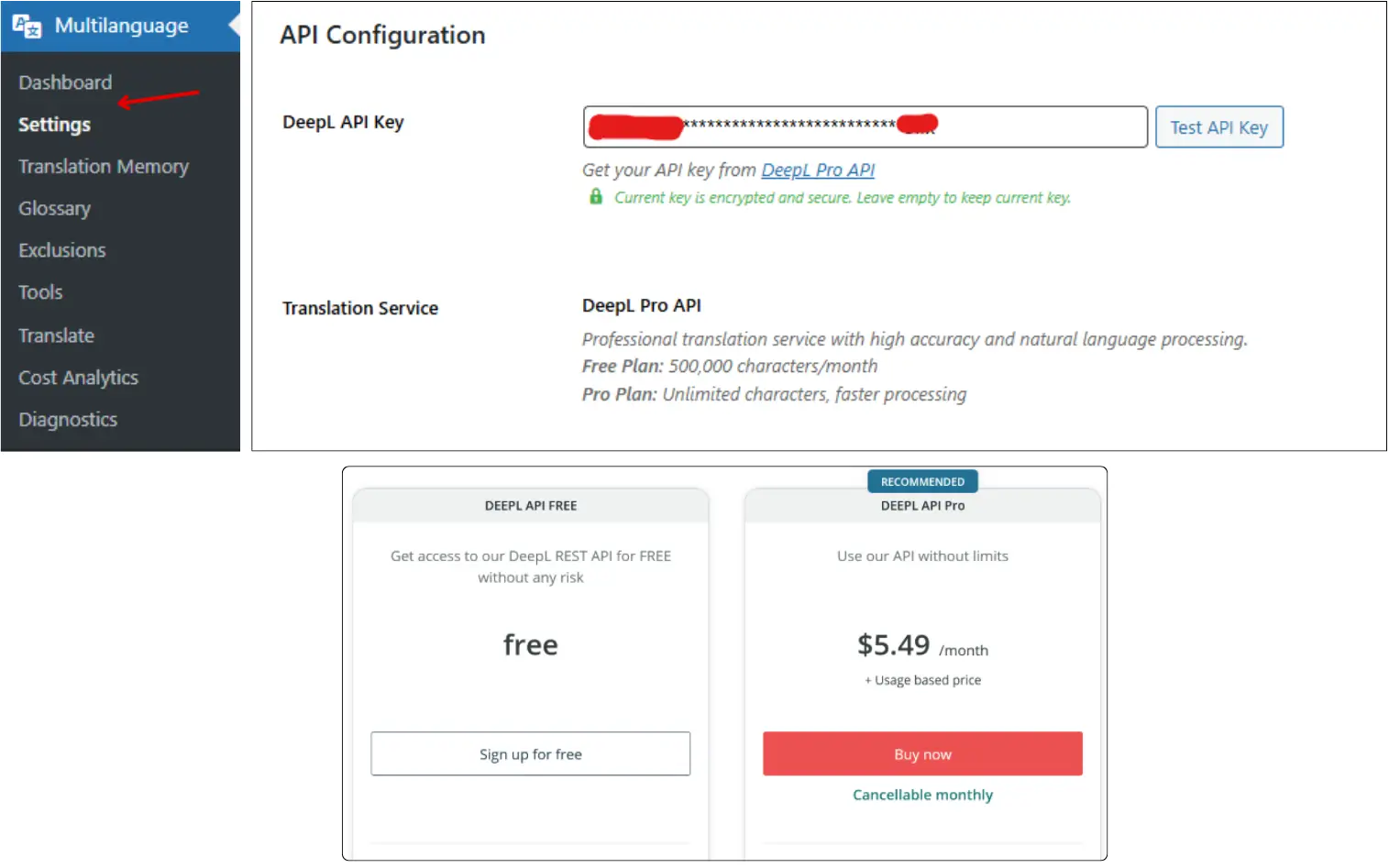
If the test is successful, the plugin confirms your usage and that the key is valid.
Important notes:
The key is encrypted and stored securely.
It is only used for translation requests.
Without a valid DeepL key, automatic translations will not run.
Language Settings
The Language Settings section controls your multilingual structure.
Key options:
Default Language
Represents the main website language (original content language).
Enabled Languages
Select which additional languages your site will be translated into.
Simply check the box for each language you want to support.
The plugin handles all translation logic based on your selection.
These settings define:
Which languages show up in your language switcher
Which languages can receive translated content?
How your multilingual URLs and sitemaps are structured
SEO Settings
The SEO Settings are designed to help search engines correctly interpret your multilingual site.
Main options include:
Hreflang Tags
Adds language-specific hreflang tags so Google knows which language version to show to which users.
Image Alt Text Translation
Automatically translates image alt attributes, improving accessibility and SEO in each language.
URL Slugs
Enables translated URL slugs for each language.
Instead of one English slug for every language, each language can have localized URLs.
Sitemap Tags
Controls whether translated content is included in your website multilingual sitemap.
SEO Protection (Indexing Protection)
Prevents search engines from indexing incomplete or partially translated pages.
Useful while setting up or bulk-translating large parts of your site.
Correctly configuring this section is critical for multilingual SEO performance.
Language Switcher Settings
The Language Switcher Settings control how visitors change languages on your site.
Key options:
Default Style (Dropdown)
A classic dropdown selector for languages.
Display Options
Show country flags.
Show native language names.
Adjust how languages appear visually.
Floating Switcher
Adds a floating language button on your site.
You can choose its screen position (for example: bottom-right, bottom-left, etc.).
These settings let you design an intuitive, modern way for visitors to switch between languages.
WooCommerce Integration
If you run a WooCommerce store, this plugin can make it fully multilingual.
The WooCommerce integration lets you translate:
Product titles and descriptions
Short descriptions
Product categories and tags
Attributes and variations
Shop-related pages like Cart, Checkout, My Account, etc.
Key benefits:
Translated content is preserved when switching languages.
The visitor shopping cart is kept while they change language.
Shoppers experience a consistent multilingual storefront from product pages to checkout.
API Management: Status Limits & Alerts
The API Management section gives precise control over DeepL usage.
API Status
When enabled, translations are processed normally.
If you want to pause all translations (for example, to avoid over-usage), you can disable this to stop new DeepL requests.
Daily and Monthly Credit Limits
Set the maximum number of characters allowed per day or month.
Set a limit of 0 only when you intentionally want no plugin-side character cap; DeepL plan limits and billing still apply.
Essential if using a free DeepL plan or managing strict API costs.
Usage Alerts
Enable alerts at 80% of the daily or monthly quota.
Gives time to pause translation or upgrade your DeepL plan before overages occur.
This section helps control costs and avoid sudden API overuse.
Usage Charts & Consumption Monitoring
At the bottom of the API management area, you will see Usage Charts.
These display:
Daily translated characters
Monthly translated characters
A visual bar showing what percentage of your set limits has been used
This makes it easy to:
Monitor how much translation work is happening
Plan when to increase limits or upgrade DeepL plans.
Detect unusual spikes in translation activity.
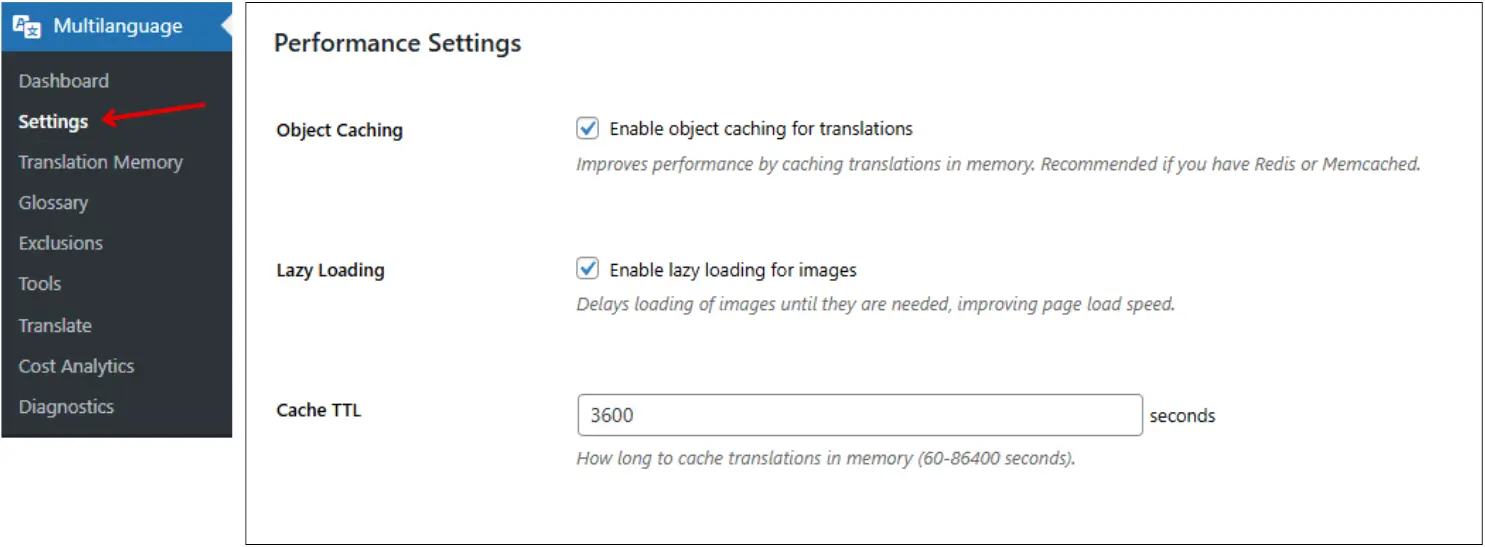
Performance Settings
The Performance Settings are designed to keep your multilingual site fast and efficient.
Options include:
Object Caching
Translations are remembered in memory when this is on, eliminating the time of re-lookup.
Recommended when your server supports Redis or Memcached.
Lazy Loading for Images
Delays image loading until they are actually needed on screen.
Especially helpful on pages that exist in multiple languages.
Cache TTL (Time to Live)
Defines how long translations are cached in memory, measured in seconds.
Can be set from 60 seconds up to 24 hours, depending on your server and update frequency.
After configuring, click Save Changes.
Translation Modes Overview
The plugin offers three main translation modes:
Comprehensive Translation
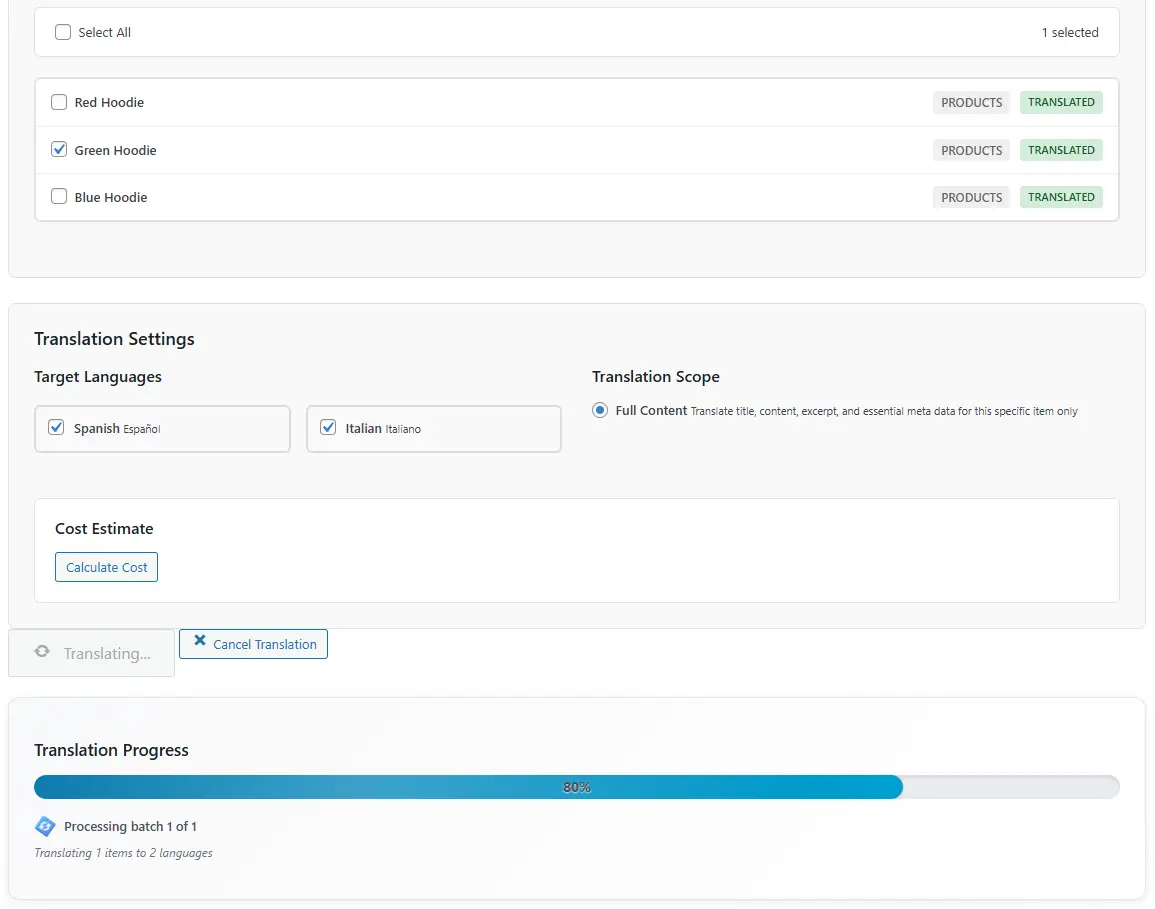
Individual Content Translation
URL Localization
Each mode has a different purpose: full-site translation for broad coverage, individual translation for priority pages, and URL localization for translated slugs.
Comprehensive Translation (Full-Site)
Comprehensive Translation scans your entire website and translates:
Theme strings
WooCommerce elements
Elementor/Gutenberg content
Menus and widgets
Other registered content types
Usage:
Open the Translation section.
Choose Comprehensive Translation.
Select target languages.
Click Start Comprehensive Translation.
Notes:
This is the fastest way to translate a full site.
It will burn a greater number of API credits, since each element is worked with the others.
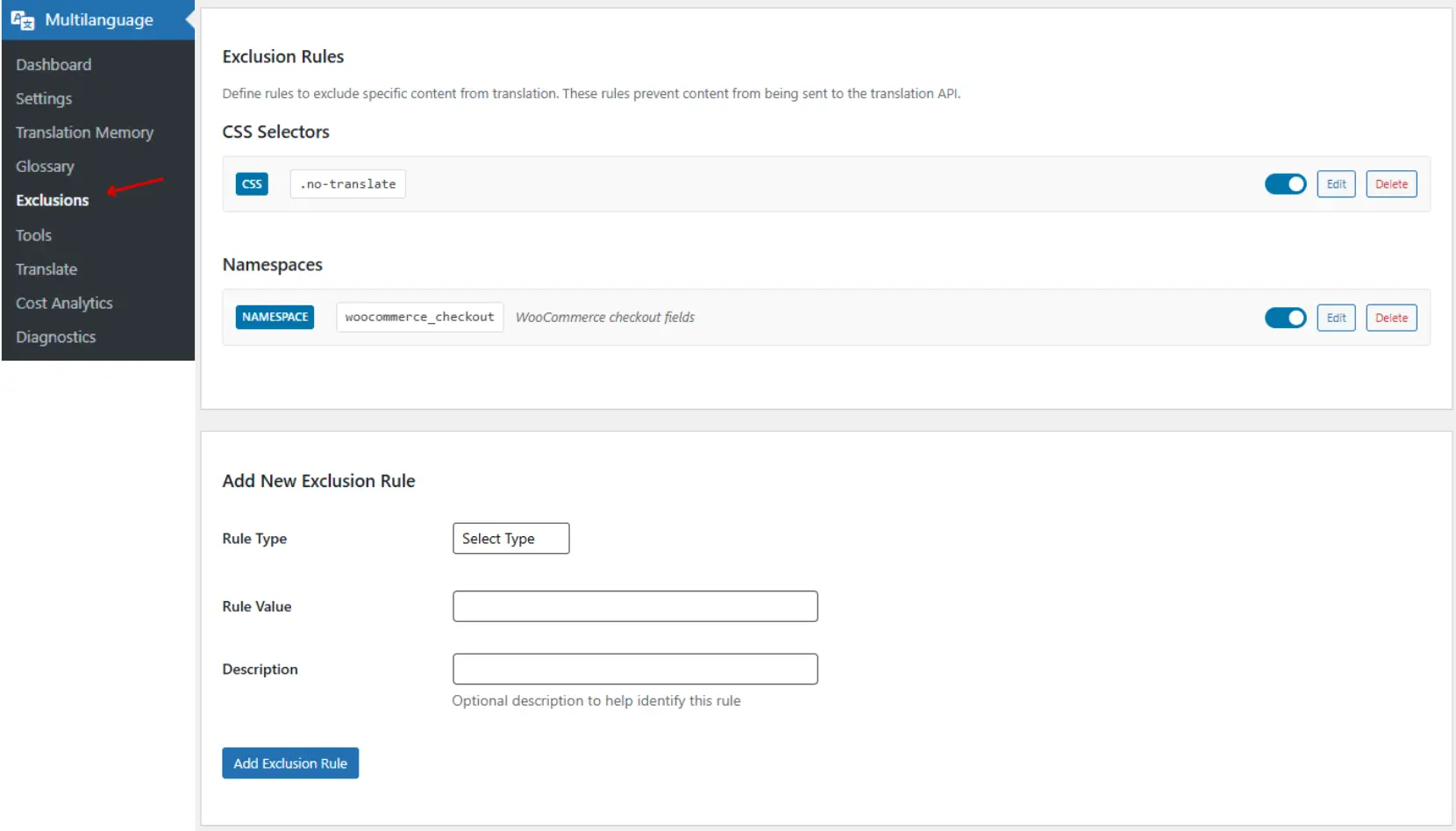
When the page is sent for translation, the text inside that selector is not translated.
Important note:
You must set the exclusion rule before translating the page.
If a page was already translated, you may need to undo and re-run the translation.
Namespace Exclusion
Namespaces are predefined identifiers used by WordPress, WooCommerce, themes, and page builders.
Adding a namespace to the exclusion list prevents all associated content from being translated.
Examples:
A namespace for WooCommerce Checkout ensures that checkout fields remain untouched.
A namespace for titles prevents page or product titles from being translated.
The plugin documentation provides a list of supported namespaces. Combining CSS selectors and namespaces gives complete control over what is and is not translated.
Multilingual Sitemap System
Voxfor Multilanguage Plugin includes a multilingual sitemap engine that integrates with major SEO plugins such as Rank Math and Yoast SEO.
How it works:
For each language, the plugin generates a separate sitemap.
These sitemaps include:
Posts
Pages
Products
Categories and taxonomies
Examples:
sitemap.xml shows the master sitemap indeYou’llu’ll see entries like:
Spanish sitemap index
Italian sitemap index
Each language sitemap can be:
Opened and inspected.
Validated using any sitemap validation tool.
Benefits:
Clean, structured, language-specific sitemaps.
Search engines can crawl and index every translated page correctly.
The Tools section contains four essential utilities:
Clear Translation Cache
Clears the translation cache if updated translations are not appearing.
Forces the plugin to reload fresh translations.
Optimize Database
Removes old, unused translation records and trash.
Keeps the database lean and efficient.
Process Queue & Clear Failed Items
If some DeepL requests are stuck or pending, Process Queue pushes them through immediately.
Clear Failed Items removes failed or stuck translation attempts from the queue.
Cost Analytics
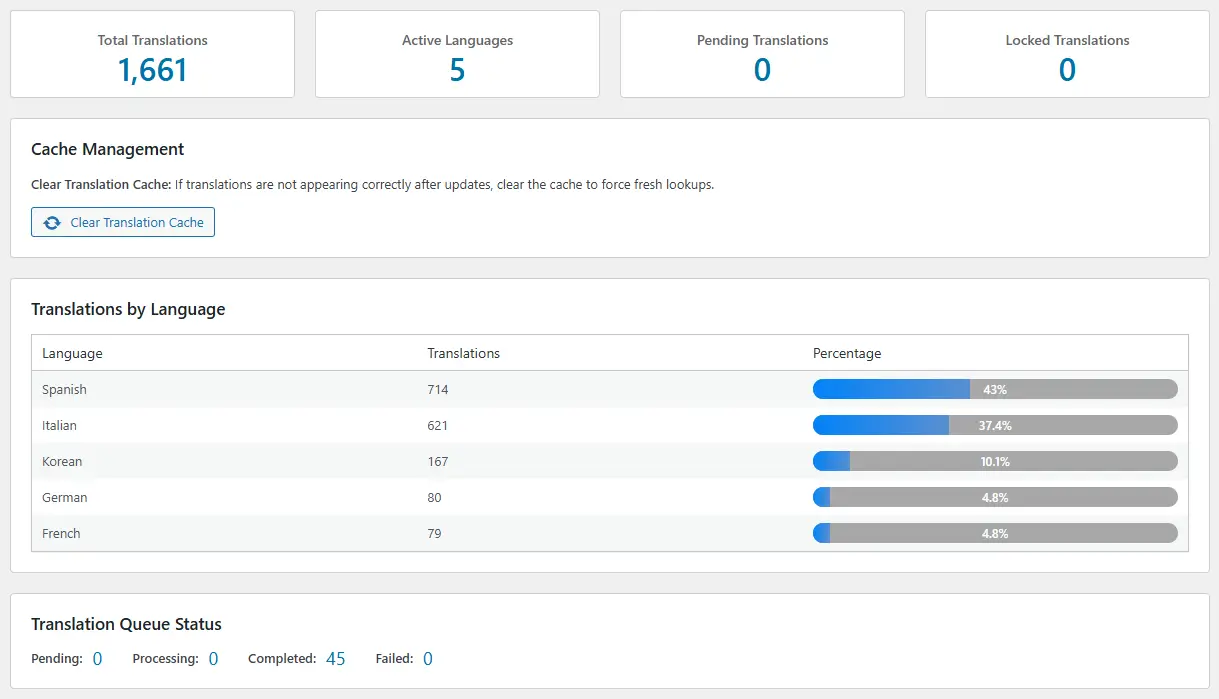
Shows live DeepL API usage data:
Total characters translated
Current remaining quota
Daily average usage
Usage history in table form
Helps understand and manage your translation costs.
Diagnostics
Displays system health and server compatibility for the plugin.
Checks items such as:
PHP version
PHP memory limit
Required extensions and settings
Anything marked as failing should be corrected to ensure stable operation.
Setup Checklist & Final Review
Use this checklist before translating at scale with Voxfor Multilanguage Plugin:
Before translating at scale
Configure API key, language settings, SEO settings, and exclusion rules first.
Decide which languages matter most for your audience.
Start with key pages.
Translate the homepage, main product pages, key blog posts, and core navigation pages first using Individual Content Translation.
Use Comprehensive Translation carefully.
Ideal for full-site rollouts, but monitor API usage and costs.
Fine-tune with Translation Memory & Visual Editor
Use Translation Memory for phrase-level fixes.
Use the Visual Editor for context-based adjustments on important pages.
Control terminology with Glossary
Add rules for brand names, technical jargon, and recurring phrases.
Protect sensitive or design-critical areas with Exclusion Rules.
Especially useful for complex layouts, shortcodes, or checkout forms.
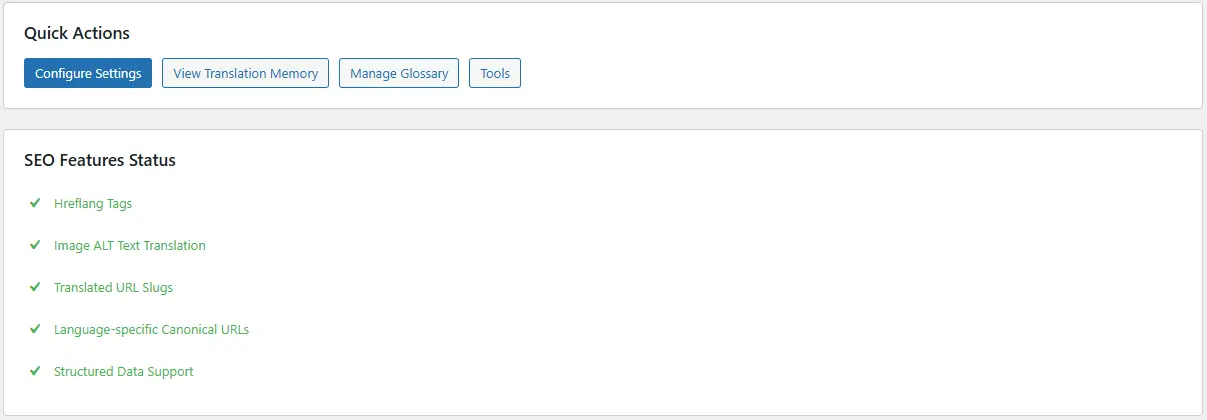
Review SEO setup
Confirm hreflang is enabled.
Validate multilingual sitemaps.
Verify that slugs are correctly localized.
Monitor usage and performance.
Use API limits and alerts to avoid overages.
Adjust cache settings and performance options to keep the site fast.
With these steps in place, Voxfor Multilanguage Plugin becomes a complete multilingual solution for WordPress, enabling professional-grade translations, strong SEO, and a smooth experience for visitors in every language.
About the writer
Hassan Tahir prepared this guide for WordPress and WooCommerce teams setting up Voxfor Multilanguage Plugin, DeepL workflows, hreflang checks and multilingual SEO review.
Frequently Asked Questions
How does Voxfor Multilanguage Plugin use DeepL?
The plugin can use DeepL to translate WordPress content, but important pages still need human review for terminology, intent, brand voice and local search behavior.
Does the plugin create hreflang tags?
It can support multilingual SEO workflows with hreflang and localized URLs, but you should verify source code, canonicals, sitemap output and cache behavior after setup.
Can it translate WooCommerce products?
Yes, WooCommerce product content can be part of the translation workflow. Review product names, attributes, variations, checkout strings and category pages before indexing translated store pages.
Should every page be translated automatically?
No. Start with homepage, service pages, product categories, high-value products and core navigation. Low-value or outdated content can waste API quota and create weak localized pages.
What should I test before publishing translated pages?
Test DeepL quota, translated slugs, hreflang, canonical tags, internal links, language switcher behavior, cache clearing, sitemap output and WooCommerce cart or checkout flows.















 Lifetime VPS Europe
 Lifetime VPS Asia
 Lifetime WooCommerce Hosting
 Lifetime Hosting
 Lifetime Game Dedicated Servers
 Chicago, US
 Tokyo, Japan
 Singapore
 Hong Kong
 Seoul, South Korea
 Amsterdem, Netherlands
 London, UK
 Stockholm, Sweden
 Oslo, Norway
 Vienna, Austria
 Zurich, Switzerland
 Sydney, Australia
 Wordpress Hosting
 VPS Hosting
 DDOS Protection
 Submit Ticket
 Full Management
 Guides
 Videos and Podcasts
 Discover Creative Ideas
 Voxfor Autonomous AI Workers
 Voxfor Mega Menu
 Voxfor Advanced Price Management For WooCommerce
 Voxfor Secure Live Chat and AI Support
 Voxfor Multilanguage
 Voxfor AI Content Summary
 Voxfor Autopilot