Lifetime VPS Europe
 Lifetime VPS Asia
 Lifetime WooCommerce Hosting
 Lifetime Hosting
 Lifetime Game Dedicated Servers
 Chicago, US
 Tokyo, Japan
 Singapore
 Hong Kong
 Seoul, South Korea
 Amsterdem, Netherlands
 London, UK
 Stockholm, Sweden
 Oslo, Norway
 Vienna, Austria
 Zurich, Switzerland
 Sydney, Australia
 Wordpress Hosting
 VPS Hosting
 DDOS Protection
 Submit Ticket
 Full Management
 Guides
 Videos and Podcasts
 Discover Creative Ideas
 Voxfor Autonomous AI Workers
 Voxfor Mega Menu
 Voxfor Advanced Price Management For WooCommerce
 Voxfor Secure Live Chat and AI Support
 Voxfor Multilanguage
 Voxfor AI Content Summary
 Voxfor Autopilot
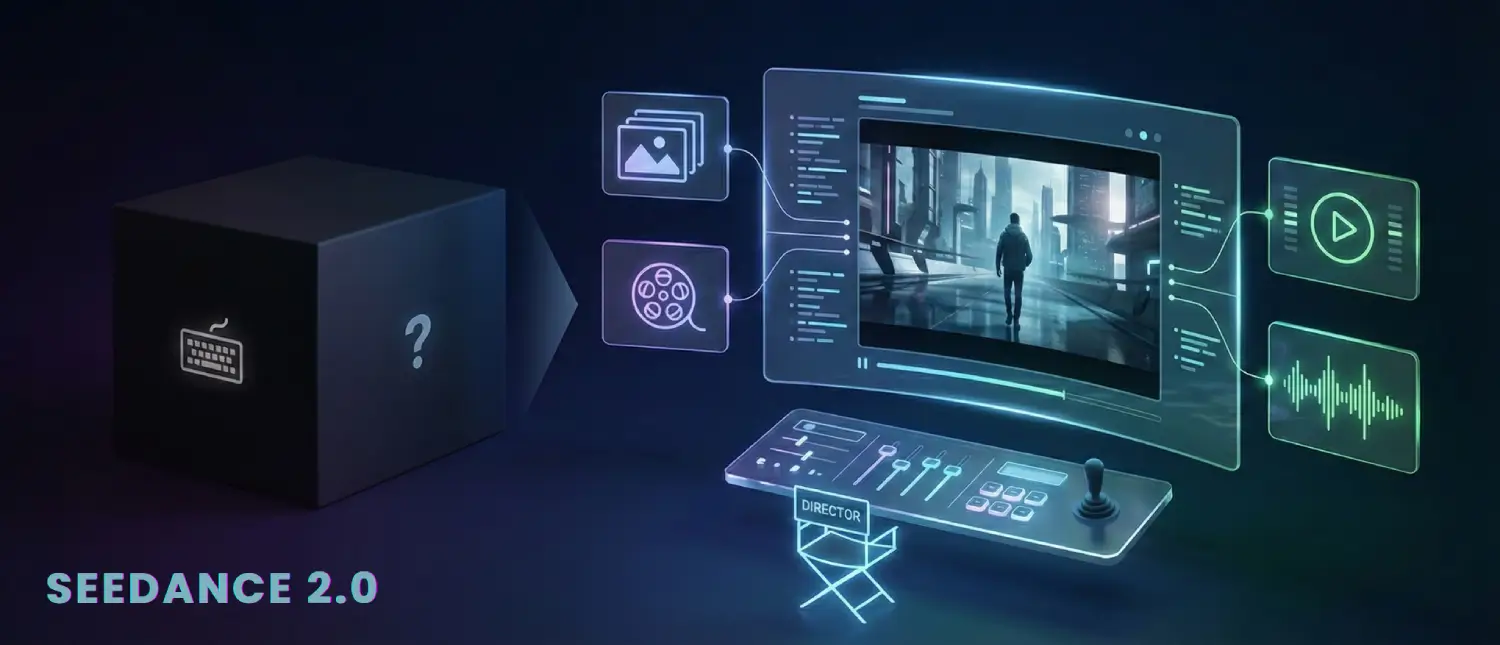
A video AI breakthrough with the release of ByteDance Seedance 2.0 in early 2026 can be described as dramatic. Text-to-video models have long been based on the black-box paradigm: you input a written prompt, and hope the output looks like your vision. Seedance 2.0 flips that script. It presents a multimodal All-Round Reference system allowing creators to add up to 12 reference files, images, video clips, and audio tracks, and explicitly indicates all the elements of the scene. Effectively, you now have a virtual director console: present the AI with what shots, characters, and sounds you would like to see, and it complies.
This frame is an example of the outcomes: lighting, character, and motion are all demonstrated in a consistent manner. Creators do not use ambiguity in text prompts; instead, they ground the AI imagination in concrete media. In Seedance 2.0, you could post a portrait of an actor, a camera shot, and a beat of music and label it as use @Image1 as the hero, replicate @Video1 pan, and time action to @Audio1. The model then makes sense of the references and integrates them into one consistent video. The output produced is aligned with the desired cinematic effect of the creator, not something generated through random generative gambits.
Seedance 2.0 unifies text, images, video, and audio into one generation architecture. Official documentation confirms it supports “up to 9 images, up to 3 videos (total ≤15s), up to 3 audio files (≤15s) and natural language instructions, for a total of 12 files.”
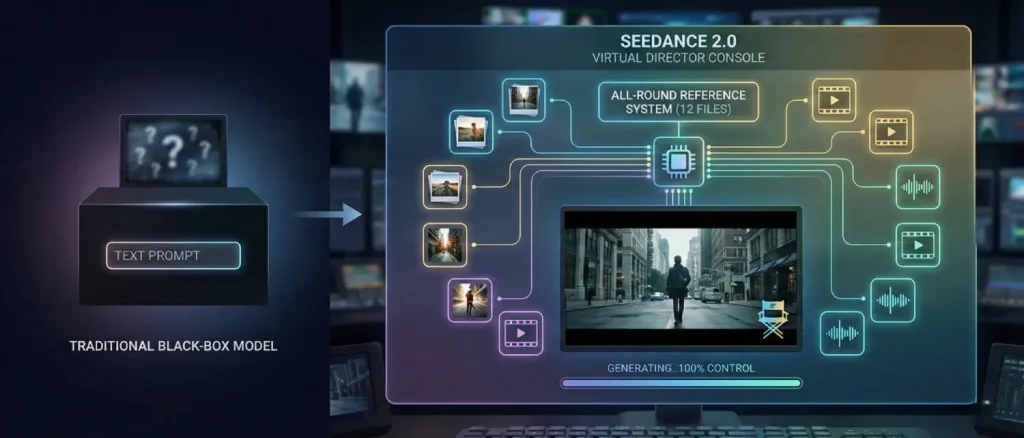
Put simply: you can scatter your 12 slots across modalities however you like – for example, 8 images + 2 videos + 2 audio, or 4 images + 3 videos + 5 audio, etc. This flexible limit encourages creators to use only the most relevant references, which in turn yields cleaner, more predictable results. Indeed, Seedance designers tout the 12-file cap as “a feature, not a constraint,” pushing users toward high-quality, high-signal inputs.
By comparison, most competing video models remain text-centric or single-reference. For example, Google Sora and Meta Make-A-Video only accept text or at most one image, while others like Runway Gen-3 allow image + text but no video or audio. Seedance 2.0 stands alone: multimodal inputs up to 12 files, versus text-only or image-plus-text for others.
As one tech guide summarizes, Seedance is now built to handle “any combination of visual, video, and audio inputs” in one generation. This multimodal input is the heart of its All-Round Reference system. It means instead of writing “a dancer doing a pirouette in a ballroom,” you can actually show the model a ballroom photo, a dancer’s outfit image, a clip of a pirouette, and a classical music excerpt. The model will use each reference appropriately, producing exactly what you showed it — a controlled choreography with the correct setting and timing.
How the All-Round Reference System Works
The key to Seedance creative control is its @Tag referencing system. After uploading your images, clips, and audio, you refer to each in the prompt by an @prefix and an ID such as @Image1, @Video1, or @Audio1. You then describe what to do with that reference, giving the model explicit directional instructions.
“Use @Image1 as the hero’s look, @Image2 as background,
follow @Video1 camera movement, and sync actions to @Audio1 beat."
This specifically informs the model: Image1 is used to get the face and costume; Image2 is used to get the scene layout; Video1 is used to get the motion choreography; and Audio1 is used to get the timing. The AI processes every reference with a special encoder (visual patch tokens in the case of images, spatiotemporal tokens in the case of video, spectrogram in the case of audio) and finally produces a single latent representation. Since all the inputs are different and marked, it is able to maintain each of the elements without confusion.
The practical outcome is like having a director’s storyboard. For example, the model can “tell the difference between a character reference and a style reference,” as one user guide notes. You could upload two photos of the same person (frontal and profile) and say, “@Image1 is the first shot, @Image2 is the last shot; maintain the same face in both.” Seedance 2.0 will keep that face and identity consistent across the generated sequence. Another prompt might say, “Use @Video1 for all camera pans and @Image3 for the actor’s outfit.” The engine will latch onto those cues precisely, dramatically reducing the “morphing” errors common in earlier AI videos.
Tech reviewers have confirmed this modular flexibility. Researchers in hands-on tests discovered they could transform one reference such as changing the motion clip, and only that part of the output would change; they could not alter the face of the character, her clothes, or the background since those references had not been modified.
Such modular control has never been seen in text-to-video. You do not have to rewrite a complete prompt to correct a single problem, but simply replace or modify the corresponding reference. The others act as anchors, maintaining uniformity. One tester captured it clearly: it is possible to iterate on one dimension of video without losing progress on all the others. This accelerates creativity by a large margin.
The Benefits: Professional Directing, Not Guesswork
With the All-Round Reference system, Seedance 2.0 behaves more like a film editor than a random image generator. Every key creative decision can be locked down. For example:
- Visual Style and Branding: Upload a product image or logo as an anchor. The model then consistently applies that design to characters or props. An advertiser can ensure brand colors or packaging appear exactly as intended across shots.
- Character Consistency: For narrative or series, use multiple angles of a character (front, side, three-quarter) or just one high-resolution portrait. Prompt “Maintain the same facial structure and clothing from @Image1.” The character will not drift or swap appearances across different shots.
- Motion and Camera Moves: Any complex action or camera choreography can be “borrowed” from a reference video. Want a cinematic tracking shot or a dancer’s pirouette? Simply upload a video clip with that motion and instruct the AI accordingly. The model replicates the exact camera path, pacing, and physical dynamics. This cuts out the guesswork of trying to describe a shot in words.
- Audio and Rhythm: Upload a music track or sound effect and tag it as background mood. The AI will time cuts and movements to the beat. For instance, in a dance scene prompt, you could say “kick drum hits at 5s, sync jump to @Audio1.” The model includes native sound, lip-sync, and environment audio, aligning them to match visuals precisely.
Combining these lets creators “direct” their scene. In one tutorial, a user called the result “the model respects your files, it’s built for ‘reference-to-video’.” Another guide points out that this shift means creators think less about writing the perfect prompt and more about building a brief with references that remove ambiguity.
In practice, people use it to clone viral videos or cinematic sequences: show the AI a popular clip, provide an actor or character image, and say, “apply this look and background to that motion.” Seedance 2.0 will output a new video with your subject performing that choreography, all guided by the provided inputs.
From a technical standpoint, the All-Round Reference system improves every major shortcoming of prior models. By anchoring on input assets:
- Temporal Coherence: The AI no longer drifts arbitrarily between frames. It has clear reference points to keep characters and props steady, so multi-second actions feel smooth and physically plausible.
- Physical Realism: In tests with dynamic scenes, Seedance 2.0 characters displayed believable weight, momentum, and collisions without explicit prompting. This is because the model is trained to understand physics and motion patterns, and the references help reinforce realism.
- Cinematic Quality: Since you directly provide camera movements and define transitions, the AI can create a broadcast-quality composition with the same lighting and framing. In fact, one of the reviews points out that lighting direction and depth-of-field effects are consistent and correspond with the type of shot.
Advantages Over Traditional Prompt-Only Tools
This is prior to the release of Seedance 2.0, where the workflow of AI video was frequently text-centric. Users detailed scenes and then wordy prompts were tweaked over hours. The outcomes were unstable: one word alteration could change the entire clip without any foreseeing.
By comparison, Seedance 2.0 uses a reference-based approach, making it feel more like a precision instrument than a slot machine. Key differences include:
- Control vs. Chance: You think that with mere text, the model will get it. You give references, and you are precise in what you mean. That makes the generation direction. According to creators, it is now possible to say I want that specific person in that exact place doing that specific action and the model will do it; however, at one point, it was purely guessing.
- Speed of Iteration: Since you can isolate elements, fixing mistakes is faster. If the lighting is off, upload a different reference or adjust the tag. If the camera angle needs changing, swap the video clip. This modular feedback loop halves wasted generations compared to prompt-only methods.
- Native Audio and Sync: Unlike older tools, Seedance 2.0 doesn’t require a separate sound design step. Its dual-branch AI generates audio and video together. This means cut changes or dialogue edits happen seamlessly, a boon for storytellers.
- Multi-Shot Narratives: Other platforms normally render a single shot. Seedance storyboarding feature provides separation of scenes into several interconnected shots depending on context. Even in your prompt, you can add some segments of the scene, such as: Scene 1: A street in the city, Scene 2: Interior of a car, Scene 3: Chase shot, and so on, and it will create a sequence that flows logically.
Simply put, Seedance 2.0 is more like a professional video editing application with AI support than a black box to play with. One of the reviews refers to it as stepping away from guessing with AI to accurate guidance. Another adds that the UI has been transformed into something closer to a video editor, just drag in references and type a shot list in text, rather than writing a novel-length prompt. It represents a paradigm change in the interaction between creators and AI.
Real-World Workflows and Use Cases
The All-Round Reference system opens up new possibilities across industries. Here are some key scenarios where creators are already experimenting with Seedance 2.0:
- Advertising & Marketing: Agencies can replicate winning formats by plugging brand assets into trending templates. For example, a cosmetic ad might use a photo of the product (@Image1) and a reference clip of a glamorous model catwalk (@Video1). Seedance 2.0 merges them into a custom, branded promo without new filming. Testimonials highlight how teams can “reference successful ad templates” with their own products and branding.
- Creative Storytelling and Film: Indie filmmakers and animators love the storyboard power. One can feed a scene sketch or first frame (@Image) and a camera movement clip (@Video), then prompt, “let this character discover a hidden door.” The result is a shot sequence that looks like a pre-visualized film scene.
- Social Media Content: For short-form content, speed and flexibility are king. Creators can remix memes or TikTok trends effortlessly. The Weshop guide calls this the “viral clone” workflow: pick a trending clip as your motion guide, upload a photo of yourself or a product, and say, “give me this vibe.” The AI churns out a polished clip in minutes.
- Education & Training: Seedance has the ability to visualize lesson concepts. Suppose a history teacher modifies one of the most renowned paintings into an animation clip: submit a picture, a script of the narration, and any additional sound effects. The AI will bring the scene to life and align the audio, producing a highly engaging instructional film.
- Game and VFX Pre-Vis: In film or games, Seedance can serve as a low-cost pre-visualization tool. Directors can test stunt ideas by combining reference clips of movement (@Video) with 3D renders or concept art (@Image). They can preview how a scene flows before expensive shooting. The ability to edit specific segments such as replacing a character or extending a shot means a rough cut can be refined dynamically.
The common theme in these scenarios is efficiency and fidelity. Whether one is on a shoestring indie film budget or part of a high-volume marketing team, Seedance 2.0 offers a way to get professional-looking footage with minimal overhead.
Creators report that even tasks like adding product logos or brand colors have never been easier: simply include the design as an image reference, and the AI handles the rest with pixel-level accuracy. Another user quoted on the website said they “10x’d” their content output by referencing templates and remixing them with their own style.
Practical Tips for Mastery
Even with great tools, technique matters. Here are practical tips distilled from early adopters, tutorials, and community guides:
- Use High-Quality References: The AI can only be as good as what you feed it. Upload sharp, high-resolution images and clear video clips whenever possible. One experienced user notes that using 4K or 2K source photos prevents blur in the output. A noisy or blurry reference will yield a bland result. The Mango Animate review similarly emphasizes crisp 1080p/2K input for best results.
- Be Selective (Less Is More): Do not use all of your reference slots at once. The BudgetPixel guide recommends uploading short, high-signal references instead of a half-relevant file dump. For example, if your focus is on face identity and general dance style, a single portrait headshot and a clean dance video might be enough.
- Label Roles Clearly: In your prompt, explicitly state what you want from each reference. Use simple phrasing like “Use @Image1 for outfit and face” or “Match the lighting from @Image2.” Many users found that being redundant helps: if a detail is important, mention it more than once such as “hair color stays red, @Image1 hair stays red.”
- Iterate One Thing at a Time: Seedance 2.0 modularity allows the system to be tuned in one dimension at a time. If the motion is wrong, simply change the @Video reference. If the lighting is too dark, replace the background image or adjust the scene description.
- Write Shot-List Style Prompts: Instead of one long block of text, many power-users compose prompts like a storyboard. Break a 10–15 second video into segments, describing what happens in each part. For each block, reference the relevant assets.
0-4s: Wide shot city street. @Image1 actor walks toward the camera. @Audio1 sounds of traffic.
5-9s: Close-up on the actor's face. Focus on expression. Maintain @Image1 identity.
10-15s: Tracking shot pulling back to show city skyline.
This approach forces the AI to plan shots sequentially and maintain continuity. In fact, the EveryLab prompt structure was described as “more predictable than anything from unstructured prompts.” Use it especially for narrative or multi-shot work.
- Mind the Time Codes: If syncing to beats, use numeric timestamps in your prompt. For example: “@Audio1 beat at 3.0s, do a jump on the beat.” Testers found numeric cues worked better than vague phrases like “on the drop.” The model can interpret timing down to a fraction of a second.
- Extend, Don’t Regenerate: To continue an existing clip, upload the current video as a reference and specify the extension length. Seedance will append new content seamlessly, avoiding the need to regenerate the whole scene from scratch if you only need a few extra seconds.
- Use Multiple Angles for Details: If a particular detail must stay consistent, consider uploading multiple images that focus specifically on it. The EachLabs team, for example, uploaded separate close-ups to ensure the model retained small props such as a necklace that were being dropped in full-body shots. The AI preserved details it had seen in isolation more reliably.
- Balance Creativity vs Consistency: The settings in Seedance 2.0 allow tuning the “creativity” vs “consistency” tradeoff. More consistency means stricter adherence to your inputs, while more creativity can introduce surprise elements. For precise projects, it is often best to lean toward consistency. If the model is straying too much, tighten these controls before adjusting the prompt.
Experimentation is necessary in every situation. Conveniently, many users begin with a very simple setup: one image + one video + possibly one audio + minimal text. Once you have a functional foundation, you can gradually become more complex.
Over time, you will understand which modality affects what and how to word prompts for maximum effect. The core mindset is this: think of the AI as a cooperative partner, and it will produce aligned, high-quality output.
Comparing to Other AI Tools
It helps to contextualize Seedance 2.0 by comparing it with prior tools and models:
- Seedance 1.x (Previous Version): Seedance 1.5 Pro could handle joint audio-video generation, but it was far more limited. It typically accepted one image or a text prompt at a time and could not natively support extensions or multi-shot sequences. Character drift and scene mismatch were common issues.
- Kling (Kuaishou): Kling gained recognition for fluid motion, but struggled with consistency. It is comparatively weak in character identity preservation and camera control when measured against Seedance. While Kling’s organic motion could look impressive, it often felt arbitrary in direct comparisons, whereas Seedance delivers predictable, director-level control.
- Sora (OpenAI text-to-video): Sora remains text-only with no native sound support. Users who complain about Sora’s lack of multi-shot and multi-modal capabilities often find Seedance far more powerful. Where Sora excels in visual creativity from a prompt, Seedance excels in consistent and accurate output when guided by references.
- Veo (Google): Veo 3.1 does allow multi-shot outputs, but it still lacks integrated audio support and has no true image reference feature, relying primarily on text prompts and limited style guidance. The WaveSpeed guide notes that Seedance matches Veo’s narrative strengths while adding reference locking, a capability that Veo does not offer.
- Others (Runway Gen-3, Wan, etc.): Most competitors fall into the text + image category. The NxCode comparison table highlights that only Seedance checks all the boxes: native audio, multi-shot capability, and 12-file input support. No other model offers that combination of features. For example, Runway Gen-3 supports text + image, but does not allow video or audio references.
In summary, Seedance 2.0 redefines the AI video category. Instead of fitting features into an existing mold, it creates a new one: “reference-first” video generation. Reviewers consistently remark that it feels like a professional video creation platform, not just a demo tool. One even noted that the UI now “feels like a video editor” rather than an AI lab instrument.
By directly enabling director-style workflows such as shot-list prompts, reference uploads, and segment extensions, Seedance elevates AI from a novelty gadget to a practical production tool.
Beyond the Prompts: Practical Outcomes
Seedance 2.0 is already making waves. Early adopters span from hobbyists to professionals:
- Filmmakers: An independent director used Seedance to pre-visualize a complex stunt sequence. He uploaded POV footage of the desired jump (@Video1) and a still of his lead actor (@Image1), then prompted “Actor does @Video1 stunt.”
- Advertisers: A marketing agency built a campaign by indexing successful video ads as templates. They dragged in previous campaign video clips as @Video references and brand assets as @Images. According to a case study, they achieved “10× faster turnaround” on client videos because they could instantly mock up new ads by remixing old ones with new references.
- Educators and Hobbyists: Media professors are teaching the concept of filmmaking at universities using Seedance in their classes. For example, students uploaded Renaissance paintings as reference images and classical music as sound, then composed prompts to bring history to life. The result was coherent animations, which were later discussed in the context of narrative framing.
These stories underline a common truth: the more seeds (references) you provide, the less the AI has to “imagine.” What’s revolutionary is that now every input can be a seed.
This concept explains why ByteDance says creators can “transform ideas into visuals with full control.” It also sheds light on the stock market reaction reported in tech media, where investors see Seedance 2.0 as making high-quality video generation both cheaper and faster than traditional production.
From a creative standpoint, it positions the AI as a versatile partner rather than a wild card.
Conclusion: Directing with AI
Seedance 2.0 has ushered in a new paradigm: reference-first AI video generation. By allowing up to 12 mixed-media inputs with clear tagging, it transforms vague prompts into detailed instructions. Creators gain the power to dictate casting, choreography, cinematography, and sound, all within a single system. In doing so, the AI steps out of the black box and into the director’s chair.
Gone are the days of endlessly tweaking text prompts and hoping for the best. Now you show the AI exactly what you want and specify how each element should be used. The result is not random art, but reliable, professional-looking video that follows your creative vision. Whether building an ad campaign, a film storyboard, or a viral video, the All-Round Reference system gives creators direct control, elevating AI from a novelty to a true production tool.
As one test put it: “Seedance replaced luck with logic.” With that shift, the era of “AI video as a guessing game” is coming to an end. We now have an AI video model that listens, follows instructions, and delivers, one that, in ByteDance’s words, allows creators to “be true directors” of their digital content.
About the writer

Hassan Tahir wrote this article, drawing on his experience to clarify WordPress concepts and enhance developer understanding. Through his work, he aims to help both beginners and professionals refine their skills and tackle WordPress projects with greater confidence.