Lifetime VPS Europe
 Lifetime VPS Asia
 Lifetime WooCommerce Hosting
 Lifetime Hosting
 Lifetime Game Dedicated Servers
 Chicago, US
 Tokyo, Japan
 Singapore
 Hong Kong
 Seoul, South Korea
 Amsterdem, Netherlands
 London, UK
 Stockholm, Sweden
 Oslo, Norway
 Vienna, Austria
 Zurich, Switzerland
 Sydney, Australia
 Wordpress Hosting
 VPS Hosting
 DDOS Protection
 Submit Ticket
 Full Management
 Guides
 Videos and Podcasts
 Discover Creative Ideas
 Voxfor Autonomous AI Workers
 Voxfor Mega Menu
 Voxfor Advanced Price Management For WooCommerce
 Voxfor Secure Live Chat and AI Support
 Voxfor Multilanguage
 Voxfor AI Content Summary
 Voxfor Autopilot
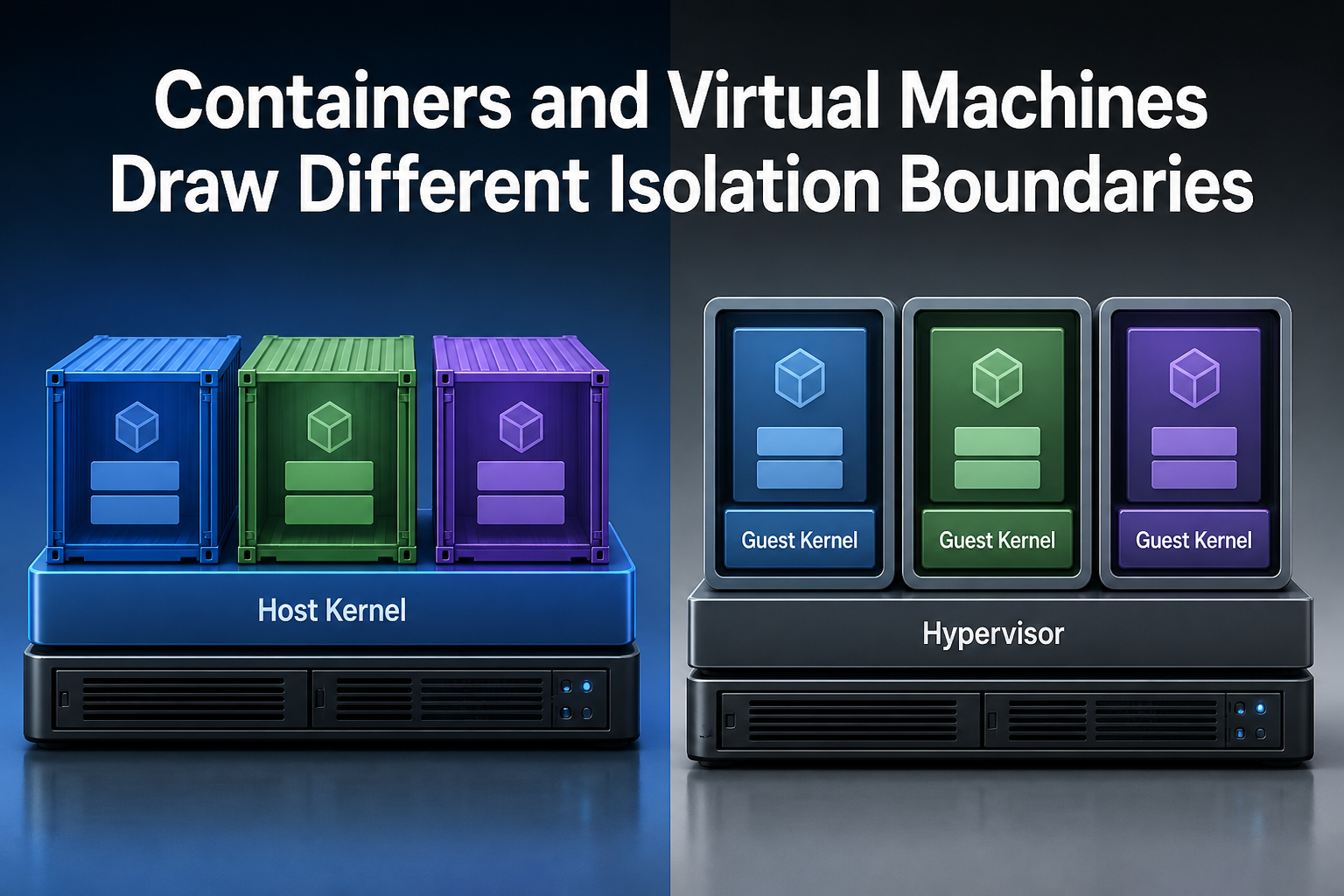
A container image and a virtual disk can both make software portable, yet they do not put the same boundary around that software. Containers isolate processes while normally sharing the host kernel. Virtual machines place a guest operating system and its own kernel behind a hypervisor. That difference affects trust, operating-system choice, failure scope, patch ownership and recovery design.
In practice, the answer is rarely “containers are better” or “VMs are safer.” A trusted web application may benefit from container packaging inside a VM, while customer-supplied code may need a separate kernel or a purpose-built sandbox. Choose the boundary first; choose the packaging and orchestration tools around it.
Audience and scope: this explanation is for developers, infrastructure buyers and operators who understand basic server concepts but do not need to be virtualization specialists. “Kernel” means the operating-system component that mediates processes, memory, devices and system calls. A “hypervisor” is the layer that presents virtual hardware to guest operating systems.
The Boundary Sits Below the Application
Inside an ordinary Linux container, the workload remains a set of host processes constrained by kernel mechanisms. Namespaces give processes separate views of resources such as process IDs, mounts and networks; control groups account for and limit CPU, memory and I/O. Docker’s own Engine security documentation describes both mechanisms and warns that configuration, daemon access and kernel hardening remain part of the security model.
By contrast, a VM sees virtual hardware. Its guest operating system boots a separate kernel, while the hypervisor allocates processor, memory, storage and network devices. Microsoft’s current container and VM architecture comparison makes the consequence explicit: containers use the host kernel, whereas each VM carries a complete operating system.
Packaging is therefore not the same as isolation. An OCI image can make an application repeatable across compatible container hosts, but it does not give the application a new kernel. A VM image can preserve a whole guest environment, yet it also carries more lifecycle state: operating-system packages, services, drivers and configuration must be maintained inside the guest.
Production architecture explains why the technologies often appear together. Cloud and hosting platforms commonly provision a VM, then run a container runtime inside it. Red Hat’s updated 2026 overview calls containers and VMs complementary technologies, not mutually exclusive replacements, and describes platforms that manage both container and VM workloads.
Reproduce the Boundary on a Disposable Linux Lab
The comparison becomes more useful when the boundary is observable. The following lab was reproduced on Debian 13 inside a KVM guest, kernel 6.12.96, on August 8, 2026. It uses unshare from util-linux; no container daemon, production mount, network rule or persistent service is touched. Run it in a disposable Linux VM or test host where unprivileged user namespaces are allowed. This is a namespace lab, not a claim that unshare reproduces every policy a container runtime adds.
First, capture the current process view. The namespace inode numbers are local identifiers that make the later comparison unambiguous.
printf 'kernel=%sn' "$(uname -r)"
printf 'pid=%sn' "$$"
for ns in user mnt pid; do
  printf '%s=' "$ns"
  readlink "/proc/self/ns/$ns"
done
Next, enter new user, mount and PID namespaces. --map-root-user grants root only inside the new user namespace, --fork starts the child in the new PID namespace, and the child becomes PID 1 there.
unshare --user --map-root-user --mount --pid --fork sh -c '
  printf "kernel=%sn" "$(uname -r)"
  printf "pid=%sn" "$$"
  for ns in user mnt pid; do
    printf "%s=" "$ns"
    readlink "/proc/self/ns/$ns"
  done
'
The process view changed, but uname -r did not. That is the central shared-kernel result: Linux namespaces can provide different process, mount and identity views without booting another kernel.
State ownership is a separate decision. This third input mounts temporary memory-backed storage only inside the new mount namespace while also updating a file in the outer test directory. When the namespace exits, the temporary mount disappears, while the explicitly external file remains.
VOXFOR_BOUNDARY_LAB=$(mktemp -d)
printf 'outside-originaln' > "$VOXFOR_BOUNDARY_LAB/persistent.txt"

unshare --user --map-root-user --mount --fork sh -c '
  boundary_dir=$1
  mkdir "$boundary_dir/ephemeral"
  mount -t tmpfs tmpfs "$boundary_dir/ephemeral"
  printf "inside-onlyn" > "$boundary_dir/ephemeral/transient.txt"
  printf "outside-updatedn" > "$boundary_dir/persistent.txt"
  printf "inside: persistent=%s transient=%sn"
    "$(cat "$boundary_dir/persistent.txt")"
    "$(cat "$boundary_dir/ephemeral/transient.txt")"
' sh "$VOXFOR_BOUNDARY_LAB"

printf 'outside: persistent=%s transient_exists=%sn'
  "$(cat "$VOXFOR_BOUNDARY_LAB/persistent.txt")"
  "$(test -e "$VOXFOR_BOUNDARY_LAB/ephemeral/transient.txt" && echo yes || echo no)"
Finally, identify the outer machine’s virtualization boundary. A physical host may return none; the reproduced environment returned kvm and full, proving this namespace lab itself ran inside a hardware-virtualized guest.
printf 'virt=%sn' "$(systemd-detect-virt --vm)"
lscpu | awk -F: '/Hypervisor vendor|Virtualization type/ {
  gsub(/^[ t]+/, "", $2)
  printf "%s=%sn", $1, $2
}'
Representative output from the reproduced run is below. Namespace inode values and the outer shell PID will differ on another host.
kernel=6.12.96+deb13-amd64
pid=384285
user=user:[4026531837]
mnt=mnt:[4026531841]
pid=pid:[4026531836]
kernel=6.12.96+deb13-amd64
pid=1
user=user:[4026532747]
mnt=mnt:[4026532748]
pid=pid:[4026532749]
inside: persistent=outside-updated transient=inside-only
outside: persistent=outside-updated transient_exists=no
virt=kvm
Hypervisor vendor=KVM
Virtualization type=full
The boundary test should produce one consistent set of observations: the kernel release stays the same before and inside unshare; user, mount, and PID namespace identifiers differ; the child sees its own PID 1; the external file still reads outside-updated; the tmpfs-only file disappears after exit; and virtualization detection matches the test host. Together, those results demonstrate the namespace and state boundaries exercised here without pretending to replace a runtime-specific security audit.
Cleanup is scoped to the directory created by mktemp. Preserve the variable in the same shell, confirm it is non-empty and points below /tmp, then remove only the two known files/directories. No production rollback is needed because the lab installs no package and changes no service.
case ${VOXFOR_BOUNDARY_LAB:-} in
  /tmp/tmp.*)
    test ! -e "$VOXFOR_BOUNDARY_LAB/ephemeral/transient.txt"
    unlink "$VOXFOR_BOUNDARY_LAB/persistent.txt"
    rmdir "$VOXFOR_BOUNDARY_LAB/ephemeral"
    rmdir "$VOXFOR_BOUNDARY_LAB"
    ;;
  *) printf 'Refusing cleanup: unexpected lab pathn' >&2; exit 1 ;;
esac
Isolation Is More Than a Security Label
Shared-kernel isolation is still real isolation. Namespaces, cgroups, capabilities, seccomp, SELinux or AppArmor, user namespaces, read-only filesystems and restricted device access can remove many paths a process does not need. Running as a non-root user, dropping capabilities and protecting the container runtime socket materially changes the risk.
Conversely, a VM is not an automatic security verdict. Hypervisors, virtual devices, guest kernels, management interfaces and image pipelines all have attack surfaces. A vulnerable guest can still lose its own data or credentials, and a hypervisor escape—although a different path from a container escape—is not impossible. Network segmentation, identity controls, patching and backup validation remain necessary on both sides.
Trust should drive the first decision. Code built and reviewed by one team is a different problem from arbitrary scripts uploaded by customers. Putting mutually untrusted tenants in ordinary containers on one shared kernel accepts a broader common failure surface than placing them behind separate guest kernels. Where that threat model matters, use VMs, microVMs or a sandbox runtime designed to intercept or virtualize system calls, and verify the implementation rather than relying on the word “container.”
gVisor illustrates the middle ground. Its current architecture describes a userspace application kernel that intercepts system calls and integrates with OCI tooling. It adds a stronger layer between the workload and host kernel, but its documentation also names compatibility and system-call overhead tradeoffs. A hardened runtime is an architectural choice with tests to run, not a label that upgrades every workload automatically.
Resource limits deserve separate treatment. A cgroup quota can stop one container from consuming an agreed CPU share, but it is not a different kernel boundary. When a service is slow despite low host utilization, the container CPU-throttling diagnosis shows why host averages and workload limits must be read together. VMs have their own allocation and contention mechanisms; the layer changes, while the need to observe both guest and host remains.
Recovery Units Follow the Packaging Model
Container operations generally favor replacement. Kubernetes defines a container image as a ready-to-run package and says running containers should be treated as immutable: build a new image, then recreate the container. Its container concept documentation also separates the image from the node and runtime that execute it.
That model works only when persistent state has an explicit home. Databases, uploaded files, secrets and queues do not become disposable because the process is containerized. Recovery must cover the image or build source, deployment declaration, external volumes, data services, credentials and the control plane that can schedule a replacement. A restart policy is narrower: as the Docker health and restart investigation explains, an unhealthy probe does not necessarily cause a container restart.
VM recovery often treats the guest disk and configuration as a larger unit. Snapshots and image backups can capture more of the machine, but crash-consistent storage is not automatically application-consistent. The Proxmox VM backup consistency guide separates capture mechanics from the database and filesystem evidence needed after restore.
Neither model eliminates recovery design. Containers tend to move application state outside the replaceable runtime; VMs tend to preserve more state inside the recoverable guest. The correct recovery unit is the smallest set that can re-create the service and its accepted data state, not whichever artifact is easiest to copy.
Failure scope follows the same layers. Losing one container process may trigger a replacement on the same node. Losing the node affects every container scheduled there. Losing one guest affects that VM; losing the hypervisor host affects all of its guests. Orchestration and clustering can relocate workloads, but they do not erase common dependencies such as storage, identity, networking or the physical host.
Most Production Systems Use Both
The useful comparison is not always containers *versus* VMs. A common stack is physical hardware, hypervisor, VM, guest Linux kernel, container runtime and application containers. The VM establishes a tenant or node boundary; containers provide repeatable application packaging and smaller deployment units inside it.
Separate lifecycles are one benefit of the layered design. Infrastructure staff can patch or replace VM images on one schedule, while application teams rebuild container images more frequently. The separation is helpful only when ownership is explicit. If nobody owns the guest kernel because “the app is in Docker,” the VM layer becomes neglected. If nobody rebuilds container images because “the VM is patched,” application libraries remain stale.
Capacity evidence must also cross layers. A container can hit a memory limit while the VM still has free RAM; a VM can experience host pressure while the guest believes it has available pages. The KVM ballooning pressure analysis demonstrates why reclaim decisions need both guest and host measurements. For abrupt memory loss, the Linux OOM evidence path helps identify whether the kernel, a cgroup or systemd-oomd made the decision.
Hosted infrastructure adds one more check: confirm what the provider actually supplies. A product called “server” could represent shared hosting, a container-based environment, a KVM guest or dedicated hardware. Voxfor’s current managed-hosting page states KVM virtualization and root access, giving a buyer two concrete boundary facts to verify before treating a plan as a VM with guest-level control.
Readers choosing a hosting model rather than an application boundary can use KVM VPS hypervisor buyer guidance for plan-level questions about KVM, container VPS, dedicated hardware, sizing, location and support responsibility. That page owns the buyer decision; this article owns the reproducible kernel, state and recovery distinction between application containers and VMs.
Choose from Four Constraints
Start with trust. If unrelated or hostile code must not share a host kernel, ordinary containers are not the final boundary. Select a VM, microVM or evaluated sandbox runtime, then apply least privilege inside it as well.
Next, check operating-system and kernel requirements. A workload that needs a different kernel, kernel modules, unusual device handling or a non-host operating system belongs in a VM or on dedicated hardware. A Linux application with ordinary userspace dependencies is a natural container candidate.
Then define deployment and recovery behavior. Containers fit services that can be rebuilt from an image and declaration, with persistent state protected separately. VMs fit workloads whose guest environment is a meaningful managed unit—but only if patching, configuration drift and application-consistent restore tests have owners.
Finally, measure density and performance rather than repeating generic claims. Containers avoid a separate guest OS per workload and can reduce fixed overhead. VMs add guest kernels and virtual hardware, but real performance depends on allocation, storage, networking, drivers and contention. Benchmark the representative service at the boundary you intend to operate.
Several answers can coexist on one platform:
- trusted stateless services in ordinary containers;
- a database in a VM with an application-aware backup plan;
- untrusted jobs in isolated VMs or sandboxed runtimes;
- containers inside VMs to combine node isolation with application portability;
- dedicated hardware when a workload requires exclusive devices, licensing or a physical failure boundary.
Avoid choosing from one attribute alone. Fast startup does not settle tenant trust. Stronger kernel separation does not settle deployment speed. High density does not settle recovery. The chosen boundary must satisfy all four constraints at once.
FAQ: Containers and Virtual Machines
Is a container a lightweight virtual machine?
No. A typical container is an isolated group of host processes that shares the host kernel. A VM receives virtual hardware and boots its own guest kernel. Both can package workloads, but their operating-system and isolation boundaries are different.
Are virtual machines always more secure than containers?
No technology is automatically secure. VMs normally provide a separate-kernel boundary, which is valuable for untrusted workloads, but the hypervisor, guest OS and management plane still require hardening and patches. Containers can be strongly hardened, yet ordinary containers continue to share the host kernel.
Can containers and VMs run together?
Yes. Many production platforms run a container runtime inside VMs. The VM can define a node or tenant boundary, while containers provide portable application images and smaller deployment units inside that boundary.
Which is easier to back up: a container or a VM?
The answer depends on where the service state lives. Containers encourage replaceable runtime instances with data protected in volumes or external services. VM backups can capture a larger guest environment, but databases and filesystems still need application-consistent recovery evidence.
Do containers always use fewer resources?
Containers usually avoid the fixed cost of a separate guest operating system for every workload. That can improve density, but actual CPU, memory, storage and network use depends on the application, runtime limits and host contention. Measure the full stack instead of assuming a universal ratio.
When should untrusted code use a VM?
Use a separate-kernel boundary when a compromise must not directly share the host kernel with other tenants. A VM or microVM is a common choice; evaluated sandbox runtimes may also fit. The decision still requires limits, network isolation, credential boundaries and recovery controls.
Write Down the Boundary You Chose
Preserve a short architecture record with five facts: the workload trust level, the kernel boundary, who owns patching at every layer, where persistent state lives, and which artifact or service restores it. Add the observable failure scope: process, container, VM, host, storage system or cluster.
That record is more durable than a product label. When the workload begins accepting customer code, needs a different operating system, gains persistent data or moves to another platform, revisit the boundary instead of assuming the original container or VM choice still fits.