Lifetime VPS Europe
 Lifetime VPS Asia
 Lifetime WooCommerce Hosting
 Lifetime Hosting
 Lifetime Game Dedicated Servers
 Chicago, US
 Tokyo, Japan
 Singapore
 Hong Kong
 Seoul, South Korea
 Amsterdem, Netherlands
 London, UK
 Stockholm, Sweden
 Oslo, Norway
 Vienna, Austria
 Zurich, Switzerland
 Sydney, Australia
 Wordpress Hosting
 VPS Hosting
 DDOS Protection
 Submit Ticket
 Full Management
 Guides
 Videos and Podcasts
 Discover Creative Ideas
 Voxfor Autonomous AI Workers
 Voxfor Mega Menu
 Voxfor Advanced Price Management For WooCommerce
 Voxfor Secure Live Chat and AI Support
 Voxfor Multilanguage
 Voxfor AI Content Summary
 Voxfor Autopilot
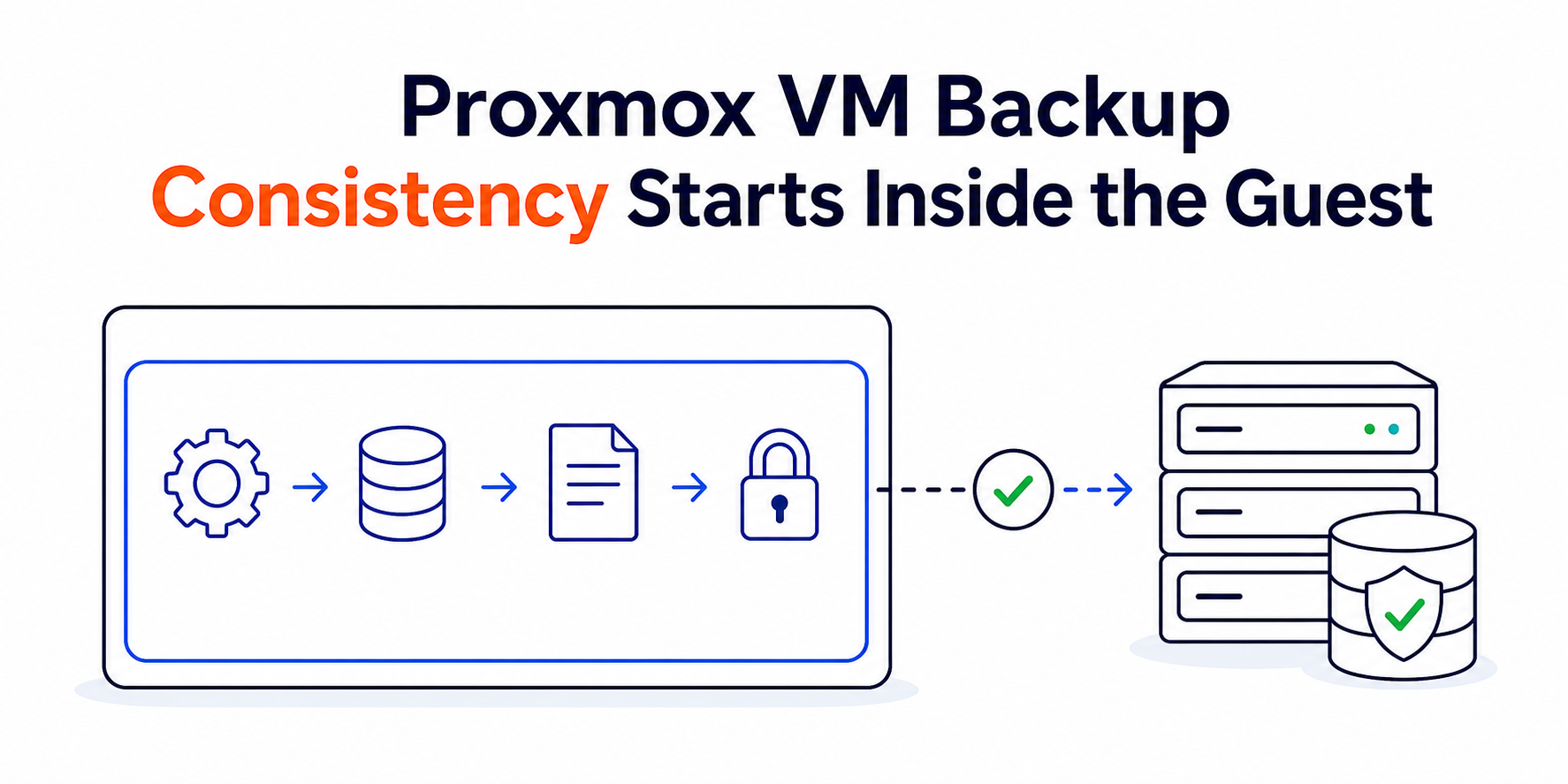
A completed Proxmox backup task proves that an archive was created. It does not automatically prove that every application inside the VM reached a recoverable business state. Snapshot mode can preserve a coherent view of virtual disk blocks while the guest is running, but the guarantee changes according to what happened inside that guest before capture.
Three questions decide the claim: Was the QEMU Guest Agent reachable? Did Proxmox actually issue and complete filesystem freeze and thaw for this job? Did the workload need an application-aware writer or hook beyond filesystem consistency? Treat those as separate evidence gates instead of calling every green snapshot “application-consistent.”
The guarantee has three layers
Crash-consistent capture is the lowest defensible tier for a running VM when no guest coordination is proven. The restored operating system and journaled filesystem may recover as they would after an abrupt power loss, while an application can still need replay, repair, or reconciliation. Proxmox’s backup-mode documentation explicitly describes snapshot mode as the lowest-downtime VM option with a small inconsistency risk.
Filesystem-consistent capture adds guest coordination. When the QEMU Guest Agent is enabled, available, and allowed to freeze filesystems, Proxmox asks it to sync and freeze freezable local filesystems before the live backup point, then thaw them. QEMU’s protocol reference defines that operation precisely; it does not claim that every database, queue, or remote mount has completed its own semantic checkpoint.
Application-coordinated capture requires workload knowledge. Windows can involve VSS writers, while Linux can use a carefully designed freeze hook or a database-native process. Voxfor’s KVM hypervisor explanation helps clarify why the host can preserve virtual hardware state without understanding every transaction inside the guest. Likewise, Immich restore-boundary guidance shows why one application’s recoverable set may include a database, media and configuration rather than one filesystem alone.
The tiers are not marketing labels. They are claims that must be supported by configuration, job-time evidence and a restore result. Never promote a backup to a higher tier because the guest agent package merely exists.
Choose downtime before you choose a label
Proxmox VE offers three VM backup modes, and none should be selected by habit.
- Snapshot mode keeps operation downtime lowest. The VM continues running while Proxmox performs a live backup; guest freeze/thaw improves consistency when the agent path works.
- Stop mode performs an orderly guest shutdown and provides the highest consistency in Proxmox’s VM backup model, at the cost of a short interruption. A clean shutdown is useful evidence, but workload acceptance after restore still belongs in the recovery contract.
- Suspend mode exists for compatibility. Proxmox notes that it creates longer downtime and does not necessarily improve VM data consistency over snapshot mode, so it is not a universal middle ground.
Workload tolerance sets the choice. A stateless web worker may accept a lower tier than a database primary, billing system, directory service, or mail store. Operators sizing the physical platform can use dedicated-server hardware criteria to consider storage latency, controller behavior, memory and recovery capacity before promising a backup window. Capacity cannot create application consistency, but a saturated host or slow target can lengthen the period during which coordination and copy-before-write work affect the guest.
Containers follow different Proxmox backup mechanics and are outside this VM-focused article. Do not transfer the VM mode claims to LXC without reading the container section of the same Proxmox manual.
Audit the guest channel from both sides
Start on the Proxmox node with one representative VM. These commands are read-only; replace 123 with the approved VMID.
VMID=123
qm config "$VMID" | grep -E '^(agent|name|ostype):'
qm agent "$VMID" ping
Configuration should show guest-agent communication enabled. Current Proxmox syntax accepts agent: enabled=1,freeze-fs=1; compact output may appear as agent: 1, because freeze-fs defaults to enabled. An explicit freeze-fs=0 means Proxmox will not issue the freeze/thaw cycle for covered operations. Proxmox warns in its QEMU/KVM VM manual that disabling the option can lead to inconsistent filesystems.
A successful ping proves only that the host and agent can communicate at that moment. It does not prove that a later backup reached the agent, that filesystem freeze succeeded, or that an application writer completed. Record the ping time and move to job-time evidence.
Inside a Linux guest, confirm the daemon and channel without invoking freeze:
sudo systemctl is-active qemu-guest-agent
sudo systemctl status qemu-guest-agent --no-pager
sudo test -e /dev/virtio-ports/org.qemu.guest_agent.0
Distribution packaging can start the service through socket or device activation, so interpret service output with the VM’s actual unit definition. The Proxmox guest-agent installation guide remains the source for supported host enablement, package installation and the ping test.
The task log is the receipt
Open the completed backup task in the Proxmox web interface and preserve the full log with its VMID, node, mode, target, start time and result. For a snapshot-mode job that used guest freeze, Proxmox documents these observable lines:
INFO: issuing guest-agent 'fs-freeze' command
INFO: issuing guest-agent 'fs-thaw' command
Both events matter. A skip, timeout, agent error or missing freeze line means the intended filesystem-consistency evidence is absent for that run, even if the archive later completes. A missing thaw or guest I/O that remains stalled is an incident requiring immediate, controlled attention; do not wait for the next schedule.
Avoid using qm guest cmd VMID fsfreeze-freeze as a casual health check. The command freezes writable local filesystems until thaw, and an interrupted operator session can prolong the outage. QEMU exposes a status call, but its own reference warns that other guest processes can make status reporting imperfect. Use read-only ping for reachability and a controlled backup task for end-to-end evidence.
FAQ: Questions that decide the backup contract
Does a successful Proxmox snapshot backup mean the VM is application-consistent?
A successful task proves archive creation, not automatic application consistency. The higher claim requires evidence that the workload reached a valid semantic checkpoint, such as a suitable Windows VSS writer or a verified Linux application hook, and that a restore passes application-level checks.
Does enabling QEMU Guest Agent guarantee that freeze ran?
Agent enablement alone is insufficient. The service must be running and reachable inside the guest, freeze-fs must allow the operation, and the specific backup task log must show successful freeze and thaw; an earlier ping or installed package is not job-time proof.
Does Proxmox snapshot mode require storage that supports snapshots?
Native storage snapshots are not required. Proxmox VE live backup provides snapshot-like semantics across storage types; that host capability remains separate from guest filesystem or application consistency.
Is stop mode always the right choice for important VMs?
Stop mode is not universally correct. It offers Proxmox’s highest VM backup consistency but introduces downtime, so the workload’s availability objective, shutdown behavior, recovery point and tested restore contract must choose the tradeoff.
Should freeze-fs be disabled when Windows uses another backup product?
Prefer compatible Windows VSS semantics before disabling freeze. Proxmox commonly recommends VSS_BT_COPY when another in-guest solution shares VSS; disabling freeze can leave filesystems inconsistent and needs a workload-specific decision plus restore test.
Can manual fsfreeze be used as a routine guest-agent check?
Manual fsfreeze is a poor routine health check because it blocks writes until thaw and creates an operational risk if the session or command path fails. Use qm agent VMID ping for reachability, then inspect freeze/thaw evidence from a controlled backup job.
Does a Linux fsfreeze hook make every database backup application-consistent?
A Linux hook earns application-consistent status only when it invokes the product’s supported coordination method, completes within the freeze window, fails safely, always handles thaw and produces a restored workload that passes semantic checks. A generic script name proves nothing.
Linux hooks and Windows VSS change the meaning
Linux: keep hook scope smaller than the freeze window
QEMU Guest Agent supports an optional fsfreeze hook that receives freeze and thaw arguments. Proxmox also documents a Debian-style hook directory in its VM consistency guide. That mechanism can coordinate an application, but it can also turn a short filesystem pause into an outage if the hook waits on a network service, performs a large dump, leaks secrets, or cannot finish.
Before enabling a hook, define its owner, maximum runtime, logs, failure behavior and thaw path. Keep network calls and long exports outside the frozen interval. Prefer a database-native checkpoint or pre-created local artifact when the product supports one, and protect hook files as privileged configuration. Never copy a generic database command into production without matching engine version, replication role and recovery model.
Windows: decide who owns VSS semantics
On Windows, QEMU Guest Agent implements freeze through VSS. Proxmox notes that the default behavior uses VSS_BT_FULL, which can interfere with another backup application’s chain. Its current guidance recommends VSS_BT_COPY for coexistence when another in-guest backup tool relies on VSS, followed by a reboot and configuration verification. Microsoft defines those VSS backup types; do not treat their names as interchangeable.
Use read-only checks inside the guest before the next controlled job:
Get-Service QEMU-GA
Get-ItemProperty 'HKLM:\SYSTEM\CurrentControlSet\Services\QEMU Guest Agent VSS Provider' -Name VssOption -ErrorAction SilentlyContinue
vssadmin list writers
If a writer is failed or unstable, Windows VSS writer diagnosis provides a separate ownership workflow. Fixing VSS should preserve the same requester, components, volumes and consistency mode; switching to a different green path can hide the original failure.
Restore tests expose the guarantee you really achieved
Configuration and logs establish what the capture path attempted. A restore establishes whether that claim was useful. Choose one recent representative backup and recover it into an isolated network with a non-conflicting VMID, MAC addresses, IP identity and service endpoints.
Acceptance must match the workload. Boot success and a clean filesystem check are useful, but an application-coordinated claim also needs a representative transaction: read and write a disposable database record, authenticate against the restored directory, submit and consume a test queue message, or open a known document and verify related metadata. External volumes, object stores and secrets must be present or explicitly excluded from the declared recovery set.
Record application recovery messages rather than hiding them. Journal replay may be expected for a crash-consistent tier; manual database repair may violate the promised recovery point. Voxfor’s isolated Proxmox restore drill provides the broader identity, timing, repository and cleanup procedure once capture-time consistency has been named.
Write a policy the next operator can verify
A useful backup policy names evidence rather than saying “snapshot daily.” For every protected VM, record:
- VMID, workload owner and included/excluded disks or external data;
- selected mode and declared consistency tier;
- guest-agent enablement,
freeze-fsstate and guest service owner; - expected freeze/thaw task-log evidence and the action when it is missing;
- Windows VSS type or Linux hook purpose, version, timeout and rollback;
- isolated restore date, application acceptance result and unresolved recovery work.
Review that record after guest-agent upgrades, Windows VirtIO changes, database changes, storage migrations and backup-job edits. Proxmox specifically warns that a Windows guest-agent update can overwrite the VSS registry setting, so post-upgrade verification belongs in the change plan.
A green job is the beginning of the evidence chain, not its final guarantee. When configuration, task logs, workload coordination and an isolated restore all agree, the consistency label becomes something another operator can verify instead of an assumption discovered during recovery.