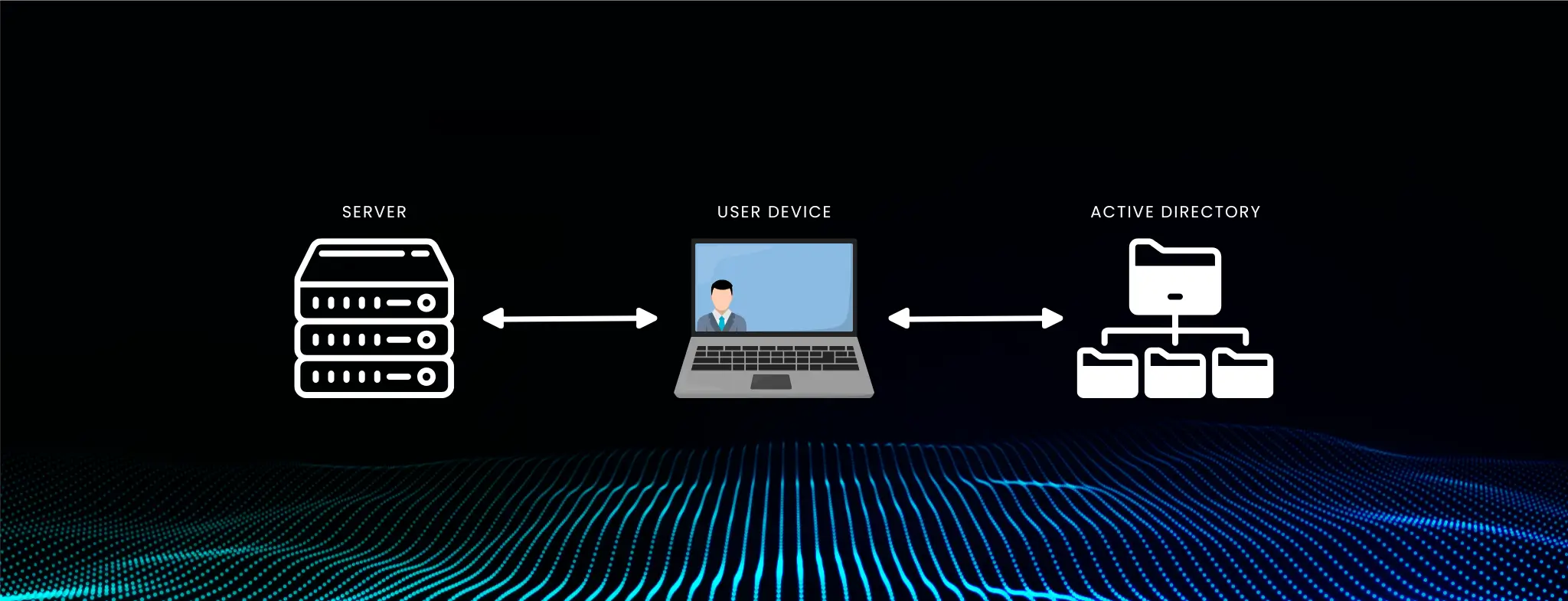
Linux systems are known for their reliability, flexibility, and robust open-source community. Meanwhile, many organizations rely heavily on Microsoft Active Directory (AD) for centralized identity and access management. As a result, there is often a pressing need to integrate Linux servers and workstations into the existing AD infrastructure. This process, called Linux AD authentication, allows administrators to streamline user management, bolster security, and enforce consistent policies across Windows and Linux operating systems.
In this guide, you will explore the key concepts, protocols, and best practices that enable smooth Linux AD authentication. You will learn about Kerberos, LDAP, and SSSD (System Security Services Daemon) and see how they work in unison to bridge Linux hosts with an Active Directory environment. Various approaches will be examined, ranging from Realmd and PBIS (Likewise) to Centrify. You will be prepared to join your Linux systems to an AD domain and maintain a secure, stable, and unified identity management solution by the end.
Integrating Linux with Active Directory can initially seem daunting, especially for administrators who have primarily managed Windows-based systems. Yet, the benefits are substantial. End users and IT teams reap significant security, convenience, and efficiency advantages by unifying authentication under a single set of credentials.
This article covers:
Active Directory (AD) is Microsoft’s directory service that provides a centralized method for user authentication, authorization, and other identity-related tasks within an organization. When you join Linux servers to an AD domain, those servers become part of the broader identity management system. This not only streamlines user administration but also ensures compliance with corporate policies.
Understanding how AD operates, its reliance on DNS, how Kerberos tickets are issued, and how LDAP queries function is fundamental. These insights will help you anticipate and resolve issues that may arise during Linux integration.
Many organizations run heterogeneous environments. You might have web or database servers on Linux, while your organization’s user base and identity management are rooted in AD. Integrating Linux systems with AD can:
A single identity store means users need only one set of credentials, reducing password sprawl and errors. Administrators can quickly onboard and offboard employees or contractors, ensuring immediate updates across the entire environment.
When Linux machines join an AD domain, they inherit AD-based security. Password complexity rules account lockout policies, and more can be enforced uniformly. Auditing user activities and managing privileges become significantly easier.
A unified directory allows Linux users to access file shares, printers, and other organizational resources governed by AD. Plus, managing group memberships and defining who can access what becomes simpler. This leads to more streamlined workflows and lower operational overhead.
Before configuring Linux AD authentication, ensure your environment is correctly set up. Two elements, DNS and time synchronization, can make or break the integration.
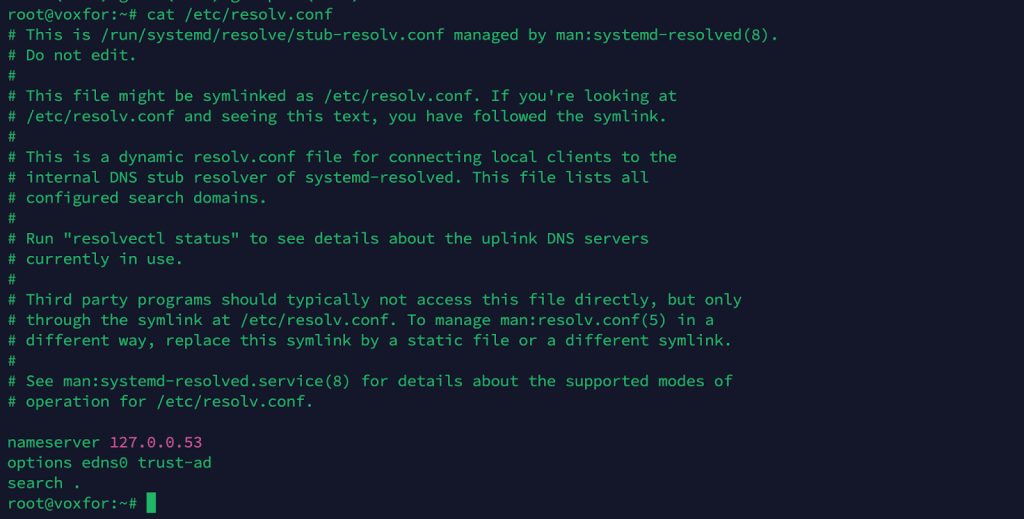
DNS issues are among the most common causes of failed domain joins. Proper hostname resolution is essential for locating and communicating with AD domain controllers.
Kerberos uses time-based tickets to authenticate users and systems. Even slight discrepancies (e.g., over five minutes) between a client and domain controller can cause tickets to be invalidated. Synchronize domain controllers and Linux hosts with the same NTP source or ensure each system syncs with a reliable time server.
Linux and Active Directory communicate using industry-standard protocols. Grasping these basics will make troubleshooting easier.
Kerberos is a ticket-based authentication protocol that reduces the repeated exposure of credentials over the network. Instead of sending passwords, Kerberos uses a key distribution center (KDC) to issue time-bound tickets, enhancing security and offering single sign-on (SSO) capabilities.
Lightweight Directory Access Protocol (LDAP) is used to query and modify information within a directory service such as AD. On a Linux system, LDAP helps retrieve user and group information from Active Directory so that local applications and processes recognize AD accounts.
SSSD is a middle layer that manages authentication and identity lookups on Linux. It caches credentials so users can still log in even if the domain controller is temporarily unreachable. With SSSD, system services can rely on a single, standardized mechanism for handling user and group data.
Various solutions exist for joining Linux systems to an AD domain. The choice depends on your organization’s needs, skill sets, and budget.
Realmd simplifies the domain-join process. It automatically discovers AD realms and coordinates with SSSD for authentication. Many modern distributions (RHEL, CentOS, Fedora, Ubuntu, etc.) provide packages for Realmd and SSSD, making this approach straightforward.
PBIS (formerly Likewise) is another robust tool integrating Linux or UNIX systems with AD. It can handle single sign-on, group policy, and centralized authentication. PBIS includes free and enterprise editions, offering additional features with a commercial license.
Centrify is a commercial option known for advanced features like auditing, MFA, and profound policy control. While it can be more expensive, large enterprises with stringent compliance needs might find the extra features and dedicated support indispensable.
This section provides a detailed walkthrough for integrating Linux with AD using SSSD and Realmd. Commands may vary slightly across distributions, but the overall process remains similar.
Note: To join a machine to the domain, you should have root (or sudo) privileges on your Linux system and appropriate permissions within AD.
On RHEL/CentOS/Fedora-based systems:
sudo yum install realmd sssd sssd-tools adcli samba-common-tools oddjob oddjob-mkhomedirOn Ubuntu/Debian-based systems:
sudo apt-get update
sudo apt-get install realmd sssd sssd-tools adcli samba-common-bin oddjob oddjob-mkhomedir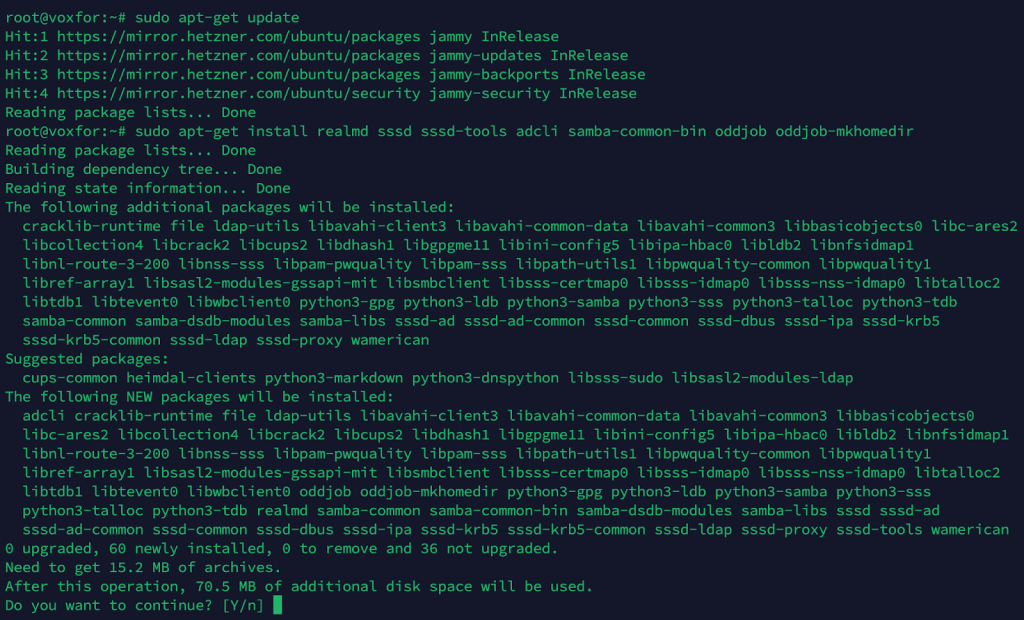
These packages include:
Replace example.com with your AD domain:
sudo realm discover example.com
Successful discovery should display the domain details and indicate it is an Active Directory realm.
sudo realm join --user=Administrator example.com
You will be prompted for the password of the AD account with sufficient privileges to join machines to the domain. If successful, the command will silently complete, and your Linux system is now a domain member.
Inspect /etc/sssd/sssd.conf to ensure your settings match your environment. A sample configuration might look like:
[sssd]
services = nss, pam
config_file_version = 2
domains = example.com

[domain/example.com]
id_provider = ad
auth_provider = ad
chpass_provider = ad
access_provider = ad
cache_credentials = True

ad_domain = example.com
krb5_realm = EXAMPLE.COM
realmd_tags = manages-system joined-with-adcli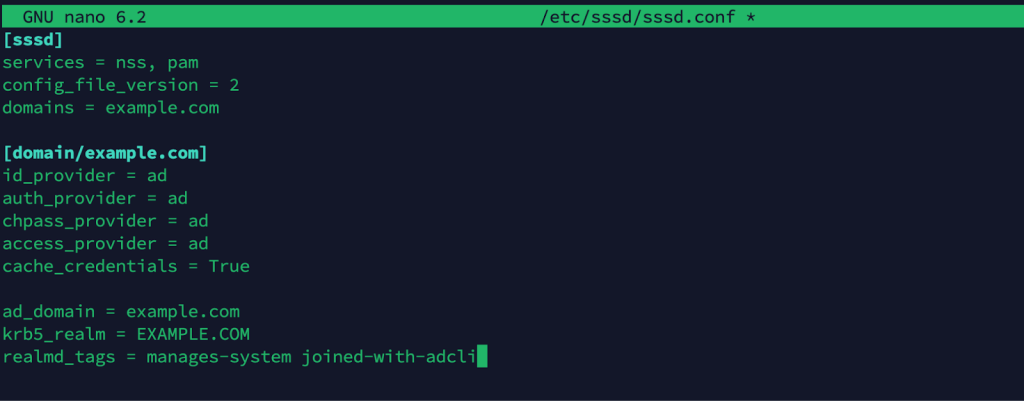
Ensure the file permissions are correct:
sudo chmod 600 /etc/sssd/sssd.conf
sudo systemctl restart sssd
This restarts SSSD with the new configuration.
Check Domain Membership
sudo realm list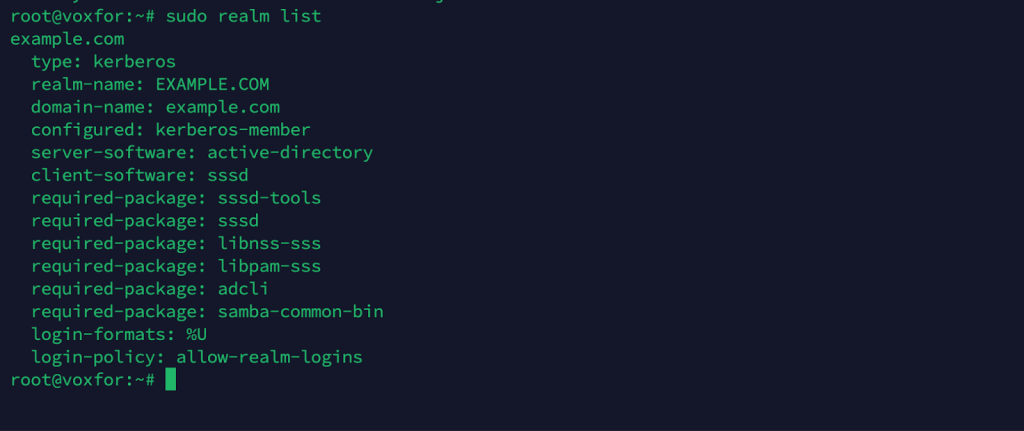
Verify AD User Lookup
id [email protected]
Despite careful preparation, misconfigurations and environmental problems can arise. Below are a few common pitfalls.
If you cannot resolve domain controllers or the join process hangs:
Kerberos errors often point to time synchronization problems or misconfigured realms:

If domain joins time out:
Kerberos usually grants about five minutes of leniency. If your system clock drifts beyond that:
After successfully joining your Linux systems to AD, adhere to best practices to maintain a stable, secure environment.
Keep your Linux machines and domain controllers updated. Vulnerabilities in Kerberos, Samba, or SSSD can be exploited. Apply vendor-recommended patches to ensure the latest security fixes.
You can configure Kerberos ticket lifetimes, encryption types, and renewal intervals in AD. Mandating modern, secure cipher suites reduces the risk of intercepted or forged tickets.
Some tools, like PBIS or Centrify, enable partial or complete GPO enforcement on Linux. This can centralize configuration management and policy enforcement across your mixed environment.
Organizations with multiple AD forests may establish cross-forest trusts. With such trusts, a Linux system in one domain can authenticate users from a different trusted forest, assuming the necessary trust relationships are in place.
MFA is often mandatory for high-security environments. While Windows systems may enforce MFA natively, Linux can also be configured to require additional factors (smart cards, tokens, one-time passwords). Integrations vary depending on the vendor solution.
When numerous Linux machines are joined to AD, performance becomes important. SSSD caches user and group data to reduce the load on domain controllers. Adjust caching settings in /etc/sssd/sssd.conf to optimize retrieval. If you manage a large enterprise environment, distribute load across multiple domain controllers and global catalog servers.
Your decision depends on your organization’s scale, compliance needs, and existing infrastructure.
Because AD integration broadens the attack surface by linking Linux systems to a Windows domain, take steps to mitigate risks:
Post-integration, keep an eye on:
Review logs regularly for anomalies. Detecting failing authentications or suspicious logins helps maintain security and user confidence.
Integrating Linux systems into an Active Directory environment unifies identity management, strengthens security, and simplifies administrative tasks. By leveraging industry-standard protocols like Kerberos and LDAP, along with tools such as SSSD, Realmd, PBIS, or Centrify, you can seamlessly authenticate Linux machines against an existing AD domain.
This guide has walked you through the essential steps, from DNS configuration and time synchronization to advanced features such as cross-forest trusts and multi-factor authentication. With the outlined best practices, troubleshooting advice, and performance tips, you can build a robust, scalable integration that meets the needs of modern, hybrid IT infrastructures.
Whether your organization prefers open-source solutions like Realmd and SSSD or requires commercial-grade features provided by PBIS or Centrify, the end goal is the same: a consistent, secure, and efficient identity environment across Linux and Windows systems. Following these recommendations will ensure your Linux AD authentication deployment remains reliable, compliant, and ready to adapt to evolving organizational demands.

Vinayak Baranwal wrote this article. Use the provided link to connect with Vinayak on LinkedIn for more insightful content or collaboration opportunities.





 Lifetime VPS Europe
 Lifetime VPS Asia
 Lifetime WooCommerce Hosting
 Lifetime Hosting
 France Lifetime Dedicated Servers
 Germany Lifetime dedicated servers
 Lifetime Game Dedicated Servers
 Chicago, US
 Tokyo, Japan
 Singapore
 Hong Kong
 Seoul, South Korea
 Amsterdem, Netherlands
 London, UK
 Stockholm, Sweden
 Oslo, Norway
 Vienna, Austria
 Zurich, Switzerland
 Sydney, Australia
 Wordpress Hosting
 VPS Hosting
 DDOS Protection
 Submit Ticket
 Full Management
 Guides
 Videos and Podcasts
 Discover Creative Ideas
 MetaAgentOS High-Ticket Support System
 Voxfor Mega Menu
 Voxfor Advanced Price Management For WooCommerce
 Voxfor Secure Live Chat and AI Support
 Voxfor Multilanguage
 Voxfor AI Content Summary


