
Inbound Marketing Strategy
Helpful tutorials attract qualified visitors, but reliable hosting keeps those readers engaged. Voxfor VPS gives growing websites the speed, uptime, and control needed to support stronger inbound marketing campaigns.
AI tools like ChatGPT, Gemini, Claude, and Perplexity are fundamentally changing how people discover information online. Unlike traditional search engines that crawl every page of your site on a recurring schedule, AI assistants retrieve only small sections of a website in real time while generating answers. This means they can easily miss critical content, especially on large, frequently updated websites.
A solution is the llms.txt file, which will fill this gap. With a simple, structured Markdown file in the root of your domain, you provide AI models with a clear roadmap to the most important content. It will not produce immediate returns but place your website at the leading edge of the curve as the use of AI-driven search keeps expanding.
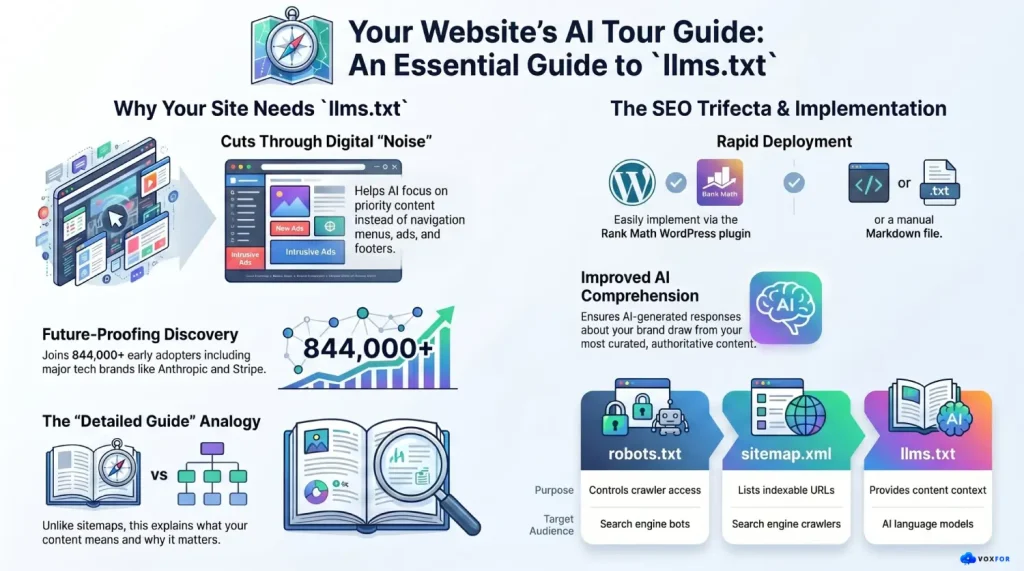
llms.txt is a plain-text, human-readable file in Markdown format that you should place in the root of your web page and can be viewed at yourdomain.com/llms.txt. It was proposed by data scientist and Answer in September 2024, AIs co-founder Jeremy Howard, to tackle an actual structural issue: large language models have small context windows, and therefore cannot process web pages full of clutter and heavy JavaScript code effectively.
Think of it as a curated tour guide for AI. Instead of letting AI crawlers wander around your site, this file says: “Here’s what matters. Here’s what you should pay attention to.”
A well-structured llms.txt file typically contains:
Here’s a basic example of what the file looks like in practice:
# Your Website Name
> A comprehensive resource for web hosting, WordPress, and developer tools.

## Key Pages
- [Homepage](https://yourdomain.com/)
- [About Us](https://yourdomain.com/about/)

## Blog
- [WordPress Hosting Guide](https://yourdomain.com/blog/wordpress-hosting/) – Detailed hosting comparison for WordPress users
- [Best WooCommerce Plugins](https://yourdomain.com/blog/woocommerce-plugins/)

## Documentation
- [Getting Started](https://yourdomain.com/docs/getting-started/)
- [API Reference](https://yourdomain.com/docs/api/)

## Optional
- [Community Forum](https://yourdomain.com/community/)
- [Changelog](https://yourdomain.com/changelog/)
The standard also supports a companion file, llms-full.txt, which compiles all of your site’s text content into a single Markdown document, making it easy for AI tools to load your entire site’s context at once.
Most website owners are already familiar with robots.txt and sitemap.xml. The llms.txt file completes the trio, but each one serves a very different purpose and audience.
| File | Purpose | Target Audience | Format |
| robots.txt | Controls crawler access, tells bots which pages to crawl or skip | Search engine bots (Googlebot, Bingbot) | Plain text directives |
| sitemap.xml | Lists all indexable URLs on your site so search engines can discover them | Search engine crawlers | XML structure |
| llms.txt | Highlights your most important content and provides context for AI comprehension | AI language models (ChatGPT, Claude, Gemini, Perplexity) | Markdown text |
A helpful analogy: robots.txt is the security guard checking who gets in. sitemap.xml is the building directory showing all room numbers. llms.txt is the detailed guide explaining what happens in each room and why it matters. All three files live in your website’s root directory and complement each other, none replaces the others.
The critical distinction is that llms.txt doesn’t control access or list pages; it describes your content and tells AI systems which pages deserve the most attention.
Standard HTML pages are full of noise, navigation menus, cookie banners, sidebar widgets, footers, ads, and JavaScript-rendered elements. To a human visitor, your site looks polished and organized. But to an AI trying to understand your content in real time, it can look like a wall of clutter.
llms.txt cuts through that noise. It provides AI models with a clean, organized snapshot of your site, exactly the kind of structured data that language models process efficiently. The key benefits include:
The Honest Reality: What llms.txt Can and Cannot Do
It’s important to be transparent about where things currently stand. As of early 2026, no major AI platform has officially confirmed that their systems actively read and use llms.txt files. Google’s John Mueller stated in 2025 that “none of the AI services have said they’re using llms.txt, and you can tell when you look at your server logs that they don’t even check for it.”
A detailed analysis of 94,000+ cited URLs from 11,000+ AI responses monitored across ChatGPT, Claude, Gemini, Grok, and Perplexity found no statistically significant evidence that these models prefer pages with an llms.txt file when performing live web searches.
However, there are compelling reasons to implement it anyway:
The bottom line: it’s a low-effort, no-downside step that positions your site for a future where AI agents almost certainly will use structured guidance files like this one.
For WordPress users, the easiest way to implement llms.txt is through the Rank Math SEO plugin, which includes a built-in LLMS Txt module that handles file generation automatically.
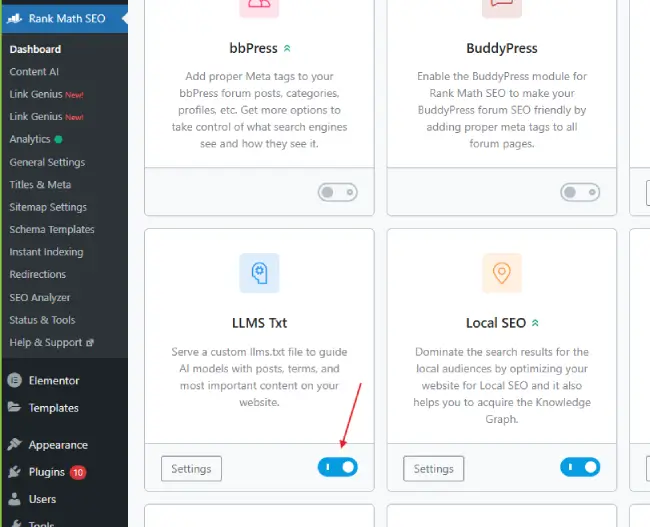
Navigate to Rank Math SEO → Dashboard inside your WordPress admin area. Scroll through the available modules until you find the LLMS Txt module, then click the toggle to enable it.
Note: If the LLMS Txt module is not visible, update Rank Math to the latest version from the Plugins screen.
Once enabled, click the Settings icon on the LLMS Txt module card, or navigate directly to Rank Math SEO → General Settings → Edit llms.txt.
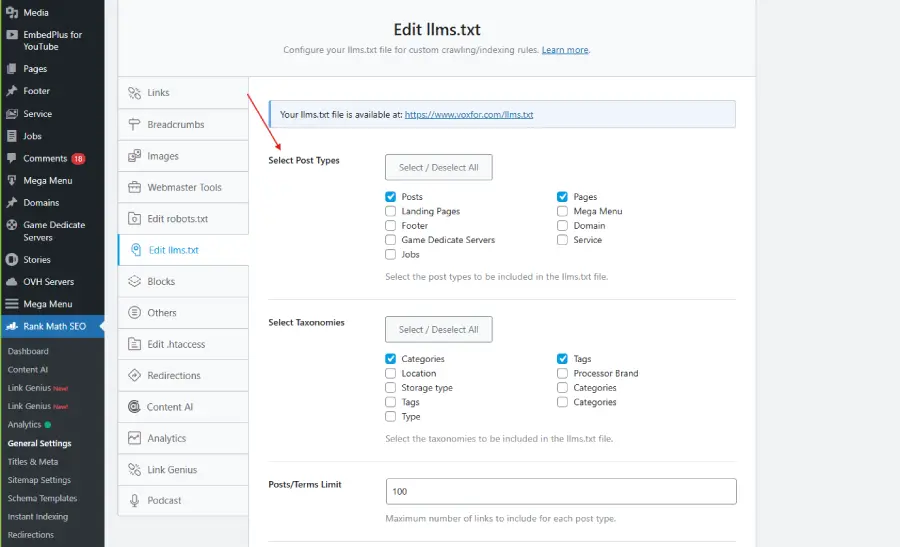
Choose which post types you want featured in your llms.txt file, for example, Posts and Pages. Rank Math will automatically generate a list of each item’s title, URL, and short description (intro text). Any content set to noindex will be excluded from the file automatically.
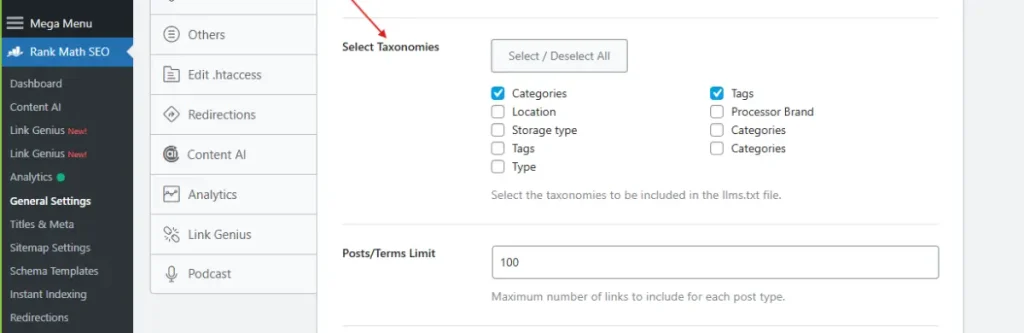
You can also include taxonomies such as Categories or Tags. Selecting Categories, for instance, will list each category name and its corresponding URL in the file, useful for sites with a clear editorial taxonomy.
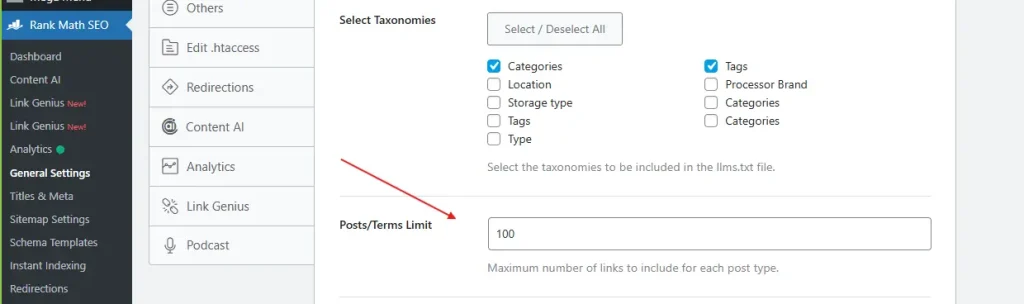
Define the maximum number of posts or taxonomy terms to include. The default is 100, which is a reasonable starting point for most sites. Adjust this higher if you have a large content library with many important pages.
The Additional Content field will enable you to add any additional links, notes, or context of your own (that you desire to be part of the file). All entries must be on a new line. This can be used to add custom documentation links, home pages or brand specific instructions.
Click Save Changes to store your configuration. Then click the preview link at the top of the Edit llms.txt tab to view your live file at https://yoursite.com/llms.txt. Verify that everything looks correct and that your priority content is represented accurately.
If you prefer full control, or if you’re not using Rank Math, you can create and upload the file manually. This approach works for any website platform.
Start by selecting your most valuable pages, those that best explain your brand, products, services, or expertise. Think about pages that establish authority, answer common user questions, or drive conversions.
Open a plain text editor (Notepad on Windows or TextEdit on Mac) and create the file structure:
# Your Website Name
> summary of what your website offers.

## Core Pages
- [Service/Product Name](https://yourdomain.com/page/) – Short description

## Blog / Articles
- [Post Title](https://yourdomain.com/blog/post-slug/) – One-line context

## Documentation
- [Guide Title](https://yourdomain.com/docs/guide/) – What this covers

## Optional
- [Community Page](https://yourdomain.com/community/)
Each page entry should include a required Markdown hyperlink and, optionally, a short note about the page after a dash.
Save the file as llms.txt and upload it to the root directory of your website (the same location where robots.txt lives). Using FTP, SFTP, or your hosting file manager, place the file at yourdomain.com/llms.txt.
Go to your browser and access the following link: yourdomain.com/llms.txt. Your Markdown-formatted text should appear as plain text. In the event that it loads, then your implementation is complete.
Important for WordPress Users: If you’re using All in One SEO (AIOSEO), you must go to All in One SEO → Sitemaps → LLMs.txt and set the toggle to Inactive before uploading your own manual file, to avoid conflicts.
Beyond Rank Math, several other tools support llms.txt generation on WordPress:
| Plugin | Key Features | Compatibility |
| LLMs.txt and LLMs-Full.txt Generator | Automatically generates both llms.txt and llms-full.txt; configurable via Settings screen | Compatible with Yoast SEO, Rank Math, SEOPress, AIOSEO |
| Website LLMs.txt | Full integration with Yoast SEO, Rank Math, SEOPress, and AIOSEO; supports manual generation trigger | Broad plugin support |
| All in One SEO (AIOSEO) | Built-in LLMs.txt toggle under Sitemaps settings | Native WP integration |
| Manual Upload | Total control; no plugin dependency | Any platform |
For sites on non-WordPress platforms, online generators like Firecrawl llms.txt Generator can crawl your site and produce the file automatically.
A poorly structured llms.txt file delivers little value. Follow these best practices to maximize its effectiveness:
llms.txt is one piece of a larger strategy known as Answer Engine Optimization (AEO), the practice of optimizing your content to be discovered and cited by AI-powered tools like ChatGPT, Perplexity, Claude, and Gemini.
Billions of queries are now processed monthly by these platforms, 7.5 billion ChatGPT queries per month alone, according to Wix’s data. As AI increasingly becomes the first touchpoint for information discovery, websites that optimize for AI comprehension will have a structural advantage over those that rely solely on traditional SEO signals.
AEO best practices that complement llms.txt include:

Hassan Tahir wrote this article, drawing on his experience to clarify WordPress concepts and enhance developer understanding. Through his work, he aims to help both beginners and professionals refine their skills and tackle WordPress projects with greater confidence.






 Lifetime VPS Europe
 Lifetime VPS Asia
 Lifetime WooCommerce Hosting
 Lifetime Hosting
 France Lifetime Dedicated Servers
 Germany Lifetime dedicated servers
 Lifetime Game Dedicated Servers
 Chicago, US
 Tokyo, Japan
 Singapore
 Hong Kong
 Seoul, South Korea
 Amsterdem, Netherlands
 London, UK
 Stockholm, Sweden
 Oslo, Norway
 Vienna, Austria
 Zurich, Switzerland
 Sydney, Australia
 Wordpress Hosting
 VPS Hosting
 DDOS Protection
 Submit Ticket
 Full Management
 Guides
 Videos and Podcasts
 Discover Creative Ideas
 MetaAgentOS High-Ticket Support System
 Voxfor Mega Menu
 Voxfor Advanced Price Management For WooCommerce
 Voxfor Secure Live Chat and AI Support
 Voxfor Multilanguage
 Voxfor AI Content Summary


