Lifetime VPS Europe
 Lifetime VPS Asia
 Lifetime WooCommerce Hosting
 Lifetime Hosting
 Lifetime Game Dedicated Servers
 Chicago, US
 Tokyo, Japan
 Singapore
 Hong Kong
 Seoul, South Korea
 Amsterdem, Netherlands
 London, UK
 Stockholm, Sweden
 Oslo, Norway
 Vienna, Austria
 Zurich, Switzerland
 Sydney, Australia
 Wordpress Hosting
 VPS Hosting
 DDOS Protection
 Submit Ticket
 Full Management
 Guides
 Videos and Podcasts
 Discover Creative Ideas
 Cybersecurity Services
 Voxfor Mega Menu
 Voxfor Advanced Price Management For WooCommerce
 Voxfor Secure Live Chat and AI Support
 Voxfor Multilanguage
 Voxfor AI Content Summary
 Voxfor Autopilot
Quick Answer
WooCommerce B2B scaling works well when wholesale plugins, role-based pricing, quote requests, bulk order forms, inventory sync and buyer portals are supported by hosting that can handle logged-in users, large catalogs and dynamic checkout traffic.
Recommended Next Steps
- Choose B2B plugins based on role pricing, quote workflows, minimum order rules, tax rules, approval flows and API compatibility.
- Use object cache and optimized hosting because B2B stores often have logged-in pricing, large catalogs and uncached account flows.
- Connect custom development where wholesale pricing, ERP sync, inventory rules or buyer portals outgrow off-the-shelf plugins.
Related Voxfor Resources
WooCommerce B2B Workflow Matrix
Before selecting a plugin, map the workflow. B2B stores usually fail when pricing rules, approval steps, inventory sync and checkout performance are planned separately. Use the matrix below to decide whether an off-the-shelf plugin is enough or whether the store needs custom WooCommerce development.
| B2B requirement | Plugin feature to check | Custom work trigger | Hosting concern |
|---|---|---|---|
| Role-based wholesale pricing | Customer groups, tiered pricing and minimum order rules | Pricing depends on ERP contracts, negotiated quotes or branch-specific catalogs | Logged-in pricing reduces full-page cache coverage |
| Buyer approval | Registration forms, manual approval and private catalog visibility | Approval must sync with CRM, sales reps or account managers | Admin actions and email queues need reliable processing |
| Bulk ordering | One-page order forms, SKU search and CSV order import | Large buyers need saved carts, repeat orders or purchase-order workflows | Search, cart fragments and checkout calls need careful caching |
| Quote requests | Request-a-quote buttons and quote-to-order conversion | Quotes require multi-step approval, margin rules or regional tax logic | Private account pages must stay fast under logged-in traffic |
| ERP and inventory sync | API hooks, webhooks or connector support | Stock, credit limits, invoices or customer terms live outside WooCommerce | Background jobs need monitoring and retry handling |
The transition from traditional retail-focused online stores to robust business-to-business environments represents one of the most significant shifts in modern commerce. For companies operating on the most popular store-building platforms, the standard features are often built with the individual consumer in mind, focusing on beautiful pictures and a simple one-click purchase process. However, the needs of a wholesale buyer are vastly different. These professional purchasers do not look for emotional triggers or flashy advertisements; they look for speed, accuracy, custom pricing agreements, and a simplified way to order hundreds of items in a single sitting. This report analyzes the top ten digital tools designed to transform a standard retail shop into a powerful wholesale machine, evaluating them based on their ability to manage complex pricing, control who sees which products, and streamline the administrative work required to manage thousands of business relationships.
B2B WooCommerce hosting
Scale WooCommerce B2B sales on dedicated VPS resources
B2B stores need reliable catalogs, account workflows, pricing rules, and checkout performance. Voxfor VPS gives WooCommerce businesses dedicated resources for larger orders, growing traffic, and complex store operations.
The Changing Landscape of Business-to-Business Digital Sales
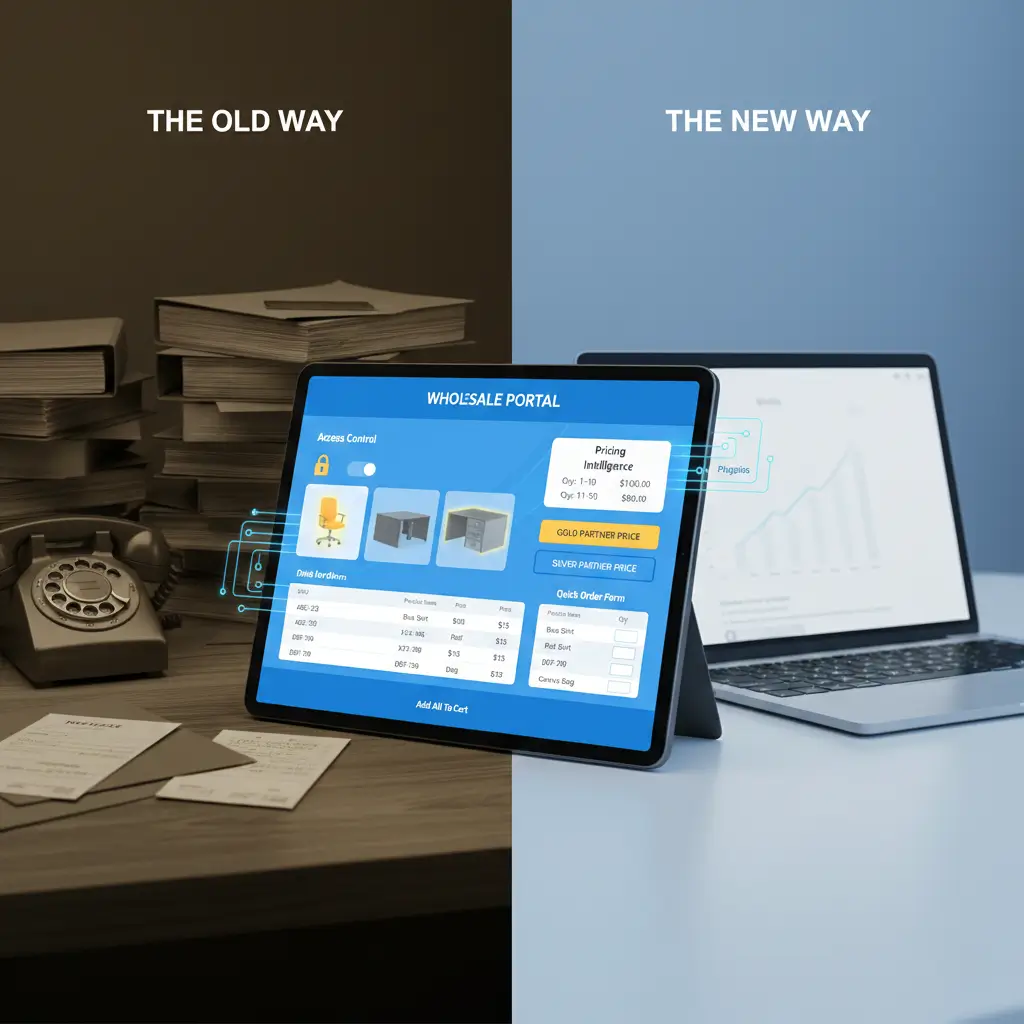
The old way of doing business between companies, often involving physical books, long phone calls, and manual paper invoices, is rapidly disappearing. Today’s professional buyers expect a digital experience that mirrors the speed and convenience of their personal shopping, but with the specialized tools they need for their professional roles. When a wholesale buyer visits a website, they want to see prices that have been specifically negotiated for their company, they want to be exempt from taxes without having to ask, and they want to be able to re-order the same list of products they bought last month with one button.
Most basic online store software is simply not built to handle these requests. Retail stores are designed to show the same price to everyone. Wholesale, by its very nature, is about showing different prices to different people. This gap in functionality has led to the creation of specialized software “plugins”, tools that sit on top of the existing store and add new layers of intelligence. These tools allow a single website to serve a regular person buying one shirt and a giant corporation buying ten thousand shirts at the same time, without ever confusing the two.
The Three Pillars of a Wholesale Digital Strategy
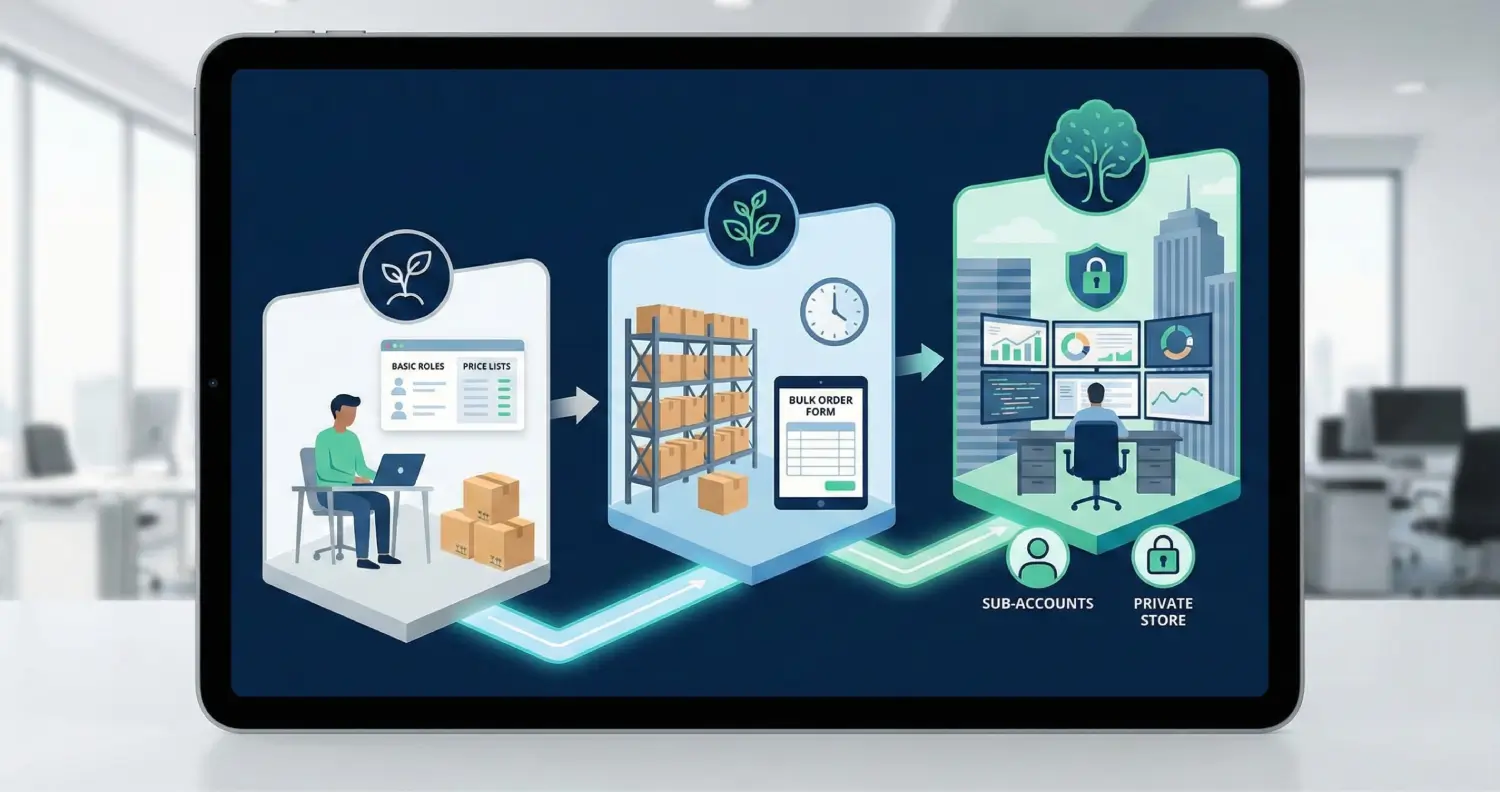
To evaluate these tools effectively, it is necessary to understand the three main jobs they must perform. The first is access control, which is the ability to show or hide specific parts of the store depending on who is logged in. For example, a furniture maker might sell standard chairs to everyone, but their heavy-duty office desks might only be visible to verified office supply companies. The second pillar is pricing intelligence. This includes tiered pricing, where the cost per item drops as the quantity increases, and role-based pricing, where a “Gold Level” partner gets a better deal than a “Silver Level” partner.
The third pillar is the ordering experience. Business buyers are often busy and do not have time to navigate through thirty different product pages to build their order. They need a single, fast list where they can type in the numbers they want for every item and hit “add to cart” once. The following evaluation examines how the reviewed solutions handle these pillars and which business requirements they fit.
1. Wholesale Suite: Established Wholesale Toolkit
Wholesale Suite has established itself as the most widely adopted solution for turning a standard store into a wholesale store, with a long market history. Its longevity in the market, spanning over eight years, has allowed it to become one of the most stable and well-tested options available. What sets this solution apart is its modular design. Rather than being one giant, heavy piece of software, it is split into three distinct parts that work together: pricing, ordering, and lead capture.
The core of the system is the pricing tool, which allows a store owner to create a “Wholesale Customer” category. Once a customer is put into this category, they automatically see special prices that the owner has set for them. This tool also handles “minimum requirements,” such as a rule that a business must spend at least $500 to get the discount. This prevents small, unprofitable orders from taking advantage of wholesale rates.
The second part of the suite, the “Order Form,” is a game-changer for businesses that sell hundreds of different items. Instead of the typical retail layout with big pictures, it presents a simple, clean table where a buyer can search by a product’s unique code (often called a SKU) and quickly add many items to their basket. This speed is why many large distributors choose this suite over others. Finally, the “Lead Capture” tool provides a professional registration form where new businesses can sign up. The store owner can then review their details and approve them, ensuring that only real businesses get access to the secret wholesale prices.
| Feature | Benefit to the Business Owner |
| Wholesale Customer Category | Automatically shows the right price to the right person after they log in. |
| Minimum Order Rules | Ensures every wholesale order is large enough to be profitable. |
| One-Page Order Form | Let buyers finish their weekly ordering in seconds instead of minutes. |
| Approval Workflow | Prevents regular retail customers from seeing your secret business prices. |
| Tax Controls | Automatically removes taxes for business buyers who are reselling your goods. |
2. WholesaleX: Modern B2B Feature Set
WholesaleX is a relatively new player in the market, but it has quickly gained a reputation for being the most feature-rich “all-in-one” tool available. While other solutions require you to buy several different parts, WholesaleX includes almost everything a modern business needs in a single package. It is designed specifically for “hybrid” stores, websites that sell to both regular people and other companies at the same time.
One of the most innovative features of WholesaleX is its “Dynamic Rules Engine” This allows a store owner to create very specific “If/Then” scenarios. For instance, an owner could set a rule that says, “If a customer is from the United Kingdom and they buy more than 50 blue shirts, give them free shipping and a 15% discount.” This level of control allows businesses to run very complex sales and promotions that were previously impossible without hiring a computer programmer.
Furthermore, WholesaleX includes a “Wallet” system, which mirrors how large businesses often have an account balance with their suppliers. A customer can add money to their digital wallet on the website and then use that balance to pay for orders. This is much faster for the customer than typing in a credit card number every time they want to buy something. It also includes an internal “Conversation” tool, allowing buyers and sellers to discuss a price quote or an order directly on the website, keeping all the records in one place instead of scattered through emails.
3. B2BKing: Broad Feature Set for Larger Operations
For businesses that need a truly “enterprise-grade” experience, B2BKing is frequently cited as the most powerful option. If a standard store were a bicycle, B2BKing would be a heavy-duty semi-truck. It is designed to handle the most complex business needs, such as hiding the entire store from the public so that only invited partners can even see that the website exists.
One of its standout features is “Sub-accounts“. In a large company, the person who does the shopping might not be the person who owns the company. B2BKing allows a business to have one main account but create several “sub-logins” for its employees. Each employee can place items in the cart, but the main owner can be the one who clicks “pay.” This matches exactly how real corporations operate in the physical world.
B2BKing also handles the difficult task of international taxes. In many regions, like Europe, a business needs to prove it is a real company by providing a tax identification number (VAT number). B2BKing automatically checks these numbers against government databases to make sure they are real before it allows a customer to buy something without paying tax. This protects the store owner from legal trouble and makes the process automatic and stress-free.
| Pricing Tier | Cost Consideration | Fit |
| Standard License | Approximately $179.50. | Professional stores need all features in one place. |
| Multi-Site | Scaled pricing for up to 3 or more sites. | Agencies managing multiple client stores. |
| Comparison Note | Higher upfront cost than simple tools, but includes everything. | Large businesses want to avoid buying separate add-ons. |
4. Wholesale for WooCommerce (by WPExperts): Centralized Wholesale Manager
This tool is a comprehensive solution that excels at managing a large number of different customer groups. It is particularly useful for companies that have a “tiered” distribution network, for example, selling to small local shops, medium regional distributors, and large national wholesalers, all at different prices.
A major benefit of this tool is its “Wholesale Dashboard,” which provides a clear window into how the business is performing. It shows exactly how much money is coming from regular shoppers versus business shoppers, how many new wholesale applications are waiting to be reviewed, and which products are the most popular among bulk buyers. This data is essential for a business owner to make smart decisions about what to stock and which customers to reward with better deals.
Additionally, this plugin offers a “Product Sampling” feature. In the business world, a buyer might not want to spend $5,000 on a new type of coffee bean without tasting it first. This tool allows the buyer to request a small sample directly through the website. Once they try the sample and like it, they are much more likely to come back and place a massive order. This small feature can significantly increase the conversion rate for new business customers.
5. WooCommerce Wholesale Pro (by Barn2): Visibility-Focused Wholesale Setup
Barn2 solution is favored by businesses that value clean design and extremely fast performance. Many wholesale tools can become “heavy,” meaning they make the website load slowly because they are doing so many things at once. Barn2 has a reputation for writing very “light” software that works quickly, which is important for both the customer’s experience and for showing up higher in search engine results.
The main focus of this tool is visibility control. It makes it incredibly simple to choose which people can see which items. An owner can mark an entire category of products as “Wholesale Only,” meaning regular visitors do not see those items listed on the site. This is perfect for manufacturers who have certain products that are too complex for a regular person to use.
When combined with their “Product Table” tool, it creates a strong one-page ordering experience for wholesale catalogs. The table layout is specifically designed to work well on mobile phones and tablets, which is becoming increasingly important as more business buyers place orders while they are on the move or working in a warehouse.
6. Whols: Lower-Cost Starting Point
For a business that is just starting its wholesale journey and wants to keep costs as low as possible, Whols is often the top recommendation. It offers a “freemium” model, meaning there is a very capable version that costs nothing, with a paid version available if the business needs more advanced features later.
Despite its lower price, it still includes the “must-have” features for a professional store. It has a registration form for new buyers, the ability to set a different price for wholesale users, and the option to require a minimum number of items in the cart. One of its most helpful features is the “Savings Label.” When a wholesale customer is logged in, the website shows them exactly how much money they are saving by buying from the business side of the store. For example, it might say, “You are saving $20 on this item.” This small detail makes the customer feel like they are getting a great deal and encourages them to add more to their cart.
Whols also includes an “Automatic Approval” option. If a business owner is too busy to manually check every new sign-up, they can set the tool to automatically give the “Wholesale” role to anyone who fills out the form. While this is less secure, it can remove a daily approval step for a fast-growing business, but it should be used only when open registration is acceptable.
| Feature Comparison | Whols (Free Version) | Whols (Paid/Pro Version) |
| Wholesale Role | Included. | Multiple Roles. |
| Price Control | Global or Individual. | Category-based pricing. |
| Registration | Basic Form. | Custom Form Builder. |
| Shipping | Free Shipping for Wholesalers. | Role-based Shipping Methods. |
| Support | Community support. | Priority help and updates. |
7. ELEX Catalog Mode Wholesale & Role-Based Pricing: Catalog Mode and Role-Based Pricing
ELEX provides a unique tool that combines wholesale pricing with something called “Catalog Mode.” This is a setting that turns off the “Add to Cart” button and hides the price. Instead, it turns the store into a digital brochure or “catalog.” This is a vital feature for businesses that sell items where the price changes every day, or where the final cost depends on the specific needs of the customer, such as custom-printed packaging.
Instead of a “Buy Now” button, a visitor might see a “Request a Quote” button. Clicking this allows the customer to send a message to the seller asking for a price. The seller can then look at the request, calculate the cost, and send a custom offer back. This “Request a Quote” workflow is much more common in high-end business sales than a simple checkout process.23
ELEX also allows for “Price Suffixes” based on a customer’s role. This means a store can display a price followed by a message, like “$100 (For Businesses Only)” or “$120 (Including Tax).” This clears up any confusion and makes the store look much more professional to high-volume buyers.
8. WooCommerce B2B (by ilghera): Long-Running B2B Option
This plugin is one of the most respected “classic” choices, holding a top-rated position on the CodeCanyon marketplace for years. It is known for being extremely stable and compatible with almost any website design. It is particularly popular in Europe and Asia because it has been translated into many different languages.
A major advantage of this tool is its “Lifetime” pricing model. While many modern software companies make you pay a fee every year, ilghera often allows you to pay once and keep the software forever. For a small ormedium-sizedm business that wants to avoid “subscription fatigue,” this is a very attractive option.
It includes specialized “B2B Payment Methods,” such as “Purchase Orders” and “Invoice Payments”. These allow a customer to place an order now and pay the bill thirty days later, a practice called “Net Terms.” This is how most large businesses prefer to pay, and having this option built in makes a small company look much larger and more established.
9. Wholesale Market for WooCommerce (by CedCommerce): Entry-Level Wholesale Option
The CedCommerce solution is perfect for the business that wants a simple, “no-fuss” way to start selling bulk items. It is designed with simplicity as its highest priority, making it a great choice for someone who isn’t very comfortable with technology.
The tool focuses on the core tasks that every wholesale store needs: it adds a “Wholesale Price” box to every product page and allows the owner to set a “Minimum Quantity.” If a customer tries to buy fewer items than the minimum, the website will show a friendly message explaining that they need to add more to get the special price.7
One of its most useful features for an owner is the “CSV Import/Export” tool. If a business owner has five hundred products, they don’t want to click into every single page to set a wholesale price. Instead, they can put all the prices into a spreadsheet and upload it to the website in one go. This can save hours or even days of boring manual data entry.
10. B2B for WooCommerce (by Addify): Modular B2B Toolkit
Addify B2B for WooCommerce is actually a combination of five of their most popular smaller tools, bundled into one “Super-Plugin.” Because it is a combination of different tools, it is incredibly thorough. It covers everything from hiding prices to creating complex rules for which shipping methods different customers can use.
A key feature of this bundle is the “Tiered Quantity Pricing Table”. This is a small, clear chart that sits on the product page and shows the customer how the price changes as they buy more. It acts as a silent salesperson, showing the customer that if they buy just ten more items, they will save a significant amount of money. This often leads to larger “average order values,” meaning the company makes more money from every person who visits the site.
It also allows for “Cart Level Discounts”. This is a rule that applies to the entire shopping basket, not just one product. For example, an owner could say, “If the total basket is over $2,000, take an extra 5% off the whole thing.” This encourages businesses to buy all their supplies from one store instead of splitting their order between different companies.
| Plugin | Key Strength | Suitable Use Case |
| Wholesale Suite | Reliability and modular design. | Established businesses that want a “safe” bet. |
| WholesaleX | Modern features like “Wallets”. | High-tech brands and fast-growing startups. |
| B2BKing | Private stores and sub-accounts. | Manufacturers and large corporate suppliers. |
| Whols | Lower-cost entry point. | New businesses on a strict budget. |
| ELEX | “Request a Quote” and Catalog Mode. | Custom-made goods and complex machinery. |
| Barn2 Pro | Fast performance and simple setup. | People who want a clean, fast website. |
| ilghera B2B | Lifetime updates and stable history. | Small businesses that hate monthly fees. |
| CedCommerce | Easiest setup for beginners. | Owners who want the simplest possible tool. |
| Addify B2B | Thorough rules and tiered tables. | Stores that need very specific pricing rules. |
| WPExperts | Great dashboards and sales data. | Data-driven owners who want to track growth. |
Deep Insights into Wholesale Pricing Strategies
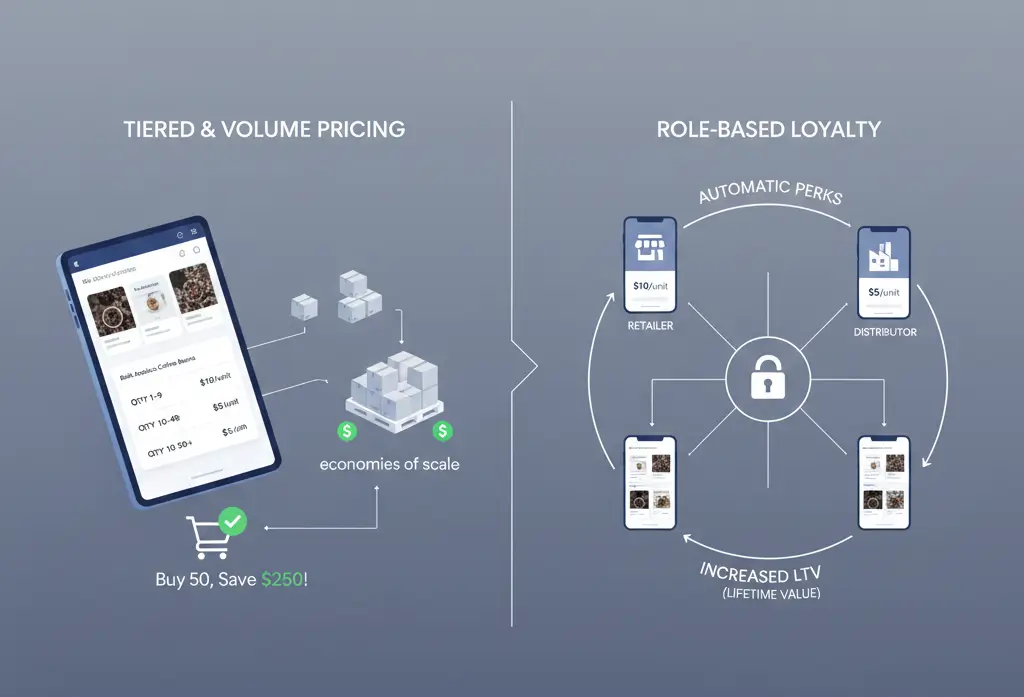
Setting the right price is the most critical part of a wholesale business. Unlike retail, where a price is usually “fixed,” wholesale pricing is a dynamic conversation between the buyer and the seller. The tools discussed in this report use three main methods to handle this complexity.
The Psychology of Tiered and Volume Pricing
Tiered pricing is based on the idea of “economies of scale.” In simple terms, it is cheaper for a seller to handle one big box than ten small boxes. The labor, the tape, the shipping label, and the time spent on the phone are all the same for one item as they are for a hundred. To pass those savings on to the customer, the seller offers a lower price for larger quantities.
There are two ways to calculate this. In a “Volume” model, if a customer buys enough items to reach the next level, every item they bought gets the lower price. In a “Tiered” model, the first few items might be full price, and only the extra items get the discount. Most wholesale plugins use the Volume model because it is much easier for customers to understand. When they see that adding one more unit to their cart will drop the price for the whole order, they often do it.
Role-Based Pricing and Customer Loyalty
Not all customers are equal in the business world. A small local cafe that buys ten bags of coffee a month is a “Retailer,” but a national chain that buys a thousand bags is a “Distributor.” Role-based pricing allows a store owner to create categories for these different levels of customers.
The benefit of this is that the website automatically knows who the customer is the moment they log in. There is no need for the customer to use a coupon code or call the owner to ask for their special price. It is all handled automatically. This makes the customer feel like they have a personal, professional relationship with the store, which builds loyalty and makes them less likely to go to a competitor.
Strategic Access Control: The Power of “Wholesale Visibility”
One of the biggest mistakes a new wholesale business can make is showing its business prices to the general public. If a regular person sees that a business can buy a product for $10 while they are being charged $20, they might feel cheated. This is why access control, the ability to hide things, is so important.
Creating a Private Store Experience
Some businesses choose to run a “Private Store.” This means the shop page is empty if you are not logged in. This creates an air of exclusivity and professional secrecy.1 It also protects the business’s “margins”, the difference between what it costs to make an item and what it sells for. By keeping prices hidden, the business can maintain its brand value in the public eye while still offering great deals to its partners.
Managing Registration and Approvals
A professional wholesale store acts as a “gatekeeper.” When a new person wants to join, they fill out a registration form. The store owner can then check to see if they have a real storefront, a valid business license, and a good reputation.1 The tools analyzed in this report allow this to happen smoothly. The owner can even set up different forms for different types of businesses, for example, asking a local shop for their address but asking an online-only store for their social media links.
Operational Excellence: Tax Exemption and Shipping
For many businesses, the “math” of wholesale is the hardest part to manage. Specifically, the rules around taxes and shipping can be very complicated.
Simplifying Tax Compliance (VAT and Sales Tax)
In most parts of the world, if one business sells a product to another business for the purpose of reselling it, the seller does not have to charge sales tax or Value Added Tax (VAT). This is because the tax will be collected later when the product is sold to the final customer.
Managing this manually is a nightmare. A good wholesale plugin will have a “Tax Exemption” box where a customer can enter their official tax identification number1 The plugin can then check if the number is real and, if it is, automatically remove the tax from the total. This means the customer sees the correct, lower price, and the business owner doesn’t have to spend hours doing extra paperwork for the government.
Complex Shipping for Bulk Orders
Shipping a single t-shirt is easy; shipping a pallet of five thousand t-shirts is hard. Wholesale orders often require different shipping methods, like heavy-duty trucks instead of standard mail carriers. The top plugins allow an owner to restrict shipping options based on the “Role” of the customer. A regular person might see “Free Standard Shipping,” while a wholesale customer might see “Freight Truck Delivery” or “Local Warehouse Pickup.” This ensures that the customer gets their items safely and the seller doesn’t lose money on shipping costs.
Technical Health: Speed and Performance in High-Volume Stores
When a store moves into wholesale, the amount of data it has to process grows significantly. A retail customer might have one or two items in their cart, but a business buyer might have three hundred different types of items. This puts a massive strain on the website’s “brain” (the server).
The Importance of Caching and Optimization
If a website is slow, a business buyer will get frustrated. They are placing these orders as part of their busy workday and don’t have time to wait for a spinning circle on the screen. Some plugins are better at this than others. For example, Barn2 solutions and Wholesale Suite are known for being very well-optimized.
A key technical concept to look for is “Object Caching.” This is a way for the website to “remember” certain things, like a customer’s special discount, so it doesn’t have to do the math every time the customer clicks a button. This makes the website feel much faster and more professional, which is essential for keeping high-value business customers happy.
Mobile-Ready Wholesale
We are seeing a trend where more and more business orders are placed from smartphones. A manager might be walking through their warehouse and realize they are low on a specific item; they want to be able to pull out their phone and order more immediately. Therefore, the “Bulk Order Forms” and “Registration Pages” must work perfectly on small screens. The most modern tools, like WholesaleX and B2BKing, are built with this in mind, ensuring a smooth experience no matter what device the customer is using.
Wholesale Portal Direction
B2B ecommerce is moving away from simple pricing tools toward complete wholesale portals. A portal is more than just a different price; it is an entirely different version of the website for business users.
Personalization and AI
The next generation of tools will likely include artificial intelligence to help business owners. For example, the software might notice that a customer hasn’t ordered their usual supply of towels this month and send a friendly reminder email automatically. Or it might suggest that because a customer is buying a lot of paint, they might also need to buy brushes at a special discount. This level of personalized service was once only possible for giant corporations, but it is now becoming available to small and medium businesses through these plugins.
Integrating with the Rest of the Business
The most successful wholesale stores do not exist in a vacuum. They need to “talk” to other software, such as accounting systems (like QuickBooks or Xero) and warehouse managers. Many B2B plugins increasingly focus on these integrations, making it so that when a wholesale order is placed online, it automatically creates an invoice in the accounting software and tells the warehouse team to start packing the order. This “seamless” workflow is a practical way to reduce manual order handling.
Decision Path
Selecting the correct tool depends on the current size of the business and where the owner wants it to be in three years.
For a business that is just starting, perhaps selling a few bulk orders to local shops, a practical path is to start small. A tool like Whols or the free version of Wholesale Suite allows the owner to learn how wholesale works without spending a lot of money. It provides the basic “Role” and “Price” features that are the foundation of any business-to-business store.
For a mid-sized company that is growing quickly and has a complex list of products, the focus should be on efficiency. Wholesale Suite (the full bundle) or Barn2 Wholesale Pro are sensible choices here because they offer the “Bulk Order Form,” which saves the customers time and makes them more likely to order again.
For large-scale operations, manufacturers, or companies with very secret pricing, an “enterprise” tool like B2BKing or WholesaleX is necessary. These tools provide the “Sub-accounts” and “Private Store” features that professional corporate buyers expect. While they take a little more time to set up, they provide a much more professional and secure environment for high-value business deals.
The ultimate goal of adding these tools to a store is to remove “friction.” Friction is anything that makes it hard for a customer to give you money. By using the right wholesale plugin, a business owner removes the need for phone calls, emails, and manual tax calculations. They turn the website into a self-service ordering portal that can accept large wholesale orders with less manual follow-up. That operational efficiency is the real value of a planned B2B WooCommerce setup.
About the writer

Hassan Tahir wrote this article, drawing on his experience to clarify WordPress concepts and enhance developer understanding. Through his work, he aims to help both beginners and professionals refine their skills and tackle WordPress projects with greater confidence.
Frequently Asked Questions
What is a practical WooCommerce B2B setup?
A practical setup combines role-based pricing, buyer approval, quote requests, bulk order forms, customer-specific catalogs, reliable hosting, object cache and a clear plan for ERP or inventory sync.
Do wholesale plugins replace custom development?
Sometimes. Plugins can handle common role pricing, approvals and order forms, but custom development is often needed for ERP sync, unique contracts, private buyer portals or complex pricing rules.
How should wholesale pricing rules be planned?
Start with customer groups, minimum order quantities, volume tiers, tax rules, shipping rules and approval rules. Then choose the plugin or custom path that matches those rules with the least operational friction.
What hosting features matter for B2B checkout?
B2B checkout depends on logged-in sessions, account portals, dynamic pricing and large carts, so hosting should support object cache, stable PHP workers, database tuning, backups, logs and careful cache exclusions.
When should ERP sync be custom?
Custom ERP sync is usually needed when stock, credit limits, invoices, customer-specific pricing or purchase-order approvals live outside WooCommerce and must stay consistent after every order.
How can bulk order forms stay fast?
Use lean plugins, object cache, indexed product data, limited AJAX payloads, HPOS-compatible tools and performance testing with realistic logged-in wholesale accounts.