Lifetime VPS Europe
 Lifetime VPS Asia
 Lifetime WooCommerce Hosting
 Lifetime Hosting
 Lifetime Game Dedicated Servers
 Chicago, US
 Tokyo, Japan
 Singapore
 Hong Kong
 Seoul, South Korea
 Amsterdem, Netherlands
 London, UK
 Stockholm, Sweden
 Oslo, Norway
 Vienna, Austria
 Zurich, Switzerland
 Sydney, Australia
 Wordpress Hosting
 VPS Hosting
 DDOS Protection
 Submit Ticket
 Full Management
 Guides
 Videos and Podcasts
 Discover Creative Ideas
 Voxfor Autonomous AI Workers
 Voxfor Mega Menu
 Voxfor Advanced Price Management For WooCommerce
 Voxfor Secure Live Chat and AI Support
 Voxfor Multilanguage
 Voxfor AI Content Summary
 Voxfor Autopilot
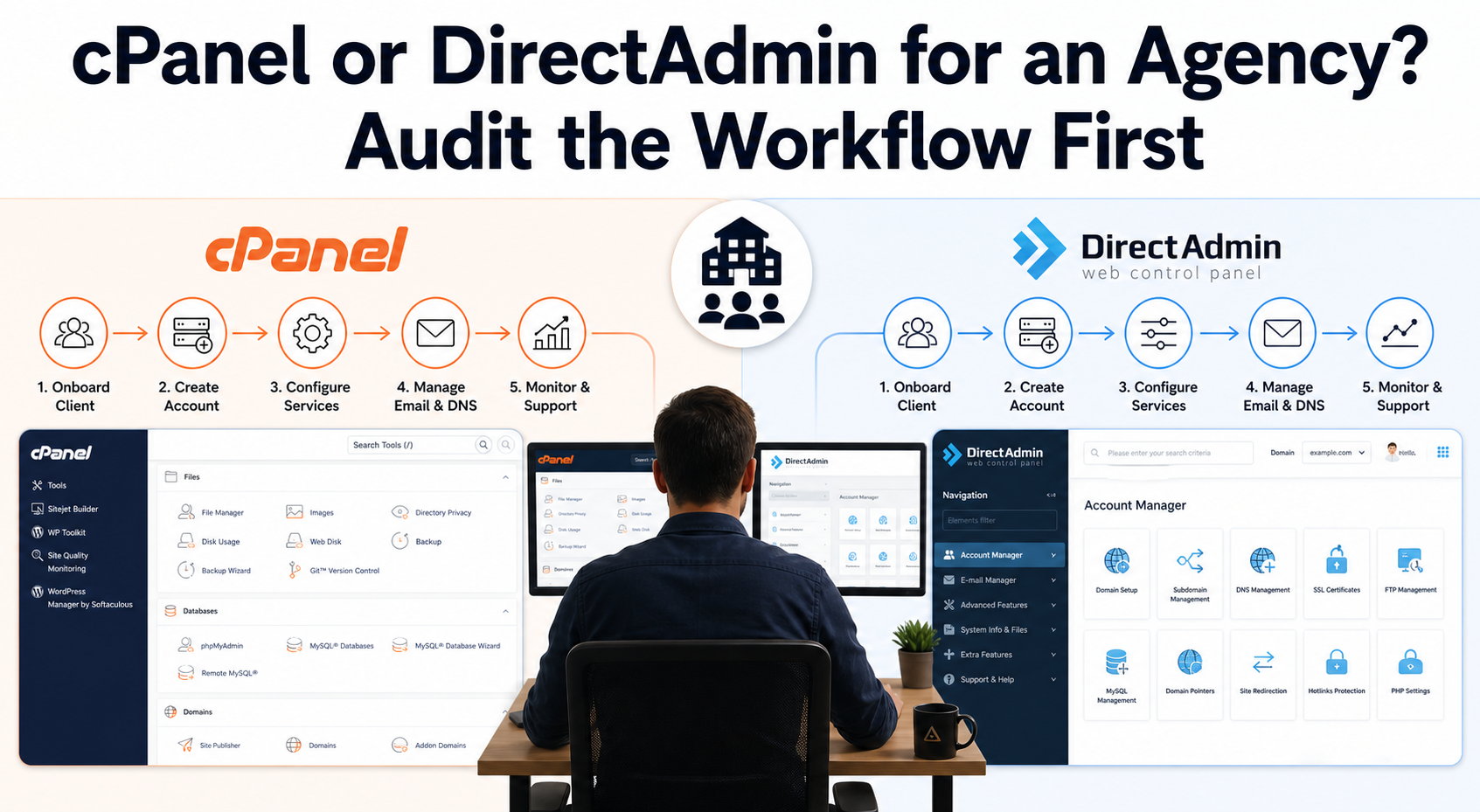
An agency can lose more money to one recurring support ticket than it saves on a control-panel license. If clients cannot create a mailbox, find a backup, delegate safe access, or understand where DNS is managed, the "cheaper" panel creates paid staff work. Choose cPanel or DirectAdmin from the workflow your agency must repeat—not from a generic feature count.
This comparison is for agencies, freelancers and reseller-hosting teams that manage several client accounts. You should know which domains, websites, mailboxes and databases belong to each client, but you do not need to be a Linux administrator. The deliverable is a reviewable decision record: required tasks, account growth, integrations, migration exceptions, restore evidence and an exit path.
One Panel Choice Reaches Every Support Queue
cPanel and DirectAdmin both cover the ordinary hosting surface: domains, DNS, files, email, databases, certificates, backups and separate customer accounts. Their important difference is how those capabilities fit your staff, client and provider boundaries.
At the hierarchy level, cPanel normally pairs a client-facing cPanel account with WebHost Manager (WHM), where server administrators and resellers create accounts, packages and permissions. DirectAdmin exposes Admin, Reseller and User levels inside its own hierarchy. Both can serve an agency. Neither hierarchy proves that clients receive only the access they need or that staff can recover an account under pressure.
Start by classifying the work:
- Client self-service: create a mailbox, reset a password, inspect storage, download a backup, add a redirect.
- Agency operations: create accounts, set packages, move ownership, suspend service, audit usage, coordinate DNS.
- Server operations: patch the operating system, update the panel, manage services, secure root access, monitor capacity and restore after host failure.
Confusing those layers causes bad comparisons. A familiar client screen does not replace server management, while a powerful administrator screen does not make a safe client handoff. When ownership must pass to the customer, use an agency client-control handoff checklist to verify durable access instead of handing over one shared administrator credential.
Write the Ten Tasks Your Agency Actually Repeats
Feature lists reward panels for capabilities your team may never use. A task inventory rewards the panel that reduces real work without hiding a required control.
Observe a normal month
Export or sample one month of support requests. Group them by action rather than product name: mailbox creation, failed delivery, SSL renewal, database access, WordPress staging, restore request, file recovery, DNS change, account transfer or resource limit. Add the staff minutes and escalation owner for each group.
Client language matters. If customers already ask for "cPanel access," migration includes retraining, help-center changes and revised handoff documents. Familiarity has value, but record it as avoided support time—not as proof that one panel is technically superior.
Test the hardest routine action
Pick the highest-volume task and the highest-risk task. A frequent mailbox workflow may reveal navigation and delegation friction; a restore reveals whether backups are usable. Record the exact client-facing vocabulary in each trial rather than assuming that similar outcomes use the same labels in both panels.
Run each task with an ordinary client account and with the agency role expected to support it. Record completion time, required privilege, documentation quality and the evidence that proves success. A screenshot of a green notification is weaker than a received test message, a restored file hash or a public certificate check.
Include failure and escalation
Ask what happens when the client cannot finish. Can staff impersonate or assist without sharing credentials? Is the action logged? Does the provider own the underlying service, or does the agency need root access? The panel decision changes if the agency sells self-service hosting, fully managed care or a narrow website-maintenance plan.
Account Growth Changes the License—and the Process
An account is an isolated panel identity, not simply another domain. One agency client may own several domains inside one account, or each client/project may need a separate login and ownership boundary. Decide that model before comparing tiers.
On the official pages checked August 8, 2026, cPanel retail pricing lists Solo for one account, Admin for up to five, Pro for up to 30 and Premier for up to 100 with a stated per-account charge above that tier. DirectAdmin retail pricing lists Personal PLUS for two accounts/20 domains, Lite for ten accounts/50 domains and Standard with unlimited accounts and domains. Prices, taxes, partner discounts, bundled provider licenses and product terms can change, so recheck the live offer before approval.
Model three account counts
Calculate the panel and required add-on cost at today’s account count, the expected count in 12 months and a high-growth case. Keep domains separate from accounts. Then add:
- staff training and rewritten client documentation;
- billing/provisioning integration work;
- backup, security, web-server and WordPress extensions;
- monitoring and support subscriptions;
- temporary overlap during migration;
- staff time for tickets the panel does not prevent.
Compare like-for-like service boundaries
A retail license on a self-managed VPS is not equivalent to a provider-managed panel bundle. The provider may install, patch, migrate, monitor and back up the environment—or may only issue a license. Use server-management responsibility questions to name every task that remains with the agency.
For delegated operations, compare each provider’s managed server operations scope, covering control-panel installation, migrations, server-side issues, DNS, mail, backups and whether cPanel/WHM is optional or bundled.
A Panel Migration Is a Compatibility Project
Moving between servers that run the same panel and changing panel families are different risks. cPanel’s current Transfer Tool documentation describes account, package and configuration transfers between supported sources, warns about DNS and database-name behavior, and lists material that still needs manual handling. DirectAdmin’s cPanel import guidance explicitly names conversion limits such as mailing lists, database-name changes, unsupported PostgreSQL/Ruby workloads and the need to test one account first.
Choose the worst representative account
Do not pilot the smallest brochure site. Select an account with long database names, cron jobs, redirects, custom DNS, several mailboxes, forwarding, SSL, backups and any extension the agency depends on. Remove secrets from the evidence package, but preserve enough structure to expose incompatibility.
The source account must remain recoverable throughout the exercise. Keep its original archive, record DNS time-to-live values, and define the stop point after which new writes must be reconciled. A cross-panel importer can move many files while still leaving application configuration, mail routing or ownership incorrect.
Define acceptance outside the panel
After restoration, prove public DNS, HTTPS, pages, forms, logins, scheduled work, mail send/receive, database writes, redirects, backups and the real customer transaction. A WordPress post-migration QA checklist provides a useful public-surface branch when WordPress is part of the account.
Keep a rollback and an exit test
Rollback means more than changing DNS back. Name how you will reconcile orders, form submissions, mail and database writes created after the migration boundary. Before selecting either panel, also prove that you can export one account, restore it into an isolated target and locate the documentation required to leave the platform later.
APIs, Extensions and Backups Decide the Operating Fit
Core checkboxes hide the dependencies that lock an agency into a workflow.
Inventory automation by API operation
cPanel’s WHM API 1 covers server administration, reseller accounts and services. DirectAdmin documents an actively extended JSON API plus a legacy API in its developer API reference. Presence of an API is only the first check.
List the exact operations your billing or agency system performs: create account, apply package, suspend, unsuspend, reset credentials, fetch usage, install a certificate, start a backup and report completion. Confirm authentication, privilege scope, idempotency, error output and version behavior in a non-production environment.
Automation should expose a completion marker rather than treating "request accepted" as success. The WHMCS completion-marker workflow demonstrates that distinction for scheduled billing tasks; apply the same evidence rule to provisioning calls.
Name every required extension
Record web server, PHP selector, WordPress manager, malware scanner, backup system, billing module, mail filter and resource-isolation layer. For each item, capture vendor support for the panel, license cost, installation owner, update owner, data location and replacement path.
For Cloudflare-fronted cPanel accounts, an AutoSSL validation trace shows why a panel feature still depends on public DNS and certificate-authority reachability. Include those external dependencies in the extension inventory instead of assuming a green panel toggle owns the whole result.
Avoid broad claims that one panel is always lighter or more secure. Enabled services and add-ons change resource usage and attack surface. Security comes from supported software, least privilege, timely patches, monitored configuration and tested recovery—not from a logo.
Treat backup as a recovery contract
A panel-generated archive is not automatically an off-server backup, and a successful backup job is not a successful restore. Verify schedule, retention, destination credentials, encryption, failure alerts and a restore into an isolated account. Keep a provider- or platform-independent copy when the business requires recovery after loss of the panel server or license.
Run a Two-Day Evidence Trial
This is a buyer evaluation, not an interface tutorial. Use vendor demos, temporary managed environments or disposable non-production servers that you are authorized to test.
Day one: client and agency work
- Create one client account from the agency/reseller role.
- Complete the ten-task inventory with the least privilege available.
- Record client-facing labels, task time, support notes and audit evidence.
- Exercise one billing/API operation and confirm the final state, not only HTTP success.
- Test the required WordPress, mail, security and backup extensions.
Day two: migration, restore and exit
- Import the hard representative account into an isolated target.
- Run public DNS, HTTPS, application, mail and scheduled-work acceptance.
- Restore one file, one database and one mailbox or mail path where applicable.
- Export the account again and document what a future destination would need.
- Ask another staff member to repeat the highest-volume client task from the written note.
Score evidence, not preference
| Decision field | cPanel evidence | DirectAdmin evidence | Pass rule |
|---|---|---|---|
| Client task load | Median time and ticket-risk notes | Same ten tasks | No unresolved high-volume task |
| Account model | Current, 12-month and growth tier | Same account counts | Cost includes accounts and add-ons |
| Agency operations | Reseller privileges and audit trail | Reseller privileges and audit trail | Least privilege supports the service |
| Automation | Exact API/billing operations | Exact API/billing operations | Final state and failures are observable |
| Migration | Same-panel and exit method | cPanel import and exit method | Hard account passes external QA |
| Recovery | Off-server archive and isolated restore | Off-server archive and isolated restore | File/data/mail evidence is recoverable |
| Support boundary | Agency/provider ownership | Agency/provider ownership | Every recurring task has one owner |
Mark each cell measured, vendor-confirmed, provider-confirmed, estimated or unknown. Unknown is work before approval, not a zero-cost assumption.
FAQ: cPanel and DirectAdmin Agency Decisions
Is DirectAdmin always cheaper than cPanel for an agency?
No. DirectAdmin’s current retail tiers can cost less at many account counts, but total cost also includes provider bundles, extensions, migrations, training, support time and management. Compare the live offers at your current and expected account counts with the same service boundary.
Is cPanel easier for clients?
Clients with cPanel experience may complete familiar tasks faster, while other clients may prefer DirectAdmin’s organization. Test your ten highest-volume tasks with representative users. Familiarity is measurable support value, not a universal usability verdict.
Can DirectAdmin import every cPanel account automatically?
No. DirectAdmin documents a cPanel importer, but it also lists feature and naming differences that can require manual work. Pilot the hardest representative account and validate DNS, HTTPS, databases, mail, jobs, backups and application transactions outside the panel.
Does cPanel include WHM for agency account management?
cPanel and WHM licenses pair the client-facing cPanel interface with WHM server and reseller management. Exact privileges still depend on the license, server owner and reseller access policy, so confirm the actions your agency needs rather than assuming full administration.
Which panel is better for WHMCS automation?
Both ecosystems can integrate with billing and provisioning tools, but the useful answer depends on the exact module and operations your workflow needs. Test create, suspend, unsuspend, package change, usage retrieval and failure reporting against the versions you will run.
Does changing panels improve website speed?
Not by itself. Panel services consume resources, but website performance also depends on CPU, memory, storage, web server, PHP, database, caching, traffic and configuration. Benchmark the same application and enabled service set before attributing a result to the panel.
Can the panel’s backup replace an independent disaster-recovery copy?
Only if it meets the same failure boundary, retention, security and restore requirements—which an archive stored on the same server usually does not. Keep recovery material outside the panel server when the business must survive server loss, and prove an isolated restore.
Sign the Exit Test Before Choosing
Record one winner only after both candidates face the same task list, account forecast, integration inventory, pilot migration and restore test. The signed decision should name the accepted panel, evidence date, license/source terms, unresolved exceptions, task owners and next review trigger.
Attach one final exit receipt: account exported, archive stored independently, restore destination identified, DNS and mail ownership documented, and a second staff member able to find the procedure. That receipt keeps the panel useful as a tool instead of turning it into undocumented agency infrastructure.