Helpful tutorials attract qualified visitors, but reliable hosting keeps those readers engaged. Voxfor VPS gives growing websites the speed, uptime, and control needed to support stronger inbound marketing campaigns.
Multilingual SEO is the practice of optimizing your website so that it ranks in search engines across multiple languages and geographic regions. It goes well beyond simply translating your content, it involves aligning your technical infrastructure, content strategy, and keyword targeting with the expectations of search engines and real users in each target market.
When done correctly, multilingual SEO allows your website to appear in the right search results for the right audience, regardless of the language they search in. When done incorrectly, or not at all, your translated pages can be invisible in search engines, flagged as duplicate content, or served to the wrong audience entirely.
In today’s global web, multilingual SEO is no longer optional for businesses that want international reach. It is a foundational part of any serious content strategy.
Search engines like Google do not simply detect a user’s location and serve any translated page. They look for explicit signals that tell them which language version to show, to whom, and why. Without those signals, your multilingual website can end up hurting more than helping.
Here is what is at stake:
One of the most important distinctions in multilingual SEO is the difference between translation and localization.
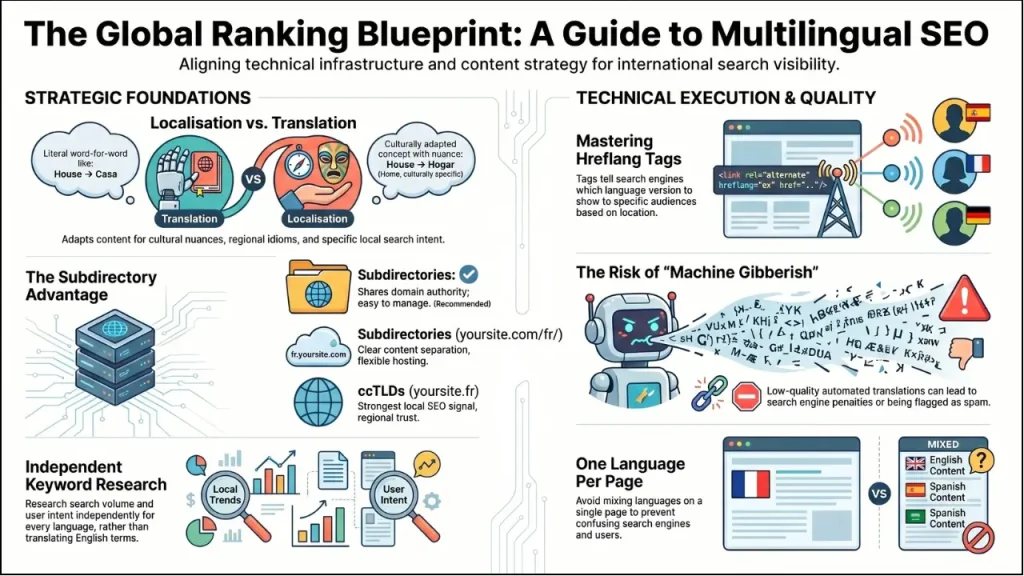
Translation converts words from one language to another, preserving the original meaning. It is a necessary first step, but it often falls short on its own for SEO purposes. A direct translation of your English title tag may rank poorly in Spanish because the keywords that perform in English do not carry the same search volume or intent in another language.
Localization goes deeper. It will localize your content to suit a particular market in both culture and language. This means using region-specific keywords, modifying idioms, restructuring dates and currencies, and making your message local and local preferences local norms. As an example, the term cheap flights in Spain can be translated to mean vuelos baratos, whereas in Mexico, landing pages with ofertas de vuelos would rank and convert higher, as that is the way local users search.
In SEO, localization is the best strategy in any case. Search engines will reward content that is actually useful to the intent of the user, and localized content is much more so than word-for-word translation.
Google distinguishes between two types of international websites:
Many global businesses need to be both. A site targeting French speakers in France and in Canada would need language differentiation and regional differentiation. Understanding this distinction from the outset is critical for getting your URL and content architecture right.
Your URL structure is the first and most fundamental SEO decision for a multilingual website. Google recommends using separate, dedicated URLs for each language version. There are three main options:
| Structure | Example | Pros | Cons |
| Subdirectories | yoursite.com/fr/ | Shares domain authority; easy to manage and analyze | Requires careful internal linking |
| Subdomains | fr.yoursite.com | Clear content separation; flexible hosting | Treated as separate sites by Google; authority can be diluted |
| ccTLDs | yoursite.fr | Strong local SEO signal; builds regional trust | Expensive; complex to manage; requires separate SEO for each domain |
For most websites, especially small to medium-sized businesses, subdirectories are the recommended approach. They leverage your existing domain authority, are the simplest to manage, and are easiest for analytics tracking. Subdirectories like yoursite.com/es/ for Spanish or yoursite.com/de/ for German tell both users and search engines exactly what to expect.
The most important rule, no matter which structure you are using: cookies, JavaScript, or IP-based redirects, should never be your only option for providing the different language versions. Bots used in search engines are unable to save cookies or even reliable JavaScript-based redirects, so those versions of the language might never be indexed.
If there is one technical element that defines multilingual SEO, it is the hreflang attribute. This HTML tag tells search engines which language and regional version of a page to show to a specific audience.
In the absence of hreflang, search engines can view your pages in French and English as a competition with each other since they have similar content. Google realizes that with hreflang properly placed.
Each version gets indexed and ranked independently for its target audience.
Hreflang uses ISO 639-1 language codes and ISO 3166-1 Alpha-2 country codes. The basic syntax added to the <head> section of each page looks like this:
//yoursite.com/en/" />
//yoursite.com/fr/" />
//yoursite.com/es/" />
//yoursite.com/" />
Key rules for correct hreflang implementation:
Hreflang can be applied using HTML > tags in the head of the page, HTTP headers (when working with non-HTML documents such as PDFs) or in your XML sitemap. In the case of WordPress sites, this can be automatically done by a set of plugins, which eliminates the need to write the code manually.
One of the most common and costly mistakes in multilingual SEO is simply translating your English keywords into another language. Something effective in a certain language may not be effective in another, not due to the fact that the translation is defective, but because people in different markets do not search in the same way. A successful multilingual search of keywords implies.
For example, a software product might be searched as “project management tool” in English. Still, local users in Germany might search for “Projektmanagement Software”. In contrast, French users search for “logiciel de gestion de projet”, and these terms have completely different competition levels and SERP landscapes.
All the on-page SEO features should be optimized by language. It is a grave omission to merely translate body content but leave metadata in English.
Title tags and meta descriptions should be translated and localized in each language version. This means:
Performing keyword research in each language to identify the most relevant and searched terms.
Image ALT text is frequently overlooked in multilingual SEO, but it carries real weight, both for search indexing and for screen-reader accessibility. Every image on your site should have its ALT text translated and optimized for local keywords in each language version.
The HTML `lang` attribute in your page’s `<html>` tag (e.g., `<html lang=”fr”>`) tells browsers and search engines the primary language of each page. This should be set correctly for every language version, it assists both search engine parsing and accessibility tools.
A common mistake, particularly on partially translated sites, is mixing languages on a single page. This creates multiple problems:
Every page should be 100% in one language.
Multilingual websites are at inherent risk of duplicate content penalties if not structured properly. While Google generally treats properly implemented translations as separate, unique content for different audiences, there are scenarios where translated pages can still be flagged.
Google specifically cautions against low-quality automated translations that are translated as machine-written gibberish. Web pages containing poor quality translated materials can be assigned a lower rank, or worse, they could be treated as spam. That is why AI-supported translation is to be invariably combined with quality control and localization services.
In cases where near-identical content exists (such as English for the US and English for Australia), canonical tags help signal which version is the primary one. Canonical tags and hreflang work together, hreflang identifies language relationships while canonical tags prevent self-competition between similar pages.
Google specifically cautions against low-quality automated translations that are translated as machine-written gibberish. Web pages containing poor quality translated materials can be assigned a lower rank, or worse, they could be treated as spam. That is why AI-supported translation is to be invariably combined with quality control and localization services.
Backlinks remain one of the most powerful ranking factors in SEO, and this holds for multilingual SEO as well. However, an English backlink pointing to your French page has limited value for French-language rankings. You need to build authority within each target language market.
Strategies for multilingual link building include:
Technical Considerations: Language-Specific Sitemaps and Crawlability
Beyond hreflang, several technical elements must be in place for search engines to properly crawl and index multilingual content:
WordPress powers a significant portion of the web, and building a multilingual WordPress site that is properly optimized for SEO requires the right tools. Manually managing hreflang tags, translated slugs, language-specific canonical URLs, and multilingual sitemaps is complex and error-prone.
That is why using a dedicated multilingual plugin is the most reliable approach for WordPress site owners. The right plugin automates the technical complexity, hreflang generation, canonical URL management and translated metadata, while giving you full control over translation quality and content organization.
Use this checklist to audit your multilingual SEO setup:
Technical Setup
Content & On-Page SEO
Authority Building
Try Voxfor Multilanguage: A Free WordPress Plugin Built for Multilingual SEO
If you are running a WordPress website and want to implement multilingual SEO without the technical headaches, Voxfor Multilanguage is a powerful, free solution worth exploring.
Available at wordpress.org/plugins/voxfor-multilanguage, the plugin uses the DeepL API — one of the most accurate AI translation engines available, to deliver professional-quality translations while keeping full SEO control in your hands.
The plugin is 100% free and open source (GPLv3), with no premium tiers or hidden costs. The only requirement is your own DeepL API key, which is free for smaller sites and very affordable at scale.
For any WordPress website owner serious about reaching a global audience, Voxfor Multilanguage removes the most significant technical barriers to multilingual SEO and puts a professional-grade solution in your hands at no cost.

Hassan Tahir wrote this article, drawing on his experience to clarify WordPress concepts and enhance developer understanding. Through his work, he aims to help both beginners and professionals refine their skills and tackle WordPress projects with greater confidence.






 Lifetime VPS Europe
 Lifetime VPS Asia
 Lifetime WooCommerce Hosting
 Lifetime Hosting
 France Lifetime Dedicated Servers
 Germany Lifetime dedicated servers
 Lifetime Game Dedicated Servers
 Chicago, US
 Tokyo, Japan
 Singapore
 Hong Kong
 Seoul, South Korea
 Amsterdem, Netherlands
 London, UK
 Stockholm, Sweden
 Oslo, Norway
 Vienna, Austria
 Zurich, Switzerland
 Sydney, Australia
 Wordpress Hosting
 VPS Hosting
 DDOS Protection
 Submit Ticket
 Full Management
 Guides
 Videos and Podcasts
 Discover Creative Ideas
 MetaAgentOS High-Ticket Support System
 Voxfor Mega Menu
 Voxfor Advanced Price Management For WooCommerce
 Voxfor Secure Live Chat and AI Support
 Voxfor Multilanguage
 Voxfor AI Content Summary


