Lifetime VPS Europe
 Lifetime VPS Asia
 Lifetime WooCommerce Hosting
 Lifetime Hosting
 Lifetime Game Dedicated Servers
 Chicago, US
 Tokyo, Japan
 Singapore
 Hong Kong
 Seoul, South Korea
 Amsterdem, Netherlands
 London, UK
 Stockholm, Sweden
 Oslo, Norway
 Vienna, Austria
 Zurich, Switzerland
 Sydney, Australia
 Wordpress Hosting
 VPS Hosting
 DDOS Protection
 Submit Ticket
 Full Management
 Guides
 Videos and Podcasts
 Discover Creative Ideas
 Voxfor Autonomous AI Workers
 Voxfor Mega Menu
 Voxfor Advanced Price Management For WooCommerce
 Voxfor Secure Live Chat and AI Support
 Voxfor Multilanguage
 Voxfor AI Content Summary
 Voxfor Autopilot

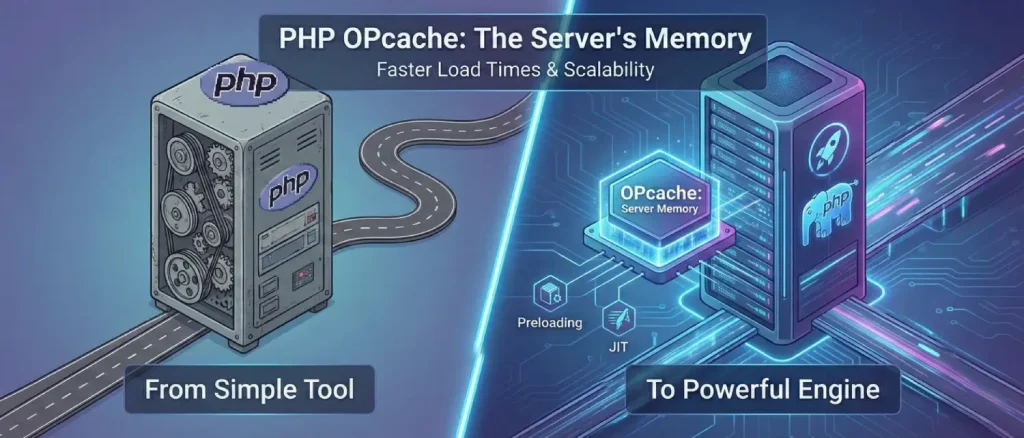
PHP has come a long way. It started as a basic tool for simple websites, but today, it’s a powerful engine running some of the biggest applications in the world. Because it’s grown so much, the way we handle its speed has had to change, too.
PHP performance hosting
Tune PHP performance on a VPS built for control
OPcache can improve PHP performance, but server resources and configuration still matter. Voxfor VPS gives developers control over PHP settings, caching, and production environments for faster websites.
Think of OPcache as the “memory” for your server. Normally, every time a user visits a page, PHP has to read, translate, and compile the code from scratch, which is like a chef re-reading a recipe every single time someone orders the same dish. It’s a waste of energy. OPcache solves this by remembering the “recipe” after the first time.
By skipping those repetitive steps, your server doesn’t have to work nearly as hard. This means your website loads faster, handles more visitors at once, and doesn’t max out your CPU. In this guide, we’ll show you how to set up OPcache on different systems and look at the newest “super-speed” features, like Preloading and JIT, that keep modern PHP running lightning-fast.
The Foundations of Opcode Caching
To understand why OPcache is such a big deal, we first need to look at what happens “under the hood” every time someone visits a PHP-powered website.
Unlike some programming languages that are “pre-built” (like a ready-to-eat meal), PHP is traditionally interpreted. This means the server has to “cook” the code into a language the computer understands every single time a request comes in.
It’s not just a simple translation, though; it’s a four-step assembly line:
Reading: The engine pulls the file from the hard drive.
Tokenizing: It breaks the code down into tiny, identifiable pieces (like words in a sentence).
Parsing: It builds a “map” (called an AST) to understand how those pieces fit together.
Compiling: Finally, it turns that map into Opcodes, the actual instructions the machine can run.
Without OPcache, your server is like a chef who has to re-read the recipe, find the ingredients, and chop the vegetables every time a customer orders the same sandwich. It works, but it’s incredibly repetitive and slows everything down when the restaurant gets busy.
This whole process is repeated in a typical non-caching environment on a per-request basis, even when the underlying file has not changed. The performance penalty is insignificant on small-traffic installations. Nevertheless, with more advanced applications that use frameworks such as Laravel or Symfony, or content management systems (CMS) such as WordPress and Drupal, a single page request can require hundreds of different files to be loaded. The maximum disk I/O and CPU cycles spent in unnecessary compilation are one of the main bottlenecks.
OPcache completely changes how your server works by giving it a “shared memory” or a quick-access brain. The very first time a script is run, the server does the hard work of translating it, but then it saves those finished instructions in a special memory area that every part of your website can reach.
For every visitor after that, the server doesn’t have to re-read or re-translate the code at all; it just grabs the ready-to-go instructions directly from the RAM. By cutting out all that repetitive “thinking” time, your website can load up to three times faster, and your server’s CPU doesn’t have to work nearly as hard, often cutting its workload by 50% to 80%.
The Evolution of Caching: From APC to Zend OPcache
Opcode caching in PHP has a history where its external status changed to an internal status. Before PHP 5.5, opcode caching and user-data caching in the industry were based on Alternative PHP Cache (APC).
Nevertheless, in 2013, PHP 5.5 was released, and the Zend OPcache extension (initially created as a commercial offering by Zend Technologies as the brand Zend Accelerator) was open-sourced and embedded in the PHP core. This incorporation was able to make it more reliable and in sync with the internal adjustments of the Zend Engine.
| Era | Primary Caching Solution | Key Characteristics |
| Pre-PHP 5.5 | APC (Alternative PHP Cache) | Separate extension; handled both bytecode and user variables. |
| PHP 5.5 – 7.3 | Zend OPcache | Core integration; focused exclusively on bytecode; APC became APCu for user data. |
| PHP 7.4+ | OPcache + Preloading | Introduced class/function preloading at server startup. |
| PHP 8.0+ | OPcache + JIT | Introduction of Just-In-Time compilation to native machine code. |
The modern approach separates bytecode caching (OPcache) from user-variable caching (APCu or Redis). While OPcache stores the immutable instructions of the application, APCu or Redis stores dynamic data such as database query results or session information.
Linux Ecosystems
To successfully integrate the use of OPcache, it is important to customise the installation and configuration depending on the operating system and PHP handler that is being used.
The majority of contemporary Linux distributions come with OPcache activated in default settings. In most cases, the latest performance features need to be enabled or may need to be handled by the repositories.
Debian and Ubuntu Environments
The commonly included package in the Ubuntu ecosystem is OPcache. In the case of the environment that uses Nginx and PHP-FPM, the installation is simplified through Advanced Package Tool (APT).
sudo apt update
sudo apt install php-opcache php-fpm -y
For those utilizing Apache, the integration often occurs via libapache2-mod-php. Once installed, the configuration files are located in version-specific directories, such as /etc/php/8.3/fpm/php.ini or /etc/php/8.3/apache2/php.ini. After any configuration change, the corresponding service must be restarted to re-initialize the shared memory segment:
sudo systemctl restart php8.3-fpm
# or
sudo systemctl restart apache2
RHEL, AlmaLinux, and Rocky Linux Architectures
Enterprise Linux distributions often prioritize stability over the inclusion of the latest PHP versions. To leverage advanced OPcache features like JIT in PHP 8.x, administrators typically rely on the Remi Repository.
The procedural steps for a high-performance installation on AlmaLinux 9 involve:
- Repository Initialization: Enable the EPEL and Remi repositories to access modular PHP versions.
sudo dnf install https://dl.fedoraproject.org/pub/epel/epel-release-latest-9.noarch.rpm -y
sudo dnf install http://rpms.remirepo.net/enterprise/remi-release-9.rpm -y- Module Configuration: Reset the default PHP module and enable the desired version stream (e.g., 8.3).
sudo dnf module reset php
sudo dnf module enable php:remi-8.3 -y- Core Installation: Install the PHP interpreter along with the OPcache extension.
sudo dnf install php php-opcache -yIn these environments, OPcache settings are often separated into a dedicated configuration file located at /etc/php.d/10-opcache.ini, allowing for cleaner management of performance-specific overrides.
Technical Mastery of OPcache Configuration
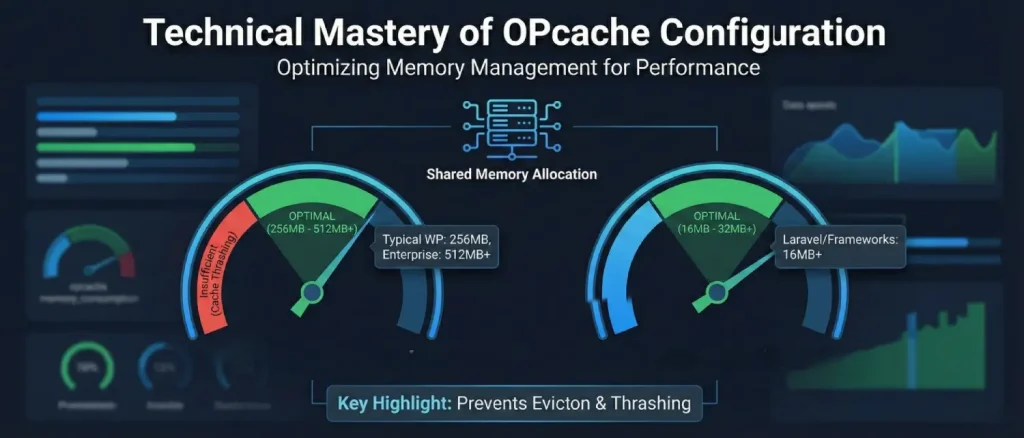
The default settings of OPcache are made to be as compatible as possible, usually sacrificing much in terms of performance. Administrators have to carefully optimize the instructions in the php.ini file in order to achieve the complete potential of the extension.
Memory Management and Sizing
The most critical aspect of OPcache tuning is the allocation of shared memory. If the allocated space is insufficient, the system will enter a state of “cache thrashing,” where it must frequently evict old scripts to make room for new ones, or worse, stop caching altogether.
Shared Memory Consumption (opcache.memory_consumption)
This directive defines the size of the memory pool in megabytes. While the default is 128MB, this is often insufficient for modern applications. For a typical WordPress site with 30-50 plugins, 256MB is a safer baseline. Large enterprise applications or multi-tenant servers should consider 512MB or more. The memory required can be estimated by analyzing the total size of the application’s PHP files on disk, though bytecode generally requires slightly more space than the original source.
Interned Strings Buffer (opcache.interned_strings_buffer)
Interned strings are used to optimize memory in PHP since the same string is only stored once (e.g., the name of a variable or a constant used in a class). When using frameworks such as Laravel, where thousands of files roughly use the same strings, this value can be increased to 16MB or 32MB with a huge payoff. This buffer on 64-bit architectures can be scaled greatly higher where needed.
The Hash Table and File Limits (opcache.max_accelerated_files)
The max_accelerated_files directive does not simply limit the number of files; it determines the size of the hash table used to index the cached scripts. To minimize collisions, which degrade lookup performance, the Zend Engine uses a fixed set of prime numbers for the table size. When an administrator sets a value, PHP automatically rounds it up to the next available prime in the sequence.
| Configured Value | Actual Prime Used | Use Case |
| 3,000 | 3,907 | Small blogs, minimal WordPress sites. |
| 10,000 | 16,229 | Standard Laravel or WordPress installations. |
| 50,000 | 65,407 | Large enterprise monoliths or multi-site clusters. |
A common mistake is underestimating the file count. One must account for all dependencies within the vendor directory and any generated PHP files. A safe rule of thumb is to set this value to at least 2x the current file count of the application.
Validation Strategies and Deployment Workflows
One of the most impactful performance decisions is how OPcache handles file changes. The validate_timestamps and revalidate_freq directives control this.
Timestamp Validation (opcache.validate_timestamps)
When enabled (1), OPcache checks if the file on disk has a newer timestamp than the cached bytecode. If a change is detected, it invalidates the cache and recompiles the file. In a development environment, this is essential. However, in production, the constant disk I/O required to check timestamps on every request (or at a set frequency) introduces unnecessary overhead.
For maximum performance, production environments should set opcache.validate_timestamps=0. This instructs OPcache to never check for file changes, serving the cached bytecode indefinitely.
This approach, however, necessitates an explicit cache-clearing mechanism during the deployment process, such as a reload of the PHP-FPM service.
Revalidation Frequency (opcache.revalidate_freq)
If timestamp validation is enabled, this directive sets the interval in seconds between checks. A value of 0 results in a check on every request, which is highly inefficient. A typical compromise for production sites that cannot use explicit invalidation is 60 to 300 seconds.
Specialized Directives for Modern Environments
Additional directives ensure compatibility and stability in complex application stacks:
- opcache.save_comments: Must be set to 1. Many modern frameworks (Symfony, Laravel) use doc-comments or attributes for metadata and routing. Disabling this will break these applications.
- opcache.fast_shutdown: Enables a more efficient sequence for deallocating memory at the end of a request, which can improve response times slightly on older PHP versions (pre-7.2).
- opcache.enable_cli: Critical for CLI-heavy applications. This allows PHP scripts run from the terminal (cron jobs, queue workers, Artisan commands) to benefit from the opcode cache.
Advanced Performance: OPcache Preloading
Introduced in PHP 7.4, preloading is a sophisticated feature designed to move the performance baseline of PHP applications even closer to that of compiled languages. While standard opcode caching happens “lazily” (on the first request), preloading allows the server to load a specific set of files into memory at startup.
The Mechanics of Preloading
During the initialization of the PHP-FPM or Apache process, the engine executes a designated “preload script.” This script uses opcache_compile_file() to load classes, functions, and interfaces into the global shared memory.
These entities then become permanently available for all subsequent requests as if they were built-in functions of the PHP core itself.
This mechanism effectively eliminates the overhead of “autoloading”, the process where the PHP engine must locate and load class files on demand. For frameworks like Laravel or Drupal, which may load hundreds of files per request, eliminating the autoloader can reduce latency by 10% or more.
Implementation and Constraints
Preloading is an “all-or-nothing” optimization. Because the preloaded code is immutable within the process, any change to a preloaded file requires a full restart of the PHP service to take effect. Furthermore, if the preload script contains an error, the PHP service will fail to start, making robust error handling within the preload script mandatory.
For large applications, it is not advisable to preload every file. Instead, administrators should focus on “hot” classes, those required by the vast majority of requests. Frameworks like Symfony often generate these preload scripts automatically, tailored to the specific application’s dependencies.
The Just-In-Time (JIT) Compilation Engine
The release of PHP 8.0 marked a significant architectural milestone with the inclusion of the Just-In-Time (JIT) compiler. JIT is not a replacement for OPcache but an additional layer that operates within it.
While OPcache stores bytecode, JIT translates specific sequences of that bytecode into native machine code (CPU instructions) during execution.
JIT Architecture and the CRTO Mask
the behavior of the JIT compiler is governed by a complex four-digit configuration string known as the CRTO (CPU, Register, Trigger, Optimization) bitmask. This allows fine-grained control over when and how code is compiled to machine instructions.
| Digit | Meaning | High-Performance Value | Resulting Behavior |
| C | CPU Optimization | 1 | Enables AVX instruction generation for compatible CPU. |
| R | Register Allocation | 2 | Uses a global linear-scan register allocator for maximum efficiency. |
| T | JIT Trigger | 5 | Tracing JIT: Monitors hot code paths and optimizes them dynamically. |
| O | Optimization Level | 5 | Highest optimization level, including inner procedure analyses. |
The most common and recommended configuration is opcache.jit=tracing, which serves as a user-friendly alias for the 1255 mask. The “Tracing JIT” is particularly effective because it doesn’t just look at individual functions; it looks at the entire execution path (the “trace”) to find optimization opportunities.
Performance Implications of JIT
Benchmarks show that JIT can provide a massive performance boost (often 10x or more) for CPU-bound tasks, such as mathematical computations, image processing, or machine learning algorithms.
However, for the majority of web applications, which are “I/O bound” (waiting on database queries or network responses), the impact of JIT is often negligible, sometimes providing only a 1-5% improvement.
In PHP 8.4, the default settings for JIT have been adjusted to be safer for general use. While JIT remains disabled by default, the jit_buffer_size is now pre-allocated to 64MB in some configurations, though the opcache.jit directive must be explicitly set to tracing to activate it.
Monitoring, Analysis, and Visualization
A correctly configured OPcache instance requires ongoing monitoring to ensure that memory limits are not being reached and that hit rates remain optimal.
Programmatic Status and CLI Tools
The PHP engine provides internal functions to retrieve cache statistics. The opcache_get_status() function returns an array containing critical data points such as used_memory, free_memory, num_cached_scripts, and opcache_hit_rate.
For command-line administration, CacheTool is the definitive utility. It allows administrators to interact with the PHP-FPM socket directly, bypassing the web server.
# Viewing OPcache status via CacheTool
php cachetool.phar opcache:status --fcgi=/var/run/php-fpm.sock
The output of these tools should be monitored for “Oom restarts” (out-of-memory restarts). If this value is non-zero, it indicates that the opcache.memory_consumption is too low for the current codebase, leading to frequent cache flushes and performance degradation.
Graphical Interfaces for Visual Tuning
Several open-source projects provide a visual layer over the opcache_get_status() data, making it easier to spot trends.
- amnuts/opcache-gui: A modern, React-based dashboard that provides a real-time view of memory usage, hit rates, and a searchable list of all cached files. It is often integrated into developer workflows to verify cache invalidation after deployments.
- Datadog/New Relic Integrations: For enterprise environments, APM tools can ingest OPcache metrics (like php_opcache.cache_full) to trigger alerts when the cache reaches capacity.
Key Metrics for Optimization
| Metric | Target | Significance |
| Hit Rate | > 98% | Indicates most requests are served from cache; low rates suggest frequent evictions. |
| Wasted Memory | < 5% | Memory used by invalidated scripts; high values trigger a restart. |
| Cache Full | false | If true, new scripts cannot be cached until a restart occurs. |
| Oom Restarts | 0 | Any value above 0 indicates insufficient memory allocation. |
Operational Workflows and Maintenance
Maintaining an OPcache-optimized environment requires a structured approach to code deployment and troubleshooting.
Deployment and Cache Invalidation
The “stale code” problem is the most frequent operational issue. When validate_timestamps is disabled, the server will continue to serve old code even after new files have been uploaded.
Best Practices for Invalidation:
- Service Reloads: The most reliable way to clear the cache is systemctl reload php-fpm. This is “graceful,” meaning it waits for current requests to finish before re-initializing the memory segment.
- Atomic Symlinks: High-performance deployments often use symlinks (e.g.,
current -> releases/v2). However, OPcache may sometimes struggle with symlink changes ifopcache.revalidate_pathis not configured correctly. In such cases, an explicitopcache_reset()call via a web-accessible script, or CacheTool, is necessary.
Handling the “Thundering Herd”
A “cache stampede” or “thundering herd” occurs when the cache is cleared on a high-traffic site. Hundreds of concurrent requests suddenly miss the cache and attempt to recompile the application simultaneously, causing a massive CPU spike that can crash the server.
To mitigate this, administrators should avoid clearing the cache during peak hours and consider using a “file-based” fallback for the opcode cache to speed up the repopulation process.
Troubleshooting Common Errors
- “Cannot redeclare class”: This error sometimes occurs in older PHP versions when OPcache fails to properly handle class inheritance during a revalidation. A full cache reset is the standard resolution.
- Memory Fragmentation: Frequent invalidation of small files can lead to memory fragmentation. If wasted_memory grows too fast, it is often better to increase the total memory pool rather than relying on more frequent restarts.
Performance Analysis: Real-World Benchmarks
The impact of OPcache is not uniform; it varies based on the architectural complexity of the application.
Content Management Systems: WordPress and Drupal
WordPress, by its nature, is highly modular. Core files, theme files, and plugin files are all loaded via a chain of require_once calls. In a benchmark environment, enabling OPcache for a standard WordPress site often reduces the “Time to First Byte” (TTFB) by 300ms to 500ms on a medium-sized VPS.
For Drupal, which has an even larger file footprint, the addition of Preloading has been shown to provide an additional 10% performance boost on top of standard opcode caching.
Framework Performance: Laravel and Symfony
Laravel relies heavily on its service container and autoloader. Without OPcache, every Artisan command or web request must traverse the entire dependency tree, which involves expensive reflection and file system calls for every single class resolution.
In production tests, Laravel applications with opcache.enable_cli=1 and an optimized max_accelerated_files (usually set to 10,000+ to cover the massive vendor directory) show a 40% increase in job processing rates for background workers managed by Supervisor.
CPU Utilization Trends
The primary benefit of OPcache is often seen not in absolute latency but in CPU efficiency. By offloading the compilation task, a server that was previously pinned at 80% CPU load under 100 concurrent users may see its load drop to 30% after OPcache integration, effectively tripling the capacity of the existing hardware.
Shared Memory Environments
Since OPcache relies on shared memory to store the bytecode, it presents some security concerns, particularly in multi-tenant or shared hosting environments.
Shared Memory Access
If multiple users share the same PHP-FPM pool, they could theoretically access the cached bytecode of other users. To prevent this, administrators should utilize separate PHP-FPM pools with distinct Unix sockets and use the opcache.restrict_api directive to limit which scripts are allowed to call administrative functions like opcache_reset().
File Integrity and Validation
Although OPcache stores the bytecode, the integrity check of the source files is not available by default. When a malicious actor alters a PHP file on disk and validate_timestamps is on, OPcache will recompile the malicious code in good faith.
The hardened posture of using OPcache in conjunction with read-only filesystems and explicit cache invalidation on deployments is the suggested approach in high-security environments.
Future Outlook: PHP 8.4 and Beyond
The experts behind OPcache are constantly working to make PHP as fast as languages that are built for speed from the ground up. In the latest PHP 8.4 update, they’ve fine-tuned how the “Just-In-Time” (JIT) compiler talks to the computer’s processor and improved how the system pre-scans code for mistakes and shortcuts.
As the world moves toward modern setups like “cloud” or “serverless” hosting, where servers turn on and off in an instant, OPcache is learning to adapt. Currently, these quick-start servers can feel a bit sluggish at first (a “cold start”) because they have to rebuild their memory cache from scratch. To fix this, future versions of PHP will likely allow the server to save its “warmed-up” memory to a file. This means a new server can simply load that file and be at 100% speed from the very first millisecond it turns on.
Strategic Summary for Implementation
To achieve an optimal PHP environment in 2025, administrators should follow a tiered approach to OPcache integration:
- Baseline Enablement: Ensure
zend_extension=opcacheis active and verify viaphp -v. - Infrastructure Tuning: Match
memory_consumptionandmax_accelerated_filesto the specific footprint of the application, ensuring a >98% hit rate. - Production Hardening: Disable
validate_timestamps=0and integrate aservice php-fpm reloadinto the CI/CD deployment pipeline. - Advanced Optimization: For high-traffic APIs, implement Preloading for core framework classes. For CPU-intensive applications, enable the Tracing JIT with a dedicated buffer.
- Continuous Monitoring: Use tools like CacheTool and opcache-gui to track memory fragmentation and OOM restarts, adjusting the configuration as the application grows.
By treating OPcache as a core architectural component rather than a simple “toggle,” organizations can ensure that their PHP applications remain responsive, scalable, and efficient under the most demanding traffic conditions.
About the writer

Hassan Tahir wrote this article, drawing on his experience to clarify WordPress concepts and enhance developer understanding. Through his work, he aims to help both beginners and professionals refine their skills and tackle WordPress projects with greater confidence.