Lifetime VPS Europe
 Lifetime VPS Asia
 Lifetime WooCommerce Hosting
 Lifetime Hosting
 Lifetime Game Dedicated Servers
 Chicago, US
 Tokyo, Japan
 Singapore
 Hong Kong
 Seoul, South Korea
 Amsterdem, Netherlands
 London, UK
 Stockholm, Sweden
 Oslo, Norway
 Vienna, Austria
 Zurich, Switzerland
 Sydney, Australia
 Wordpress Hosting
 VPS Hosting
 DDOS Protection
 Submit Ticket
 Full Management
 Guides
 Videos and Podcasts
 Discover Creative Ideas
 Cybersecurity Services
 Voxfor Mega Menu
 Voxfor Advanced Price Management For WooCommerce
 Voxfor Secure Live Chat and AI Support
 Voxfor Multilanguage
 Voxfor AI Content Summary
 Voxfor Autopilot
Quick Answer
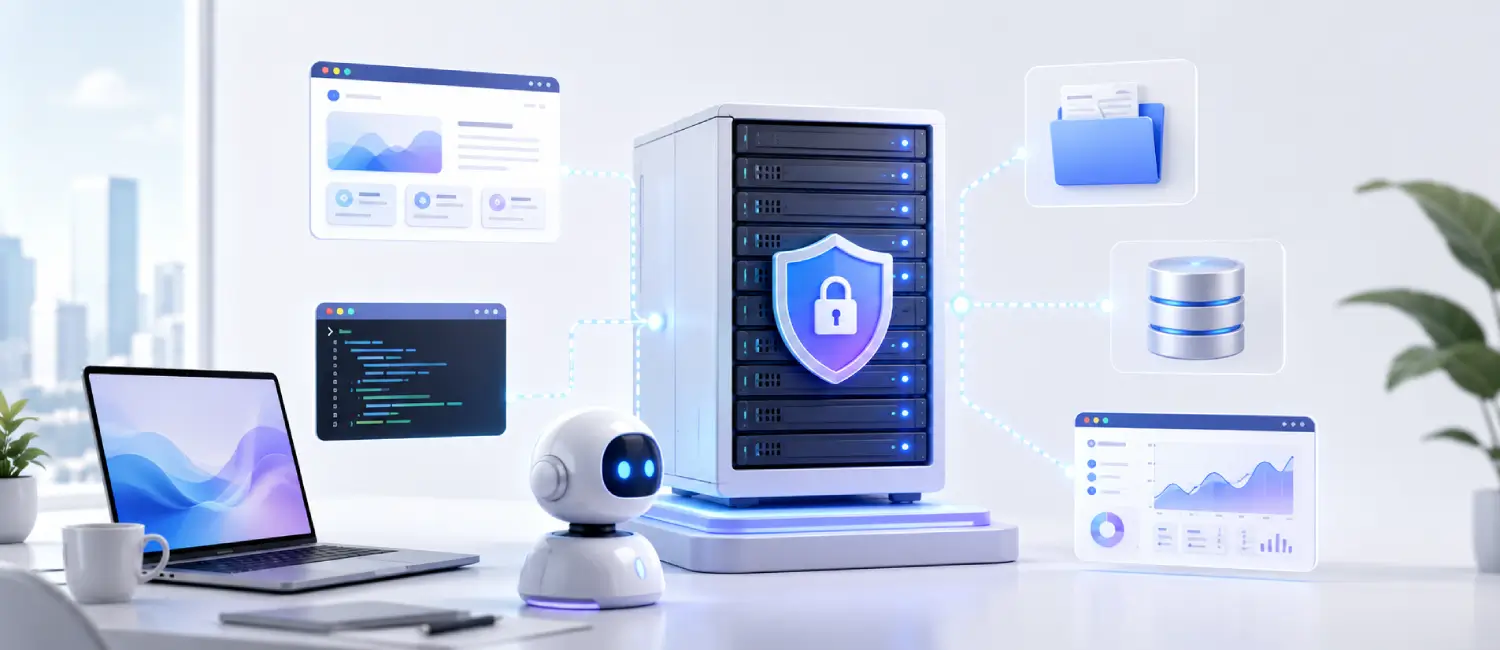
A VPS can be a practical workspace for AI agents because it stays online, keeps credentials away from a personal laptop, isolates tools from your main machine, and gives automation a stable Linux environment. For serious agents, a Voxfor Lifetime VPS can become a persistent control room for scripts, APIs, files, logs and private workflows.
This guidance assumes API-based agents, browserless workers, small queues, Docker services and private workflow automation. Local model inference, untrusted code execution and regulated data need stricter isolation and a separate security review.
VPS Fit by Agent Workload
| Use case | Recommended starting point | Why it matters |
|---|---|---|
| Private AI assistant | 2-4 vCPU, 4-8 GB RAM | Good for scheduled tasks, browserless workflows, API calls and lightweight tool use. |
| Agency automation hub | 4-8 vCPU, 8-16 GB RAM | Better for multiple agents, queues, webhooks, CRM tasks and monitoring. |
| Local LLM experiments | 8+ GB RAM, NVMe storage | Use for small local models, Ollama, retrieval tests and private data workflows. |
Where This Fits in the Voxfor AI VPS Stack
AI Agents on VPS capable of autonomously performing tasks, maintaining context, selecting tools, and achieving goals for a user. A virtual private server (VPS) is a virtual machine that is rented, has its own operating system and compute resources share the same physical machine. In other words, the worker is the AI agent, and the remote computer the worker can use, which can stay online independently, is a VPS.
A VPS is gaining traction as a viable “AI workspace” not because it’s a trend or being touted as such, but because it’s a good fit. It is becoming commonplace for modern agent systems to require the presence of a filesystem, shell, network access, persistent state and continue to operate post-browsertab closure. These days, all major AI vendors are talking about agents running “their own computer” or “virtual computer”, and provider of agent runtimes are talking about persistence, durability, human oversight, and long running sessions. This is where a small VPS running a Linux operating system fits in nicely between a developer laptop and the much heavier cloud environment.
A VPS is a good default choice for many real world agent workloads as it provides isolation, persistence, predictable monthly cost, easy remote access using standard Linux tools and allows you to easily control the CPU and memory usage. It is especially useful when your agent makes external calls to model APIs, executes scripts, accesses the web, processes files, or manages queues and small databases. It is not as well suited for workloads with high burstiness, extreme sandboxing requirements for untrusted code, or large local-model inferences requiring GPUs.
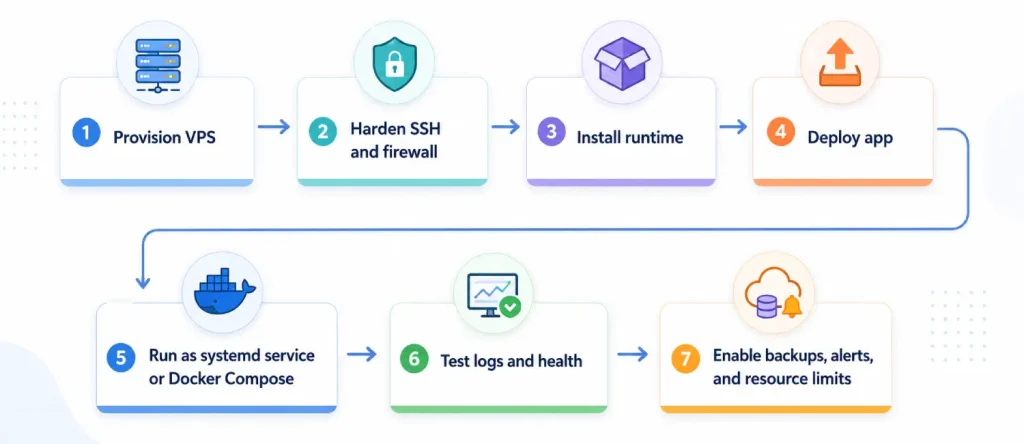
The short recommendation is this: if your agent needs a stable place to think, act, and remember, start with a Linux VPS, run one process under systemd if the stack is simple, or use Docker Compose if the stack includes sidecars like Redis, Postgres, or a browser worker, then add backups, monitoring, resource limits, and human approval for risky actions. That gets you most of the benefit without jumping straight to Kubernetes or a bespoke sandbox platform.
Assumptions used throughout this report: Linux-based VPS, no GPU, external LLM APIs rather than self-hosting large models, and small-to-medium agent workloads such as browser automation, file processing, research, routing, queue workers, and tool use. Those assumptions align better with the provider plans and agent-runtime guidance cited here than with training or heavy local inference workloads.
What this topic means
An AI agent is more than just a chatbot. Google Cloud recent mainstream definition says a software system that employs artificial intelligence to achieve objectives and execute tasks for users, reasoning, planning, memory, adapting and decision making. Anthropic distinguishes between the “workflows” (where the code decides which steps to take and which tools to use) and the “agents” (where the model dynamically selects the steps and tools to take). That distinction is important in this case because you have a software that now decides what should be done at run-time and therefore needs a real working environment and not only an API call.
A VPS can be described as a rented remote computer. According to Google, it’s a virtual machine running virtualized server resources on shared physical hardware, and according to AWS, it’s a machine on which you run an application by means of the software and data appropriate to the application, but still get dedicated resources on it. In simple words, VPS provides your agent with its own permanent workspace to run, store files, expose services and recover from reboots.
The concept of agents having their own workspace is no longer a theoretical one. OpenAI claims ChatGPT agent can perform tasks with its virtual computer, Anthropic claims Claude computer-use capability enables the model to use software the way people do, and the recent agent-infrastructure writing from LangChain takes it a step further and proposes that agents require a space with a filesystem, shell, package manager, network access, code execution and persistent state. The specific statement “VPS is the new AI workspace” is an inference, but a good one, as most of those features can be delivered by a VPS at a comparatively low operating cost with familiar Linux tooling.
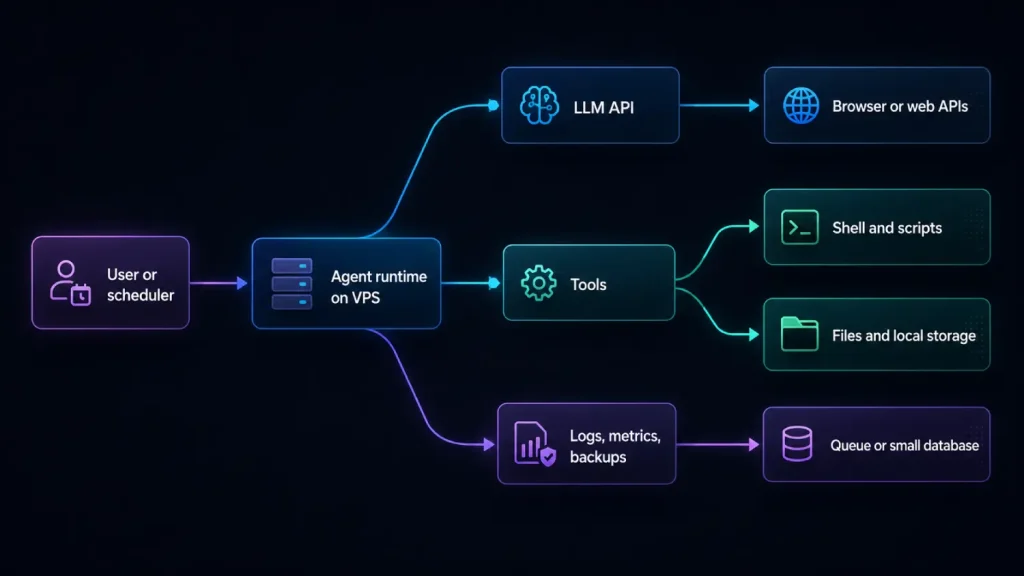
The diagram above reflects the current shape of many useful agent deployments: the model does not live on the VPS, but the agent’s working memory, tools, files, retries, logs, and process control often do. That is why the workspace matters so much.
Reference points for this review: the infrastructure advice is aligned with public guidance from Docker restart policy documentation, Anthropic computer-use documentation, and CISA secure-by-design guidance. Those references support the operational framing; they do not make a VPS automatically compliant or risk-free.
Why a VPS fits the job
The first reason is isolation, the ability to isolate an AI agent. At the hosting level, a VPS provides you with a dedicated operating system and compute slice instead of a multi-user version of an application. You can then further isolate agents on the application level using separate Unix users, directories, containers, and private network connections. With internal tools, recurring automations and many production workloads, that’s generally sufficient. There are a few salient points: This doesn’t mean the same as the strongest sandboxing model, which is a container-based system where the containers are all separate from each other and run in their own kernel and recent guidance from the agent-infrastructure community cautions against assuming that a container boundary is sufficient for truly untrusted, model-generated code.
Persistence is the second reason. Agents need to continue following a break, remember previous state, maintain files between steps, etc., and survive long tasks. LangGraph emphasizes capabilities of long running agents such as persistence, checkpointers, stores, and recovery in the event of interruption or failure. A VPS is great to pair with that as the machine itself is persistent: its disk, logs, environment, service definitions, and snapshots, can all outlive one request-response cycle.
Resource control is the third reason. A laptop is easy to suspend, easy to budget and easy to listen to but not so convenient. You can select the CPU, RAM, storage, and transfer allowance of your VPS ahead of time; limit containers to CPU and RAM; set restart policies; and use docker stats, system logs or full metrics tools such as Prometheus to view usage. It’s important because Anthropic admits that agents are likely to sacrifice cost and latency in exchange for quality of task when no one is holding them back, and this can easily lead to unbalanced bills and processes that spiral out of control.
Cost and accessibility complete the picture. VPS products are sold as low, predictable monthly bundles or per-second/hourly resources with monthly caps, and they are available with standard Linux images, SSH access, APIs, and automation-friendly tooling. For many teams, that means a VPS can be provisioned in minutes and managed with familiar tools instead of a large platform rollout.
The tradeoff is simple: a VPS is an excellent default workspace, but not a universal answer. If your agent only calls fixed-schema APIs and does not execute code or keep local state, serverless may be simpler. If your agent installs arbitrary packages, runs user-supplied code, or handles very sensitive data, stronger isolation such as per-task microVMs or managed sandboxes may be safer. If you need extreme burst scaling or GPUs, you will outgrow the simple VPS model faster.
A practical way to decide is this:
| Question | If the answer is yes | Suggested starting point |
|---|---|---|
| Does the agent need files, shell commands, or browser automation? | It needs a real working environment. | Linux VPS. |
| Does it need to resume long tasks or keep state between runs? | Persistence matters. | VPS with systemd or Docker, plus snapshots/backups. |
| Does it run untrusted or model-generated code? | Risk is materially higher. | Separate VPS or stronger sandboxing; avoid sharing with sensitive systems. |
| Is workload small and steady rather than huge and bursty? | Predictable capacity is enough. | Small or medium VPS bundle. |
| Is local GPU inference the main requirement? | VPS may be the wrong default. | Consider larger dedicated or GPU instances. |
Cost benefits and tradeoffs
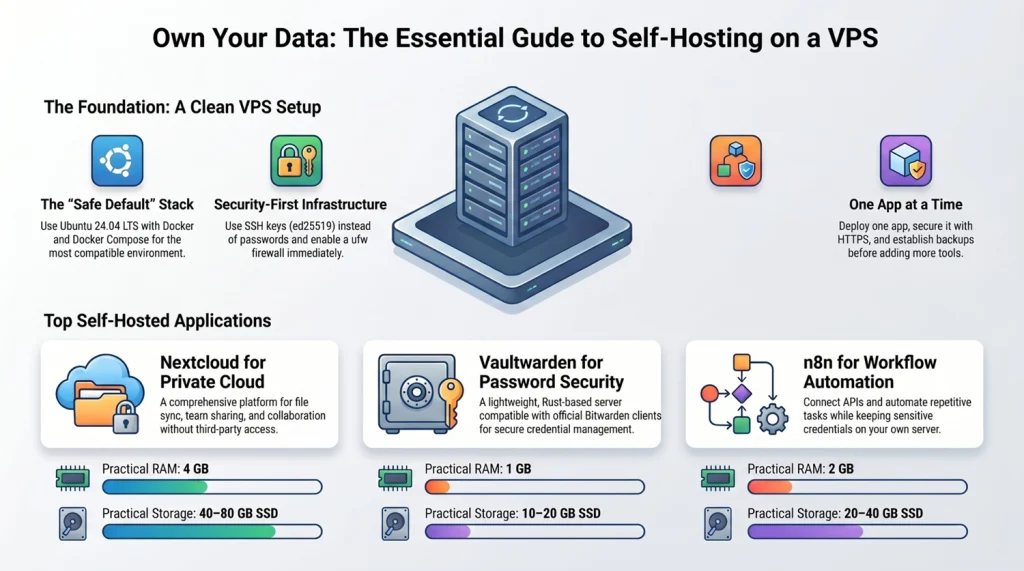
For most agent teams, cost is what makes the VPS choice compelling. The sweet spot is often not the lowest-priced plan, but the smallest plan that gives enough RAM for the agent runtime, logs, temporary files and one or two helper services. In practice, “small” usually means a single agent worker with external model APIs and light local storage, while “medium” usually means a heavier worker or a small stack with browser automation, a queue, Redis, or a database sidecar. That sizing logic is an inference from the way current agent systems use tools, files, and persistence, not a provider standard.
Prices below are representative list prices visible on official provider pages or official provider snippets at the time of review. Extras such as backups, snapshots, block storage, bandwidth overage, IPv4 charges, taxes, and regional differences can change the real total. Vultr’s exact Linux pricing page was not directly fetchable by the research tool in this session, so the Vultr row uses the closest official snippets available and is labeled accordingly.
| Provider | Typical small workload plan | Typical medium workload plan | Practical note |
|---|---|---|---|
| Voxfor | Voxfor Lifetime VPS sized for lightweight API agents, scheduled workers, systemd services and Docker containers. Start with enough RAM for dependencies, logs and browserless tasks. | Larger Voxfor VPS or managed VPS path for multiple agents, queues, webhooks, Open WebUI, vector databases or browser automation. | A natural fit when you want root access, persistent processes, Docker or systemd control, NVMe storage, backup options and hosting support in the same environment. Check the live Voxfor plan selector before ordering. |
| DigitalOcean | Basic Droplet, 2 GB RAM, 1 vCPU, 50 GB SSD, about $12/mo | Basic Droplet, 4 GB RAM, 2 vCPUs, 80 GB SSD, about $24/mo | Very straightforward pricing; per-second billing with monthly caps; often favored for simplicity and developer-friendly UX. |
| AWS Lightsail | Linux/Unix bundle, 2 GB RAM, 2 vCPUs, 60 GB SSD, about $12/mo | Linux/Unix bundle, 4 GB RAM, 2 vCPUs, 80 GB SSD, about $24/mo | Predictable bundles, included transfer, and an easy path into broader AWS services later. |
| Linode | Nanode, 1 GB RAM, 1 vCPU, 25 GB storage, about $5/mo | Shared CPU example, 8 GB RAM, 4 vCPUs, 160 GB storage, about $48/mo | Especially attractive when predictable transfer pricing matters; official page snippet surfaced representative low and mid shared plans. |
| Vultr | Official server snippet showed 2 GB / 1 CPU / 55 GB SSD / $10/mo | Official product snippet showed 4 GB / 2 vCPUs / 80 GB SSD / $20/mo | Good global footprint and simple cloud-compute positioning; exact Linux pricing page could not be fetched directly in this session. |
| Hetzner | Regular performance snippet showed 4 GB / 2 vCPUs / 80 GB SSD / about €19.99/mo | Regular performance snippet showed 8 GB / 4 vCPUs / 160 GB SSD / about €35.99/mo | Strong European appeal and GDPR messaging, but note that provider price updates can make older comparisons unreliable. |
The headline cost story is clear. DigitalOcean and Lightsail remain easy picks for beginner-friendly agent hosting; Linode stays attractive when bandwidth value matters; Vultr is appealing when region spread is important; and Hetzner can still offer a compelling European proposition, though provider price updates can make older blog comparisons unreliable.
The practical benefits and risks are easier to understand side by side:
| Dimension | Main upside of using a VPS for agents | Main risk or limit |
|---|---|---|
| Security | You control the OS, users, firewall, packages, and runtime layout instead of relying on a shared app account. | You also inherit the operations burden: SSH hardening, patching, logging, and incident response become your job. |
| Data privacy | You decide where files live, what gets logged, and which services are internet-facing; some providers also emphasize regional or GDPR-oriented positioning. | Compliance still depends on your data flows, contracts, retention rules, and model-provider use, not on the VPS alone. |
| Availability planning | systemd, Docker restart policies, snapshots, and monitoring make steady long-running workers practical. | A single VPS is still a single host; without failover or backups, one outage or bad deploy can stop the agent. This is an operational inference, but it follows directly from the single-instance model and the role of snapshots/backups in recovery. |
| Scaling | You can scale vertically by resizing plans and horizontally by adding more agent replicas or more VPS nodes. | Horizontal growth adds more moving parts: queues, locking, rate limits, shared state, and deployment discipline. |
| Cost control | Fixed bundles, monthly caps, and container limits make spend easier to reason about than uncontrolled local or enterprise cloud sprawl. | Cheap plans fail quickly if an agent leaks memory, loops forever, or runs a browser plus database on the same box. That is why CPU/RAM limits and observability matter. |
Simple setup patterns
The simplest safe assumption is a Linux VPS with one public IP, one non-root deployment user, and one of two runtime patterns: a single process managed by systemd, or a small multi-container stack managed by Docker Compose. The commands below are examples, not the only valid implementation; where installation differs by distro, the distro is called out explicitly. The setup logic follows official Docker installation guides, Docker Compose references, Python’s venv docs, npm’s install/docs guidance, and standard systemd service management.
Base server
A good first pass on any Linux VPS is: update packages, create a non-root user, install only the runtime you need, and open only the ports you actually use. Ubuntu’s firewall docs recommend ufw as an easy host-based firewall, and Docker’s docs warn that exposed container ports can bypass some firewall expectations if you do not plan for that.
# connect
ssh root@YOUR_SERVER_IP

# create a deployment user
adduser agentops
usermod -aG sudo agentops

# basic package update
apt update && apt -y upgrade        # Debian/Ubuntu example
# or
dnf -y upgrade                      # RHEL/CentOS-like example

# firewall example on Ubuntu
ufw allow OpenSSH
ufw allow 80/tcp
ufw allow 443/tcp
ufw enable
If you plan to deploy with Docker, use the official engine packages rather than whatever old package happens to be in the distro repository. On Debian-family systems, Docker documents adding its official APT repository and then installing docker-ce, containerd.io, buildx, and the compose plugin. On CentOS Stream, Docker documents the equivalent DNF repository path.
# Debian/Ubuntu-style example, based on Docker's official repository method
sudo apt update
sudo apt install -y ca-certificates curl
sudo install -m 0755 -d /etc/apt/keyrings
sudo curl -fsSL https://download.docker.com/linux/debian/gpg -o /etc/apt/keyrings/docker.asc
sudo chmod a+r /etc/apt/keyrings/docker.asc

sudo tee /etc/apt/sources.list.d/docker.sources >/dev/null <<'EOF'
Types: deb
URIs: https://download.docker.com/linux/debian
Suites: bookworm
Components: stable
Architectures: amd64
Signed-By: /etc/apt/keyrings/docker.asc
EOF

sudo apt update
sudo apt install -y docker-ce docker-ce-cli containerd.io docker-buildx-plugin docker-compose-plugin
sudo docker run hello-world

# CentOS Stream / RHEL-like example, based on Docker's official repository method
sudo dnf -y install dnf-plugins-core
sudo dnf config-manager --add-repo https://download.docker.com/linux/centos/docker-ce.repo
sudo dnf install -y docker-ce docker-ce-cli containerd.io docker-buildx-plugin docker-compose-plugin
sudo systemctl enable --now docker
sudo docker run hello-world
Python agent
For a single Python worker, a virtual environment is the cleanest starting point. Python venv creates an isolated environment so packages for one project do not spill into others.
mkdir -p /opt/agent-py
cd /opt/agent-py
python3 -m venv .venv
source .venv/bin/activate
pip install --upgrade pip
pip install requests python-dotenv

# /opt/agent-py/agent.py
import os
import time
import requests
from dotenv import load_dotenv

load_dotenv()

TASKS_URL = os.getenv("TASKS_URL", "http://127.0.0.1:8000")
POLL_SECONDS = int(os.getenv("POLL_SECONDS", "10"))

def run_once():
    # Replace this with your real tool / model / queue logic
    try:
        r = requests.get(f"{TASKS_URL}/health", timeout=10)
        print("health:", r.status_code)
    except Exception as e:
        print("health check failed:", e)

if __name__ == "__main__":
    while True:
        run_once()
        time.sleep(POLL_SECONDS)
Run it once manually first. Only after that should you make it a service.
cd /opt/agent-py
source .venv/bin/activate
python agent.py
A minimal systemd unit is usually enough for one long-running agent. systemd is the standard Linux service manager, and Restart= gives you simple self-healing after crashes.
# /etc/systemd/system/agent-py.service
[Unit]
Description=Python AI Agent
After=network-online.target
Wants=network-online.target

[Service]
User=agentops
WorkingDirectory=/opt/agent-py
EnvironmentFile=/opt/agent-py/.env
ExecStart=/opt/agent-py/.venv/bin/python /opt/agent-py/agent.py
Restart=on-failure
RestartSec=5

[Install]
WantedBy=multi-user.target

sudo systemctl daemon-reload
sudo systemctl enable --now agent-py.service
sudo systemctl status agent-py.service
Node agent
For Node-based agents, npm’s docs recommend installing Node.js and npm with a version manager or installer, then using npm to manage dependencies and scripts. For a small agent service, keep it boring: one package.json, one start script, one process manager.
mkdir -p /opt/agent-node
cd /opt/agent-node
npm init -y
npm install dotenv

{
  "name": "agent-node",
  "version": "1.0.0",
  "type": "module",
  "scripts": {
    "start": "node agent.mjs"
  }
}

// /opt/agent-node/agent.mjs
import 'dotenv/config';

const sleep = (ms) => new Promise((r) => setTimeout(r, ms));

while (true) {
  console.log('agent tick', new Date().toISOString());
  // Replace with queue polling, tool calls, model calls, etc.
  await sleep(Number(process.env.POLL_MS || 10000));
}

npm start
You can manage the Node process with systemd the same way as the Python process by changing only WorkingDirectory and ExecStart.
Multi-container stack with Docker Compose
Once the stack includes two or more moving parts, Docker Compose usually becomes easier than manually wiring services together. Docker defines Compose as a tool for defining and running multi-container applications from one YAML file. docker compose up –detach starts the stack in the background, and if configuration or image changes, Compose can recreate containers while preserving mounted volumes.
# /opt/agent-stack/compose.yaml
services:
  agent:
    build: .
    restart: unless-stopped
    env_file: .env
    volumes:
      - ./data:/app/data
    mem_limit: 1g
    cpus: 1.0
    depends_on:
      - redis

  redis:
    image: redis:7-alpine
    restart: unless-stopped
    command: ["redis-server", "--appendonly", "yes"]
    volumes:
      - redis_data:/data
    mem_limit: 256m
    cpus: 0.50

volumes:
  redis_data:

# /opt/agent-stack/Dockerfile
FROM python:3.12-slim
WORKDIR /app
COPY requirements.txt .
RUN pip install --no-cache-dir -r requirements.txt
COPY . .
CMD ["python", "agent.py"]

cd /opt/agent-stack
docker compose up -d --build
docker compose ps
That example intentionally uses a restart policy plus resource limits. In current Docker docs, restart controls how services come back after failure, mem_limit caps memory, and cpus caps CPU share for service containers. Those features are important on low-cost VPS plans because one misbehaving agent should not be able to consume the entire machine.
If the workload grows, start small and scale one step at a time. Resize the VPS vertically when CPU or memory is the bottleneck; scale horizontally when concurrency is the bottleneck and the job can be split safely. Providers document vertical resizing, and Compose supports runtime scaling with docker compose up –scale SERVICE=NUM.
Security operations and compliance
The biggest mistake teams make with agent hosting is treating a VPS like an empty box that becomes safe by default. It does not. Modern agents can browse, run scripts, access APIs, and sometimes take actions with real-world consequences. OpenAI explicitly says ChatGPT agent asks for permission before consequential actions, and Anthropic advises starting low-risk for computer-use tasks because the capability introduces familiar threats such as spam, misinformation, or fraud. That approval-heavy mindset is exactly the right one for self-hosted VPS deployments too.
A usable operating baseline looks like this:
| Area | Baseline practice | Why it matters |
|---|---|---|
| SSH and account security | Use SSH keys, keep root login tightly controlled, and enable MFA on the cloud account. CISA and NIST both stress stronger authentication, and Ubuntu firewall guidance makes it straightforward to expose only SSH and the minimum required app ports. | Most VPS compromises start at the edge: weak credentials, exposed ports, or account takeover. |
| Firewalling | Allow only the ports you need, and remember Docker-exposed ports can bypass expected firewall behavior if you do not account for Docker’s networking model. | Agents often add helper services over time; open ports are easy to forget. |
| Least privilege | Run the agent as a non-root user; separate apps by user, directory, or container; use private networking for databases where possible. Hetzner, for example, documents private networks and firewalls as standard cloud features. | This limits the blast radius when an agent or dependency misbehaves. |
| Backups | Turn on provider snapshots or backups, and also keep app-level export backups for important data. DigitalOcean and Lightsail both document snapshots/backups as normal recovery mechanisms. | A snapshot helps with server recovery; an app-level export helps with data portability and rollback. |
| Monitoring | Start with service logs and container stats, then add metrics and alerts if the agent matters to the business. journalctl, Docker logs/stats, and Prometheus are the practical progression. | Without visibility, agent loops, OOMs, and silent failures are easy to miss. |
| Resource limits | Cap CPU and RAM for containers, use restart policies, and size plans conservatively. Docker documents these controls directly. | This protects the host from one runaway worker. |
| Logging discipline | Log enough to debug, but not full secrets or unnecessary personal data. GDPR and ICO AI guidance both reinforce data minimization and accountability. | Agent traces can easily leak sensitive prompts, files, or customer data if you log everything. |
The legal and ethical layer matters just as much as the technical one. If the agent handles personal data, the familiar privacy principles still apply: lawfulness, fairness, transparency, data minimization, and storage limitation. The ICO AI guidance says those same principles apply to AI systems, and the EU AI Act timeline means some AI obligations have already started while broader applicability continues over time. Even outside Europe, the general lesson is the same document what data the agent touches, why it needs it, how long you keep it, and when a human must approve an action.
Ethically, the safest pattern is modest autonomy. Let the agent draft, summarize, classify, fetch, or prepare, but keep a human in the loop for payments, account changes, deletions, contract acceptance, irreversible publishing, or anything that could materially affect a person or organization. That pattern is consistent with current frontier-agent guidance and greatly reduces practical risk on a self-managed VPS.
Troubleshooting and migration checklist
Most VPS agent problems are boring, which is good news because boring problems are fixable. The usual culprits are failed environment variables, insufficient memory, ports not reachable, services not restarting, disks filling up, and state stored in the wrong place. Docker and systemd both provide strong first-line diagnostics.
| Symptom | First thing to check | Useful command |
|---|---|---|
| Service will not start | Service logs and unit status | sudo systemctl status agent-py.service and sudo journalctl -u agent-py.service -n 100 -f |
| Container exits repeatedly | Restart policy plus container logs | docker compose ps and docker compose logs -f agent |
| VPS feels slow | CPU and memory saturation | docker stats, free -h, top |
| Changes do not show up after deploy | Containers may need recreation, not just restart | docker compose up -d –build |
| Agent forgets state after restart | Data may not be on persistent disk or volume | Check your mounted volumes, database persistence, and backup setup. |
| Browser or helper service cannot connect | Firewall or port exposure issue | Re-check ufw rules and Docker’s port/network behavior. |
A clean migration is mostly about protecting state and reducing surprises:
| Migration item | Why it matters |
|---|---|
| Freeze dependencies before moving | Reproducibility is much easier if Python and Node dependencies are already pinned and installable in isolation. venv and npm are designed for this style of project-local dependency management. |
| Inventory secrets and environment variables | Missing API keys and queue URLs are a top cause of “it worked locally” failures. Keep them in .env or a provider secret store, not hard-coded in code. |
| Snapshot the old environment before cutover | Both Lightsail and DigitalOcean position snapshots as recovery baselines. |
| Move persistent data explicitly | Files, Redis append-only data, SQLite files, and upload folders should live in known volumes or directories, not temporary paths. |
| Test on the new VPS with real health checks | Start with low-risk tasks and verify logs, permissions, egress access, and restart behavior before switching traffic. |
| Cut over DNS, webhooks, or job schedulers last | This keeps rollback easy if the new host behaves differently under production traffic. This is operational practice inferred from snapshot- and rollback-based recovery patterns. |
| Watch logs, latency, CPU, RAM, disk, and cost for the first day | Early observation is the fastest way to catch infinite loops, quota problems, or mis-sized plans. |
The bottom line is straightforward. A VPS is becoming a common AI workspace because it is familiar, predictable in cost, remotely accessible and suitable for many tool-using, file-handling, long-running agents. It gives an agent a real place to work. Just do not confuse “good enough” with “hands off”: the same box that makes your agent useful also becomes part of your security, availability, privacy, and compliance story. Treat it like a real production workspace, with limits, logs, backups and approvals, so the deployment stays easier to operate and recover.
Conclusion
AI agents are becoming more useful every day, but they also need the right environment to work properly. Running them from a personal laptop or a random temporary setup may be fine for testing, but it is not reliable enough when the work becomes serious.
A VPS gives AI agents a safer and more stable place to run. It keeps the agent online, gives it its own private workspace, and makes it easier to manage tools, files, scripts, logs, backups, and security settings in one controlled environment.
The real value of a VPS is not that it sounds advanced. The value is simple, it gives your AI workflow a proper home.
As more businesses, developers, and creators start using AI agents for daily tasks, automation, research, support, coding, content, and operations, the need for a dedicated workspace will only grow. A VPS is becoming one of the most practical ways to build that workspace because it offers control, privacy, flexibility, and room to scale.
AI agents are not just chat tools anymore. They are becoming workers, assistants, and automation partners. And just like any useful worker, they need a safe, organized, and reliable place to do their job.
About the writer

Hassan Tahir wrote this article, drawing on his experience to clarify WordPress concepts and enhance developer understanding. Through his work, he aims to help both beginners and professionals refine their skills and tackle WordPress projects with greater confidence.
Frequently Asked Questions
Is a VPS better than a laptop for AI agents?
Yes, when the agent must run continuously. A VPS stays online, has a stable network, can be secured with firewall rules and keeps long-running automations separate from your personal device.
Can I run several AI agents on one VPS?
Yes, if the VPS has enough CPU, RAM and storage. Use separate processes, containers or service users, and monitor logs so one workflow does not consume all resources.
What VPS specs do AI agents need?
Small API-based agents can often start with 2-4 vCPU and 4-8 GB RAM. Multi-agent queues, browser automation, local databases or heavier logging usually need 4-8 vCPU, 8-16 GB RAM and careful storage planning.
Do AI agents need a GPU VPS?
Not necessarily. Tool-calling agents, API-based agents and workflow automations usually run well on CPU VPS hosting. GPU infrastructure is mainly needed for heavier local model inference or training.
What should I secure first?
Start with SSH keys, firewall rules, least-privilege API keys, log monitoring, backups and clear separation between agent tools and production credentials.