
This is a good topic for an article idea because it fits two criteria: it satisfies a real customer’s need and it’s an obvious infrastructure decision (VPS hosting is the choice that people want to make). All of the five apps below do that and all are usable on a VPS using Docker and a reverse proxy. The official docs support Docker-based installs (or container-friendly) for Nextcloud, Vaultwarden, Gitea, Grafana, and n8n, and the Ubuntu and docker docs make the base VPS install simple.
The short answer is easy. Nextcloud is the private cloud and team file sharing solution. Vaultwarden is a password vault. Gitea is a Git hosting and lightweight code collaboration platform. Grafana is used for dashboards and monitoring, and n8n is used for workflow automation. Vaultwarden and Grafana are the simplest to get started with if you have one small VPS. Nextcloud is the most suitable choice if you are looking for the widest “private cloud” experience. If you are looking for something that can help you with the repetitive manual tasks and turn them into automation, n8n is the best magnet topic.
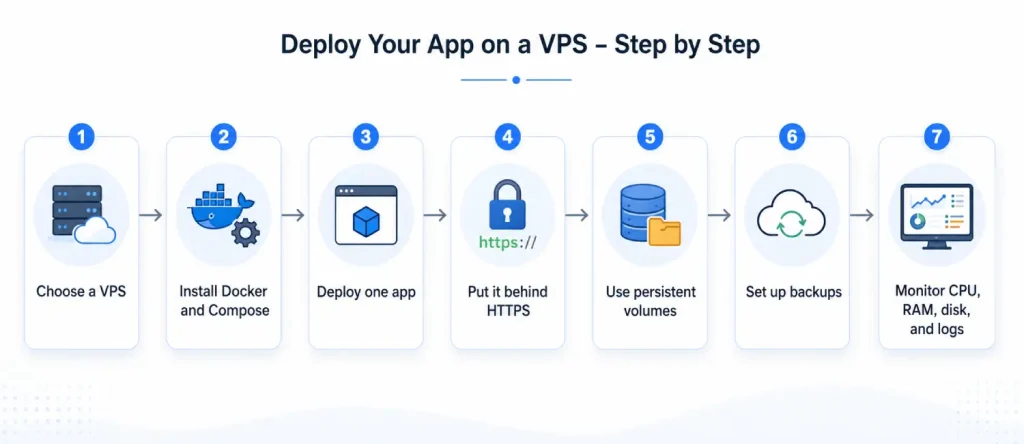
The best way to explain this to readers is to start with one app and get it online securely, backed up, and then add the others. This is a vastly superior user experience to having a lab full of users on one VPS on day one. Persistent storage, HTTPS and basic self-hosting precautions are repeatedly stressed in the vendor docs, particularly for apps that deal with passwords, files, or webhooks.
Want to run tools like Nextcloud, Vaultwarden, Gitea, Grafana, or n8n on your own server? Voxfor VPS gives you the speed, control, and reliability you need to host your self-hosted apps in one secure place. Start small with one app, add more as your needs grow, and manage your private cloud, password vault, code workspace, monitoring dashboard, and automation tools without depending fully on third-party platforms.
Self-hosting is important, because it enables people to have full control of their server, app, data, and path to updates – things that most SaaS tools and services cannot do. n8n own deployment guide explicitly lists self-hosting as the option for people who want to have full control and custom use cases, while Nextcloud describes itself as a self-hosted file sync and collaboration service. The same is true for Vaultwarden in the password-manager world: It is a lighter self-hosted server that remains compatible with official Bitwarden clients.
This is frequently the reason behind the attraction of a VPS. You can specify where the region is, add your own domain, specify how backups work, place a reverse proxy in front of the data, and store app data in named volumes and mounting folders rather than spreading it across unmanaged services. One of the best things about Docker Compose here is that you can configure services, networking and storage in a single readable file.
A typical clean setup looks like this:
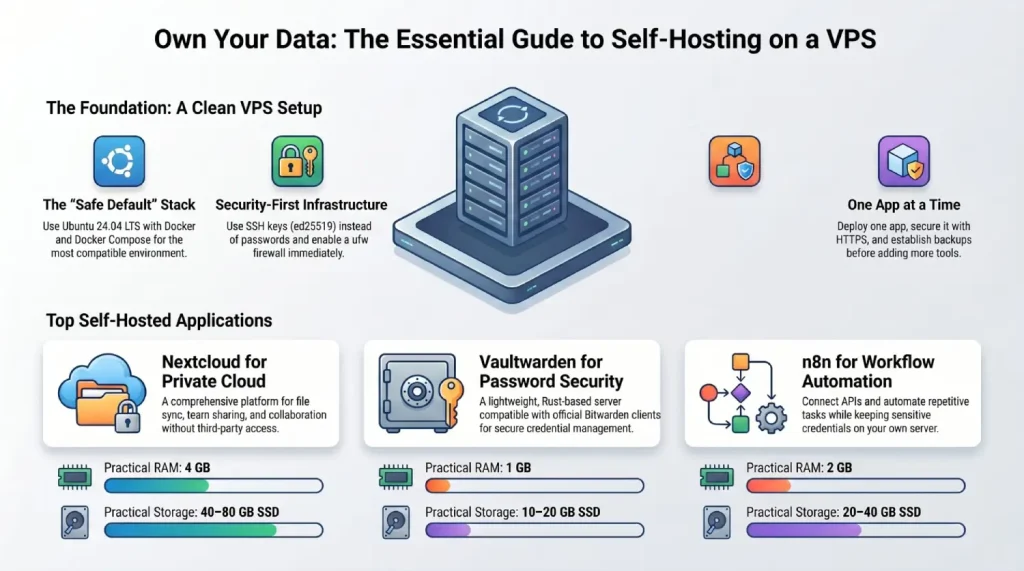
That pattern is not just “nice to have.” It is how the official examples are structured for several of these apps: Docker or Compose, persistent data storage, and HTTPS via reverse proxy or direct TLS where appropriate.
The table below uses practical starter sizes for a small real-world VPS, not marketing minimums. They are based on the published docs, official install patterns, and the fact that a real VPS also needs room for the OS, Docker, logs, and backups. Grafana publishes an explicit minimum of 1 core and 512 MB RAM, Gitea says 2 CPU cores and 1 GB RAM is typically enough for small teams, n8n says idle memory needs are modest but depend heavily on workflows, Nextcloud’s per-process memory guidance is much higher and its AIO stack runs multiple containers, and Vaultwarden’s maintainers describe it as very lightweight, with 1 GB being a safer practical floor as data grows.
| App | Main use case | Complexity | Practical starter RAM and CPU | Practical starter storage |
|---|---|---|---|---|
| Nextcloud | Private cloud, file sync, sharing, collaboration | Medium | 4 GB RAM, 2 vCPU | 40–80 GB SSD |
| Vaultwarden | Password manager | Low | 1 GB RAM, 1 vCPU | 10–20 GB SSD |
| Gitea | Git hosting, code review, small team repos | Low to medium | 2 GB RAM, 2 vCPU | 20–50 GB SSD |
| Grafana | Monitoring dashboards and alerting UI | Low | 1 GB RAM, 1 vCPU | 10–20 GB SSD |
| n8n | Workflow automation and webhooks | Medium | 2 GB RAM, 2 vCPU | 20–40 GB SSD |
A simple buying angle for readers is this: if the app holds files, start with more disk; if it runs workflows, start with more RAM; if it is user-facing and always-on, put it behind HTTPS from the beginning. That logic directly matches the way these products describe their storage, security, and deployment needs.
Use a mainstream Linux base image. Ubuntu 24.04 LTS is a safe default because Docker officially supports it, and Nextcloud lists Ubuntu 24.04 LTS among supported server operating systems. If you prefer Debian, Docker Compose plugin guidance also covers Debian-based installs cleanly.
Install Docker from Docker’s official repository, then install the Docker Compose plugin. This gives you a cleaner update path than relying on older distro packages, and it matches the install guidance used by Gitea and n8n.
Keep the network simple. Use ufw, allow only the ports you actually need, and avoid exposing internal app ports to the public when a reverse proxy can sit in front instead. Ubuntu documents ufw as its default firewall tool, n8n’s server guides explicitly open only ports 80 and 443 for web access, and Vaultwarden’s official container example binds only to 127.0.0.1:8000.
Prefer SSH keys over passwords. Ubuntu’s SSH docs recommend ed25519 keys because they are smaller and require less computation. On a basic VPS, that is the easiest win you can make before you install anything else.
If your VPS is small, add a little swap. Ubuntu’s swap documentation explains that swap acts as disk-backed virtual memory when RAM becomes tight. It is not a substitute for real RAM, but it can prevent one traffic spike or one bad workflow from crashing a tiny instance.
Finally, monitor the box. At minimum, watch CPU, memory, disk usage, and backup success. If you later install Grafana with a metrics collector, your VPS can monitor itself. Grafana’s own docs describe it as software for querying, visualizing, and alerting on metrics, logs, and traces.
A lean starter checklist:
Purpose: a private cloud for file sync, sharing, and collaboration.
The easiest modern path is Nextcloud All-in-One, which the project calls its official installation method. For a small VPS, a sensible real-world starting point is 2 vCPU, 4 GB RAM, and SSD storage, because Nextcloud recommends 512 MB RAM per process, AIO runs multiple containers, and the project explicitly recommends SSDs for better performance.
Quickstart
The official AIO install uses one master container that then manages the rest of the stack.
docker run --init --name nextcloud-aio-mastercontainer \
  --restart always \
  -p 80:80 -p 8080:8080 -p 8443:8443 \
  -v nextcloud_aio_mastercontainer:/mnt/docker-aio-config \
  -v /var/run/docker.sock:/var/run/docker.sock:ro \
ghcr.io/nextcloud-releases/all-in-one:latestBasic security tips
Use HTTPS only, set correct trusted_domains, and define trusted proxies if you run behind a reverse proxy. Nextcloud documents trusted_domains as protection against host header poisoning and strongly recommends HTTPS in production.
Backup approach
Back up four things: config, data, theme, and database. Put the instance into maintenance mode first to avoid inconsistent backups.
Ideal user scenarios
Nextcloud is ideal for freelancers, agencies, small teams, schools, and privacy-conscious users who want Dropbox-style storage plus sharing and collaboration without handing files to a third party.
Purpose: a lightweight self-hosted password-manager server compatible with official Bitwarden clients.
Vaultwarden is the easiest app in this list to justify on a small VPS. The project explicitly positions it as a lighter alternative to the official self-hosted Bitwarden stack, and a Vaultwarden collaborator has said people run it even on very small devices, while noting that 1 GB RAM is a better practical baseline as the database grows. A sensible starter size is 1 vCPU, 1 GB RAM, and 10–20 GB SSD.
Quickstart
The official README recommends the container image and a persistent/data volume.
mkdir -p ~/vaultwarden/vw-data && cd ~/vaultwardenservices:
vaultwarden:
image: vaultwarden/server:latest
restart: unless-stopped
environment:
DOMAIN: "https://vault.example.com"
volumes:
- ./vw-data:/data
ports:
- "127.0.0.1:8000:80"compose up -d.Basic security tips
Do not run Vaultwarden over plain HTTP. The project says the web vault requires HTTPS and recommends a reverse proxy. If you enable the admin page, secure the ADMIN_TOKEN; maintainers also warn that plaintext admin tokens are insecure and support hashed tokens.
Backup approach
At minimum, back up the whole /data directory off-site. Vaultwarden maintainers stress that a database-only backup is not the whole picture because attachments and other stored data matter too. They also note that newer versions include a SQLite backup subcommand, but you still need a broader file backup strategy.
Ideal user scenarios
Vaultwarden is perfect for solo users, families, consultants, and small teams who want a password manager on a low-cost VPS without the overhead of a much larger stack.
Purpose: a self-hosted all-in-one development service with Git hosting, code review, packages, and CI/CD-style features.
Gitea is a strong “developer VPS” topic because it is easy to understand and immediately useful: private repos, internal tools, issue tracking, and small-team collaboration. The docs say 2 CPU cores and 1 GB RAM is typically sufficient for small teams/projects, so 2 vCPU and 2 GB RAM is a comfortable starter size, especially if you also want a database container and runner later.
Quickstart
The official Docker docs start with a simple Compose setup and let SQLite initialize automatically for a small deployment.
services:
  server:
    image: docker.gitea.com/gitea:latest
    restart: always
    volumes:
      - ./gitea:/data
    ports:
      - "3000:3000"
- "222:22"Basic security tips
Use HTTPS through a reverse proxy, and generate or preserve proper secret values such as SECRET_KEY and INTERNAL_TOKEN when you customize the install. Gitea also documents Fail2ban integration if you want brute-force protection.
Backup approach
Use gitea dump or a database-native dump, but stop Gitea during backup if you want a consistent snapshot. Official docs explain that repos, files, and the database can drift out of sync if you back up while the instance is active.
Ideal user scenarios
Gitea fits agencies, freelancers, indie developers, internal engineering teams, classroom labs, and companies that want private Git hosting without the weight of a much larger platform.
Purpose: dashboards and alerts for metrics, logs, and traces.
Grafana is often the best “second app” on a VPS because it helps you see what your VPS and your other apps are doing. The official install docs publish a clear minimum: 1 core and 512 MB RAM. In practice, 1 vCPU and 1 GB RAM is a comfortable starter for a small personal or SMB monitoring stack.
Quickstart
Grafana Docker docs provide a minimal container example; use a persistent volume from the beginning so you do not lose dashboards and settings.
docker volume create grafana-storagedocker run -d \
-p 3000:3000 \
--name grafana \
-v grafana-storage:/var/lib/grafana \
grafana/grafana-enterpriseBasic security tips
Change the default admin password immediately. If Grafana is public, serve it over HTTPS, Grafana docs say HTTPS is important because it protects login credentials and metric data in transit. You can also pass secrets through files rather than plain environment variables.
Backup approach
Back up the configuration file, plugin data, and the Grafana database. If you use SQLite, stop Grafana before copying the DB file to preserve data integrity.
Ideal user scenarios
Grafana is ideal for sysadmins, SaaS operators, agencies hosting client apps, homelab users, or any VPS owner who wants a single place to watch server health and application performance.
Purpose: workflow automation for APIs, webhooks, approvals, AI workflows, and repetitive ops tasks.
n8n is one of the best “why buy a VPS?” topics because it gives a direct business outcome: automate work, keep data under your control, and run custom workflows on your own infrastructure. n8n’s docs say idle memory use is small, but workflow design and data volume matter a lot, so 2 vCPU and 2 GB RAM is a smart starter size for real use.
Quickstart
n8n recommends Docker for most self-hosted installs and provides a Compose pattern that uses a reverse proxy plus a persistent volume.
services:
  n8n:
    image: docker.n8n.io/n8nio/n8n
    restart: always
    ports:
      - "127.0.0.1:5678:5678"
    environment:
      - N8N_HOST=n8n.example.com
      - N8N_PROTOCOL=https
      - WEBHOOK_URL=https://n8n.example.com/
      - GENERIC_TIMEZONE=Asia/Karachi
      - TZ=Asia/Karachi
      - N8N_ENFORCE_SETTINGS_FILE_PERMISSIONS=true
    volumes:
      - n8n_data:/home/node/.n8n

volumes:
n8n_data:compose up -d.form → email → Slack or webhook → spreadsheet.Basic security tips
Use a reverse proxy with HTTPS, and set WEBHOOK_URL and N8N_PROXY_HOPS=1 correctly when the app sits behind that proxy so webhook URLs resolve properly. n8n calls reverse-proxy SSL the recommended approach.
Backup approach
Back up the persistent n8n_data volume because it stores the SQLite DB and encryption key, and also export workflows and credentials with the CLI for clean point-in-time backups. n8n documents both the volume location and the CLI backup/export commands.
Ideal user scenarios
n8n is perfect for operations teams, agencies, growth teams, founders, internal IT, and AI-focused builders who want automations and integrations without losing control of data, credentials, and webhook logic.
Self-hosted apps make a VPS much more than just a place to host a website. With tools like Nextcloud, Vaultwarden, Gitea, Grafana, and n8n, you can build your own private space for files, passwords, code, monitoring, and automation.
You do not need to set up everything at once. Start with the app you need most, keep it secure, take regular backups, and grow from there. With the right VPS hosting plan, these apps can run smoothly, stay under your control, and give you a reliable foundation for your personal projects, business tools, or development workflow.

Hassan Tahir wrote this article, drawing on his experience to clarify WordPress concepts and enhance developer understanding. Through his work, he aims to help both beginners and professionals refine their skills and tackle WordPress projects with greater confidence.






 Lifetime VPS Europe
 Lifetime VPS Asia
 Lifetime WooCommerce Hosting
 Lifetime Hosting
 France Lifetime Dedicated Servers
 Germany Lifetime dedicated servers
 Lifetime Game Dedicated Servers
 Chicago, US
 Tokyo, Japan
 Singapore
 Hong Kong
 Seoul, South Korea
 Amsterdem, Netherlands
 London, UK
 Stockholm, Sweden
 Oslo, Norway
 Vienna, Austria
 Zurich, Switzerland
 Sydney, Australia
 Wordpress Hosting
 VPS Hosting
 DDOS Protection
 Submit Ticket
 Full Management
 Guides
 Videos and Podcasts
 Discover Creative Ideas
 MetaAgentOS High-Ticket Support System
 Voxfor Mega Menu
 Voxfor Advanced Price Management For WooCommerce
 Voxfor Secure Live Chat and AI Support
 Voxfor Multilanguage
 Voxfor AI Content Summary


