Lifetime VPS Europe
 Lifetime VPS Asia
 Lifetime WooCommerce Hosting
 Lifetime Hosting
 Lifetime Game Dedicated Servers
 Chicago, US
 Tokyo, Japan
 Singapore
 Hong Kong
 Seoul, South Korea
 Amsterdem, Netherlands
 London, UK
 Stockholm, Sweden
 Oslo, Norway
 Vienna, Austria
 Zurich, Switzerland
 Sydney, Australia
 Wordpress Hosting
 VPS Hosting
 DDOS Protection
 Submit Ticket
 Full Management
 Guides
 Videos and Podcasts
 Discover Creative Ideas
 Cybersecurity Services
 Voxfor Mega Menu
 Voxfor Advanced Price Management For WooCommerce
 Voxfor Secure Live Chat and AI Support
 Voxfor Multilanguage
 Voxfor AI Content Summary
 Voxfor Autopilot

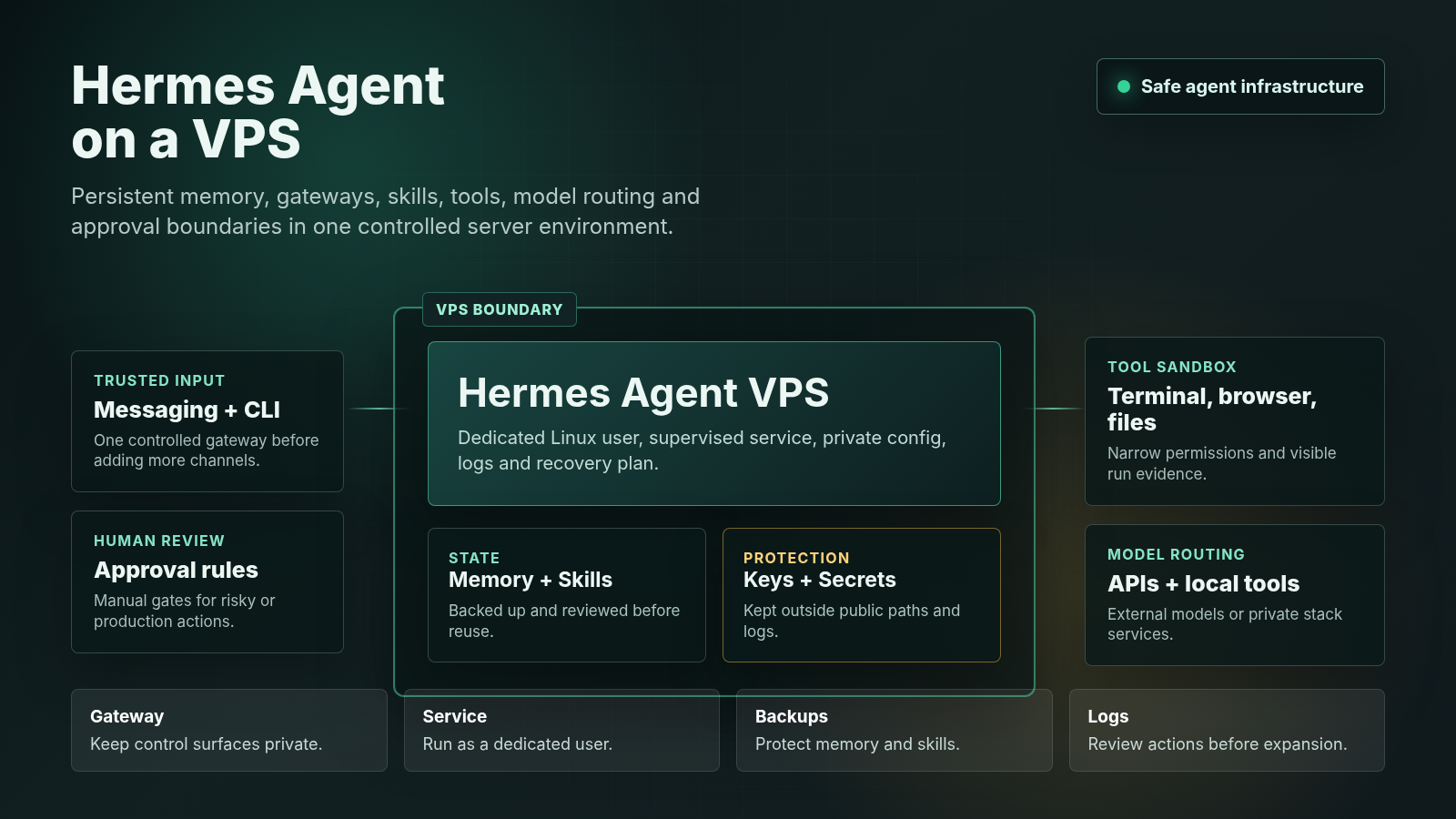
OpenClaw can run on a VPS when you want an AI agent workspace that stays online beyond your laptop. The safest setup is not a public dashboard with broad shell access. It is a locked-down Linux user, official install path, model keys stored carefully, a gateway bound to a private interface, SSH tunnel access, logs, backups and clear rules for what the agent may do.
This guide was checked against the public OpenClaw site, the OpenClaw getting started documentation, and the OpenClaw GitHub repository. OpenClaw changes quickly, so verify the official docs before running install commands on a production server.
Quick Answer
Yes, OpenClaw can be hosted on a VPS for an persistent AI agent setup. Use a VPS when you need a remote agent workspace with scheduled work, messaging channels, private tools, logs, webhooks or controlled long-running tasks. Keep the OpenClaw gateway private by default, use SSH tunneling for the dashboard, and avoid giving the agent unrestricted access to production systems until you have approval rules and rollback plans.
When VPS Hosting Makes Sense for OpenClaw
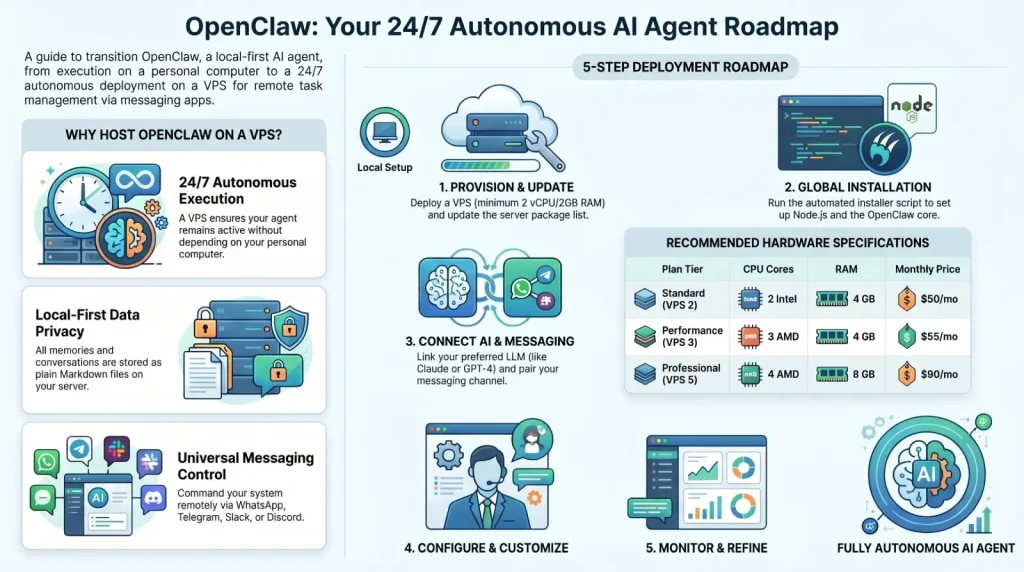
Running OpenClaw locally is useful for testing. A VPS becomes useful when the agent needs to be reachable while your laptop is off, receive messages from a channel, run scheduled jobs, call APIs, keep local state, or operate inside a controlled server environment.
| Use case | VPS fit | Security note |
|---|---|---|
| Personal AI workspace | Good for persistent notes, summaries, reminders and controlled shell tasks. | Use a non-root user and keep private files out of agent scope unless needed. |
| Automation lab | Good for testing skills, scripts, APIs, MCP servers and scheduled workflows. | Separate test credentials from production credentials. |
| Team or client setup | Useful when logs, service availability, access rules and handoff matter. | Define who can message the agent and what actions require approval. |
| Private model dashboard | OpenClaw can sit beside tools such as Open WebUI or an MCP server. | Do not expose admin dashboards directly to the public internet. |
VPS Requirements to Check First
Do not choose a plan only from a generic table. Match the VPS to the workload. A lightweight OpenClaw gateway with one messaging channel is different from a setup that also runs browser automation, local models, MCP tools or custom scripts.
- CPU and RAM: start small for gateway and chat workflows, then scale if browser automation, indexing or local model work needs more resources.
- Disk: leave space for logs, local memory, scripts, cloned repositories, browser profiles, backups and screenshots.
- Operating system: use a supported Linux distribution and check the current OpenClaw docs for Node and installation requirements.
- Network: stable outbound connectivity matters for model APIs and messaging channels.
- Backups: back up configuration, local state, skills and any custom scripts before upgrades.
- Access: use SSH keys, a non-root user and limited firewall rules before connecting model keys or messaging channels.
If you are still choosing infrastructure, review AI agent VPS hosting, running an AI agent on a VPS, MCP server hosting, Open WebUI on a VPS, and Voxfor VPS plans.
Safe Setup Path
This is a practical VPS setup path. Treat it as an operations checklist, not a replacement for the current OpenClaw documentation.
1. Secure the Server First
Before installing OpenClaw, log in to the VPS, update the operating system, create a dedicated sudo user and configure SSH keys. If the provider initially gives you administrator access, use it only to create the long-term OpenClaw user. If you are new to Voxfor Linux access, start with the first Linux VPS login guide.
ssh your-admin-user@your-server-ip
adduser openclaw
usermod -aG sudo openclaw
# Add your SSH public key for the openclaw user before disabling password access.
After the user is ready, log in as the new user for daily work. Avoid running the agent as root because OpenClaw may be connected to tools, shell commands, files and browser automation.
2. Check Official OpenClaw Install Instructions
The OpenClaw documentation currently shows the shell installer and onboarding flow. Review it directly before running anything:
curl -fsSL https://openclaw.ai/install.sh | bash
openclaw onboard --install-daemon
openclaw gateway status
openclaw dashboard
The important point is not just the install command. The important point is that onboarding should configure the model provider, API key, gateway auth and daemon behavior under the correct user. If the docs change, follow the docs instead of copying an old blog command.
3. Configure Model Keys Carefully
OpenClaw needs access to a model provider or local model workflow. Store keys only where the configured OpenClaw user and service need them. Do not paste production API keys into public screenshots, shell history, shared support tickets or frontend JavaScript.
- Use separate provider keys for testing and production-like workflows.
- Set provider spending limits where available.
- Document which workflows can call paid model APIs.
- Rotate a key if it appears in logs, screenshots or public content.
4. Keep the Dashboard Private
The OpenClaw docs describe the gateway and dashboard flow. For a VPS setup, keep the control UI private unless you have a full access-control plan. SSH tunnel access is safer for most owners:
ssh -L 18789:localhost:18789 openclaw@your-server-ipThen open http://localhost:18789 from your own browser. If you later place a domain and reverse proxy in front of the dashboard, add HTTPS, authentication, firewall rules and a clear reason for exposing it beyond SSH.
5. Connect One Messaging Channel
Start with one channel. Telegram or Discord may be enough for a test workspace; business use cases may require Slack, email or another approved channel. Pair only trusted senders, and write down who can message the agent.
For sensitive environments, use a staging channel first. Confirm that the agent cannot run high-risk actions from a message without human approval.
6. Make It Survive Reboots
The current OpenClaw onboarding flow includes daemon installation in the official docs. If you manage the service manually, keep it under the same non-root user, confirm the binary path with command -v openclaw, and check logs after reboot. Do not copy a systemd unit from the internet without matching the user, home directory and install path on your VPS.
command -v openclaw
openclaw gateway status
journalctl --user -u openclaw --no-pager -n 100
Some systems use user-level services, while others use system-level units. The safe rule is simple: the service should run as the OpenClaw user, not as root, and the paths should match the real installation.
Security Rules for an persistent Agent
An persistent AI agent has more risk than a normal script because it can receive instructions and may have tool access. Treat it like an automation operator.
- Use a dedicated Linux user for OpenClaw.
- Use SSH keys and disable password login after confirming key access.
- Bind the dashboard to localhost unless you have a tested access-control plan.
- Restrict which folders the agent can read and write.
- Install skills and tools only from sources you trust.
- Require manual approval for destructive commands, production deploys, database changes, customer messages and billing actions.
- Keep backups of OpenClaw state, config, custom skills and scripts.
- Review logs after upgrades, channel changes and new tool permissions.
Troubleshooting Checklist
If OpenClaw does not work after installation, check the failure in layers. Do not reinstall repeatedly before reading logs.
| Problem | What to check | Likely fix |
|---|---|---|
| Installer fails | OS version, Node requirement, curl access, disk space and permission errors. | Check official docs, update packages, run as the intended user and save the error output. |
| Gateway not running | openclaw gateway status, service logs and whether onboarding completed. |
Restart the gateway, rerun configuration, or fix the service user/path mismatch. |
| Dashboard not reachable | SSH tunnel command, port 18789, firewall rules and whether the gateway is bound to localhost. | Use a local SSH tunnel first before trying a public domain. |
| Model calls fail | API key, provider limits, billing status, model name and outbound network access. | Use a test prompt, check provider dashboard and rotate the key if exposed. |
| Messaging channel fails | Bot token, callback settings, allowed users and channel-specific docs. | Test one channel at a time and keep tokens out of screenshots. |
| Agent does too much | Tool permissions, skills, shell access and prompt-injection exposure. | Remove risky tools, narrow folder access and add human approval steps. |
When to Use Voxfor Help
Use a self-managed VPS if you are comfortable with Linux users, SSH keys, service logs, API keys and backups. Ask for managed technical help when the OpenClaw setup touches client systems, production servers, sensitive data, multi-channel messaging, custom skills, MCP tools or long-running business workflows.
Voxfor can be useful for the infrastructure side: choosing a VPS, hardening first login, preparing a persistent agent workspace, connecting adjacent tools, and documenting the handoff. Compare managed versus unmanaged VPS hosting before assuming support scope.
Recommended Next Step
If you are testing OpenClaw for yourself, start with a small VPS, SSH tunnel access and one messaging channel. If you are building a client or team workflow, define permissions, backups, approval rules and support scope before adding tools. For related infrastructure, review VPS specs for Ollama if local models are part of the plan, or use Voxfor lifetime VPS hosting if you want a long-running agent workspace.
FAQ: OpenClaw on a VPS
Can OpenClaw run on a VPS?
Yes. A VPS is a practical place to run OpenClaw when you need an persistent gateway, messaging channel, logs, scripts, scheduled work or remote access. Follow the current OpenClaw docs before installing.
Should the OpenClaw dashboard be public?
Usually no. Keep it private with SSH tunneling unless you have HTTPS, authentication, firewall rules and a clear reason to expose it.
Should OpenClaw run as root?
No for normal use. Create a dedicated non-root user and run OpenClaw under that account so shell access, files and service permissions are easier to control.
What VPS specs do I need for OpenClaw?
Light gateway use can start small, but browser automation, local models, indexing, screenshots and extra services need more CPU, RAM and disk. Match the VPS to the workload and scale after testing.
Can OpenClaw work with MCP servers or local AI dashboards?
Yes, it can be part of a larger private AI stack. Keep each component isolated, document credentials, and avoid exposing dashboards publicly without access controls.