Lifetime VPS Europe
 Lifetime VPS Asia
 Lifetime WooCommerce Hosting
 Lifetime Hosting
 Lifetime Game Dedicated Servers
 Chicago, US
 Tokyo, Japan
 Singapore
 Hong Kong
 Seoul, South Korea
 Amsterdem, Netherlands
 London, UK
 Stockholm, Sweden
 Oslo, Norway
 Vienna, Austria
 Zurich, Switzerland
 Sydney, Australia
 Wordpress Hosting
 VPS Hosting
 DDOS Protection
 Submit Ticket
 Full Management
 Guides
 Videos and Podcasts
 Discover Creative Ideas
 Voxfor Autonomous AI Workers
 Voxfor Mega Menu
 Voxfor Advanced Price Management For WooCommerce
 Voxfor Secure Live Chat and AI Support
 Voxfor Multilanguage
 Voxfor AI Content Summary
 Voxfor Autopilot
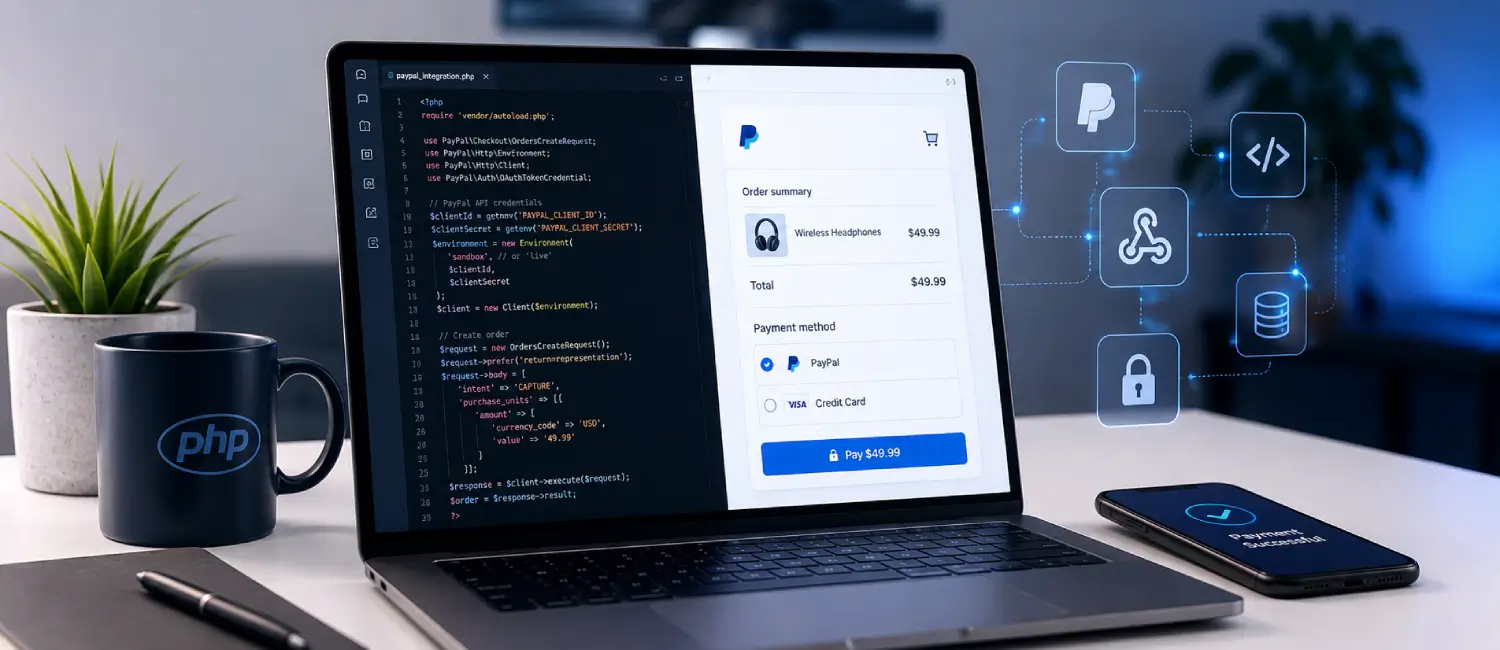
The straightest and most accurate road to PayPal payments in PHP is this: PayPal Orders v2 REST API, order creation on the server, redirect the buyer to the PayPal approval link, capture the order after it’s been approved, and then use webhooks to process asynch payments. That’s the flow that PayPal describes in its existing REST and checkout docs, and it’s the most stable flow if you are looking for a PHP backend without being stuck with out-of-dated SDKs. There is a PHP Server SDK for PayPal that is available now and it’s quite useful, but it only provides a subset of PayPal APIs, so many teams are still using direct REST API calls to access many more APIs like Webhook Management/Verification.
For a developer with intermediate PHP skills, a realistic implementation window is about ninety minutes to two and a half hours if the goal is a production-ready sandbox integration with create-order, redirect approval, capture, webhook verification, and final smoke testing. That estimate is based on the current official setup sequence: environment preparation, sandbox account creation, app credential retrieval, order creation and capture wiring, webhook subscription and verification, then sandbox validation and go-live checks.
The biggest technical decisions are straightforward. Use a live PayPal Business account when you move to production, and use sandbox Business and Personal accounts while testing. Prefer webhooks over IPN for new REST integrations, because PayPal’s REST stack uses webhooks, while IPN belongs to PayPal’s legacy NVP/SOAP family. Use idempotency with PayPal-Request-Id, keep client secrets out of source control, run over HTTPS, and always verify webhook authenticity before mutating order state.
This report below is written as a practical article you can publish or adapt. It includes exact setup steps, code, expected outputs, image URLs, testing guidance, an SDK comparison table, troubleshooting, a deployment checklist, a mermaid timeline, and a complete SEO package. All steps are grounded in official PayPal documentation, official GitHub repositories, or recent PayPal engineering posts.
Technical baseline
Before you write any payment code, lock down the environment. The official PayPal PHP Server SDK package currently declares support for PHP 7.2 | 8.0 and requires ext-json and ext-curl. For new work, it is safer to standardize on a currently supported PHP branch, such as PHP 8.1+, because the PHP project publishes support windows for release branches and older versions age out of security support. Composer 2 is current and officially documented as the recommended dependency manager for PHP. For local development, PHP built-in server is acceptable for controlled testing only, PHP own manual explicitly says it is not intended to be a full-featured public web server. For staging and production, use Apache or Nginx with HTTPS.
A practical baseline looks like this:
# Ubuntu / Debian example
sudo apt update
sudo apt install -y php php-cli php-curl php-json unzip curl

# Verify PHP and required extensions
php -v
php -m | grep -E 'curl|json'
Expected output
- php -v should report a supported PHP 8.x build.
- php -m should include at least curl and json.
Install Composer globally:
php -r "copy('https://getcomposer.org/installer', 'composer-setup.php');"
php -r "if (hash_file('sha384', 'composer-setup.php') === 'c8b085408188070d5f52bcfe4ecfbee5f727afa458b2573b8eaaf77b3419b0bf2768dc67c86944da1544f06fa544fd47') { echo 'Installer verified'.PHP_EOL; } else { echo 'Installer corrupt'.PHP_EOL; unlink('composer-setup.php'); exit(1); }"
php composer-setup.php
sudo mv composer.phar /usr/local/bin/composer
php -r "unlink('composer-setup.php');"

composer --version
Expected output
- Installer verified
- A Composer version string such as Composer version 2.x.x …
For account setup, PayPal’s current REST getting-started flow says you need a client ID and client secret from the Developer Dashboard. To go live with integrations and test some scenarios outside the US, PayPal says you need a PayPal Business account. In sandbox, PayPal automatically creates a Personal test account for the buyer side and a Business test account for the merchant side, and you can create more if you need multiple personas or scenarios.
Official PayPal standard checkout integration sequence diagram
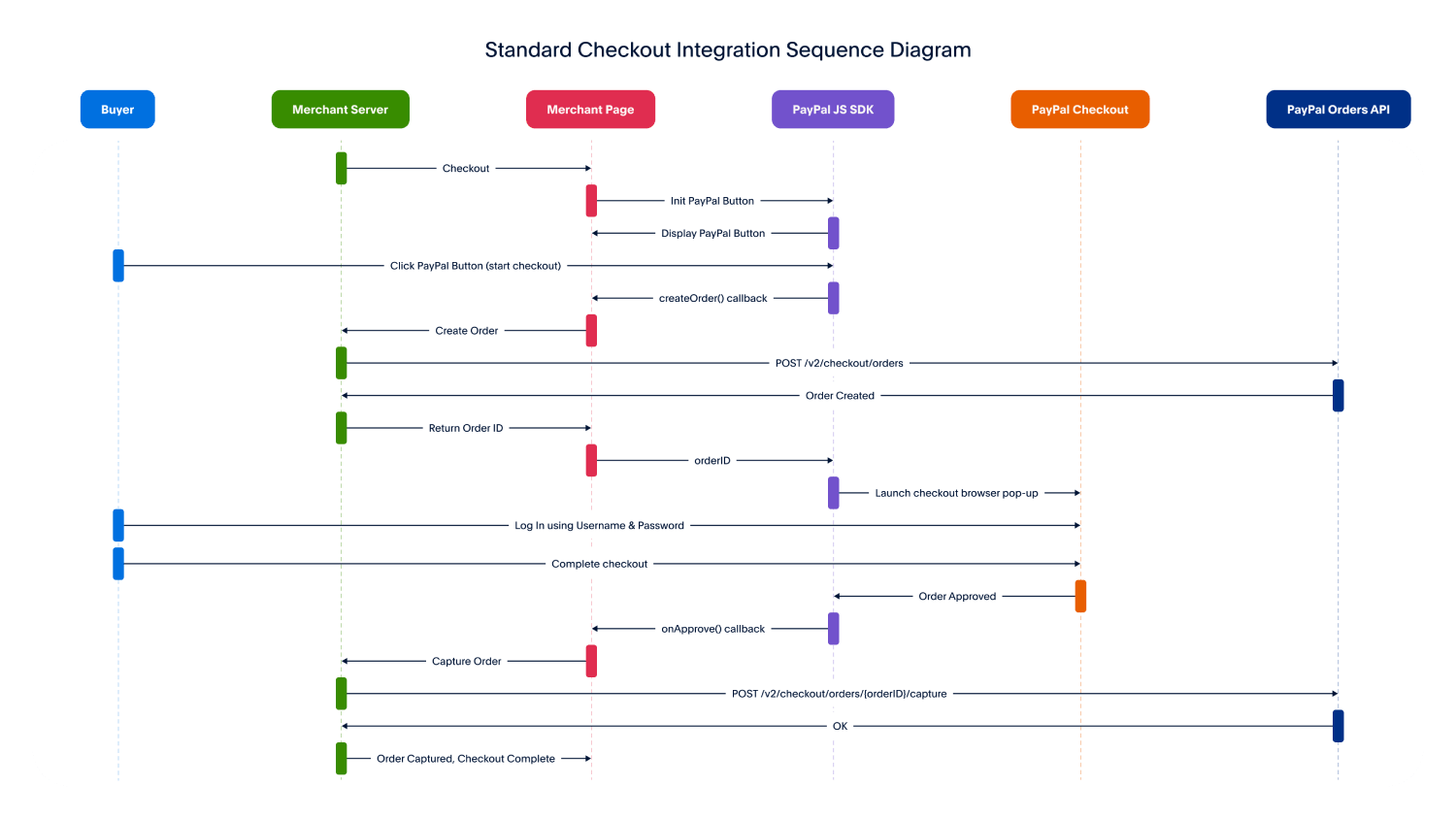
Caption: Official PayPal sequence diagram showing the core flow you will reproduce in PHP: create an order, let the buyer approve it, then capture it on the server.
A realistic time budget for this foundation work is:
| Task | Estimated time |
|---|---|
| Install PHP, curl/json extensions, Composer | 15 to 25 min |
| Create sandbox buyer and business accounts | 10 to 15 min |
| Retrieve client ID and secret from dashboard | 5 to 10 min |
| Choose SDK vs direct REST approach | 10 min |
That estimate is editorial, but it directly mirrors PayPal’s documented setup sequence and the package requirements above.
Build the integration
The fastest dashboard path
In PayPal current REST getting-started flow, the dashboard sequence is simple: log in, open Apps & Credentials, create or select an app, then copy the client ID and client secret. The sandbox account tools separately let you create or manage Personal and Business test accounts. For sandbox testing, PayPal recommends approving purchases with a Personal sandbox account and checking incoming funds inside the corresponding Business sandbox account.
Use this dashboard sequence:
- Sign in to the PayPal Developer Dashboard.
- Open Apps & Credentials.
- Create a new app or use the default app.
- Copy the Client ID and Secret.
- Open Sandbox > Accounts.
- Note the Personal account for buyer testing and the Business account for merchant testing.
Expected result
- One sandbox app with a client ID and client secret.
- At least one Personal sandbox account and one Business sandbox account available for testing.
Official PayPal Developer Dashboard screenshot from the Webhooks Simulator area
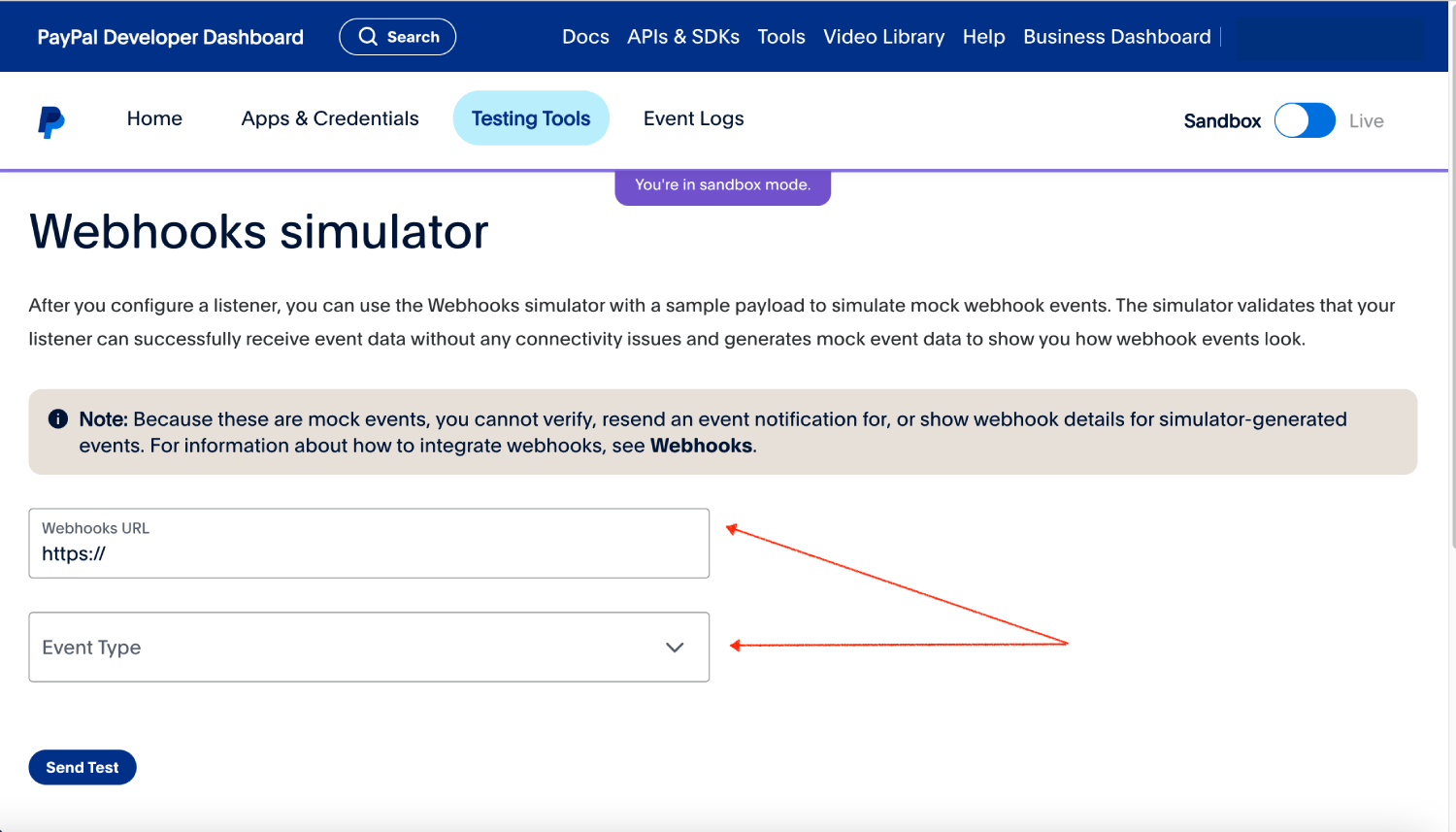
Caption: Official PayPal Developer Dashboard screenshot showing the Sandbox toggle and Testing Tools area. The exact labels can vary slightly over time, but this is the same dashboard family used for apps, credentials, sandbox accounts, and webhook testing.
SDK or direct REST
If you want the smallest moving parts and the broadest API coverage, use direct REST calls from PHP. If you want typed request builders and cleaner happy-path code for supported endpoints, use the current PayPal PHP Server SDK. The key trade-off is coverage: PayPal’s current Server SDK documentation says the SDK currently exposes only five API areas, while older PHP SDK repositories are archived or deprecated. That is why many modern PHP integrations use direct REST for the full flow, even if they use the official SDK for selected endpoints.
| Option | Status | What it covers well | Where it falls short | Best use |
|---|---|---|---|---|
| paypal/paypal-server-sdk | Current official package. Install with composer require “paypal/paypal-server-sdk:2.3.0“ | Orders, Payments, Vault, Transaction Search, Subscriptions | Limited endpoint coverage compared with all REST APIs | Teams who want an official maintained SDK for supported surfaces |
| paypal/Checkout-PHP-SDK | Archived Aug 2025 | Orders v2 and Payments v2 examples | No new features or support | Legacy projects only; not ideal for new builds |
| paypal/PayPal-PHP-SDK | Deprecated | Older REST API patterns | /v1/payments is deprecated, repo is deprecated | Existing legacy maintenance only |
| Direct REST with cURL or Guzzle | Not a package decision; uses the current REST host directly | Full control, easiest path for complete endpoint coverage, webhook endpoints, verification, idempotency headers | More boilerplate | Best default for a PHP-first integration article like this one |
If you still want the official PHP Server SDK, install it with:
composer require “paypal/paypal-server-sdk:2.3.0“
Expected output
- Composer adds
paypal/paypal-server-sdktocomposer.jsonand installs the package successfully.
A minimal SDK client bootstrap looks like this:
<?php
declare(strict_types=1);

require __DIR__ . '/vendor/autoload.php';

use PaypalServerSdkLib\Environment;
use PaypalServerSdkLib\Authentication\ClientCredentialsAuthCredentialsBuilder;
use PaypalServerSdkLib\PaypalServerSdkClientBuilder;

$client = PaypalServerSdkClientBuilder::init()
    ->clientCredentialsAuthCredentials(
        ClientCredentialsAuthCredentialsBuilder::init(
            getenv('PAYPAL_CLIENT_ID'),
            getenv('PAYPAL_CLIENT_SECRET')
        )
    )
    ->environment(
        getenv('PAYPAL_ENV') === 'live'
            ? Environment::PRODUCTION
            : Environment::SANDBOX
    )
    ->build();
PayPal own sample integration also recommends storing PAYPAL_CLIENT_ID and PAYPAL_CLIENT_SECRET as environment variables, which is a better practice than hard-coding them.
A PHP-first direct REST implementation
For a practical PHP article, direct REST is the most transparent option. The current REST docs say the API service base URL is:
- Sandbox:
https://api-m.sandbox.paypal.com - Live:
https://api-m.paypal.com
Create a simple project structure:
paypal-php-demo/
├─ public/
│  ├─ create-order.php
│  ├─ return.php
│  ├─ cancel.php
│  └─ webhook.php
└─ src/
  └─ PayPalClient.php
Create src/PayPalClient.php:
<?php
declare(strict_types=1);

final class PayPalClient
{
    private string $baseUrl;
    private string $clientId;
    private string $clientSecret;

    public function __construct()
    {
        $env = getenv('PAYPAL_ENV') ?: 'sandbox';
        $this->baseUrl = $env === 'live'
            ? 'https://api-m.paypal.com'
            : 'https://api-m.sandbox.paypal.com';

        $this->clientId = getenv('PAYPAL_CLIENT_ID') ?: '';
        $this->clientSecret = getenv('PAYPAL_CLIENT_SECRET') ?: '';

        if ($this->clientId === '' || $this->clientSecret === '') {
            throw new RuntimeException('Missing PAYPAL_CLIENT_ID or PAYPAL_CLIENT_SECRET.');
        }
    }

    public function accessToken(): string
    {
        $ch = curl_init($this->baseUrl . '/v1/oauth2/token');

        curl_setopt_array($ch, [
            CURLOPT_POST => true,
            CURLOPT_RETURNTRANSFER => true,
            CURLOPT_USERPWD => $this->clientId . ':' . $this->clientSecret,
            CURLOPT_HTTPHEADER => [
                'Content-Type: application/x-www-form-urlencoded',
            ],
            CURLOPT_POSTFIELDS => 'grant_type=client_credentials',
        ]);

        $response = curl_exec($ch);
        $httpCode = (int) curl_getinfo($ch, CURLINFO_HTTP_CODE);

        if ($response === false) {
            throw new RuntimeException('OAuth request failed: ' . curl_error($ch));
        }

        curl_close($ch);

        if ($httpCode !== 200) {
            throw new RuntimeException("OAuth request failed with HTTP {$httpCode}: {$response}");
        }

        $json = json_decode($response, true, 512, JSON_THROW_ON_ERROR);
        return $json['access_token'] ?? throw new RuntimeException('No access token returned.');
    }

    public function request(string $method, string $path, ?array $body = null, array $extraHeaders = []): array
    {
        $token = $this->accessToken();
        $ch = curl_init($this->baseUrl . $path);

        $headers = array_merge([
            'Content-Type: application/json',
            'Authorization: Bearer ' . $token,
        ], $extraHeaders);

        curl_setopt_array($ch, [
            CURLOPT_CUSTOMREQUEST => strtoupper($method),
            CURLOPT_RETURNTRANSFER => true,
            CURLOPT_HTTPHEADER => $headers,
        ]);

        if ($body !== null) {
            curl_setopt($ch, CURLOPT_POSTFIELDS, json_encode($body, JSON_THROW_ON_ERROR));
        }

        $response = curl_exec($ch);
        $httpCode = (int) curl_getinfo($ch, CURLINFO_HTTP_CODE);

        if ($response === false) {
            throw new RuntimeException('PayPal API request failed: ' . curl_error($ch));
        }

        curl_close($ch);

        return [
            'http_code' => $httpCode,
            'body' => $response === '' ? [] : json_decode($response, true, 512, JSON_THROW_ON_ERROR),
            'raw' => $response,
        ];
    }

    public static function uuidV4(): string
    {
        $data = random_bytes(16);
        $data[6] = chr((ord($data[6]) & 0x0f) | 0x40);
        $data[8] = chr((ord($data[8]) & 0x3f) | 0x80);

        return vsprintf('%s%s-%s-%s-%s-%s%s%s', str_split(bin2hex($data), 4));
    }
}
This helper follows PayPal current OAuth flow and REST base URLs, and it leaves room for the PayPal-Request-Id header that PayPal recommends for idempotency. When you call the OAuth endpoint successfully, PayPal returns JSON containing an access_token, token_type, and expires_in.
Now create public/create-order.php:
<?php
declare(strict_types=1);

require __DIR__ . '/../src/PayPalClient.php';

$paypal = new PayPalClient();

$order = $paypal->request(
    'POST',
    '/v2/checkout/orders',
    [
        'intent' => 'CAPTURE',
        'payment_source' => [
            'paypal' => [
                'experience_context' => [
                    'return_url' => 'http://127.0.0.1:8000/return.php',
                    'cancel_url' => 'http://127.0.0.1:8000/cancel.php',
                    'user_action' => 'PAY_NOW',
                ],
            ],
        ],
        'purchase_units' => [[
            'reference_id' => 'ORDER-1001',
            'description' => 'Demo order from PHP',
            'amount' => [
                'currency_code' => 'USD',
                'value' => '49.99',
            ],
        ]],
    ],
    [
        'PayPal-Request-Id: ' . PayPalClient::uuidV4(),
    ]
);

if ($order['http_code'] !== 201) {
    http_response_code(500);
    header('Content-Type: application/json');
    echo json_encode($order, JSON_PRETTY_PRINT);
    exit;
}

$approveUrl = null;
foreach (($order['body']['links'] ?? []) as $link) {
    if (($link['rel'] ?? '') === 'approve') {
        $approveUrl = $link['href'];
        break;
    }
}

if (!$approveUrl) {
    throw new RuntimeException('No approval URL returned by PayPal.');
}

header('Location: ' . $approveUrl, true, 303);
exit;
Expected result
A successful Create Order call returns HTTP 201, an order id, status: CREATED, and HATEOAS links including rel: approve and rel: capture. That is exactly the pattern PayPal shows in its orders samples.
Create public/return.php:
<?php
declare(strict_types=1);

require __DIR__ . '/../src/PayPalClient.php';

$paypal = new PayPalClient();

$orderId = $_GET['token'] ?? '';
if ($orderId === '') {
    http_response_code(400);
    exit('Missing PayPal order token.');
}

$capture = $paypal->request(
    'POST',
    '/v2/checkout/orders/' . rawurlencode($orderId) . '/capture',
    []
);

header('Content-Type: application/json');

if (!in_array($capture['http_code'], [200, 201], true)) {
    http_response_code(500);
    echo json_encode($capture, JSON_PRETTY_PRINT);
    exit;
}

echo json_encode([
    'paypal_order_id' => $capture['body']['id'] ?? null,
    'status' => $capture['body']['status'] ?? null,
    'capture_id' => $capture['body']['purchase_units'][0]['payments']['captures'][0]['id'] ?? null,
], JSON_PRETTY_PRINT);
Expected result
A successful capture returns an order with status: COMPLETED. PayPal sample output for order capture ends in Status: COMPLETED, and current checkout samples instruct you to capture only after buyer approval.
Create public/cancel.php:
<?php
declare(strict_types=1);

http_response_code(200);
echo 'The buyer canceled the PayPal checkout flow.';
Run the demo locally:
export PAYPAL_ENV=sandbox
export PAYPAL_CLIENT_ID='YOUR_SANDBOX_CLIENT_ID'
export PAYPAL_CLIENT_SECRET='YOUR_SANDBOX_CLIENT_SECRET'

php -S 127.0.0.1:8000 -t public
Open http://127.0.0.1:8000/create-order.php in your browser. For local development only, PHP built-in server is fine; PHP manual explicitly warns against using it on a public network.
Official PayPal checkout UI image
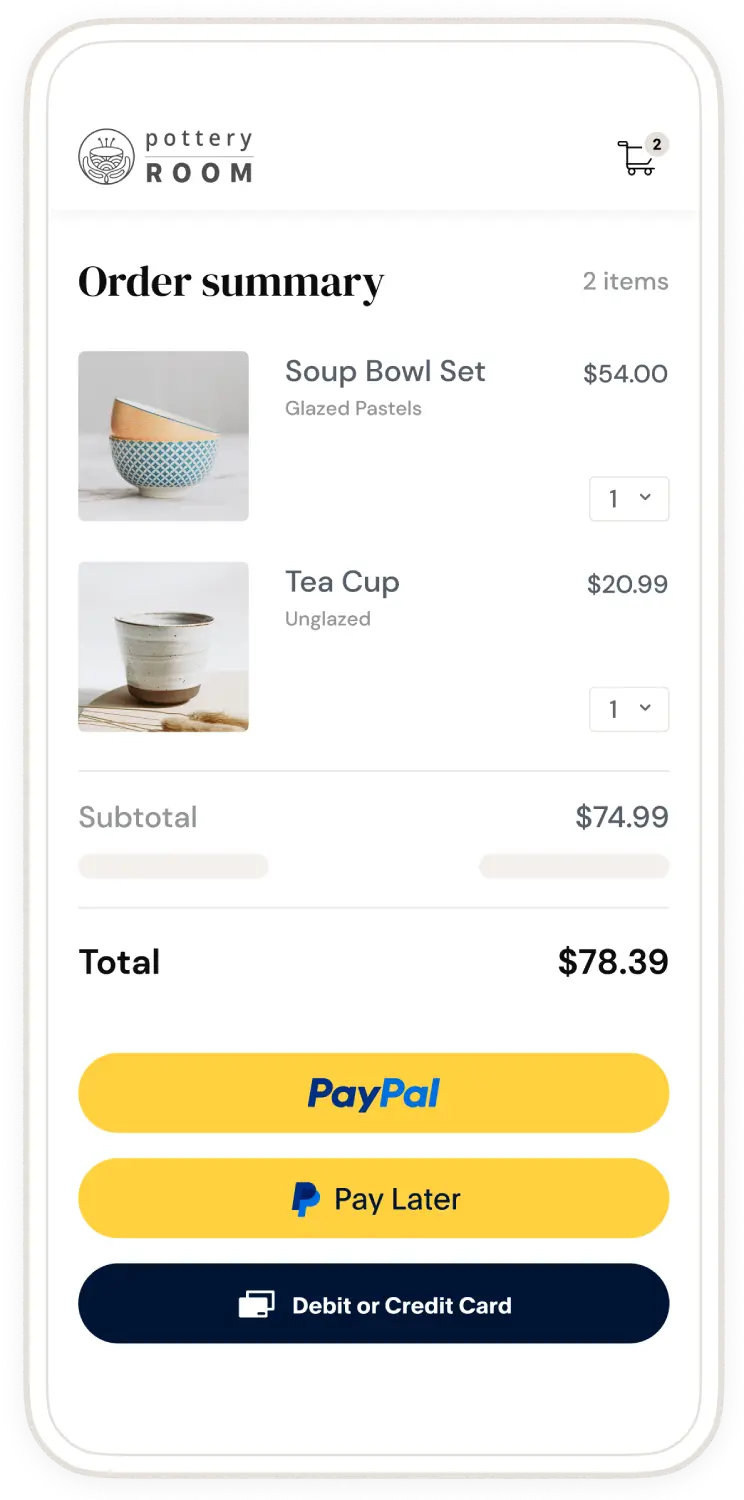
Caption: Official PayPal checkout UI example. Your PHP backend creates the order; the buyer then completes approval in the PayPal experience before your return URL captures the order.
Add notifications and testing
Why webhooks beat IPN for new PHP integrations
PayPal position is clear once you look at the current docs side by side. Webhooks are the event-notification model for REST APIs, while IPN belongs to the legacy NVP/SOAP world. IPN is still supported, but PayPal labels NVP/SOAP as legacy and recommends newer solutions for new integrations. If you are building a new PHP checkout around Orders v2, use webhooks. Keep IPN only if you are maintaining an older PayPal Payments Standard or classic integration.
A brief comparison:
| Feature | Webhooks | IPN |
|---|---|---|
| Platform family | REST APIs | Legacy NVP/SOAP |
| Payload style | HTTPS event posts with structured JSON event objects | Secure FORM POST name-value pairs |
| Recommended for new work | Yes | No, legacy only |
| Typical PHP use today | Order reconciliation, captures, refunds, subscriptions | Maintenance of older integrations |
This table is synthesized from PayPal REST webhooks guide and IPN documentation.
Register a webhook
You can subscribe a listener URL either in the dashboard or programmatically through the Webhooks Management API. When you create a webhook, PayPal returns a webhook ID, and you must store that ID because PayPal requires it during verification. Your listener must be reachable on HTTPS port 443, and PayPal retries non-2xx webhook deliveries up to twenty-five times over three days.
Programmatic example:
curl -X POST https://api-m.sandbox.paypal.com/v1/notifications/webhooks \
  -H "Content-Type: application/json" \
  -H "Authorization: Bearer ACCESS_TOKEN" \
  -d '{
    "url": "https://example.com/paypal/webhook.php",
    "event_types": [
      { "name": "CHECKOUT.ORDER.APPROVED" },
      { "name": "PAYMENT.CAPTURE.COMPLETED" }
    ]
  }'
Expected output
A successful request returns HTTP 201 Created and a JSON object containing the webhook id, listener url, and subscribed event_types.
Handle and verify the webhook in PHP
PayPal requires webhook verification. The verification payload must include the headers PayPal sends with the event, the stored webhook ID, and the full webhook event body. The required fields are auth_algo, cert_url, transmission_id, transmission_sig, transmission_time, webhook_id, and webhook_event. A successful verification returns {“verification_status”:”SUCCESS”}.
Create public/webhook.php:
<?php
declare(strict_types=1);

require __DIR__ . '/../src/PayPalClient.php';

$paypal = new PayPalClient();
$rawBody = file_get_contents('php://input') ?: '';
$event = json_decode($rawBody, true, 512, JSON_THROW_ON_ERROR);

$webhookId = getenv('PAYPAL_WEBHOOK_ID') ?: '';
if ($webhookId === '') {
    http_response_code(500);
    exit('Missing PAYPAL_WEBHOOK_ID');
}

$verification = $paypal->request(
    'POST',
    '/v1/notifications/verify-webhook-signature',
    [
        'auth_algo' => $_SERVER['HTTP_PAYPAL_AUTH_ALGO'] ?? '',
        'cert_url' => $_SERVER['HTTP_PAYPAL_CERT_URL'] ?? '',
        'transmission_id' => $_SERVER['HTTP_PAYPAL_TRANSMISSION_ID'] ?? '',
        'transmission_sig' => $_SERVER['HTTP_PAYPAL_TRANSMISSION_SIG'] ?? '',
        'transmission_time' => $_SERVER['HTTP_PAYPAL_TRANSMISSION_TIME'] ?? '',
        'webhook_id' => $webhookId,
        'webhook_event' => $event,
    ]
);

if (($verification['body']['verification_status'] ?? '') !== 'SUCCESS') {
    http_response_code(400);
    error_log('Invalid PayPal webhook signature');
    exit('Invalid signature');
}

/*
* IMPORTANT:
* Update your database idempotently here.
* Never assume a webhook arrives only once.
*/
$eventType = $event['event_type'] ?? '';

if ($eventType === 'PAYMENT.CAPTURE.COMPLETED') {
    $captureId = $event['resource']['id'] ?? null;
    $invoiceId = $event['resource']['invoice_id'] ?? null;

    // Example: mark local order paid if not already processed
    error_log("Capture completed. capture_id={$captureId} invoice_id={$invoiceId}");
}

http_response_code(200);
echo 'OK';
Expected output
- The verify call should return
verification_status: SUCCESS for an authentic webhook. - Your endpoint should return HTTP 200 quickly after processing. PayPal retries
non-2xx deliveries.
Official PayPal sample webhook verification payload
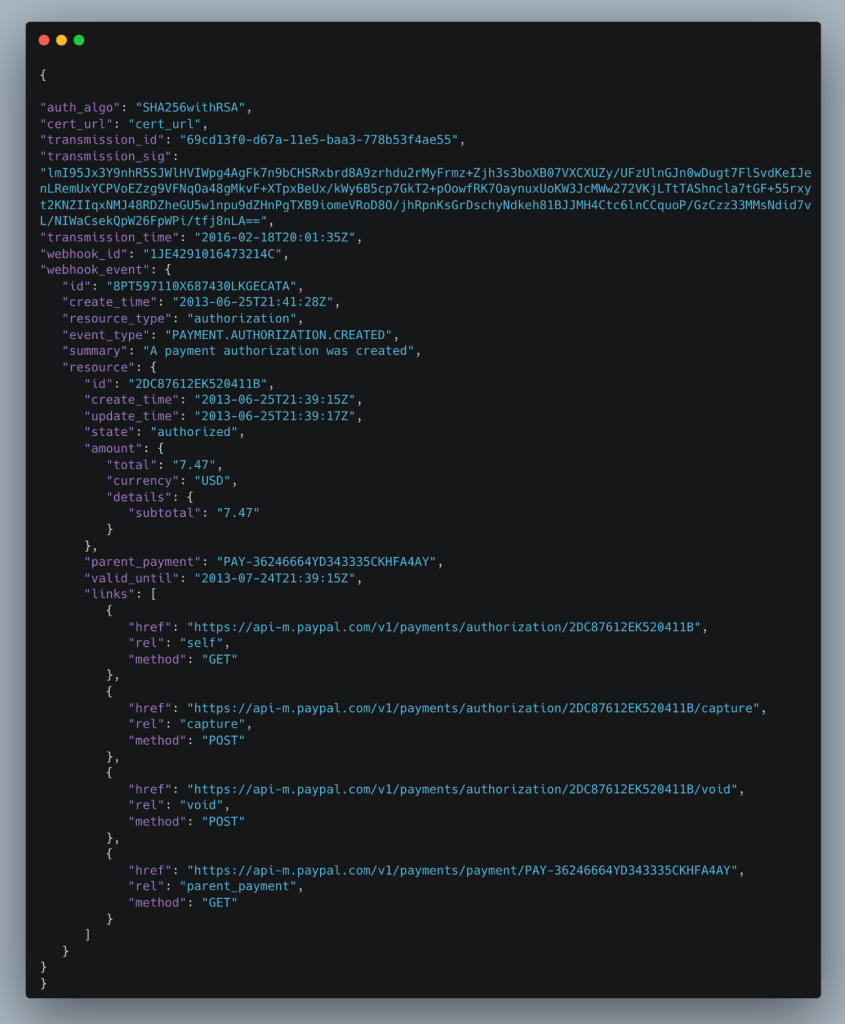
Caption: Official PayPal example of the verification payload structure. The same fields appear in the current webhook verification API reference.
Official PayPal sample webhook verification response
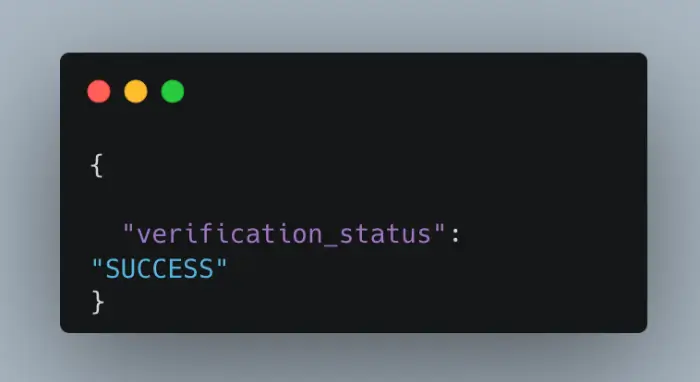
Caption: Official PayPal verification success response. Your PHP listener should not trust the webhook until it gets this success result.
Test the full payment flow
The sandbox exists specifically for this. PayPal says the sandbox mirrors the live environment for API testing and includes both buyer and merchant personas. For a standard purchase test, approve payment using a Personal sandbox account, then log in to the Business sandbox account on sandbox.paypal.com and confirm the incoming funds. If you need card testing alongside PayPal wallet flows, PayPal’s current checkout guide also points you to the card generator, test card numbers, and rejection triggers.
Test sequence:
- Launch
create-order.php. - Log in on PayPal using a Personal sandbox buyer account.
- Approve the payment.
- Let return.php capture the order.
- Confirm status: COMPLETED.
- Log in to
sandbox.paypal.comusing the corresponding Business sandbox account and confirm the activity entry.
For listener testing, PayPal also provides a Webhooks Simulator. One important limitation: PayPal’s integration guide says postback verification to the verify-webhook-signature endpoint is not supported for simulator mock events. That means the simulator is still very useful for transport and payload handling, but you should not treat simulator verification failures as proof your production webhook verification is broken.
Official PayPal Webhooks Simulator
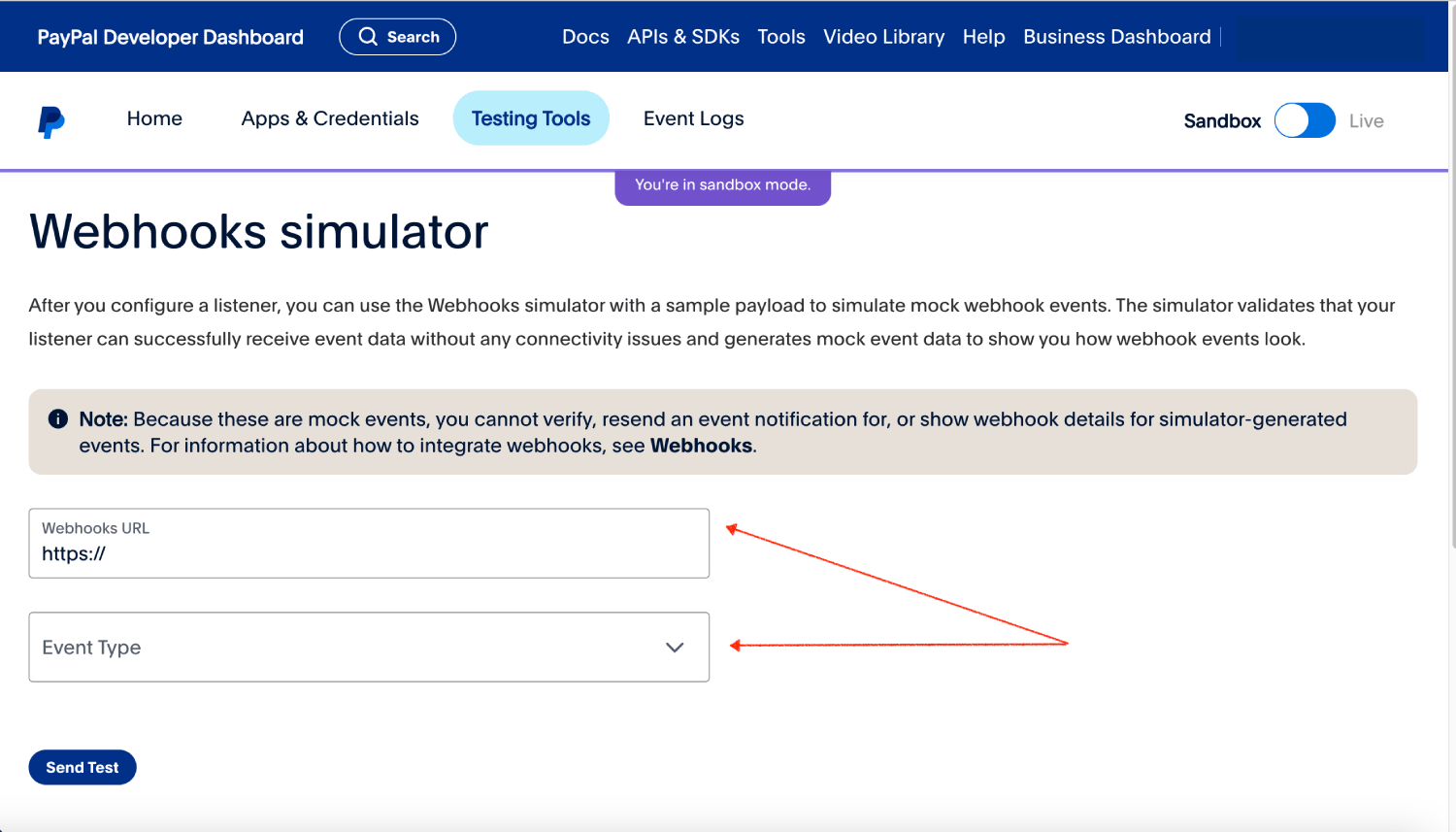
Caption: Official PayPal Webhooks Simulator. Use this to test that your listener receives payloads, but remember the current docs note that postback verification is not supported for simulator mock events.
A realistic test-and-verify time budget:
| Task | Estimated time |
|---|---|
| Create order and approval flow test | 15 to 25 min |
| Capture flow validation | 10 to 15 min |
| Webhook registration and endpoint test | 20 to 30 min |
| Sandbox account money movement check | 10 min |
The estimate is editorial, but the activities come directly from PayPal documented sandbox and checkout validation steps.
Secure and deploy
Error handling that actually matters
A robust PayPal integration is less about elegant code and more about defensive state management. The most common mistakes are visible right in PayPal current error materials:
- ORDER_NOT_APPROVED means you tried to capture before the buyer approved the order. The fix is to send the buyer to the approve link returned by Create Order before capture.
- PERMISSION_DENIED usually means the wrong environment, wrong credentials, expired token, or an account type that lacks the required permission. PayPal’s 2024 engineering post explicitly lists those as common causes.
- AUTH_CAPTURE_NOT_ENABLED appears when the relevant merchant capability or account configuration is not enabled for authorization/capture usage.
- Webhooks get retried when your endpoint returns a non-2xx response, so a slow or failing listener can create replay pressure if your local processing is not idempotent.
- Missing idempotency on POST requests increases the risk of duplicate actions after network timeouts or retried client calls. PayPal documents
PayPal-Request-Idspecifically to prevent that.
A simple PHP pattern for API error logging:
try {
    $result = $paypal->request('POST', '/v2/checkout/orders/' . $orderId . '/capture', []);
} catch (Throwable $e) {
    error_log('[PayPal] Capture failed: ' . $e->getMessage());
    http_response_code(500);
    echo 'Sorry, your payment could not be processed right now.';
    exit;
}
If PayPal returns JSON error details, persist the debug_id whenever it exists. That value is one of the most useful pieces of data when escalating to PayPal support. PayPal API error schema includes debug_id specifically for correlation.
Security best practices
The current PayPal security guidance still points to the fundamentals that matter in production:
- Use HTTPS and modern TLS. PayPal security page says PayPal requires TLS 1.1 or 1.2 and HTTP/1.1, while the safest present-day deployment choice is TLS 1.2 or newer.
- Let protocol negotiation choose the best available version and do not hard-code ciphers.
- Keep
PAYPAL_CLIENT_SECREToutside source code and inject it through environment variables or a secrets manager. PayPal current integration sample uses env vars for client ID and secret. - Verify every webhook before committing order-state changes. PayPal webhook docs and verification update blog both frame verification as mandatory.
- Use
PayPal-Request-Idon POST requests that could be retried. PayPal recommends UUID for that header. - Return a 2xx status quickly from the webhook endpoint, and move heavy downstream work to a queue if necessary. PayPal retries failed deliveries for up to three days.
Deployment checklist
Use this checklist when moving from sandbox to live:
| Check | Why it matters |
|---|---|
Replace sandbox host with https://api-m.paypal.com | Live and sandbox use different REST hosts |
| Create or retrieve live app credentials in the Developer Dashboard | Live has separate credentials from sandbox |
| Confirm you are using a PayPal Business account for production | PayPal requires a Business account to go live on integrations |
Update return_url, cancel_url, and webhook URL to production HTTPS URLs | Approval and notifications must reach real endpoints |
| Keep secrets in environment configuration, not in repo | Current PayPal samples use env vars; this reduces secret leakage risk |
| Add PayPal-Request-Id to retriable POST requests | Prevents accidental duplicate actions |
| Validate webhook signatures before changing payment state | Required to trust the sender |
Run final sandbox smoke tests and confirm live popup URLs point to paypal.com, not sandbox.paypal.com | PayPal’s production guide recommends verifying the live environment switch end to end |
Conclusion
To integrate PayPal in PHP isn’t quite such a difficult process if you follow the right approach. With the use of the PayPal Orders API, sandbox testing, secure server-side credentials, payment capture and webhook-based verification, you can create a successful online payment system without unnecessary complexity.
The key is to consider the integration as a more than a checkout button. A decent PayPal PHP integration ought to securely make the order, redirect the client for consent, capture the pay in only when it gets approved, and take care of webhooks to ensure that your order status remains accurate even if the customer closes the browser or the PayPal payment is made after a while of approval.
It is convenient for developers, and your customer will have a simple checkout process without any hassle of online payment automation. Begin with the sandbox environment, play with all payment options, confirm the webhooks, and then proceed to live credentials. When all is in working order, your PHP application will be ready to take PayPal payments with greater security, smoothness, and fewer manual problems with payments.
About the writer

Hassan Tahir wrote this article, drawing on his experience to clarify WordPress concepts and enhance developer understanding. Through his work, he aims to help both beginners and professionals refine their skills and tackle WordPress projects with greater confidence.