Lifetime VPS Europe
 Lifetime VPS Asia
 Lifetime WooCommerce Hosting
 Lifetime Hosting
 Lifetime Game Dedicated Servers
 Chicago, US
 Tokyo, Japan
 Singapore
 Hong Kong
 Seoul, South Korea
 Amsterdem, Netherlands
 London, UK
 Stockholm, Sweden
 Oslo, Norway
 Vienna, Austria
 Zurich, Switzerland
 Sydney, Australia
 Wordpress Hosting
 VPS Hosting
 DDOS Protection
 Submit Ticket
 Full Management
 Guides
 Videos and Podcasts
 Discover Creative Ideas
 Voxfor Autonomous AI Workers
 Voxfor Mega Menu
 Voxfor Advanced Price Management For WooCommerce
 Voxfor Secure Live Chat and AI Support
 Voxfor Multilanguage
 Voxfor AI Content Summary
 Voxfor Autopilot
GitHub Actions Self-Hosted Runner on a VPS: Safe CI/CD Setup
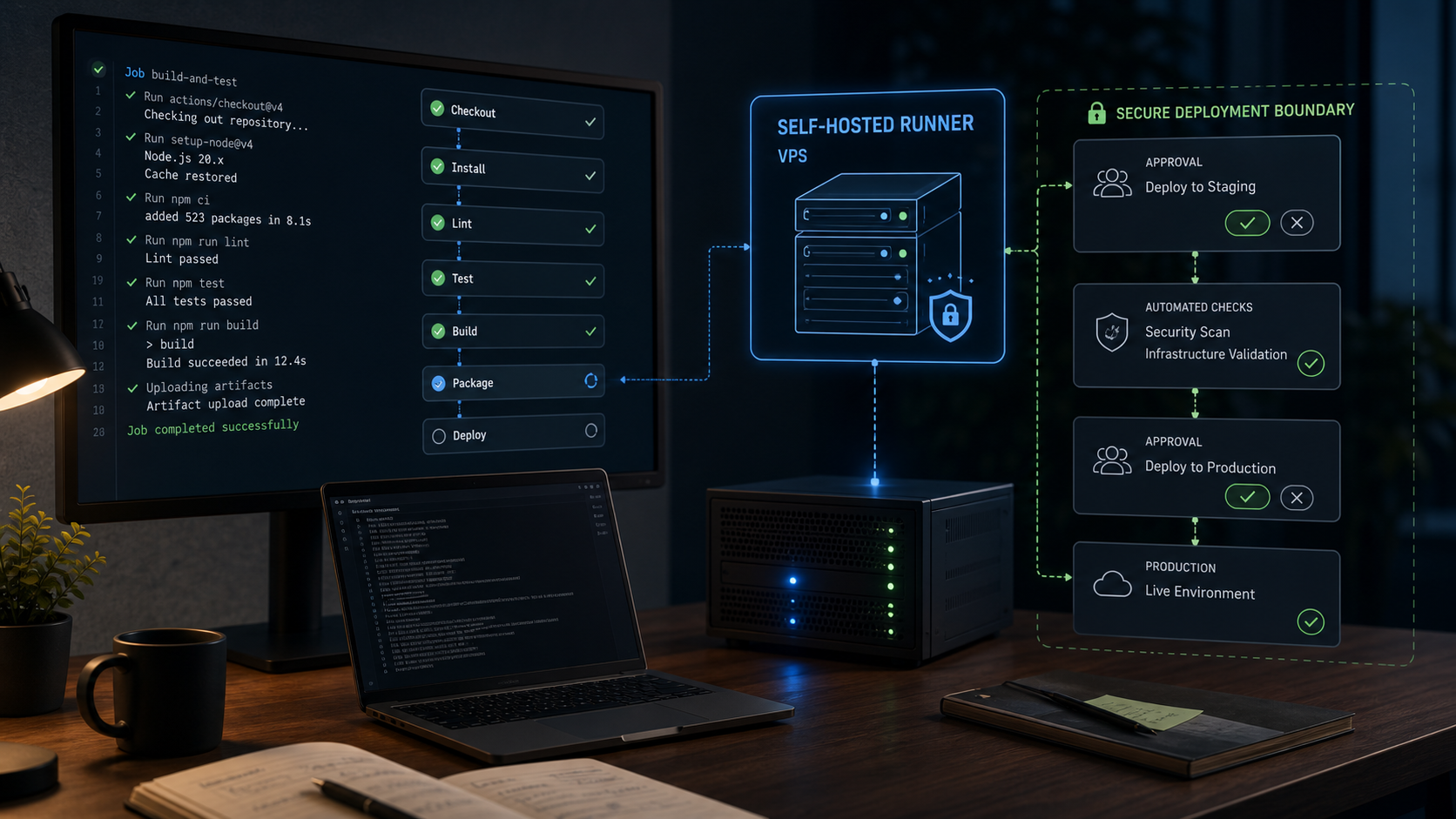
A GitHub Actions self-hosted runner can run on a VPS when builds need a stable Linux environment, private network access, custom packages, larger storage or predictable CI capacity. It should not be treated like a normal deployment script. A runner can execute repository workflows, touch secrets, build containers, upload artifacts and sometimes deploy code. That makes the runner itself part of the production surface.
This guide focuses on the VPS runner decision, not on a generic app deployment flow. Voxfor already covers auto-deploying GitHub projects to a VPS. This article is narrower: runner isolation, Docker risk, labels, systemd, logs, updates and when GitHub-hosted runners are still the cleaner option.
Quick Answer
Use a self-hosted runner on a VPS when you need persistent Linux capacity, private tools, custom dependencies, large builds or deployment access that hosted runners cannot provide. Start with a dedicated runner user, limited repository access, strict labels, protected secrets, clear logs and a rollback path. A VPS hosting plan can work well for CI/CD, but only when the runner is isolated from unrelated apps and production credentials.
When A VPS Runner Makes Sense
A VPS runner is most useful when the build environment matters. Hosted runners are convenient, but they reset often and may not have the exact packages, network routes, storage or long-lived cache a team wants. A VPS gives the team control over packages, Docker images, SSH access, local cache and deployment tooling.
| Use case | VPS runner fit | What to watch |
|---|---|---|
| Private app deployment to one VPS | Good | Keep deploy keys narrow and auditable |
| Heavy Docker builds | Good | Watch disk growth and Docker socket risk |
| Custom Linux packages or internal tools | Good | Document setup so the runner can be rebuilt |
| Public open-source repository | Risky | Untrusted pull requests can reach runner workflows |
| One small static site | Usually unnecessary | GitHub-hosted runners may be simpler |
| Regulated or customer-data workflows | Possible | Needs strict secrets, logs, approvals and retention |
What matters most is not whether the runner can start. It is whether the repository, labels, secrets and workflow permissions are narrow enough for a persistent server.
What Already Exists And What This Adds
Related deployment guides often explain how to push code from GitHub to a server. A self-hosted runner article should answer a different question: how safe is the build machine that runs the workflow?
| Existing topic | Main question | This article adds |
|---|---|---|
| GitHub auto deploy to VPS | How does code reach the server? | How the runner itself should be isolated |
| Docker on VPS | How should containers run? | Why Docker socket access is sensitive in CI |
| Linux first login | How is a VPS secured initially? | How to prepare a runner user and logs |
| Managed VPS support | Who maintains the server? | When runner maintenance becomes operational work |
That distinction prevents the article from becoming a duplicate of a normal CI/CD deployment tutorial.
Recommended VPS Baseline
For small Node, PHP, Python or static builds, a modest VPS can be enough. Docker builds, browser tests and large dependency caches need more headroom.
| Runner workload | Starting point | Notes |
|---|---|---|
| Light build/test jobs | 2 vCPU / 4 GB RAM / 50 GB NVMe | Good for small repositories and simple deploys |
| Docker builds | 4 vCPU / 8 GB RAM / 80-120 GB NVMe | Docker layers and cache can grow quickly |
| Browser tests or Playwright | 4-8 vCPU / 8-16 GB RAM / 120+ GB NVMe | Needs memory, CPU and screenshot/log storage |
| Multiple repositories | Separate runners or larger VPS | Avoid mixing unrelated trust boundaries |
| Production deploy runner | Dedicated VPS preferred | Keep it separate from public apps when possible |
Start with 4 vCPU, 8 GB RAM and NVMe storage if the runner will build containers or run browser tests. Start smaller only when the workflow is simple and easy to rebuild.
Security Model Before Installation
A GitHub runner should not run as root. It should use a dedicated Linux user and a directory that can be wiped or rebuilt without damaging other services.
Use a layout like this:
/opt/github-runner/
  actions-runner/      # runner application
  work/                # temporary job workspace
  logs/                # runner and helper logs
  cache/               # optional build cache
/etc/github-runner/
  runner.env           # service settings, not broad deploy secrets
Create the user and directories:
sudo adduser --system --group --home /opt/github-runner github-runner
sudo mkdir -p /opt/github-runner/{actions-runner,work,logs,cache}
sudo mkdir -p /etc/github-runner
sudo chown -R github-runner:github-runner /opt/github-runner
sudo chown root:github-runner /etc/github-runner
sudo chmod 750 /opt/github-runner /etc/github-runner
Use GitHub’s current self-hosted runner documentation for the actual runner token, setup and removal steps. Registration tokens expire and should not be stored in documentation, screenshots or chat logs.
Systemd Service Pattern
A reliable runner should survive reboots and make failures visible. GitHub provides service helpers for runners, but a systemd pattern still helps readers understand what a stable runner needs.
[Unit]
Description=GitHub Actions Self-Hosted Runner
After=network-online.target
Wants=network-online.target

[Service]
Type=simple
User=github-runner
Group=github-runner
WorkingDirectory=/opt/github-runner/actions-runner
EnvironmentFile=-/etc/github-runner/runner.env
ExecStart=/opt/github-runner/actions-runner/run.sh
Restart=on-failure
RestartSec=10
NoNewPrivileges=true
PrivateTmp=true

[Install]
WantedBy=multi-user.target
Check the service and logs:
sudo systemctl daemon-reload
sudo systemctl enable --now github-runner
sudo systemctl status github-runner --no-pager
sudo journalctl -u github-runner -n 100 --no-pager
Runner failure should be visible. Silent CI failure is worse than no automation because the team assumes deployments are working.
Docker Socket Risk
Many CI pipelines need Docker. The dangerous shortcut is adding the runner user to the docker group without understanding the tradeoff. Docker socket access can be close to root-level control of the host.
If Docker is required, document the risk:
sudo usermod -aG docker github-runner
sudo -iu github-runner docker ps
For sensitive workflows, consider a separate runner VPS, rootless Docker, disposable build machines, or a containerized runner with limited scope. Do not let a public repository run arbitrary pull-request code on a runner that can deploy production systems.
Labels, Repositories And Secrets
Runner labels decide which jobs can land on the machine. Avoid broad labels like self-hosted alone for sensitive deployments. Use specific labels that match the intended workflow:
runs-on: [self-hosted, linux, voxfor-runner, production-deploy]Secrets should stay in GitHub Actions secrets or a proper secret manager. Do not put long-lived deploy keys into the repository or a global runner.env file that every workflow can inherit. Do not print secrets in workflow logs. If a workflow uploads logs or artifacts, assume someone may read them later.
Good runner governance includes:
- one runner group per trust level,
- narrow labels,
- repository or organization runner scoping where available,
- protected branches for deploy jobs,
- manual approvals for production,
- short-lived deploy credentials where possible,
- logs that show success and failure without leaking tokens.
Maintenance And Lifecycle
A runner is not finished after the first green workflow. It needs a small maintenance routine so old build state does not become a hidden risk.
Check runner health and disk pressure:
df -h
sudo docker system df
sudo systemctl status github-runner --no-pager
sudo journalctl -u github-runner -n 100 --no-pager
Keep a simple runner lifecycle checklist:
- update the runner package using GitHub’s current guidance,
- unregister retired runners instead of leaving them attached to a repository,
- clean Docker and build caches when disk use grows,
- alert when a runner goes offline,
- rotate deploy keys and tokens after role changes,
- document how to rebuild the runner from a clean VPS.
If production deployments use this runner, pair maintenance with protected branches, required reviews and a rollback path. A runner that can deploy should also be easy to pause.
When Not To Self-Host
A self-hosted runner is not always an upgrade. GitHub-hosted runners are often safer for public pull requests because the environment is disposable. They also reduce maintenance when the team does not need private network access or custom packages.
Use GitHub-hosted runners when:
- the repository is public and accepts external pull requests,
- builds are small and standard,
- the team does not want to patch a server,
- there is no private network or deployment target,
- the security model is not clear yet.
Use a VPS runner when the workflow needs persistent control and the team accepts the operational responsibility.
How This Connects To The Voxfor VPS Stack
A self-hosted runner can support a broader VPS workflow:
- GitHub auto deploy to VPS for deployment flow.
- Docker vs Docker Compose on VPS for container decisions.
- Voxfor Linux VPS first login for the initial server baseline.
Keep the runner’s job clear. It should build, test and deploy controlled workflows. It should not become a shared admin box, a public app server, and a secrets warehouse at the same time.
Strengths And Practical Gaps
This setup has a clear security advantage: it treats the runner as a sensitive machine, not just a helper script. The dedicated user, labels, logs and Docker warnings give the reader a safer starting point.
Segmentation is useful when the runner is separated from unrelated apps and production data. A VPS runner works properly when the workflow has a specific job. Mixing too many repositories, customer projects or deploy targets on one runner makes troubleshooting and access control harder.
One practical gap remains: GitHub registration commands and runner versions change. This article gives the stable VPS baseline and service model, but the actual runner registration should follow current GitHub documentation.
Recommended Next Step
Start with one repository, one runner label and one low-risk workflow. Confirm logs, permissions and failure behavior before adding Docker builds or production deployment. If the runner will deploy customer-facing systems, use protected branches and manual approval before production jobs.
FAQ
Can GitHub Actions self-hosted runners run on a VPS?
Yes. A VPS can run a GitHub Actions self-hosted runner when you need custom packages, private access, persistent cache or controlled deployment tooling.
Should a GitHub Actions runner run as root?
No. Use a dedicated Linux user and limit what the runner can access. Root or broad Docker access should be treated as a serious security decision.
Is Docker safe on a self-hosted runner?
Docker can be useful, but access to the Docker socket can expose the host. Use a separate runner, rootless Docker or stricter isolation for sensitive workflows.
Should public repositories use self-hosted runners?
Be careful. Public pull requests can be risky on persistent runners. GitHub-hosted runners are often safer for untrusted external contributions.
What VPS specs are enough for a runner?
Small jobs can start with 2 vCPU and 4 GB RAM. Docker builds, browser tests and multiple repositories usually need 4-8 vCPU, 8-16 GB RAM and enough NVMe storage for cache and logs.